
Data matching is the process of identifying records across one or more datasets that refer to the same real-world entity, even when those records contain errors, abbreviations, or format differences. A customer called “Robert J. Smith” in your CRM and “Bob Smith” in your ERP are the same person. Data matching finds that connection. Without it, every downstream system that relies on that data — analytics, marketing, finance, compliance — operates on a fragmented, contradictory view of reality.
This guide explains what data matching is, how it works, where it breaks, and how Match Data Pro delivers accurate, automated matching across any dataset.
Why Data Matching Matters for Data Teams
Most enterprise databases contain between 10% and 30% duplicate or conflicting records. That figure comes from years of data entry across disconnected systems, manual imports, and API integrations that never reconciled their schemas. The cost is not just storage. Duplicate records distort revenue reporting, corrupt segmentation models, trigger duplicate mailings, and create compliance exposure when the same entity appears under multiple identities.
Consider a B2B company with a CRM and a separate marketing automation platform. A prospect fills out a form as “Acme Corp.” in one system and “Acme Corporation, Inc.” in another. Without data matching, the sales team sees two companies. Marketing sends duplicate nurture sequences. Finance books two separate accounts. A single matching operation on company name, domain, and phone would have resolved this in seconds.
Data matching is also foundational for entity resolution, which takes matching one step further: grouping all matched records into a single persistent identity with a verified golden record. And it is the prerequisite step before any meaningful data deduplication can run.
Ready to see data matching in action on your own data? Start your free trial of Match Data Pro — no contract, no setup fee.
How Data Matching Works: The Core Pipeline
A production-grade data matching pipeline runs through five distinct stages. Each one reduces noise and increases confidence before the next stage runs.
Stage 1: Data Profiling
Before any matching starts, you need to understand your data. AI data profiling scans every field in every source dataset and scores completeness, uniqueness, format consistency, and anomaly rates. This tells you which fields are reliable enough to match on, and which will introduce noise. A name field that is 40% null cannot be your primary match key. Phone number fields with five different formats need standardisation first.
Stage 2: Standardisation
Raw data from different systems almost never shares the same format. One system writes “Street” and another writes “St.” One stores phone numbers as “555-123-4567” and another as “+15551234567”. Data standardisation normalises every field to a consistent format before comparison. This single step reduces false negatives — missed matches — by 30 to 50 percent on real-world datasets.
Stage 3: Blocking
Comparing every record against every other record across large datasets is computationally prohibitive. A dataset of 1 million records would require 500 billion pair comparisons. Blocking narrows the candidate set by grouping records that share at least one common token — the first three characters of a surname, a ZIP code prefix, or a domain name fragment. Only candidates within the same block are scored. This cuts comparison volume by 99% or more while retaining virtually all true matches.
Stage 4: Fuzzy Matching and Scoring
This is the core of data matching. Each candidate pair is scored across multiple fields using different algorithms suited to each field type. Name fields use Jaro-Winkler or phonetic algorithms. Address fields use token-based matching and CASS verification. Numeric fields use exact or range comparisons. The field-level scores are combined into a composite weighted match score, typically expressed as a value between 0 and 100.
Here is a worked example using two records:
| Field | Record A | Record B | Score |
|---|---|---|---|
| Name | Robert J. Smith | Bob Smith | 72 |
| Company | Acme Corp. | Acme Corporation | 88 |
| rsmith@acme.com | robert.smith@acme.com | 81 | |
| Phone | 555-123-4567 | 5551234567 | 100 |
| Composite | 86 — auto-match |
A composite score of 86 clears most auto-match thresholds (typically set at 80+). Records below a lower threshold — say, 50 — are flagged as non-matches. Records in the review zone (50–79) are routed to a human reviewer or held for additional context. Learn more about the full range of data matching algorithms and how to weight them correctly for each field type.
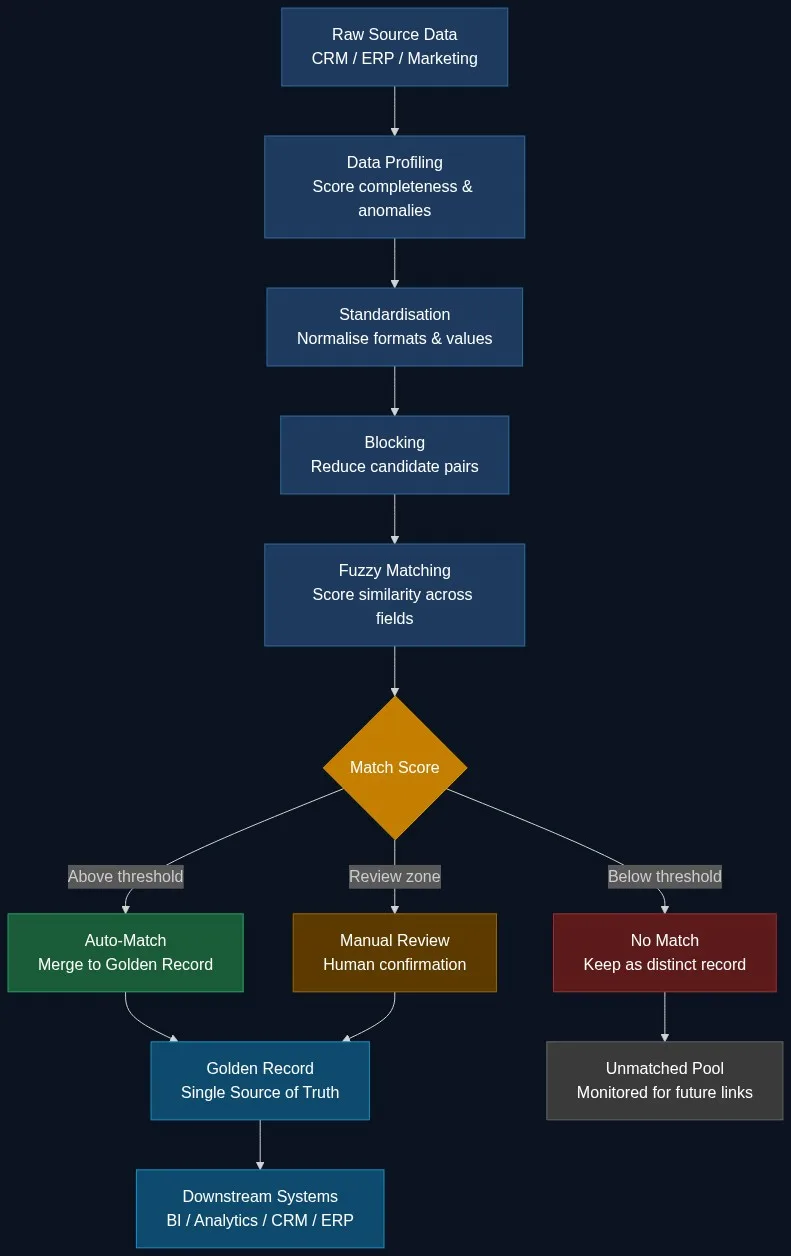
Stage 5: Survivorship and Golden Record
Once matched records are identified, survivorship rules determine which field values survive into the final golden record. The most recent email wins. The longest company name wins. The verified postal address wins over the unverified one. The result is a single, authoritative master record that every downstream system can trust.
Types of Data Matching
Not all matching problems are the same. Understanding the type of matching your use case requires helps you configure the right pipeline.
Exact Matching
Exact matching compares fields character by character and requires an identical string to declare a match. It is fast and has zero false positives — but it misses any record where even one character differs. It suits structured, controlled fields like national ID numbers, tax identifiers, or barcodes. It fails completely on free-text fields like names and addresses.
Fuzzy Matching
Fuzzy matching scores similarity rather than requiring equality. It catches typos, abbreviations, transposed characters, and format differences that exact matching misses entirely. Fuzzy matching is the standard technique for name and address fields in enterprise data quality workflows. The tradeoff is that it requires threshold configuration to control the false positive rate.
Deterministic vs. Probabilistic Matching
Deterministic matching applies fixed rules: if field A matches AND field B matches, the records are linked. It is transparent and auditable but rigid. Probabilistic matching weights evidence across many fields and computes a match probability score. It handles partial and conflicting data far better. Most production pipelines use a hybrid: deterministic rules for high-confidence anchor fields, probabilistic scoring for everything else.
Real-Time vs. Batch Matching
Batch matching processes entire datasets in scheduled runs — typically nightly or weekly. It suits historical deduplication and large-scale migration projects. Real-time matching runs via API at the point of record creation, catching duplicates before they enter the system. Match Data Pro’s live fuzzy search API supports real-time lookups with sub-100ms response times for point-of-entry deduplication.
Where Data Matching Breaks Down
Data matching fails in predictable ways. Understanding these failure modes helps you configure around them.
Skipping Standardisation
Running fuzzy matching on unstandardised data inflates false negatives. “123 Main St Apt 4” and “123 Main Street, Suite 4” are the same address. Without standardisation, a Levenshtein comparison returns a low score. The matching pipeline must clean before it scores.
Single-Algorithm Matching
No single algorithm handles all field types well. Levenshtein excels on short strings but struggles on long company names. Soundex catches phonetic variants but misses character transpositions. Using only one algorithm for all fields produces systematic gaps. A composite multi-algorithm approach — with per-field algorithm selection and weighting — is the only reliable configuration for enterprise data.
Poor Threshold Calibration
Setting your auto-match threshold too high means you miss real matches. Setting it too low floods the review queue with false positives. Threshold calibration requires testing against a labelled sample of known matches and non-matches and measuring precision and recall at each threshold value. Match Data Pro provides configurable threshold ranges and test mode to tune against your actual data before running at scale.
Nicknames and Variants
“Bob” and “Robert” score poorly on edit-distance metrics because they share only two characters. “IBM” and “International Business Machines” share no tokens. A matching engine without a nickname dictionary and abbreviation expansion library will miss these pairs. Match Data Pro includes built-in name variant libraries for personal names and common business abbreviations.
Data Matching Use Cases Across Industries
Data matching is not a single-domain problem. The same pipeline applies across sectors with different data types and different stakes.
- CRM and RevOps: Match prospects across marketing automation, CRM, and sales engagement tools to eliminate duplicate outreach and build an accurate pipeline view.
- Financial services: Match customer and counterparty records across systems for KYC, AML screening, and consolidated exposure reporting. A missed match between “J.P. Morgan Chase” and “JP Morgan” is a compliance risk.
- Healthcare: Link patient records across EHR, pharmacy, lab, and claims systems. A patient called “Maria Elena Rodriguez” in one system and “M.E. Rodriguez” in another needs to be the same identity before treatment decisions are made.
- Retail and e-commerce: Match customer identities across in-store POS, e-commerce, and loyalty platforms to build a true single customer view and accurate lifetime value metrics.
- Government and public sector: Match beneficiary records, case files, and agency databases to eliminate payment fraud and identify duplicate programme enrolments.
How Match Data Pro Handles Data Matching at Scale
Match Data Pro is a cloud SaaS platform that delivers a complete data matching pipeline — profiling, standardisation, blocking, multi-algorithm fuzzy matching, entity resolution (powered by Senzing), CASS address verification, survivorship, and golden record output — in one integrated system. No contract. No infrastructure overhead. Start processing records the same day.
Key capabilities that differentiate Match Data Pro from point solutions:
- AI-powered match suggestions: The platform analyses your data and recommends field weights, algorithm selections, and threshold values based on your actual record distribution.
- Configurable fuzzy algorithms: Choose from Levenshtein, Jaro-Winkler, Soundex, Double Metaphone, token-based, and custom scoring rules — applied per field, not globally.
- Senzing entity resolution: For complex, multi-source identity resolution, Match Data Pro integrates Senzing’s graph-based probabilistic matching engine — the same technology used by intelligence agencies and tier-1 financial institutions.
- CASS address verification: Validate and standardise US addresses against the USPS database before matching runs, eliminating the largest single source of address false negatives.
- Job automation and import/export connectors: Schedule recurring match jobs, connect to your CRM or data warehouse via native connectors, and push golden records downstream automatically.
Book a demo with the Match Data Pro team to see the full matching pipeline on your own data — or register now for a free trial and start matching records today.
Frequently Asked Questions
What is data matching in simple terms?
Data matching is the process of finding records across one or more datasets that refer to the same real-world person, company, or object, even when the records are spelled differently or stored in different formats. For example, “Acme Corp” in one system and “Acme Corporation, Inc.” in another can be matched and linked into a single master record.
What is the difference between data matching and data deduplication?
Data matching identifies records that refer to the same entity, which may be across different systems or within a single dataset. Data deduplication is a specific application of matching: it finds and removes duplicate records from a dataset, typically within a single source. Matching is the technique; deduplication is one outcome. Enterprise pipelines use matching to drive deduplication, entity resolution, and record linkage across multiple systems.
How accurate is data matching?
Accuracy depends on data quality and pipeline configuration. A well-configured multi-algorithm fuzzy matching pipeline on standardised data typically achieves 90 to 97 percent precision and recall on enterprise datasets. Accuracy drops when records are not standardised before matching, when single algorithms are used for all fields, or when threshold values have not been calibrated against a labelled sample set.
What data fields are most important for matching?
The most discriminating fields are typically email address, phone number, and a combination of first name, last name, and company name for person records. For organisation records, company name, tax identifier, and website domain are the strongest match signals. Address is useful but requires CASS standardisation first. Fields with high null rates or low cardinality (like country or state alone) add little discriminating power and should receive low weights.
Can data matching work on records with missing fields?
Yes. A multi-field weighted scoring approach is null-tolerant by design. When a field is missing in one or both records, its contribution to the composite score is zeroed out and the remaining field weights are redistributed proportionally. The match decision is then based on available evidence only. Records with very few populated fields may fall into the manual review zone rather than the auto-match zone, which is the correct behaviour.