
Address Matching Explained:
Resident, Household & Individual Matching
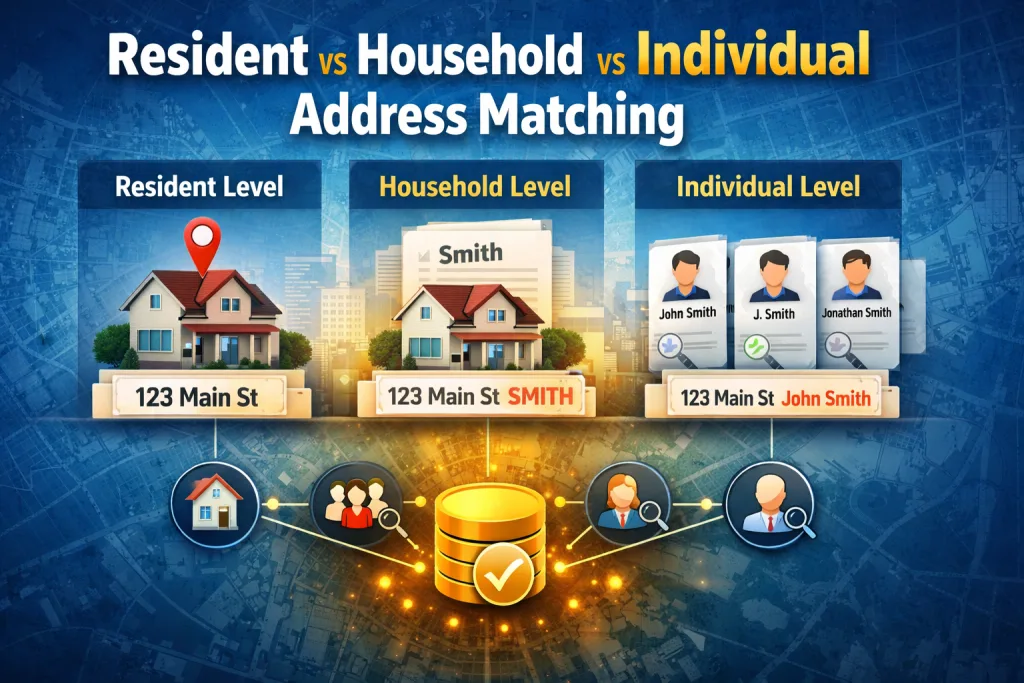
Why Address Matching Fails More Often Than People Realize
Address matching sounds simple. Match one address to another and you’re done.
In reality, it’s one of the fastest ways to introduce error if the level of matching is wrong.
We’ve seen this repeatedly. Organizations believe they are deduplicating addresses, but what they’re really doing is collapsing data that should remain distinct—or worse, missing duplicates entirely because the data isn’t standardized or parsed correctly.
The root problem usually isn’t the matching algorithm.
It’s choosing the wrong matching level and feeding it poorly prepared address data.
To get this right, you need to understand the difference between resident, household, and individual address matching—and why address parsing and multiple match definitions are essential to making any of them reliable.
What Address Matching Actually Means
At its core, address matching is about determining whether two or more records represent the same physical location or the same people at that location.
The mistake many teams make is assuming all address matching is the same. It isn’t.
There are three fundamentally different levels of address matching, each with its own use cases, risks, and value.
Resident-Level Address Matching (Address Only)
Resident-level matching treats the address itself as the entity.
This approach answers one question:
Do these records point to the same physical location?
When resident matching makes sense
Direct mail suppression
Address list deduplication
Service coverage analysis
Property-based datasets
Location-level reporting
In resident matching, names do not matter.
If two records resolve to the same standardized address, they are considered a match.
Where resident matching fails
Resident matching breaks down when:
Multiple households live at the same address
Unit or apartment data is missing or inconsistent
Mailing lists include mixed residential and commercial data
Without proper address parsing, resident matching often over-matches and collapses data that should remain separate.
Household-Level Address Matching (Address + Last Name)
Household matching adds a critical layer of context.
Instead of asking “Is this the same address?”, household matching asks:
“Is this the same household at the same address?”
When household matching is the right choice
Marketing suppression lists
Utility and service accounts
Voter or resident registries
Insurance and financial householding
CRM deduplication where family units matter
Household matching significantly reduces false positives compared to address-only matching, while still consolidating related records.
A real-world example
We worked with a client running large-scale direct mail campaigns. Their data contained millions of records, many sharing the same address but with inconsistent name formatting.
Exact matching failed. Address-only matching over-collapsed records.
By using household-level matching, they were able to correctly identify unique households instead of individual residents. Combined with proper address parsing, this reduced duplicate mailings dramatically.
The result?
Over $100,000 saved in wasted mailings in a single campaign.
Individual-Level Address Matching (Address + First + Last Name)
Individual matching is the most precise—and the most fragile.
It answers the question:
Are these records the same person at the same address?
When individual matching is required
Healthcare and patient data
Financial and compliance-sensitive records
High-touch CRM and customer engagement
Identity resolution use cases
Why individual matching often fails
Individual matching collapses quickly when:
Names are misspelled
Nicknames are used
Middle names or initials appear inconsistently
Addresses are formatted differently
This is where fuzzy matching and multiple definitions become essential.
Why Address Parsing Is Non-Negotiable
Matching confidence lives or dies on address structure.
Unparsed addresses like:
123B N Main St Apt 4B Springfield IL 62704
are nearly useless for high-confidence matching.
Proper address parsing breaks addresses into granular components:
House or premise number
Thoroughfare (street name)
Directionals
Unit or secondary designator
City, state, postal code
Country and standardized formats
Once parsed, matching logic can operate with far greater precision.
For example:
Matching on premise + thoroughfare instead of raw strings
Separating unit data to avoid over-matching apartments
Comparing standardized postal codes rather than free text
Parsed data dramatically reduces false matches and missed matches.
Why Multiple Match Definitions Catch Edge Cases
No single match rule works for all data.
This is especially true when data quality is inconsistent—which it usually is.
Multiple match definitions allow you to say:
Match using Definition A OR Definition B
Each definition contains its own criteria and thresholds
Example
Definition 1:
Parsed address number
Parsed street name
Last name
Definition 2:
Standardized address
Postal code
Unit number (if present)
This approach allows clean data to match cleanly, while still catching edge cases where parts of the data are missing, inconsistent, or degraded.
Without multiple definitions, organizations either:
Miss valid matches
Or lower thresholds and introduce false positives
Neither is acceptable at scale.
From Matches to Golden Records
Finding duplicates is only half the job.
Once records are grouped, the real value comes from merging.
Effective merging lets you:
Select the most complete values
Choose newest or oldest dates
Preserve historical fields
Merge multiple values when needed
Control overwrite and non-overwrite conditions
The result is a golden record:
one trusted representation of an address, household, or individual.
From there, you can export:
Fully deduplicated address lists
Household-level datasets
Individual-level records
Or segmented outputs for downstream systems
How Match Data Pro Supports All Three Levels
Match Data Pro was built to support resident, household, and individual matching without forcing a one-size-fits-all model.
It combines:
Address parsing and normalization
Flexible match definitions
Fuzzy matching where appropriate
Transparent grouping
Controlled merging logic
Clean export options
This allows business teams to choose the right level of matching for the problem they’re solving—without sacrificing accuracy or control.
Comparison: Address Matching Levels
| Matching Level | Data Used | Best For | Risk If Misused |
|---|---|---|---|
| Resident | Address only | Mail suppression, coverage | Over-merging households |
| Household | Address + last name | Marketing, utilities | Misses individuals |
| Individual | Address + full name | Compliance, healthcare | Sensitive to data quality |
Final Thought: Matching Level Matters More Than the Algorithm
Most matching failures don’t happen because the math is wrong.
They happen because the matching level doesn’t match the business goal.
When address data is properly parsed, matching levels are chosen intentionally, and multiple definitions are used to catch edge cases, the results are dramatic.
Cleaner data.
Lower costs.
Better decisions.
And fewer angry customers.
FAQ: Address Matching Levels
Resident matching compares addresses only and treats the location itself as the entity, regardless of who lives there.
Household matching should be used when multiple people may live at the same address and family units matter.
Not necessarily. Individual matching is the most precise but also the most sensitive to data quality issues.
Parsing breaks addresses into structured components, allowing comparisons on meaningful elements instead of raw text.
They allow clean data and messy data to be matched appropriately without lowering overall accuracy.