
Address Matching Explained:
Resident, Household & Individual Matching
Why Address Matching Fails More Often Than People Realize
Address matching is the process of determining whether two or more records point to the same physical location or the same person at that location. Done correctly — with parsed address components, fuzzy algorithms, and the right matching level (resident, household, or individual) — it eliminates duplicate mailings, consolidates CRM records, and enables accurate entity resolution across millions of records. Done incorrectly, it either over-merges households or misses duplicates entirely.
Address matching sounds simple. Match one address to another and you’re done.
In reality, it’s one of the fastest ways to introduce error if the level of matching is wrong.
The root problem usually isn’t the matching algorithm. It’s choosing the wrong matching level and feeding it poorly prepared address data.
To get this right, you need to understand the difference between resident, household, and individual address matching — and why address parsing and multiple match definitions are essential to making any of them reliable.
What Address Matching Actually Means
At its core, address matching is about determining whether two or more records represent the same physical location or the same people at that location.
The mistake many teams make is assuming all address matching is the same. It isn’t.
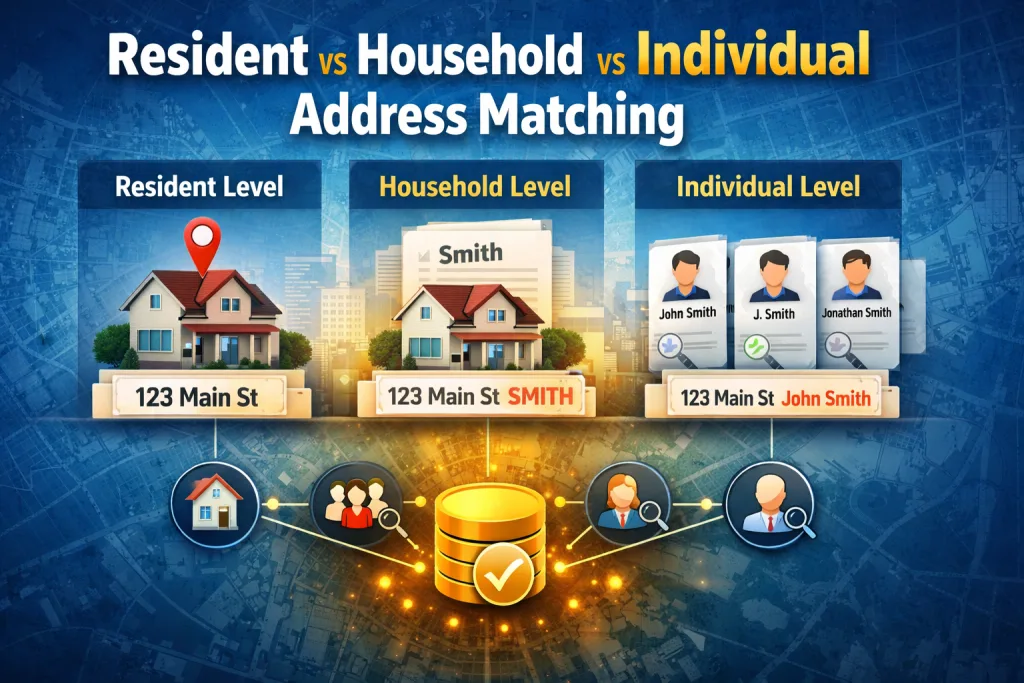
There are three fundamentally different levels of address matching, each with its own use cases, risks, and value.
Resident-Level Address Matching (Address Only)
Resident-level matching treats the address itself as the entity. This approach answers one question: Do these records point to the same physical location?
When resident matching makes sense
Direct mail suppression
Address list deduplication
Service coverage analysis
Property-based datasets
Location-level reporting
In resident matching, names do not matter. If two records resolve to the same standardized address, they are considered a match.
Where resident matching fails
Resident matching breaks down when multiple households live at the same address, unit or apartment data is missing or inconsistent, or mailing lists include mixed residential and commercial data.
Household-Level Address Matching (Address + Last Name)
Household matching adds a critical layer of context. Instead of asking “Is this the same address?”, household matching asks: “Is this the same household at the same address?”
When household matching is the right choice
Marketing suppression lists
Utility and service accounts
Voter or resident registries
Insurance and financial householding
CRM deduplication where family units matter
A real-world example
We worked with a client running large-scale direct mail campaigns. Their data contained millions of records, many sharing the same address but with inconsistent name formatting. Exact matching failed. Address-only matching over-collapsed records. By using household-level matching, they correctly identified unique households instead of individual residents. Over $100,000 saved in wasted mailings in a single campaign.
Individual-Level Address Matching (Address + First + Last Name)
Individual matching is the most precise — and the most fragile. It answers: Are these records the same person at the same address?
When individual matching is required
Healthcare and patient data
Financial and compliance-sensitive records
High-touch CRM and customer engagement
Identity resolution use cases
Why Address Parsing Is Non-Negotiable
Matching confidence lives or dies on address structure. Proper address parsing breaks addresses into granular components: house number, thoroughfare, unit designator, city, state, postal code. Once parsed, matching logic operates with far greater precision — reducing both false matches and missed matches.
Why Multiple Match Definitions Catch Edge Cases
No single match rule works for all data. Multiple match definitions allow you to define Definition A OR Definition B, each with its own criteria and thresholds, so clean data matches cleanly while edge cases with missing or inconsistent fields are still caught.
From Matches to Golden Records
Finding duplicates is only half the job. Effective merging lets you select the most complete values, choose newest or oldest dates, preserve historical fields, and export a golden record: one trusted representation of an address, household, or individual.
How Match Data Pro Supports All Three Levels
Match Data Pro was built to support resident, household, and individual address matching without forcing a one-size-fits-all model. It combines address parsing and normalization, flexible match definitions, fuzzy matching where appropriate, transparent grouping, controlled merging logic, and clean export options.
Comparison: Address Matching Levels
| Matching Level | Data Used | Best For | Risk If Misused |
|---|---|---|---|
| Resident | Address only | Mail suppression, coverage | Over-merging households |
| Household | Address + last name | Marketing, utilities | Misses individuals |
| Individual | Address + full name | Compliance, healthcare | Sensitive to data quality |
Final Thought: Matching Level Matters More Than the Algorithm
Most matching failures don’t happen because the math is wrong. They happen because the matching level doesn’t match the business goal. When address data is properly parsed, matching levels are chosen intentionally, and multiple definitions are used to catch edge cases, the results are dramatic: cleaner data, lower costs, better decisions.
FAQ: Address Matching Levels
Resident matching compares addresses only and treats the location itself as the entity, regardless of who lives there.
Household matching should be used when multiple people may live at the same address and family units matter.
Not necessarily. Individual matching is the most precise but also the most sensitive to data quality issues.
Parsing breaks addresses into structured components, allowing comparisons on meaningful elements instead of raw text.
They allow clean data and messy data to be matched appropriately without lowering overall accuracy.