

A first matching condition scoring rule evaluates an incoming data field against an ordered sequence of conditions and assigns a numeric score the moment the first condition is satisfied — stopping all further evaluation. When applied to revenue ranges, this pattern converts unstructured or semi-structured revenue strings into discrete band scores that feed directly into a composite fuzzy match score. The result: deterministic, auditable, and configurable scoring logic that scales across millions of records without ambiguity.
Revenue data is one of the most inconsistently formatted fields in B2B datasets. A CRM record might store "$5M", a data warehouse might store 5000000, and a third-party enrichment feed might store "5,000,000 USD". First-match condition logic — sometimes called a “break-on-first-match” or “first-wins” scoring pattern — is the most reliable way to achieve this at scale.
What Is a First Matching Condition Rule?
A first matching condition rule is a sequential evaluation structure where conditions are tested in a defined order and evaluation halts as soon as one condition returns true. The score attached to that condition is the output. No further conditions are tested.
In a first-match model, order matters: more specific conditions must precede general ones. As IBM’s documentation notes, deterministic matching uses a series of rules, like nested if statements, to run logical tests on datasets and seek a clear Yes or No result — first-match condition rules implement this pattern for scored, non-binary outputs.
This is the foundation of configurable, rules-driven fuzzy scoring — integrating directly into the broader matching rule scoring algorithm stack.
Why Revenue Band Scoring Matters in Fuzzy Matching
Raw numeric distance is a poor proxy for revenue similarity in B2B data. The absolute difference between $900M and $1B is $100M — but both belong to the same “large enterprise” band. Revenue band scoring solves this by discretising the revenue continuum into meaningful business segments.
Revenue Band Scoring vs. Raw Numeric Similarity
| Approach | Method | Business-Tier Aware? | Auditable? |
|---|---|---|---|
| Raw numeric distance | ABS(A − B) / MAX(A, B) | No | Moderate |
| Percentile bucketing | Dataset-relative quartiles | Partially | Low |
| First-match band scoring | Ordered conditional rules | Yes — by design | High — deterministic |
Designing Revenue Band Scoring Rules: Step-by-Step
Step 1: Normalise the Revenue String
Before any condition can be evaluated, the raw revenue field must be parsed to a clean numeric value. A robust parser should handle currency symbols, shorthand multipliers (K, M, B, T), locale-specific separators, and approximate markers. Any value that cannot be parsed should fall to a configured default score — not throw an error that halts the pipeline.
Step 2: Define Your Revenue Bands
| Band | Label | Revenue Range | Score |
|---|---|---|---|
| 1 | Small Business | < $1M | 1 |
| 2 | Mid-Market (Lower) | $1M – $10M | 2 |
| 3 | Mid-Market (Upper) | $10M – $100M | 3 |
| 4 | Enterprise | $100M – $1B | 4 |
| 5 | Large Enterprise | > $1B | 5 |
Step 3: Write the First-Match Conditions in Order
IF revenue < 1_000_000         THEN score = 1  // Band 1: Small Business
ELSE IF revenue < 10_000_000   THEN score = 2  // Band 2: Lower Mid-Market
ELSE IF revenue < 100_000_000  THEN score = 3  // Band 3: Upper Mid-Market
ELSE IF revenue < 1_000_000_000 THEN score = 4 // Band 4: Enterprise
ELSE                            score = 5       // Band 5: Large Enterprise
DEFAULT (null/unparseable)      score = 0
Step 4: Assign Field Weight in the Composite Score
| Field | Matching Method | Weight (%) |
|---|---|---|
| Company Name | Fuzzy (Jaro-Winkler + token sort) | 35% |
| Domain / Website | Exact + normalised | 25% |
| Revenue Band | First-match band score | 15% |
| Industry / SIC Code | Exact / taxonomy lookup | 15% |
| Employee Count Band | First-match band score | 10% |
Revenue Band Scoring in Practice: Worked Examples
Example 1: Same-Band Match (Full Credit)
Record A: “Acme Corp”, Revenue = “$4.8M” → Band 2. Record B: “Acme Corporation”, Revenue = “4,750,000” → Band 2. Delta = 0. Full credit. Composite score exceeds threshold → AUTO MATCH.
Example 2: Adjacent-Band Match (Partial Credit)
Record A: Revenue = “$95M” → Band 3. Record B: Revenue = “$120M” → Band 4. Delta = 1. Partial credit (50%). Composite score falls in review zone → MANUAL REVIEW.
Example 3: Null Revenue (Default Score)
Record A: Revenue = NULL → score 0. Record B: Revenue = “$2.3B” → Band 5. Revenue contributes 0 credit. However, if company name fuzzy score = 0.95 and domain matches, composite score may still exceed threshold. A missing field should reduce confidence, not block an otherwise strong match.
The Revenue Scoring Pipeline: End-to-End Flow
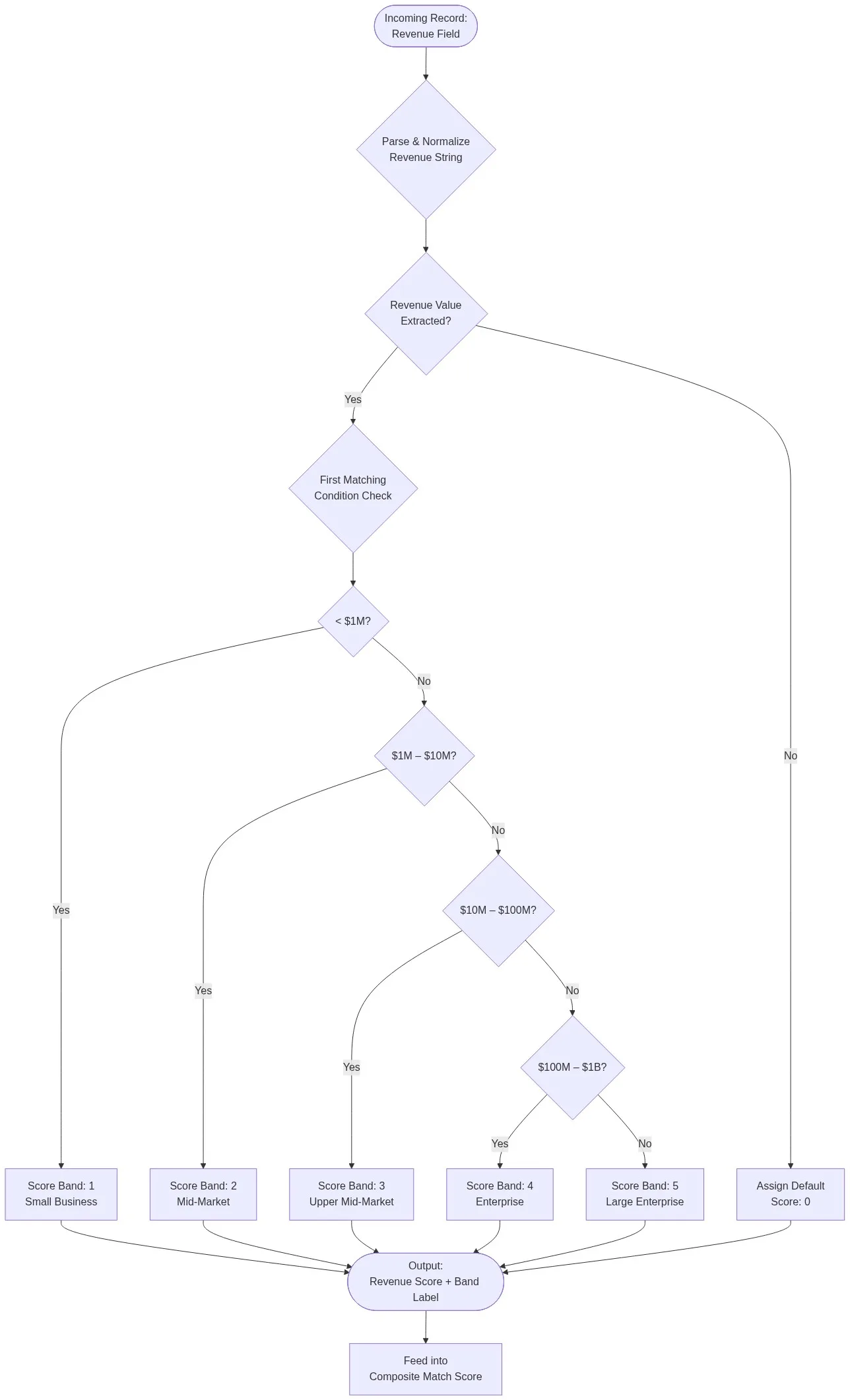
Common Configuration Mistakes and How to Avoid Them
Mistake 1: Overlapping Band Boundaries
Use exclusive upper bounds: Band 1 = < $1M, Band 2 = < $10M (implied lower = $1M).
Mistake 2: Placing Catch-All Bands First
Always order conditions from most restrictive threshold to least restrictive, with the catch-all ELSE at the end.
Mistake 3: No Default for Null/Unparseable Values
Always define an explicit default score (typically 0) and log null revenue occurrences via data profiling.
Mistake 4: Hardcoded Thresholds Without Version Control
Store band definitions in a configuration table or YAML file. Version-control your scoring rule definitions as you would application schema.
Mistake 5: Treating Revenue Band Score as a Blocking Field
Use revenue as a weighted contributing field, not a blocking gate. See the full matching rule scoring algorithm guide.
Implementing First-Match Revenue Scoring in Match Data Pro
Match Data Pro’s rules engine supports first-match condition scoring natively. Key capabilities:
- Text-to-numeric parser: Handles shorthand (K/M/B/T), currency symbols, locale separators, and approximate markers out of the box.
- First-match rule sequencing: Conditions are evaluated top-to-bottom; the first match wins.
- Configurable default scores: Define what score is assigned when a field is null, empty, or unparseable.
- Band delta scoring: Optionally configure partial credit for adjacent bands.
- Audit trail: Every match decision logs the band assigned, the delta, and the weighted contribution.
For teams evaluating tooling options, the data quality software comparison for 2026 covers how platforms differ on scoring rule configurability.
FAQ: First Matching Condition Scoring Rules for Revenue Ranges
What is a first matching condition scoring rule in data matching?
A first matching condition scoring rule evaluates a field value against an ordered list of conditions and assigns a score the moment the first condition is satisfied, then stops. This produces deterministic, auditable scores with no ambiguity about which rule fired.
Why use revenue bands instead of raw revenue difference for matching?
Raw revenue difference is a poor similarity signal because the business significance of a given dollar gap varies enormously by scale. Revenue bands discretise the continuum into business-meaningful segments so that scoring reflects commercial reality rather than arithmetic distance.
How should I handle null or missing revenue fields in a scoring rule?
Always define an explicit default score for null or unparseable revenue values — typically 0. Do not configure revenue as a blocking field; a missing revenue value should reduce confidence, not veto an otherwise strong match.
What order should revenue band conditions be evaluated in?
From the most restrictive (lowest threshold) to the least restrictive, with a catch-all else clause at the end: IF revenue < $1M → Band 1; ELSE IF revenue < $10M → Band 2; and so on.
How do first-match condition scoring rules differ from probabilistic matching?
First-match rules are deterministic: a given input always produces the same output. Probabilistic matching uses statistical models to estimate likelihood. Production pipelines combine both. See the data matching software buyer’s guide for a comparison of scoring architectures.
Start Matching Smarter with Configurable Scoring Rules
Match Data Pro’s configurable rules engine makes this straightforward: define your bands, set your weights, and let the engine handle parsing, evaluation, and audit logging at scale.