

Data match merging is the process of identifying records that represent the same real-world entity across one or more source systems, then consolidating them into a single authoritative output — the golden record — using configurable survivorship rules and field-level conflict resolution strategies. Without a disciplined merge phase, even a perfectly tuned fuzzy matching pipeline produces duplicated, fragmented, or contradictory master data that corrupts downstream CRM, ERP, and analytics systems.
This guide covers the complete match-merging pipeline: from candidate pair generation through survivorship rule design, merge strategy selection, conflict handling, and golden record publication. Each section includes concrete technical examples drawn from real CRM deduplication, MDM, and RevOps workflows.
What Is Match Merging? Core Concepts Defined
Match merging sits at the intersection of two distinct operations: matching — determining that two or more records refer to the same entity — and merging — consolidating those records into one canonical output. Many teams treat these as a single step, but they operate on fundamentally different logic and failure modes.
Matching is a probabilistic or deterministic scoring problem. Merging is a governance and conflict-resolution problem. Confusing the two leads to architectures where match thresholds are tuned to compensate for poor merge logic, or where every matched pair is auto-merged without accounting for field-level data quality differences across sources.
Key Terms
- Candidate pair: Two or more records flagged by the match engine as likely co-referent, above a minimum score threshold.
- Survivorship rule: A configured policy that determines which field value from a matched cluster “survives” into the golden record.
- Golden record: The single authoritative output record produced by merging a candidate cluster, representing the best-known truth for that entity.
- Merge cluster: The full set of source records determined to represent a single entity — may contain two or dozens of records depending on source system overlap.
- Field-level conflict: A scenario where matched records carry different, irreconcilable values for the same attribute (e.g., two different phone numbers for the same company).
- Source trust score: A configured weight that ranks source systems by reliability for specific attribute types — e.g., CRM is trusted for contact name; ERP is trusted for billing address.
For a deeper grounding in the matching phase, see our guide on what fuzzy matching is and how it works.
The Full Match-Merging Pipeline: Stage by Stage
The diagram below maps the complete pipeline from raw source ingestion through golden record publication.
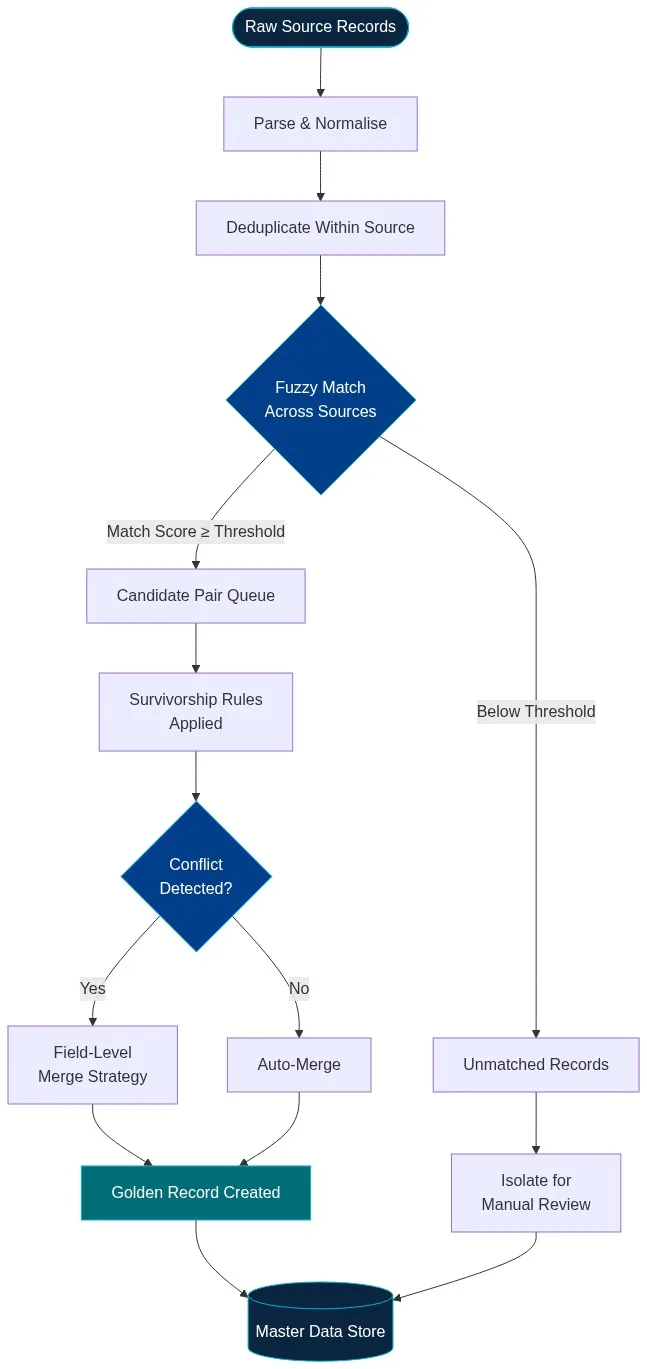
Stage 1: Parse and Normalise
Before any matching can occur, raw records must be standardised. Phone numbers stripped to E.164 format. Company names stripped of legal suffixes (Ltd, LLC, Inc) and lowercased. Addresses parsed to street number, street name, city, state, and ZIP. Without normalisation, two records for “Acme Corporation, Inc.” and “ACME Corp” will score poorly on a simple string comparison even though they are clearly the same entity.
See our complete data cleansing guide for normalisation techniques across common field types.
Stage 2: Within-Source Deduplication
Run a deduplication pass within each source system before cross-source matching. This reduces the candidate pair space significantly and prevents merge clusters from growing to unmanageable sizes.
Stage 3: Fuzzy Match Across Sources
The matching engine scores every record pair using a composite similarity score. For a detailed breakdown of scoring algorithms and threshold calibration, see our matching rule scoring algorithms guide.
Stage 4: Survivorship Rules Applied
For each field in each candidate cluster, a survivorship rule determines which source value is written to the golden record.
Stage 5: Conflict Detection and Field-Level Merge Strategy
When survivorship rules cannot produce an unambiguous winner, a field-level merge strategy is invoked. Options include: take the most recent value, take the most complete value, concatenate all values, or flag for manual review.
Stage 6: Golden Record Publication
The resolved golden record is written to the master data store and cross-referenced to all contributing source records via lineage pointers. Source records are not deleted; they remain in their origin systems.
Survivorship Rule Strategies: A Technical Comparison
| Strategy | How It Works | Best For | Risk |
|---|---|---|---|
| Source Priority | Rank source systems; take value from highest-ranked source with a non-null value | Fields where one system is authoritative | Preferred source may be stale |
| Most Recent | Take the value with the most recent modification timestamp | Frequently updated fields: address, phone, email | Recent entry may be a data entry error |
| Most Complete | Score each value by completeness; take the highest-scoring value | Address fields, contact details with variable fill rates | Completeness does not imply accuracy |
| Verified Flag | Take the value flagged as verified by a third-party enrichment service | Address, phone, and email fields with enrichment data | Depends on enrichment service coverage |
Field-Level Conflict Resolution: Real-World Examples
Scenario 1: Conflicting Company Phone Numbers
A CRM record shows +1-415-555-0100 (entered in 2021), while a marketing automation record shows +1-415-555-0177 (entered in 2024). Apply a recency rule only when the newer value passes a format validation check. If validation fails, fall back to the source-priority rule.
Scenario 2: Subsidiary vs. Parent Company Name
One source records “Acme Widget Division” and another records “Acme Corporation.” The merge engine should write the parent entity name to company_name and the division name to a doing_business_as field.
Scenario 3: Revenue Figure Discrepancy
ERP reports $4.2M ARR; CRM reports $3.8M. ERP is the system of record for financials. A source-priority rule resolves this cleanly — but only if your survivorship configuration explicitly maps the revenue field to the ERP source.
See our AI data profiling guide for a complete walkthrough on profiling before survivorship configuration.
Match Merging in Practice: CRM Deduplication Walkthrough
Step 1: Profile and Normalise
Run AI data profiling across all three sources. Output: field-level completeness scores, format distribution maps, and a cross-source duplicate estimate.
Step 2: Configure Blocking and Matching
Apply blocking on the first three characters of normalised company name plus state code. See our fuzzy name matching guide for algorithm selection best practices.
Step 3: Configure Survivorship by Field
- company_name: Source priority — Salesforce
- billing_address: Verified flag — CASS-certified value wins; if none verified, most recent
- phone: Recency with format validation gate
- annual_revenue: Source priority — ERP export
Step 4: Run, Review, and Publish
280,000 input records consolidated to approximately 174,000 golden records — a 38% reduction. For an end-to-end overview, see our data matching and merging guide and 2026 buyer’s guide.
Common Match Merging Mistakes and How to Avoid Them
- Using a single survivorship strategy for all fields. Configure survivorship at the field level, not the record level.
- Not preserving lineage pointers. Golden records must retain references to all contributing source records.
- Auto-merging too aggressively. Always inspect the distribution of match scores before committing to a threshold.
- Skipping within-source dedup before cross-source matching. Unresolved internal duplicates inflate cluster sizes.
- Not running a post-merge validation pass. Run completeness and consistency checks after golden record creation.
- Treating match merging as a one-time operation. A match-merging pipeline must run incrementally on a schedule.
Frequently Asked Questions
What is the difference between matching and merging in a data pipeline?
Matching determines that two or more records refer to the same real-world entity by scoring their similarity. Merging consolidates those matched records into a single canonical output — the golden record — by applying survivorship rules to resolve field-level conflicts.
What are survivorship rules in data merging?
Survivorship rules are configured policies that determine which source value for a given field “survives” into the golden record when multiple matched records carry different values. Common strategies include source priority, most recent, most complete, and verified flag.
How do you set auto-merge thresholds for match merging?
Auto-merge thresholds should be calibrated by sampling matched pairs at various score ranges and manually reviewing them for accuracy. Lower-confidence pairs should be routed to a human review queue rather than auto-merged.
What is a golden record and how is it different from a master record?
A golden record is the output of the match-merging process — a single authoritative representation of an entity constructed from the best attribute values across all contributing source records. All golden records are master records, but not all master records are golden records.
Can match merging be run incrementally rather than as a full batch job?
Yes, and for production pipelines it should be. Match Data Pro supports scheduled incremental merge jobs with configurable change detection and audit trail logging.
Start Merging Cleaner Data Today
Match Data Pro’s match-merging engine combines configurable fuzzy matching, field-level survivorship rules, automated conflict resolution, and full lineage tracking — deployable as SaaS or on-premise with no long-term contract required.
Start Your Free Trial
Schedule a Demo
Questions? Email us at sales@matchdatapro.com