
Duplicate CRM records inflate pipeline figures, double-send marketing emails, and cause sales reps to call the same contact twice. The fix is a structured six-step deduplication process: profile your data, standardise fields, block candidate pairs, score matches with fuzzy algorithms, merge using survivorship rules, and verify addresses. Run it once as a batch cleanup, then automate it to keep duplicates out permanently.
Ready to clean your CRM now? Start a free trial of Match Data Pro and run your first deduplication job in minutes.
Why CRM Duplicate Records Are Worse Than They Look
A typical mid-market CRM holds between 5% and 25% duplicate contact or account records. The damage is not just cosmetic. Duplicates corrupt every report that touches the data. A contact “Jon Smith” at Acme Corp and “Jonathan Smith” at ACME Corporation are the same person. Without deduplication, your sales team has two open opportunities, two email threads, and two sets of activity logged against a single customer.
Common sources of CRM duplicates:
- Manual entry without validation at point of capture
- Lead imports from trade shows, events, or third-party lists
- System migrations that carry forward existing duplicates
- Integrations with marketing automation or ERP that create new contacts without checking for existing ones
- Nickname and abbreviation variants: “Bob” vs “Robert”, “Co.” vs “Company”, “St.” vs “Street”
Exact-match deduplication (find identical email addresses) catches maybe 40% of duplicates. The rest require fuzzy matching algorithms that score similarity across name, phone, address, and company fields simultaneously.
The Six-Step CRM Deduplication Pipeline
The diagram below maps the full pipeline. Each step feeds the next. Skipping a step, especially standardisation before matching, is the most common reason deduplication jobs produce poor results.
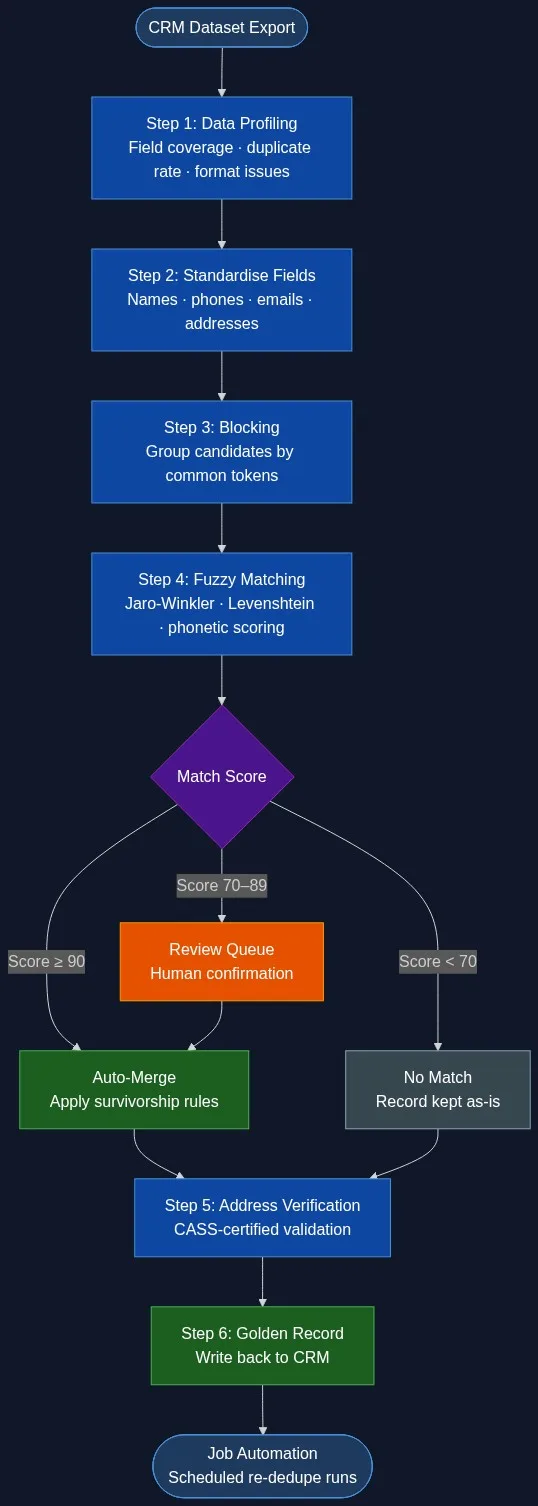
Step 1: Data Profiling
Before running any matching logic, profile your dataset. Data profiling tells you what percentage of records have a populated email, how many phone numbers are in non-standard formats, and what the overall duplicate rate looks like based on exact-match clustering. These metrics set your threshold expectations before fuzzy scoring begins.
Key profiling outputs for CRM deduplication:
- Field completeness: % of records with first name, last name, email, phone, company
- Format distribution: how many phone numbers use dashes vs dots vs no separator
- Exact duplicate rate: records sharing the same email or phone
- Null rate per field: fields with high null rates need a lower weight in match scoring
Step 2: Standardise Fields
Matching “Bob Smith” against “Robert Smith” fails if neither name has been normalised. Standardisation converts every field to a consistent format before scoring begins. This is where most manual deduplication attempts break down: teams skip it and then wonder why their match rates are low.
Standardisation rules for CRM fields:
| Field | Raw value | Standardised value |
|---|---|---|
| First name | BOB | Robert |
| Company | ACME Corp. | ACME Corporation |
| Phone | 212.555.0100 | +12125550100 |
| Address | 123 Main St, Ste 4 | 123 Main Street Suite 4 |
| Bob.Smith@ACME.COM | bob.smith@acme.com |
Match Data Pro applies over 40 built-in standardisation rules covering name parsing, phone normalisation, company suffix expansion, and address component separation. You can also configure custom rules for domain-specific patterns such as employee IDs or product codes. See how this fits into a full enterprise data cleaning workflow.
Step 3: Blocking
A 500,000-record CRM has 125 billion possible record pairs. Comparing every pair is computationally infeasible. Blocking reduces the comparison space by grouping records that share at least one common token: the first three characters of a surname, the same area code, or the same company domain.
A good blocking strategy misses fewer than 2% of true duplicates while reducing the comparison space by 99%+. Match Data Pro uses multi-key blocking: a record pair is included if it matches on any one of several blocking keys. This prevents missed matches when a single field is corrupt or missing.
Step 4: Fuzzy Matching and Scoring
Each candidate pair produced by blocking is scored across multiple fields using a weighted combination of fuzzy matching algorithms. Different algorithms suit different field types:
- Jaro-Winkler for given names and surnames: rewards prefix similarity, handles transpositions
- Levenshtein distance for short codes and IDs: counts minimum character edits
- Phonetic (Soundex/Double Metaphone) for names that sound alike: “Smith” matches “Smyth”
- Token-based (TF-IDF cosine) for company names and addresses: handles word-order variation
Field scores are combined into a composite match score using configurable weights. A typical CRM configuration:
| Field | Weight | Algorithm |
|---|---|---|
| 40% | Exact / Levenshtein | |
| Full name | 25% | Jaro-Winkler + phonetic |
| Phone | 20% | Exact (normalised) |
| Company | 10% | Token cosine |
| Address | 5% | Token cosine |
Pairs scoring 90 or above are auto-merged. Pairs scoring 70-89 go to a human review queue. Pairs below 70 are treated as distinct records. These thresholds are configurable. Teams with higher data quality tolerance tighten the auto-merge threshold to 95; teams working with noisier legacy data may lower it to 85. For a deeper look at algorithm selection, see the guide on data matching algorithms and multi-algorithm record linkage.
Step 5: Survivorship Rules and Merging
When two records are confirmed as duplicates, survivorship rules determine which field values survive in the merged golden record. This is not a simple “keep the newest record” decision. Different fields have different reliability signals.
Common survivorship rules for CRM records:
- Most recent non-null wins: phone number, email, job title
- Longest non-null wins: company name (avoids abbreviations overwriting full names)
- Source priority wins: verified records from the billing system outrank unverified web form entries
- Highest confidence wins: address with CASS verification flag set to true outranks unverified address
Match Data Pro lets you define survivorship rules per field and per source system. The merged record retains a complete audit trail: which source contributed each field value, and why. This matters for GDPR compliance and for dispute resolution when sales reps disagree about which record was “correct”. For background on how merging and survivorship fit together, see the guide on data match merging and survivorship rules.
Step 6: Address Verification
After merging, run every address through CASS-certified verification. CASS (Coding Accuracy Support System) validates addresses against the USPS database, corrects street suffix abbreviations, appends ZIP+4 codes, and flags non-deliverable addresses. An address that reads “123 Main St, Ste 4, Nw Yrk, NY” becomes “123 Main Street Suite 4, New York, NY 10001-2345”.
Non-deliverable addresses are a common source of hidden duplicates: the same physical location entered in five different formats. Address verification at this stage collapses those variants before they re-enter the CRM. Match Data Pro’s address matching and verification pipeline handles this automatically as part of the post-merge step.
Handling Hard CRM Deduplication Cases
Nicknames and Name Variants
“Bill” and “William” share no common characters. Levenshtein distance gives them a score near zero. Phonetic algorithms score them differently too. The correct approach is a nickname lookup table: a pre-built mapping of common given-name variants. Match Data Pro ships a 4,200-entry nickname table covering English, Spanish, French, and Portuguese common names. When the lookup table confirms “Bill” maps to “William”, the name field score jumps to 100 regardless of string distance.
Same Person, Different Company
A contact who changed employers will have the same name and phone number but a different email domain and company name. Matching purely on email would miss them. Matching purely on name and phone would produce false positives for common names. The solution is a weighted composite score where a high name + phone match with a low email match still scores above the review threshold (70-89). A human reviewer then confirms whether this is a job-change update or a genuine different person.
Parent and Child Account Relationships
“Acme Corp” and “Acme Corp – London Office” are not duplicates. They are related accounts. A naive fuzzy match on company name would flag them as duplicates with a score of 88. Configure company matching to exclude records where one name is a substring of the other and both have distinct addresses. Match Data Pro’s blocking and rule configuration supports this pattern without custom code. For teams managing multiple CRM sources simultaneously, the guide on matching records across multiple systems covers the extended cross-source scenario.
Automating Ongoing CRM Deduplication
A one-time deduplication run decays within weeks. New leads come in daily from web forms, paid campaigns, and event scans. Without an ongoing deduplication process, you are back to 10% duplicates within a quarter.
Two mechanisms keep duplicates out after the initial cleanup:
Real-Time API Deduplication
Match Data Pro’s live fuzzy search API can be called at the point of record creation. When a lead form is submitted, the API queries the existing CRM population for near-matches before the record is written. If a match is found above threshold, the new lead is merged or flagged for review instead of creating a duplicate. Latency is under 200ms for a 1-million-record CRM.
Scheduled Batch Jobs
For records that enter through integrations or bulk imports, schedule a nightly or weekly batch deduplication job. Match Data Pro’s job automation engine lets you configure the full pipeline, profiling through merging, as a scheduled task. The job logs every match decision, every merge action, and every survivorship outcome. These logs feed directly into your automated deduplication workflow.
Want to see deduplication running on your own CRM data? Book a demo and we will walk through your specific data structure and match configuration.
CRM Deduplication Before a Migration
If you are planning a CRM migration, deduplication must happen before cutover, not after. Moving dirty data into a new system does not fix it. It embeds the problem in the new platform’s history, where it is harder to correct because activity, notes, and opportunities are already linked to duplicate records.
Run the full six-step pipeline on your source dataset. Export a clean, deduplicated snapshot. Load the snapshot into the new CRM. This approach also reduces migration time: a 200,000-record CRM deduped to 150,000 records loads 25% faster and requires 25% less validation effort. The full pre-migration preparation guide covers this in detail: CRM data migration: how to prepare and clean your data before the move.
Measuring Deduplication Success
Track these metrics before and after a deduplication run to quantify the business impact:
| Metric | Before deduplication | After deduplication |
|---|---|---|
| Total contact records | 210,000 | 162,000 |
| Duplicate rate | 23% | <1% |
| Email bounce rate | 8.4% | 2.1% |
| Unsubscribe overlap (same contact, 2+ records) | 14% | 0% |
| Open opportunity count (accurate) | Understated by ~18% | Accurate |
The duplicate rate below 1% is achievable with a well-configured pipeline and ongoing automation. Above 5% is a sign that either the initial cleanup was incomplete or new duplicates are entering faster than the scheduled job catches them. Review your blocking keys and API integration coverage if your rate climbs back above 5%.
Start a free trial of Match Data Pro to profile your CRM, run a sample deduplication job, and see your projected clean record count before committing to a full cleanup.
Frequently Asked Questions
How long does it take to dedupe a CRM with 500,000 records?
With a platform that uses blocking and parallel processing, a 500,000-record deduplication job typically completes in 15 to 45 minutes. Manual review of the 70-89 score band adds time depending on volume, but that queue is usually 5-15% of total pairs. Standardisation and profiling add 30 to 60 minutes for an initial run.
What is the difference between exact-match and fuzzy deduplication?
Exact-match deduplication flags records with identical field values such as the same email address. Fuzzy deduplication scores similarity across multiple fields simultaneously, catching variants like “Jon Smith” and “Jonathan Smith” at the same company. Most CRM duplicate problems require fuzzy matching because exact matches catch fewer than half of real duplicates.
Should I dedupe contacts and accounts separately?
Yes. Account deduplication and contact deduplication use different field weights and blocking strategies. Account records weight company name, domain, and address heavily. Contact records weight given name, surname, email, and phone. Run account deduplication first, then link contacts to the merged accounts before running contact deduplication, so account relationships are correct before contact records are collapsed.
How do I prevent new duplicates from re-entering the CRM after cleanup?
Two mechanisms work together: a real-time API call at the point of record creation that checks for near-matches before writing a new record, and a scheduled batch job that catches anything that entered through integrations or imports. Without both layers, duplicates return within weeks of the initial cleanup run.
Can I dedupe CRM data without exporting it to a third-party tool?
Match Data Pro supports direct CRM connectors for common platforms, so data does not need to leave your environment as a flat file export. Records are streamed through the deduplication pipeline and results are written back via the connector. For security-sensitive deployments, the platform also supports on-premise processing where no data leaves your network.