
You can match records across multiple systems without a shared identifier by using a five-stage pipeline: profile each source, standardise fields, generate candidate pairs through blocking, score them with a weighted multi-algorithm engine, and apply survivorship rules to produce a single golden record. No universal customer ID required. The pipeline works whether you have two source systems or twenty.
Ready to see it in action? Start your free trial of Match Data Pro and connect your first two source systems in minutes.
Why the Absence of a Shared Identifier Is the Core Problem
Most organisations have data in at least three places: a CRM, an ERP, and a marketing automation platform. Each system assigns its own internal ID to every customer, contact, or vendor record. CRM ID 10045 is the same person as ERP ID VND-882 and marketing record MKT-CX-2201. Nothing in the raw data says so.
The result: downstream reports double-count revenue, sales teams call the same prospect three times, and compliance teams cannot produce a clean subject-access record. According to Gartner research, poor data quality costs organisations an average of $12.9 million per year. Cross-system duplication is one of the primary drivers.
The standard fix — manually assigning a universal ID — fails at scale. When one system has 400,000 records and another has 600,000, cross-referencing them by hand is not feasible. You need a matching pipeline that operates on the content of the records themselves: name, address, phone, email, and any combination of those fields.
Stage 1: Profile Each Source Before You Match Anything
Do not start matching on raw data. Run AI data profiling on each source system first. Profiling reveals null rates, format inconsistencies, and value distributions before they corrupt your match scores.
A typical profiling pass will surface issues like these:
| Field | System A (CRM) | System B (ERP) | Problem |
|---|---|---|---|
| Phone | +1 (602) 555-0198 | 6025550198 | Format mismatch — both are valid |
| Company name | Acme Corp. | ACME CORPORATION | Case + abbreviation divergence |
| Address | 123 W Main St | 123 West Main Street, Ste 4 | Abbreviation + unit suffix mismatch |
| First name | Bob | Robert | Nickname vs. legal name |
Each mismatch above would score a 0 on a naive exact-match comparison. After profiling, you know exactly which standardisation steps are needed before scoring begins.
Stage 2: Standardise Fields Across Sources
Standardisation brings every field into a canonical form before comparison. This is where most homegrown matching attempts fail — they skip standardisation and wonder why match rates are low.
Name standardisation
Apply these transforms before scoring names:
- Uppercase or lowercase all values consistently
- Expand common abbreviations: Corp. → Corporation, St. → Street
- Strip punctuation: periods, commas, ampersands
- Normalise nickname variants: Bob → Robert, Liz → Elizabeth (via lookup table)
- Parse company suffixes into a separate token: LLC, Inc., Ltd.
Phone standardisation
Strip all formatting characters and reduce to a 10-digit national number (or E.164 for international). +1 (602) 555-0198 and 6025550198 become 6025550198 — identical. An exact match on phone is now possible without fuzzy scoring.
Address standardisation
Run CASS-certified address verification on all postal records. CASS parsing decomposes each address into street number, street name, directional, unit type, unit number, city, state, and ZIP+4. You can then compare parsed components rather than raw strings. “123 W Main St” and “123 West Main Street, Ste 4” share street number 123, street name MAIN, directional WEST — a strong partial match even without identical strings.
Match Data Pro’s data cleansing and standardisation engine applies all of these transforms as a configurable pre-match step, processing millions of records without custom scripting.
Stage 3: Blocking — Cutting the Candidate Space Without Missing Matches
You cannot compare every record in System A against every record in System B. With 400,000 records in A and 600,000 in B, a naive cross-join produces 240 billion pairs. That is computationally impractical.
Blocking (also called indexing or bucketing) reduces candidate pairs to a manageable set by only comparing records that share at least one blocking key. Common blocking strategies include:
- Exact email domain: only compare records within the same @domain
- Soundex or NYSIIS phonetic key: group records whose names sound similar (catches JOHNSON / JONSON / JOHNSTON)
- ZIP code prefix: only compare records in the same 3-digit ZIP prefix
- First 3 characters of company name: reduces candidate space by roughly 97% while catching most abbreviation variants
- Phone prefix: group by area code + first 3 digits
Use multiple blocking passes (multi-pass blocking) and take the union of candidates from each pass. This ensures a record missed by one blocking key is still caught by another. A well-designed blocking strategy reduces candidate pairs by 99.5% or more while missing fewer than 1% of true matches.
Stage 4: Multi-Algorithm Scoring Across Fields
Each candidate pair now receives a composite match score assembled from per-field similarity scores. Match Data Pro’s multi-algorithm scoring engine applies different algorithms to different field types — because no single algorithm works equally well on names, addresses, and free-text fields.
Here is a worked scoring example for one candidate pair:
| Field | System A value | System B value | Algorithm | Score | Weight |
|---|---|---|---|---|---|
| First name | Bob | Robert | Nickname table | 1.00 | 0.15 |
| Last name | Andersen | Anderson | Jaro-Winkler | 0.97 | 0.20 |
| Company | Acme Corp | ACME CORPORATION | Token set ratio | 0.95 | 0.25 |
| Phone | 6025550198 | 6025550198 | Exact | 1.00 | 0.25 |
| ZIP | 85001 | 85001-4230 | Prefix match | 1.00 | 0.15 |
| Composite score | 0.979 | ||||
A score of 0.979 exceeds any reasonable auto-link threshold (typically 0.85+). These two records are the same person — despite different first name formats, different last name spellings, different company name formats, and a ZIP+4 in one system.
For details on how each algorithm handles specific field types, see our guide on how fuzzy matching algorithms work.
Threshold routing
Not every pair should be auto-linked. Route pairs based on composite score:
- Score ≥ 0.85: auto-link — high confidence, no human review needed
- 0.65 – 0.84: review queue — send to a human adjudicator for a match/no-match decision
- Score < 0.65: no match — records remain separate
Set thresholds conservatively at first. You can always lower the auto-link threshold once you have validated the engine’s accuracy on a sample of your data.
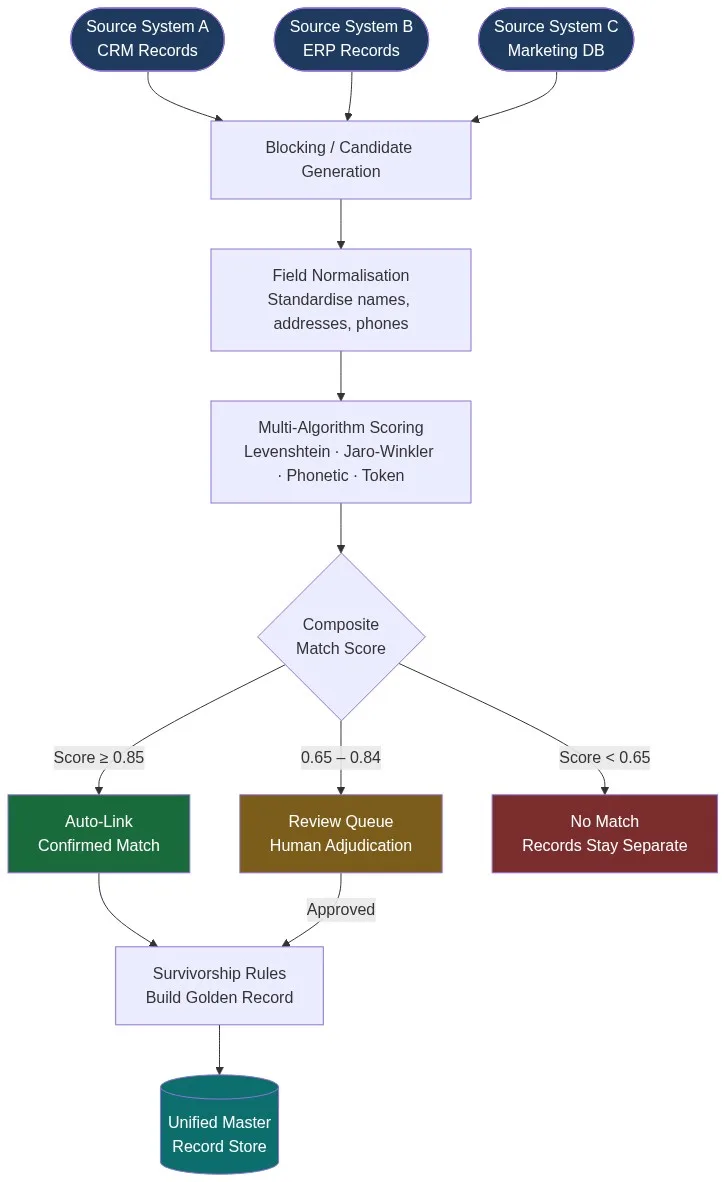
Stage 5: Survivorship Rules and Golden Record Creation
Once pairs are confirmed as matches, you need to decide which field values to carry into the unified record. This is survivorship. Two matched records may have different values for the same field — which one wins?
Common survivorship rules:
- Most recent: take the value from whichever record was updated last
- Most complete: prefer the non-null value; if both are non-null, prefer the longer or more detailed one
- Source priority: designate a trusted source-of-truth system per field type (ERP wins for billing address; CRM wins for contact name)
- Verified flag: prefer values that have been explicitly validated (CASS-verified address, email-confirmed record)
Match Data Pro’s data merging and survivorship engine lets you configure field-level rules per source system without writing code. The output is a golden record: the single authoritative representation of each real-world entity across all your source systems.
For teams dealing with complex multi-system entity resolution, Match Data Pro also integrates Senzing entity resolution — a graph-based engine that handles transitive matches (A=B, B=C, therefore A=C) and evolves as new records arrive.
Handling Edge Cases That Break Simple Pipelines
A production cross-system matching pipeline encounters edge cases that a proof-of-concept never surfaces.
Transposed digits in phone numbers
602-555-0198 vs. 602-555-0189 — a single digit transposition. Exact comparison fails. Levenshtein distance of 2 on a 10-character string scores around 0.80 — enough to route to the review queue rather than auto-link. Pair it with a high name score and the composite still clears the threshold.
Unit number suffixes in addresses
“123 Main St” vs. “123 Main St Suite 400” — same building, different unit. Parse the unit token separately and score it independently. A missing unit in one system scores as neutral (0.5) rather than a hard miss (0.0). This avoids false negatives for customers who provided their address at different levels of detail across systems.
Business name legal variants
“Smith & Sons” vs. “Smith and Sons LLC” — a common ERP-to-CRM divergence. Token set ratio comparison handles this well: it compares the intersection of tokens rather than the full strings, scoring SMITH and SONS as a strong match regardless of the connector word and suffix.
International name ordering
East Asian name formats place family name first: Li Wei in the CRM may appear as Wei Li in the ERP if one system was populated by a Western operator. A name parser that recognises country codes and reverses field order before scoring catches this class of mismatch entirely.
Match Data Pro’s configurable matching rules let you define field-specific algorithm assignments, weights, and edge-case overrides through the UI — without writing code.
Operationalising the Pipeline: Batch vs. Continuous Matching
Cross-system record linkage is not a one-time project. New records arrive in each source system daily. You need a strategy for keeping linked records current.
Batch matching
Run a full matching pass on a scheduled cadence — nightly, weekly, or monthly depending on data velocity. Export new and changed records from each source system since the last run, run them through the matching pipeline, and update the golden record store. Match Data Pro’s job automation engine schedules and executes batch matching jobs without manual intervention.
Real-time API matching
For high-velocity systems — point-of-sale, web forms, API integrations — you need real-time matching at the point of record creation. Match Data Pro’s live fuzzy search API accepts a new record as input and returns the best-matching golden record (and match score) in under 200ms. New records that do not match any existing entity are flagged as candidates for a new golden record rather than silently creating a duplicate.
For a detailed comparison of when to use each mode, see our guide on deduplication API vs. batch processing.
Want to see how the full pipeline performs on your own data? Book a demo and we will walk through a live match against your source systems. Or register now to start a free trial with no contract and no commitment.
Frequently Asked Questions
How do you match records across systems when there is no shared ID?
You match on the content of the records themselves — name, email, phone, address, and any combination of those fields. A multi-algorithm scoring engine computes a similarity score for each candidate pair. Pairs above a configured threshold are linked; those below are kept separate. No shared identifier is required. The pipeline works as long as records share at least some overlapping attribute values.
What is blocking and why is it necessary for cross-system matching?
Blocking reduces the number of record pairs that need to be scored. Without it, matching 400,000 records against 600,000 produces 240 billion pairs — computationally impractical. Blocking groups records by a shared key (phonetic name code, ZIP prefix, email domain) so that only records within the same block are compared. A well-designed multi-pass blocking strategy reduces candidate pairs by 99% or more while missing fewer than 1% of true matches.
Which fields produce the most reliable cross-system match signals?
Email address (when available and accurate) is the highest-signal field — it is unique, rarely changes, and tolerates near-zero error. Phone number (normalised) is the second strongest. Full name combined with ZIP code forms a reliable compound key. Address alone is weaker because many people share an address. Use email and phone as anchor fields and treat name plus location as corroborating evidence, not the primary signal.
How do you handle records where key fields are missing in one system?
Treat missing fields as scoring gaps rather than hard failures. If System A has no email and System B does, score email as neutral (0.5 or omit from the composite) rather than zero. Weight the available fields more heavily. A record with strong name + phone + address agreement can still cross the auto-link threshold even with a missing email. Match Data Pro lets you configure per-field null handling in the matching rule definition.
What happens after records are matched — how is the golden record maintained?
After matching, survivorship rules determine which field value from each linked record goes into the golden record. You configure rules per field: most recent, most complete, or source-priority (e.g., ERP wins for billing address). The golden record is stored separately from the source systems and updated incrementally as new records arrive. Source system records are never modified — the golden record is a read layer, not a write-back.