
When one customer appears as five records across your CRM, ERP, marketing platform, and support system, every downstream process breaks. Analytics double-counts revenue. Sales reps call the same contact three times. Compliance reports inflate customer counts. The fix is a structured 5-step deduplication pipeline: profile the data, standardise it, block candidate pairs, score them with fuzzy matching, then merge using survivorship rules. Done right, this reduces duplicate rates from 20–30% to under 2% and produces a reliable single customer view.
Ready to consolidate your duplicate customer records? Start a free trial of Match Data Pro and run your first deduplication job in minutes — no contract required.
Why One Customer Ends Up in Many Records
Duplicate customer records are not a data entry error problem. They are a systems architecture problem. When a business runs three or more platforms — a CRM, an ERP, a marketing automation tool, a support desk — each system creates its own customer identifier. Without a shared primary key, every integration event is a potential duplicate creation event.
The scale is predictable. A 2023 Gartner survey found that the average organisation has a 10–25% duplicate rate in its CRM. For companies that have grown by acquisition or platform migration, that figure can reach 40%. Here is what it looks like in practice:
| Source | Record | Name | Phone | |
|---|---|---|---|---|
| CRM | 001 | Jonathan R. Smith | jsmith@acme.com | 212-555-0101 |
| ERP | C-8821 | Jon Smith | j.smith@acme.com | (212) 555-0101 |
| Marketing | MKT-449 | Jonathan Smith | jsmith@acme.com | +1 212 555 0101 |
| Support | TKT-991 | J. Smith | jsmith@acme.com | — |
These four records are the same person. No exact join will catch them. All differ in name format, email subdomain, and phone notation. This is why standard data matching techniques fail on real-world customer data and why a fuzzy deduplication pipeline is mandatory.
The Business Cost of Duplicate Customer Data
Before detailing the fix, it is worth quantifying the problem. The IBM Data Analytics group estimated that poor data quality costs US businesses $3.1 trillion annually. Duplicate records are a major driver of that figure. The direct costs include:
- Inflated marketing spend. Sending the same campaign to four records of one person wastes 75% of that send cost and damages sender reputation.
- Broken customer experience. A customer who calls support and is told “you are not in our system” — because the support record was created under a variant name — loses trust immediately.
- Revenue miscounting. When a customer’s orders are split across three records, revenue reporting understates LTV, misroutes renewal alerts, and corrupts segmentation models.
- Compliance exposure. GDPR Article 17 (right to erasure) requires that you delete all records for a data subject. If you have four records for one customer, you must find all four to comply. Duplicate data makes this operationally impossible without a deduplication framework.
See also: how to measure and monitor data health with dashboards so you catch duplicate rates before they reach damaging levels.
The 5-Step Framework to Fix Duplicate Customer Data
The diagram below maps the full pipeline. Each step is explained in detail below.
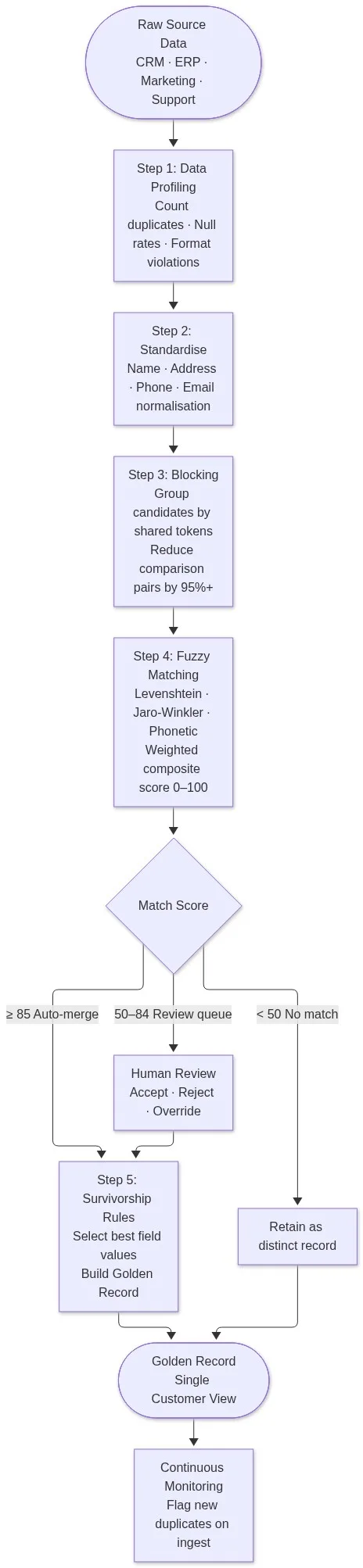
Step 1: Profile the Data
AI-powered data profiling is the mandatory first step. Before you can fix duplicate records, you need to know how many exist, which fields carry the most duplication risk, and what format inconsistencies will block matching later. A profiling run produces:
- Duplicate candidate count per source system
- Null rates per field (phone null at 34% means you cannot rely on phone as a blocking key)
- Format violation counts (phone stored in 7 different notations, date in 3 formats)
- Field-level completeness scores that rank which fields are most matchable
Match Data Pro’s AI profiler scans datasets automatically and flags these issues with severity rankings. Profiling a 500,000-record dataset typically takes under 10 minutes and produces a report you can share with stakeholders before any cleaning starts.
Step 2: Standardise Before You Match
Fuzzy matching cannot compensate for unstandardised data at scale. If “Jon” and “Jonathan” need to match, the name field must first be expanded against a nickname dictionary. If phone numbers are stored in seven formats, they must all resolve to E.164 before scoring begins.
Key standardisation tasks for customer deduplication:
- Name: uppercase, strip punctuation, expand common abbreviations (St → Street, Corp → Corporation), apply nickname mapping (Jon → Jonathan, Bob → Robert)
- Address: parse into components (street number, street name, unit, city, state, ZIP), apply CASS verification to append ZIP+4 and correct directional prefixes
- Phone: strip formatting characters, convert to 10-digit domestic or E.164 international
- Email: lowercase, trim whitespace, flag disposable domains
Match Data Pro’s data standardisation pipeline handles all of these transformations in a single configured job, including CASS-certified address parsing and verification for US postal data.
Step 3: Blocking — Reduce the Comparison Space
A naive deduplication job compares every record against every other record. For 500,000 records, that is 125 billion comparisons. No pipeline survives that at production speed. Blocking solves this by grouping records into candidate buckets based on shared token values, so only records within the same bucket are compared.
Effective blocking keys for customer data:
- First 3 characters of last name + 5-digit ZIP
- Soundex code of last name + first 3 characters of first name
- Domain portion of email address
- Normalised phone number (last 7 digits)
Use multi-pass blocking — run three to four blocking keys and union the candidate sets. This reduces comparison pairs by 95–99% while ensuring near-zero missed match rates. Match Data Pro’s blocking engine supports configurable multi-pass strategies out of the box.
Step 4: Fuzzy Matching — Score Every Candidate Pair
Once candidate pairs are formed, each pair receives a composite match score from 0 to 100. The score combines multiple algorithm outputs, weighted by field reliability:
| Field | Algorithm | Weight | Example Score |
|---|---|---|---|
| Last name | Jaro-Winkler | 30% | 96 (Smith / Smith) |
| First name | Jaro-Winkler + nickname dict | 20% | 88 (Jonathan / Jon) |
| Address | CASS-normalised exact match | 25% | 100 (same ZIP+4) |
| Exact (normalised) | 15% | 95 (domain match) | |
| Phone | Exact (E.164) | 10% | 100 |
Composite score for the example above: (96×0.30) + (88×0.20) + (100×0.25) + (95×0.15) + (100×0.10) = 95.65. This clears an auto-merge threshold of 85.
Score routing is then applied:
- 85–100: auto-merge — high confidence, no human review required
- 50–84: review queue — presented to a reviewer with field-level score breakdown
- 0–49: no match — records retained as distinct entities
Match Data Pro’s fuzzy matching engine supports Levenshtein, Jaro-Winkler, phonetic (Soundex / Metaphone), token set ratio, and custom regex-based algorithms — individually configurable per field type.
Step 5: Survivorship Rules — Build the Golden Record
Merging is not the same as keeping the most recent record. Survivorship rules define field-level logic for which source wins when values conflict. Common survivorship strategies:
- Source priority: CRM address wins over ERP address (CRM is maintained by sales reps who verify on call)
- Most recent non-null: take the most recently updated non-empty value regardless of source
- Longest populated: for name fields, prefer the longest non-abbreviated version (“Jonathan” over “Jon”)
- CASS-verified: always prefer the CASS-verified address component over an unverified one
The output is a golden record — a single, authoritative customer entity that links back to all contributing source records with their original IDs preserved. No data is deleted; source records are marked as merged and cross-referenced to the golden record. This preserves audit history and allows rollback if a merge is later disputed.
Read more about how survivorship rules and golden records work in practice.
Scaling the Pipeline: From 50K to 50 Million Records
The five steps above work at any scale, but the implementation details change as volume grows. Here are the key adjustments for large-scale deduplication:
Job Automation and Scheduling
A one-time deduplication job is not enough. Customer data arrives continuously — web form submissions, CRM imports, support ticket creation. Each new record is a potential duplicate. Match Data Pro’s job automation lets you schedule recurring deduplication runs or trigger them via API webhook on each ingest event, so the pipeline runs continuously rather than as a quarterly project.
Real-Time Fuzzy Search at Point of Entry
The most effective way to control duplicate growth is to prevent duplicates from being created in the first place. Match Data Pro’s live fuzzy search API lets you query the existing customer database in real time as a new record is typed. If a user enters “Jonathan Smith, 212-555-0101”, the API returns the top-scored matches from the existing database before the record is saved. If a match clears the threshold, the system prompts the user to link to the existing record rather than create a new one.
Entity Resolution for Cross-System Matching
When the matching problem spans more than two systems — CRM + ERP + support + marketing + billing — standard pairwise deduplication misses cross-system clusters. Entity resolution using Senzing resolves this by building a graph of relationships across all source records and clustering them into identity groups. Each cluster becomes a golden entity, and each member record retains its source ID. This is the correct architecture for organisations with four or more contributing systems.
Import/Export Connectors
Getting data into the pipeline cleanly is as important as the matching itself. Match Data Pro’s import/export connectors support CSV, Excel, JSON, and direct database connections. The connector layer handles character encoding, field mapping, and type validation before the data reaches the profiling stage — eliminating a common class of pre-match errors.
Book a demo to see the full deduplication pipeline running on a dataset similar to yours. We can configure field weights, blocking keys, and survivorship rules during the session.
Keeping Duplicates from Returning
A clean dataset degrades over time. Without continuous monitoring, duplicate rates typically return to baseline within 12–18 months. Three mechanisms prevent this:
- Ingest-time matching: run the fuzzy search API on every incoming record before it is committed to the database
- Scheduled batch runs: run full deduplication jobs weekly or monthly to catch records that slipped through or arrived from new integration sources
- Data quality monitoring: track duplicate rate as a dashboard metric, alerting when it exceeds a defined threshold (typically 2–3% for a maintained dataset)
These three mechanisms form a closed loop. The batch job catches what ingest-time matching misses. The monitoring catches what the batch job misses — and triggers an alert before the problem compounds. See how to build a data quality dashboard to track these metrics in real time.
Frequently Asked Questions
How do I find duplicate customer records across different systems?
The most reliable method is a fuzzy matching pipeline with blocking. First standardise all records to a common format, then group candidate pairs by shared tokens (last name prefix + ZIP, email domain, normalised phone). Score each pair using weighted algorithms — Jaro-Winkler for names, exact for email, CASS-normalised for address. Records scoring above your threshold are duplicate candidates for review or auto-merge.
What is a golden record and how do you build one?
A golden record is a single authoritative customer entity built by merging all duplicate records using survivorship rules. Survivorship rules define which source wins for each field when values conflict — for example, preferring the CRM address over the ERP address because sales reps verify addresses on calls. The golden record links back to all contributing source records with their original IDs preserved for audit and rollback.
How long does a large-scale deduplication project take?
With an automated pipeline and clean imports, a 500,000-record deduplication project typically completes in 2–4 weeks end-to-end: 3–5 days for profiling and standardisation configuration, 1–2 days for the matching run, and 1–2 weeks for review-queue resolution. Without automation, the same project can take 3–6 months of manual work. Match Data Pro’s job automation compresses this significantly by handling the matching and merging steps without manual intervention.
What is the difference between deduplication and entity resolution?
Deduplication removes duplicate records within or across a small number of datasets by pairwise comparison. Entity resolution is a broader process that clusters all records across any number of source systems into identity groups using graph-based matching. Deduplication is the right tool for two or three systems. Entity resolution is the correct architecture when matching spans four or more systems or when relationships between entities (households, organisations, subsidiaries) must also be resolved.
Can I prevent new duplicates from being created without changing my existing systems?
Yes. Match Data Pro’s live fuzzy search API integrates at the ingest layer without requiring changes to your source systems. Any application that creates a new customer record can query the API before saving. The API returns existing records that exceed a similarity threshold, allowing the application to prompt the user or auto-link the new record to an existing one instead of creating a duplicate. This works via REST and requires no changes to your CRM or ERP.