
A vendor matching engine identifies duplicate and near-duplicate supplier records across procurement systems and consolidates them into a single, verified golden vendor record. Without one, organisations routinely pay the same supplier twice, miscount spend by vendor, and fail audit checks when tax IDs appear under three different name spellings. This guide covers the full implementation pipeline: from profiling raw vendor data through fuzzy matching configuration to survivorship rules and ERP write-back.
Start a free trial of Match Data Pro to run your first vendor deduplication job today — no contract required.
Why Vendor Data Is Uniquely Hard to Match
Vendor records accumulate inconsistencies faster than customer records for three reasons.
First, supplier names are entered by multiple people in multiple systems. “Acme Corp”, “ACME Corporation”, “ACME Corp.”, and “Acme Incorporated” all refer to the same entity. A standard exact-match join misses all four variants. Second, vendor addresses change frequently — companies relocate, acquire PO boxes, or add new delivery sites. A record created three years ago may carry a stale address that no longer resolves to the USPS database. Third, tax IDs are the most reliable identifier, but they are absent in 20–40% of vendor records in typical ERP databases and are sometimes entered with formatting errors (dashes omitted, leading zeros stripped).
The result: enterprise procurement teams frequently operate with 15–30% duplicate vendor rates. Each duplicate is a fraud risk, a spend analytics blind spot, and a payment-process inefficiency.
Read more about the upstream causes in our guide to vendor master data cleansing.
The 7-Stage Vendor Matching Pipeline
A production-grade vendor matching engine runs through seven discrete stages. Skipping any one of them degrades precision at every stage downstream.
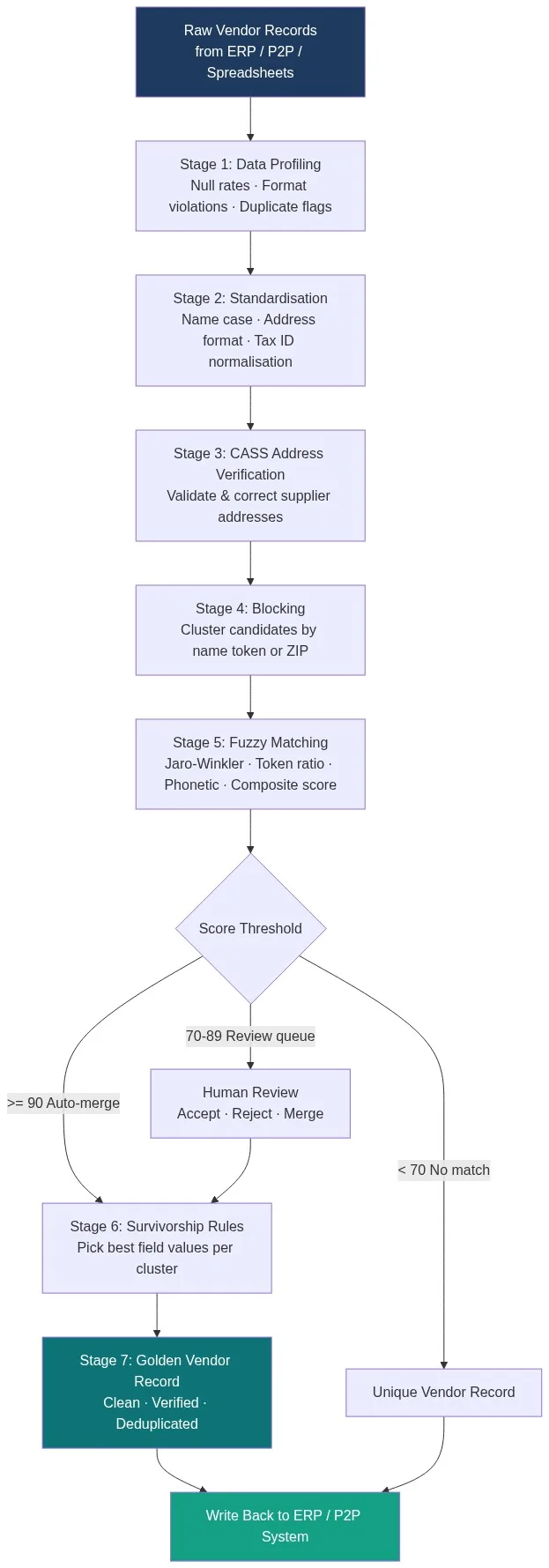
Stage 1: Data Profiling
AI data profiling scans every vendor field and returns null rates, format violation counts, and a preliminary duplicate estimate. Typical findings: 22% of vendor name fields contain legal-suffix inconsistencies (LLC vs L.L.C.), 18% of address fields fail postal format validation, and 6–9% of records share a tax ID with at least one other record. This baseline shapes the standardisation rules in the next stage and determines which fields carry enough signal to use in the match key.
Stage 2: Standardisation
Before matching, every field must be normalised to a common format. Vendor name standardisation means: lowercase conversion, legal-suffix expansion (“Inc” to “Incorporated”), stopword removal (“The”, “and”), and punctuation stripping. Address standardisation means applying a consistent street type (St not Street, Ave not Avenue). Tax ID standardisation means zero-padding EINs to nine digits and inserting the canonical hyphen. Data standardisation best practices reduce downstream match errors by 40–60% before a single fuzzy score is computed.
Stage 3: CASS Address Verification
Vendor addresses verified against the USPS Coding Accuracy Support System (CASS) database return a standardised deliverable address, a ZIP+4 code, and a delivery point barcode. This matters for matching because two records for the same supplier may carry a pre-move and post-move address. Once both are CASS-resolved to a canonical format, the address field contributes usable signal to the composite match score rather than noise. Match Data Pro’s CASS address verification runs inline as part of the matching pipeline — no separate batch job required.
Stage 4: Blocking
Comparing every vendor record against every other record (an O(n²) operation) is computationally impractical at scale. Blocking reduces candidate pairs by grouping records that share at least one indexing token. Common blocking keys for vendor data: first three characters of the normalised vendor name, five-digit ZIP code, or the first five digits of the tax ID. A well-designed blocking strategy reduces comparison pairs by 95–99% while retaining 98%+ of true match candidates.
Stage 5: Fuzzy Matching and Composite Scoring
Within each block, every candidate pair is scored across multiple algorithms. Match Data Pro’s fuzzy matching engine applies field-specific algorithms and combines them into a weighted composite score.
| Field | Algorithm | Weight |
|---|---|---|
| Vendor name | Jaro-Winkler + Token ratio | 35% |
| Tax ID (EIN) | Exact match | 30% |
| Street address | Levenshtein + CASS normalised | 20% |
| Phone number | Numeric exact after stripping | 10% |
| ZIP code | Exact match (5-digit) | 5% |
A composite score of 90 or above triggers an automatic merge. Scores between 70 and 89 route to a human review queue. Scores below 70 are treated as distinct vendors. These thresholds are configurable — procurement teams with high data quality often set the auto-merge threshold at 85; teams cleaning legacy data from multiple acquisitions may start at 92 until confidence is established.
Stage 6: Survivorship Rules
When two or more vendor records merge, survivorship rules determine which field value survives in the golden record. Standard rules for vendor data: prefer the most recently updated value for address and phone, prefer the non-null value when one field is blank, prefer the longest non-null legal name, and always use the verified tax ID if one record has it and the other does not. Survivorship rules and golden records are defined once and apply consistently across every merge in the job — no manual per-record decisions required.
Stage 7: Golden Vendor Record and ERP Write-Back
The output is a single golden vendor record per supplier: clean, verified, and deduplicated. Match Data Pro’s import/export connectors write the golden records directly back to SAP, Oracle, NetSuite, or any P2P platform via API or file export. The original source records are retained in a lineage log so every merge decision is auditable.
Configuring Match Thresholds for Vendor Data
Threshold configuration is the most common point of failure in vendor matching projects. Set the auto-merge threshold too low and you merge distinct suppliers. Set it too high and you leave thousands of duplicates in place.
The practical approach: run the matching job in review-only mode first. Examine 200–300 candidate pairs across the full score range. Measure precision and recall at each threshold band. In most vendor datasets, a composite threshold of 88–92 achieves 95%+ precision with acceptable recall. After the first production run, use Match Data Pro’s data quality dashboard to track the volume of records entering each score band over time. Drift in that distribution signals incoming data quality degradation before it affects downstream spend reporting.
Handling Edge Cases: Subsidiaries, DBAs, and Name Changes
Subsidiaries and Parent Companies
A vendor matching engine should not automatically merge a subsidiary into its parent. “Acme Corp” and “Acme Logistics LLC” may share an address but represent distinct legal entities with separate tax IDs. Configure the engine to flag these as related rather than identical. Match Data Pro’s entity resolution layer (powered by Senzing) builds a relationship graph between vendor records so procurement teams can see that Acme Logistics is a subsidiary of Acme Corp without collapsing their payment records.
DBA Names and Trade Names
Suppliers often enter their “doing business as” name rather than their legal entity name. “Joe’s Electrical” may be registered as “Josephine D. Martinez dba Joe’s Electrical LLC”. Token-based fuzzy algorithms catch these cases more reliably than character-level edit-distance algorithms because they evaluate word overlap rather than string similarity.
Name Changes After Acquisition
Supplier acquisitions generate new legal names that bear no phonetic similarity to the old name. Tax ID matching is the primary resolution mechanism here. Where the tax ID survived the acquisition intact, the engine links the pre- and post-acquisition records automatically. Where it changed, entity resolution using address, phone, and bank account reference fields provides the linking signal.
Automating Ongoing Vendor Deduplication
A one-time vendor deduplication project solves yesterday’s problem. New duplicate vendors enter the system every month through new purchase orders, supplier self-registration portals, and subsidiary onboarding. The engine needs to run continuously.
Match Data Pro’s job automation scheduler runs vendor matching jobs on a defined cadence — daily, weekly, or triggered by record volume thresholds. New vendor records added since the last run are matched against the existing golden record set. Only net-new candidates enter the scoring pipeline, which keeps job run times predictable regardless of total dataset size. This is the same principle used in API vs batch deduplication — the right trigger model depends on how frequently new vendors are added.
Ready to build your vendor matching engine? Book a demo with the Match Data Pro team to walk through a proof of concept on your own vendor data.
Frequently Asked Questions
What is a vendor matching engine?
A vendor matching engine is a software pipeline that identifies duplicate and near-duplicate supplier records across procurement, ERP, and P2P systems using fuzzy scoring algorithms and survivorship rules, then consolidates them into a single verified golden vendor record. It differs from a simple deduplication tool in that it handles legal name variants, address changes, and subsidiary relationships at scale.
How many duplicate vendors does a typical enterprise have?
Enterprises with 5,000 or more active vendor records typically carry a 15–30% duplicate rate. In organisations that have completed one or more acquisitions, that figure can exceed 40%. The most common cause is manual data entry across multiple procurement systems with no real-time deduplication check at point of entry.
What fields should I use to match vendor records?
Tax ID (EIN or VAT number) is the highest-confidence matching field when available. Vendor name (after standardisation) and street address (after CASS verification) are the primary fuzzy-match fields. Phone number and ZIP code act as secondary signals. Email domain is useful for digital-first suppliers. Weight your composite score to reflect field availability in your dataset.
What composite score threshold should I use for auto-merge?
Most vendor datasets produce reliable auto-merges at a composite threshold of 88–92. Start with 92 for the first production run to minimise false positives, review a sample of merged pairs, then lower the threshold incrementally if recall is too low. Always route scores in the 70–89 band to a human review queue rather than discarding them — they contain genuine duplicates with data quality issues.
Can a vendor matching engine handle international supplier records?
Yes, but international vendor matching requires algorithm adjustments. Non-Latin character sets need transliteration before fuzzy scoring. Address formats vary by country and require country-specific parsing before standardisation. VAT number formats differ by jurisdiction. Match Data Pro handles multi-language vendor names and international address formats out of the box, with configurable country-specific field weights.