
Merge purge is the process of combining two or more overlapping datasets, detecting duplicate records across them, and producing a single deduplicated master file without losing valid data. It is used whenever data exists in silos — after acquisitions, CRM migrations, data warehouse consolidations, or routine marketing list hygiene — and exact-match joins cannot find all duplicates because names, addresses, and identifiers are recorded inconsistently across sources.
Ready to clean your overlapping datasets? Start a free trial of Match Data Pro and run your first merge purge job in minutes.
What “Merge Purge” Actually Means
The term combines two distinct operations. Merge refers to bringing records from multiple sources into one place. Purge refers to identifying and eliminating duplicates within that combined set. Neither step is trivial at scale.
A simple SQL UNION brings two tables together in seconds. The hard part is the purge: deciding which records represent the same real-world entity when Source A has “Jon Smith, 123 Main St” and Source B has “Jonathan Smith, 123 Main Street”. An exact-match query misses that pair entirely. Fuzzy matching algorithms calculate a similarity score between the two records and surface the pair as a probable duplicate so it can be merged or reviewed.
Where Merge Purge Appears in Practice
- Post-acquisition CRM consolidation: Two customer databases from different organisations need to be collapsed into one without doubling outreach to shared contacts.
- Marketing list hygiene: A mailing list sourced from three vendors and one internal export contains thousands of overlapping records with inconsistent formatting.
- Data warehouse unification: Operational, financial, and support data land in the same warehouse with no shared customer ID.
- ERP or CRM migration: Source data must be deduplicated before loading into the new system to avoid importing 20% duplicate records on day one.
The Six-Stage Merge Purge Pipeline
A reliable merge purge process follows a defined sequence. Skipping stages produces missed duplicates, false merges, or corrupted field values. Here is the full pipeline with concrete examples at each stage.
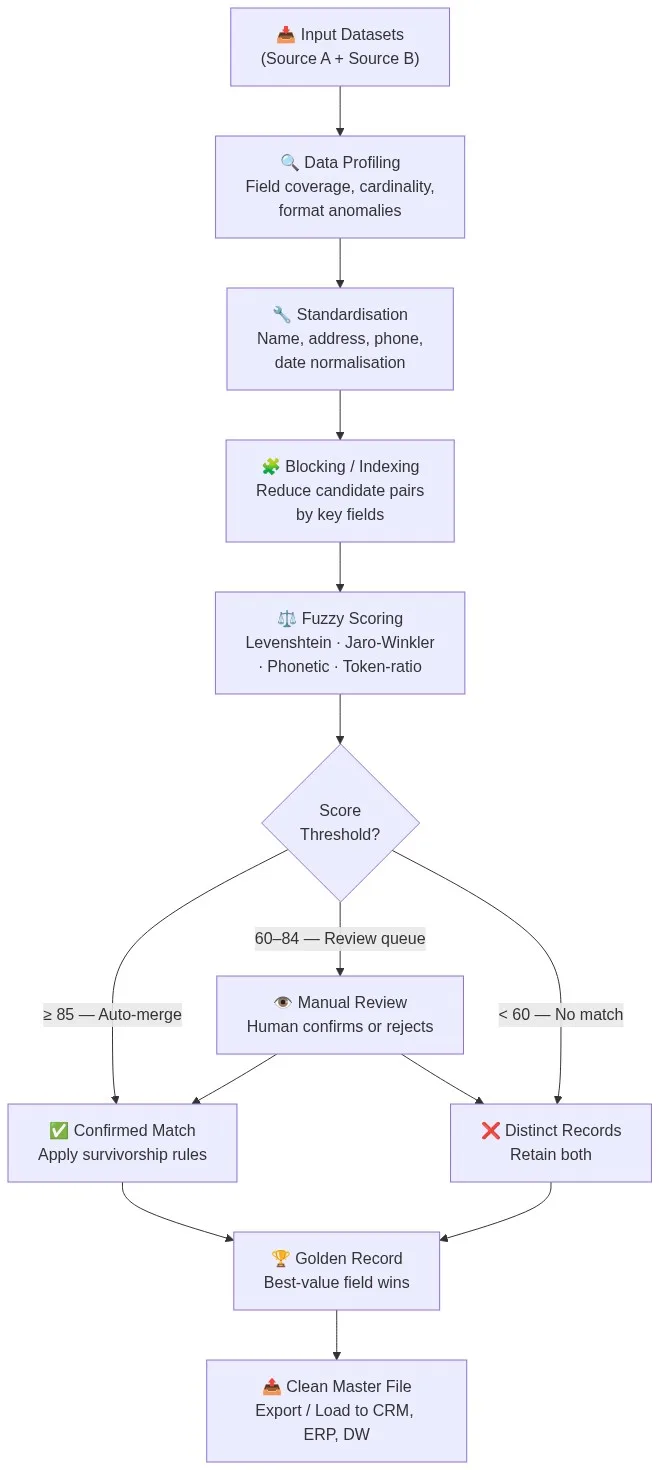
Stage 1: Data Profiling
Data profiling scans each source for field coverage, format variation, and cardinality before any matching begins. A profile report tells you that Source A has 92% email coverage and Source B has 61%, that phone numbers appear in four formats across the combined set, and that company names have 38 distinct representations of “Limited” vs “Ltd” vs “LTD”. Without this information, you cannot configure matching rules accurately.
Stage 2: Standardisation
Standardisation normalises field values so that fuzzy algorithms compare apples to apples. Typical transforms include:
- Name parsing: “Jonathan R. Smith Jr.” becomes first=”Jonathan”, last=”Smith”, suffix=”Jr”
- Address parsing and CASS verification: “123 Main St Apt 4B, NY 10001” becomes a structured, USPS-verified record
- Phone normalisation: “+1 (212) 555-0100”, “2125550100”, and “212.555.0100” all resolve to the same canonical form
- Date normalisation: “01/15/2023”, “15 Jan 23”, and “2023-01-15” map to ISO 8601
Match Data Pro’s data cleansing pipeline handles these transforms automatically via configurable field-level rules before matching begins.
Stage 3: Blocking
Comparing every record in Source A against every record in Source B is computationally expensive. A dataset with 500,000 records per source produces 250 billion candidate pairs. Blocking reduces this to a manageable set by grouping records that share a common key — the same first three characters of a surname, the same ZIP code, or the same area code — and only comparing within those groups. A well-designed blocking strategy retains 99%+ of true duplicates while cutting candidate pairs by 95–99%.
Stage 4: Fuzzy Scoring
Each candidate pair receives a composite similarity score built from multiple algorithms. A typical merge purge configuration applies:
- Jaro-Winkler on first and last name fields (handles transpositions and prefix similarity)
- Levenshtein distance on email local parts (handles one-character typos)
- Token-ratio matching on company names (“Acme Corp LLC” vs “ACME Corporation”)
- Exact match on phone and tax ID with high weight
- Address similarity after CASS verification
Each field score is weighted and summed to a composite score between 0 and 100. Read the full breakdown in the fuzzy matching algorithms guide.
Stage 5: Threshold Routing
Three thresholds partition candidate pairs into three lanes:
- Auto-merge (score ≥ 85): Records are confirmed duplicates. Merge automatically.
- Review queue (score 60–84): Records are probable duplicates. Route to a human reviewer.
- No match (score < 60): Records are distinct. Retain both in the master file.
Threshold values depend on data quality and risk tolerance. A financial services team running KYC checks may lower the auto-merge threshold to 90 and widen the review queue. A direct-mail team running list hygiene may accept 80 for auto-merge. Match Data Pro lets you configure thresholds per matching definition without code changes.
Stage 6: Survivorship Rules and Golden Record Creation
When two records are confirmed as duplicates, survivorship rules determine which field values survive in the merged output. Common survivorship strategies include:
- Most recent wins: Use the field value from the record with the latest modified date
- Most complete wins: Use the field value that is not null when the other is null
- Source priority wins: Trust Source A’s email over Source B’s if Source A is the authoritative CRM
- Longest wins: For address line 2, prefer the fuller description
The result is a golden record: one master record per real-world entity, built from the best available field values across all sources. Match Data Pro’s survivorship and golden record engine applies these rules per field and logs every decision for audit.
Where Merge Purge Breaks Without the Right Tools
Transposed Digits in Phone Numbers
Source A: 617-555-0182. Source B: 617-555-0128. After normalisation these look like different numbers. Levenshtein distance = 2 (transposed digits), which produces a score of ~78 on the phone field alone. Without a weighted composite score, this pair fails to merge. With proper multi-field weighting — name, company, and address all matching at 95+ — the composite score exceeds 85 and the records merge correctly.
Unit and Suite Suffixes
“123 Main Street” and “123 Main St Ste 400” will not match on an exact address comparison. CASS verification standardises both to “123 MAIN ST STE 400” before scoring, resolving the discrepancy at the normalisation stage.
Nickname Variants
“Robert Johnson” and “Bob Johnson” score low on pure string similarity. A phonetic algorithm like Metaphone resolves “Bob” and “Robert” to different codes. This is a known edge case best handled by extending the blocking key to include email domain: if both records share the same email domain and company, the composite score accounts for the likely match even when the name score is low.
Automating Merge Purge at Scale
Manual merge purge does not scale beyond a few hundred records per session. A dataset of 2 million contacts across three sources requires automated job scheduling, parallel processing, and exception handling. Match Data Pro’s job automation engine runs merge purge as a scheduled pipeline: ingest from connectors, profile, standardise, match, route exceptions to a review queue, and export the golden master file to your CRM, data warehouse, or ERP.
The platform supports import from CSV, Excel, SQL databases, Salesforce, HubSpot, and other systems via its REST API and import connectors. Output goes back to the same systems automatically, with full job logs for lineage and compliance.
For teams that need real-time duplicate prevention at point of entry rather than batch processing, the live fuzzy search API checks every new record against the master before insertion — so duplicates never enter the system in the first place.
Merge Purge vs. Deduplication vs. Entity Resolution
These three terms are often used interchangeably but they describe different scopes:
- Deduplication finds and removes duplicate records within a single dataset.
- Merge purge combines multiple datasets and deduplicates across them simultaneously.
- Entity resolution links records across systems without necessarily merging them — building a graph of related records rather than a single flat file.
In practice, most enterprise data projects need all three. Match Data Pro runs Senzing entity resolution alongside its merge purge engine so that post-merger teams can both consolidate their master file and build a relationship graph for downstream analytics.
Getting Started with Match Data Pro
Match Data Pro is a cloud SaaS platform with no long-term contract. You can upload your first dataset, configure a matching definition, and review duplicate candidates the same day. The platform includes AI-powered data profiling, configurable fuzzy matching, CASS address verification, survivorship rules, and a job scheduler in a single workflow — no assembly required.
Start your free trial or book a demo to see the merge purge pipeline running on your own data.
Frequently Asked Questions
What is merge purge in data management?
Merge purge is the process of combining two or more overlapping datasets and removing duplicate records to produce a single clean master file. It uses fuzzy matching algorithms to identify records that refer to the same real-world entity even when names, addresses, or identifiers are recorded differently across sources. The output is one authoritative golden record per entity.
How is merge purge different from deduplication?
Deduplication removes duplicates within a single dataset. Merge purge handles the more complex case of combining multiple datasets first, then deduplicating across all sources simultaneously. Merge purge also requires survivorship rules to decide which field values to keep when two records from different sources both have valid but conflicting data.
What algorithms are used in merge purge?
Merge purge typically uses a combination of Jaro-Winkler or Levenshtein for name fields, token-ratio matching for company names, phonetic algorithms for nickname handling, and exact or near-exact matching for structured identifiers like phone numbers and tax IDs. Each algorithm scores a specific field; a weighted composite score determines whether two records are a match.
How do you set merge purge thresholds?
Start with a threshold of 85 for auto-merge and 60 as the lower bound for the review queue, then calibrate on a sample of 1,000–2,000 record pairs from your actual data. Measure false positives (records incorrectly merged) and false negatives (true duplicates missed) and adjust the threshold in 5-point increments until both error rates are within acceptable limits for your use case.
Can merge purge run automatically without manual review?
Yes, for high-confidence matches above your auto-merge threshold. In a well-configured pipeline, 70–85% of duplicate pairs score above the auto-merge threshold and require no manual review. The remaining 15–30% fall into a review queue where a human confirms or rejects the match. Job automation runs the full pipeline on a schedule and routes only the review queue to analysts.