
Fuzzy matching finds records that refer to the same real-world entity even when the values are spelled differently, transposed, abbreviated, or otherwise inconsistent. Unlike exact matching, which requires character-for-character equality, fuzzy matching uses similarity algorithms to score how alike two strings are, then applies a configurable threshold to decide whether two records are a match. For any organisation managing CRM, ERP, or marketing data at scale, fuzzy matching is not optional — it is the engine that makes deduplication, entity resolution, and data consolidation possible.
Ready to see fuzzy matching in action? Start a free trial of Match Data Pro and run your first match job in minutes.
Why Exact Matching Fails in Real-World Data
Most enterprise datasets contain the same entity under dozens of slightly different representations. A customer named “Robert Johnson” appears as “Bob Johnson”, “R. Johnson”, “Johnson, Robert”, and “Robrt Johson” across four source systems. An address entered as “123 Main St Ste 4” in CRM might be “123 Main Street Suite 4” in ERP. A company named “Acme Corp.” in the contract database appears as “ACME Corporation” in the billing system.
Exact matching treats all four of those name variants as distinct records. The result is inflated customer counts, fragmented revenue attribution, duplicated marketing spend, and broken 360-degree views. According to IBM’s data quality research, poor data quality costs organisations an average of $12.9 million per year. Fuzzy matching is the corrective layer that bridges the gap between how data is entered and how it actually needs to be queried and merged.
The Core Problem: Variability Without a Shared Key
Exact matching works when every system uses a shared unique key — a customer ID, a tax identification number, a UUID. Most real-world integrations do not have that. Data arrives from acquisitions, manual entry, third-party enrichment, and legacy migrations. Each source applies its own formatting conventions. Fuzzy matching solves the key-free matching problem by measuring string similarity rather than requiring equality.
The Six Core Fuzzy Matching Algorithms
No single algorithm handles every data type equally well. Production fuzzy matching systems combine multiple algorithms, weight their outputs, and aggregate a composite score. Here is how the six most important algorithms behave and when to use each.
| Algorithm | Best For | Strength | Weakness | Example Score |
|---|---|---|---|---|
| Jaro-Winkler | Person names | Rewards common prefixes | Fails on abbreviations | “Jon” vs “John” = 0.93 |
| Levenshtein (Edit Distance) | Short strings, IDs | Counts minimum edits precisely | Slow on long strings | “colour” vs “color” = 1 edit |
| Soundex / Metaphone | Phonetic name variants | Catches “Smith” / “Smyth” | No score, binary output | “Fischer” = “Fisher” |
| Token Sort Ratio | Addresses, company names | Order-independent token comparison | Ignores field semantics | “Acme Corp Ltd” vs “Ltd Acme Corp” = 100 |
| N-gram Similarity | Longer text, descriptions | Handles insertion/deletion well | Sensitive to string length | Bigram: “data” vs “date” = 0.67 |
| Cosine Similarity (TF-IDF) | Free-text fields | Token-frequency weighting | Requires tokenisation setup | Product descriptions, notes |
Jaro-Winkler for Person Names
Jaro-Winkler adds a prefix bonus to the base Jaro score, making it ideal for names where the first few letters are reliable. “Robert” vs “Roberto” scores 0.94. “Katherine” vs “Kathryn” scores 0.91. This makes it the standard choice for first name and last name fields in CRM deduplication pipelines. For a deeper look at CRM-specific deduplication, see our guide on CRM deduplication and golden record creation.
Levenshtein Distance for IDs and Short Strings
Levenshtein counts the minimum number of single-character edits (insertions, deletions, substitutions) needed to transform one string into another. It is ideal for product codes, postal codes, and reference numbers where transpositions and typos are the primary error type. “B2B-9014” vs “B2B-9041” scores a distance of 2 — the transposed digits “14” / “41”. A threshold of distance ≤ 2 catches most data-entry errors in numeric codes.
Phonetic Algorithms for Sound-Alike Names
Soundex and Metaphone encode strings into phonetic representations and compare those representations. This handles culturally variant spellings: “Müller” and “Mueller”, “Singh” and “Sing”, “Fischer” and “Fisher” all map to the same phonetic key. Phonetic algorithms produce a binary output (same phonetic key or not), so they are most useful as a pre-filter or as one signal in a weighted composite score.
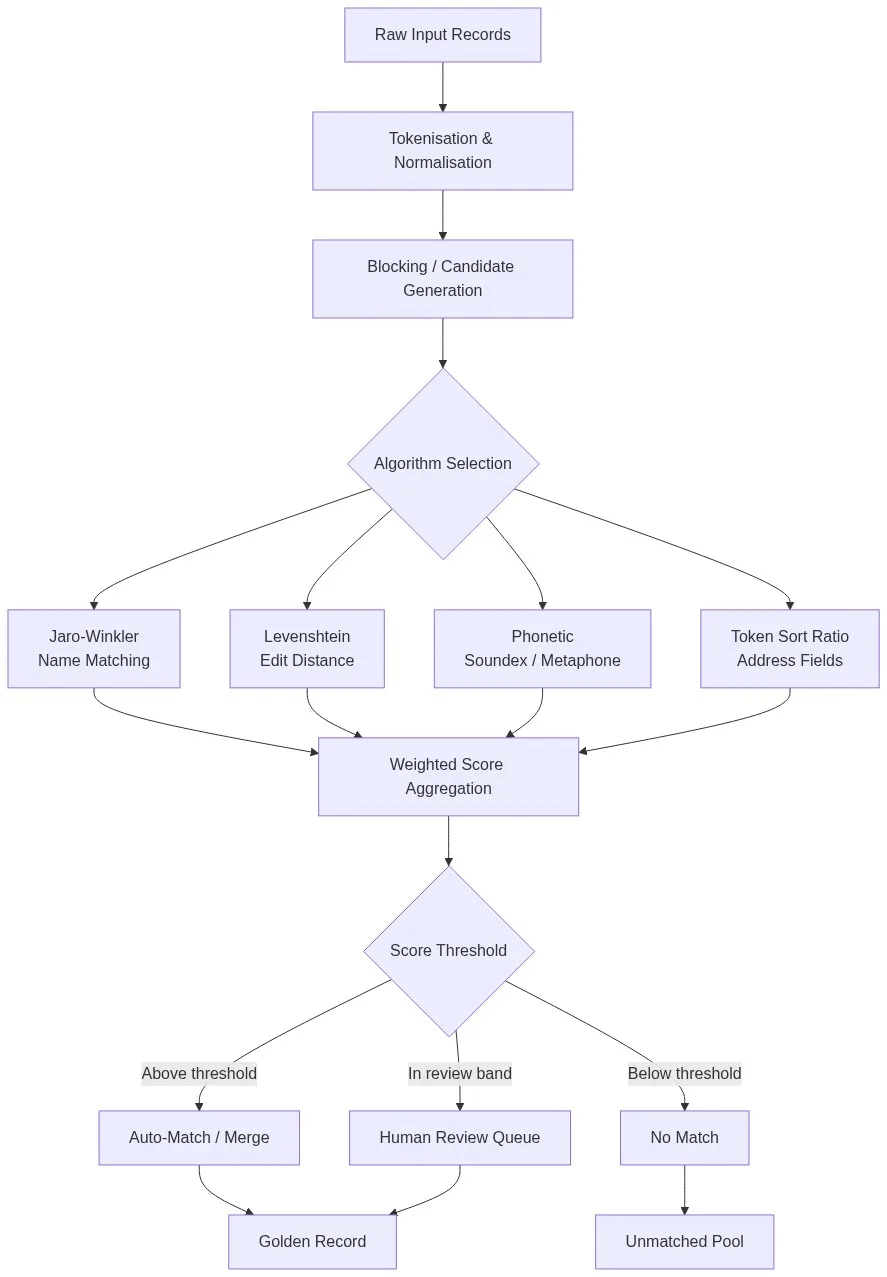
The Fuzzy Matching Pipeline: From Raw Records to Golden Record
A production fuzzy matching job does not simply compare every record against every other record. At scale, that is O(n²) — computationally infeasible for datasets with millions of rows. The pipeline breaks the problem into five sequential stages.
Stage 1 — Normalisation and Standardisation
Before any algorithm runs, every field is normalised. This means uppercasing or lowercasing, stripping punctuation, expanding abbreviations (“St” to “Street”, “Corp” to “Corporation”), and standardising date and phone formats. Normalisation alone resolves a significant fraction of apparent mismatches before scoring begins. For a full breakdown of this stage, read our article on data standardisation best practices.
Stage 2 — Blocking (Candidate Generation)
Blocking partitions the dataset into buckets based on a shared key — the first three letters of a surname, a ZIP code prefix, or a Soundex code — and only compares records within the same bucket. This reduces comparisons from O(n²) to O(n log n) without meaningfully reducing recall when the blocking key is chosen carefully. Multiple overlapping blocking keys are commonly used together to improve recall.
Stage 3 — Multi-Algorithm Scoring
Each candidate pair is scored across multiple fields using field-appropriate algorithms. A typical configuration for a contact record might look like this:
- First name: Jaro-Winkler, weight 0.20
- Last name: Jaro-Winkler + Metaphone, weight 0.30
- Company name: Token Sort Ratio, weight 0.20
- Email address: Exact + Levenshtein distance ≤ 1, weight 0.20
- Phone number: Exact on digits only, weight 0.10
The weighted scores aggregate to a composite match score between 0 and 100. A score of 92 on a contact record is a near-certain match. A score of 61 is ambiguous and goes to a human review queue.
Stage 4 — Threshold Decision
Three bands are typically configured:
- Auto-match (merge automatically): Score ≥ 90
- Review band (human decision required): Score 70-89
- No match: Score < 70
Threshold tuning is iterative. Setting the auto-match threshold too low creates false merges. Too high and the review queue floods with obvious matches. Most production systems run an initial calibration pass on a labelled sample before deploying thresholds to the full dataset.
Stage 5 — Survivorship and Golden Record Creation
Once a match group is confirmed, survivorship rules determine which field values survive into the merged golden record. Common rules include: prefer the most recently updated value, prefer the source system with the highest trusted data score, or prefer the longest non-null value. The golden record is then written to the output target — a CRM, a data warehouse, or a master data management (MDM) system.
Common Edge Cases and How to Handle Them
Edge cases are where most fuzzy matching implementations fail in practice. Here are the most common ones and the correct handling strategies.
Nicknames and Legal Name Variants
“Bill” and “William”, “Bob” and “Robert”, “Liz” and “Elizabeth” — Jaro-Winkler scores these pairs poorly because the strings share few characters. The correct fix is a nickname lookup table that maps common diminutives to their canonical forms before the algorithm runs. Without this, “William Smith” and “Bill Smith” at the same address will not auto-match despite being the same person.
Transposed Digits in Phone Numbers and IDs
A phone number entered as “555-1234” vs “555-1243” has a Levenshtein distance of 2, yet it is almost certainly a data-entry error referring to the same number. Strip all formatting characters first, then apply Levenshtein on digits only with a distance threshold of 1 or 2. For longer IDs, consider using both Levenshtein and Jaro-Winkler and taking the higher score.
Unit Suffixes and Address Components
“123 Main St Ste 4”, “123 Main Street Suite 4”, and “123 Main Street #4” all refer to the same location. Address standardisation via CASS certification parses each component — street number, street name, suffix, unit designator — before matching. Match Data Pro’s address verification and data preparation tools handle USPS CASS-certified address parsing as part of the matching pipeline, eliminating unit-suffix variation before the similarity algorithms run.
International Names and Unicode Characters
“José García” vs “Jose Garcia” — accented characters stripped by one system create a near-miss where exact matching fails entirely. Unicode normalisation (NFD decomposition followed by ASCII transliteration) should run before any algorithm. “Müller” and “Mueller” both normalise to “Muller” before Jaro-Winkler runs, restoring the expected high score.
Fuzzy Matching vs Entity Resolution: Where One Ends and the Other Begins
Fuzzy matching compares pairs of records and produces a similarity score. Entity resolution takes that output further: it groups matched record pairs into clusters, resolves transitive links (if A matches B and B matches C, then A, B, and C are the same entity), and maintains a persistent entity identity across ongoing data loads. Entity resolution is the system-level process; fuzzy matching is the scoring engine inside it.
Match Data Pro integrates Senzing-powered entity resolution directly into its matching pipeline. Senzing handles the transitive closure and persistent entity ID assignment, while Match Data Pro’s configurable fuzzy algorithms handle the field-level scoring. Together they cover both the pair-scoring problem and the entity-graph problem. For multi-source dataset scenarios, see our guide on dedupe software for multi-source data integration.
Choosing Thresholds: A Practical Calibration Approach
Threshold selection is the most consequential configuration decision in any fuzzy matching deployment. Here is a repeatable calibration process that works for most B2B datasets:
- Step 1: Extract a random sample of 500-1,000 record pairs that span the full score range.
- Step 2: Have subject-matter experts label each pair as Match, Non-Match, or Uncertain.
- Step 3: Plot precision and recall curves across score thresholds. Identify the score at which false merges first appear (upper threshold) and the score below which true matches stop appearing (lower threshold).
- Step 4: Set auto-match at the upper threshold. Set the review band between upper and lower. Set no-match below the lower threshold.
- Step 5: Re-calibrate after each major data source addition or significant schema change.
The goal is not to eliminate the review queue — it is to ensure the review queue contains genuinely ambiguous cases, not obvious matches or obvious non-matches. Match Data Pro’s AI match suggestion engine analyses your labelled pairs and recommends threshold adjustments automatically, reducing calibration time from days to hours. You can also explore how this fits into the broader context of our modern data cleansing workflow.
Frequently Asked Questions
What is fuzzy matching in simple terms?
Fuzzy matching is a technique that compares two strings and produces a similarity score rather than a binary match/no-match result. It finds records that refer to the same real-world entity even when the data is inconsistently formatted, misspelled, abbreviated, or entered differently across source systems. It is the core engine behind deduplication, entity resolution, and data consolidation.
What is the difference between fuzzy matching and exact matching?
Exact matching requires two strings to be character-for-character identical. Fuzzy matching measures how similar two strings are on a scale from 0 to 100 and lets you configure a threshold above which two records are considered a match. Exact matching is fast but brittle. Fuzzy matching handles real-world data variability — typos, abbreviations, name variants — at the cost of additional processing time and threshold configuration.
Which fuzzy matching algorithm should I use for person names?
Jaro-Winkler is the standard choice for person names because it rewards matching prefixes, which are typically the most reliable part of a name. Pair it with a phonetic algorithm (Soundex or Metaphone) for last names to catch sound-alike variants. Also apply a nickname lookup table before scoring to handle legal name vs common name differences like William vs Bill.
What score threshold should I use for auto-matching records?
There is no universal answer — thresholds depend on your data quality, domain, and risk tolerance for false merges. A common starting point is auto-match at 90 or above, review band from 70-89, and no-match below 70. Calibrate by labelling a random sample of 500-1,000 pairs and plotting precision/recall curves across the threshold range. Re-calibrate when you add new data sources.
How is fuzzy matching different from entity resolution?
Fuzzy matching scores the similarity between pairs of records. Entity resolution uses those scores to group records into clusters representing the same real-world entity, resolving transitive links and maintaining a persistent entity identity across data loads. Fuzzy matching is the field-level scoring engine; entity resolution is the system that manages the resulting entity graph. Most production data quality platforms use both together.
For deeper reading on entity resolution, see our article on entity matching algorithms and workflows, and for healthcare-specific use cases, our guide on entity resolution in healthcare.
Get Started with Fuzzy Matching on Your Data
Match Data Pro gives data engineers and ops teams a configurable fuzzy matching engine — Jaro-Winkler, Levenshtein, Soundex, Token Sort, and more — with AI-powered match suggestions, an adjustable review queue, and Senzing entity resolution built in. Deploy on SaaS or on-premise, no long-term contract required.
- Start a free trial — run your first fuzzy match job in minutes, no credit card required.
- Book a demo — see a live fuzzy matching job run against your own data sample.
- Talk to the team: sales@matchdatapro.com