
Modern data cleansing runs as a structured, automated pipeline — not a one-off manual project. A complete cleansing program moves raw data through six defined stages: profiling, standardisation, deduplication, address verification, entity resolution, and continuous monitoring. Teams that follow this pipeline consistently cut data error rates by 30–60% within the first 90 days.
The consequence of skipping any stage is compounding: unstandardised fields produce false non-matches; unresolved duplicates inflate operational costs; unverified addresses generate returned mail and failed deliveries. This guide covers every stage, the tools needed at each step, and the techniques that separate a reliable cleansing program from a one-time cleanup that degrades within weeks.
Ready to clean your data now? Start a free trial of Match Data Pro — no contract, no setup fee.
Why Data Cleansing Has Changed in the Last Three Years
The shift from manual to AI-assisted cleansing is the most significant change in data quality practice since the move to relational databases. Three forces are driving it:
- Data volume: Organisations now ingest records from CRM, ERP, marketing automation, e-commerce, IoT, and third-party enrichment sources simultaneously. A manual approach cannot scale across 10+ source systems.
- AI dependency: Machine learning models are only as accurate as the training data. Dirty input produces unreliable output — what practitioners call “garbage in, garbage out” at machine speed.
- Regulatory pressure: GDPR, CCPA, HIPAA, and sector-specific mandates require organisations to hold accurate, de-duplicated, auditable records. Regulators increasingly audit data quality directly.
The result is that data cleansing is now a pipeline discipline, not a spreadsheet exercise. Platforms like Match Data Pro’s data cleansing toolset automate the entire sequence — from profiling to monitoring — so data teams manage by exception rather than by hand.
Stage 1: Data Profiling — Know What You Have Before You Touch It
Profiling is the diagnostic step. Run it before any transformation. A proper profiling scan produces field-level statistics including: null rates, distinct value counts, format distributions, referential integrity gaps, and outlier records.
What profiling surfaces
Consider a customer table with 850,000 records imported from three legacy CRM systems. A profiling run on the phone field might return:
- 22% of values contain letters (e.g. “Call after 5pm”)
- 14% are formatted as 7-digit local numbers without area codes
- 9% are duplicates of the email field inserted by an ETL error
Without profiling, a standardisation job running on that field produces corrupt output. With profiling, the team knows exactly which records need rule-based correction before any matching runs.
Match Data Pro’s AI data profiling engine scans every field automatically, scores quality on a 0–100 scale, and surfaces anomalies without manual configuration.
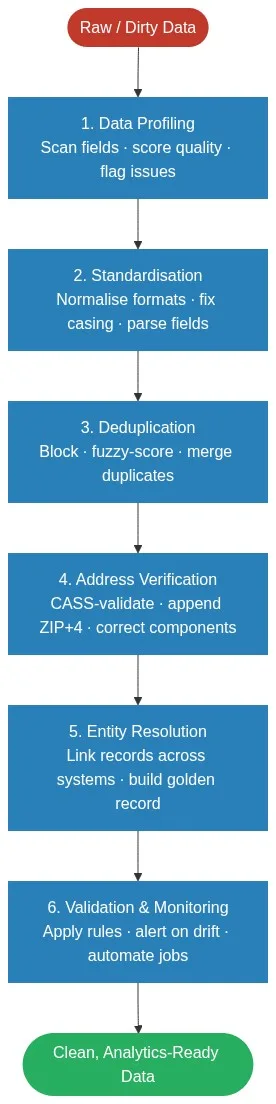
Stage 2: Standardisation — One Format, One Rule Set
Standardisation converts heterogeneous input into a uniform format that downstream processes can compare reliably. The most impactful standardisation targets are:
Name normalisation
Raw input for the same person across two systems:
| Source A | Source B |
|---|---|
| JONATHAN K. SMITH | Jon Smith |
| IBM CORPORATION | International Business Machines |
| St. Mary’s Hosp. | Saint Marys Hospital |
Without normalisation, fuzzy matching between these records requires higher thresholds and still misses a significant percentage of true matches. With standardisation — case normalisation, abbreviation expansion, punctuation removal — a Jaro-Winkler similarity score between “Jonathan Smith” and “Jon Smith” rises from 0.71 to 0.89, crossing most match thresholds.
Date and numeric formats
A single ERP migration can introduce six date formats: MM/DD/YYYY, DD-MM-YY, YYYY-MM-DD, Unix timestamps, and ISO 8601 variants. Standardising to ISO 8601 before any comparison eliminates false non-matches on date fields entirely.
For techniques on handling free-text fields specifically, see the guide on text data cleaning and free-text standardisation.
Stage 3: Deduplication — Remove the Duplicates That Drain Operational Efficiency
Duplicate records are the most measurable data quality problem. Gartner estimates poor data quality costs organisations an average of $12.9 million per year, with duplicates accounting for a disproportionate share of that figure through wasted marketing spend, inflated operational costs, and failed analytics.
A production deduplication workflow has three sub-steps:
Blocking
Comparing every record against every other record is O(n²) — unworkable at scale. Blocking groups candidate pairs using one or more shared attributes (first three characters of surname, first digit of postcode, etc.) so only plausible matches are scored. A well-designed blocking strategy reduces comparison pairs by 99%+ without losing true positives.
Fuzzy scoring
Within each block, a weighted scoring model applies multiple algorithms to different fields. Example configuration:
| Field | Algorithm | Weight |
|---|---|---|
| Last name | Jaro-Winkler | 30% |
| First name | Phonetic (Soundex) | 20% |
| Exact match | 25% | |
| Phone | Levenshtein (normalised) | 15% |
| Postcode | Exact match | 10% |
A composite score above 0.85 auto-merges. Scores between 0.70 and 0.85 go to a review queue. Scores below 0.70 are classified as non-duplicates. This three-band model keeps human review focused on genuine edge cases — typically 2–5% of the total comparison set.
See how fuzzy matching algorithms work and when to use each one for a deeper treatment of algorithm selection by field type.
Survivorship and merging
Once a duplicate pair is confirmed, survivorship rules determine which field values survive into the golden record. Common strategies: most-recently-updated wins for contact fields; most-complete record wins for demographic fields; concatenate for notes and comments. For a detailed treatment, see the guide on data match merging and survivorship rules.
Stage 4: Address Verification — The Step Most Pipelines Skip
Address errors are systemic. Addresses degrade at approximately 10–15% per year as people move, businesses relocate, and postal authorities update delivery point data. A record that passed address validation 18 months ago has a meaningful chance of being wrong today.
CASS (Coding Accuracy Support System) certification is the USPS standard for address verification. A CASS-certified process:
- Parses the raw address string into its component parts (street number, street name, unit, city, state, ZIP)
- Validates each component against the current USPS delivery point database
- Appends ZIP+4 codes for precise delivery routing
- Returns a DPV (Delivery Point Validation) status flag per record
Match Data Pro includes CASS-certified address verification as a native pipeline stage — no third-party connector required. A batch of 500,000 addresses typically returns with full DPV status and ZIP+4 appended in under 10 minutes.
Stage 5: Entity Resolution — Link Records Across Systems Into One View
Entity resolution goes beyond deduplication within a single dataset. It links records representing the same real-world entity across multiple, disconnected systems — even when no shared identifier exists.
Example: a customer exists in Salesforce as “Acme Corp”, in the billing system as “ACME Corporation LLC”, and in the support ticketing system as “Acme” with a different address. Deterministic matching on company name fails all three pairs. Entity resolution using a weighted probabilistic model — scoring name similarity, address proximity, phone number overlap, and domain — correctly links all three into a single entity cluster.
Match Data Pro integrates Senzing entity resolution, a graph-based probabilistic engine pre-trained on real-world name and address patterns. It operates in real time and requires no hand-crafted rules, making it the most scalable option for teams linking records across three or more source systems.
For an in-depth look at the cross-system linking problem, see how to match records across multiple systems without a shared identifier.
Stage 6: Validation Rules and Continuous Monitoring
Cleansing is not a one-time event. Data degrades continuously. Customer email addresses bounce. Phone numbers are reassigned. Company names change through M&A. A modern cleansing program includes automated monitoring that alerts on drift before it compounds.
Validation rules
Post-cleansing validation applies a rule set to confirm the output meets the programme’s quality targets. Typical rules:
- Null rate on required fields must be below 2%
- Email format validity must exceed 98%
- Duplicate rate must be below 0.5%
- DPV-confirmed addresses must exceed 90%
Any rule breach triggers a hold and review before the output lands in downstream systems.
Job automation and scheduling
Match Data Pro’s job automation capabilities let teams schedule cleansing jobs on any cadence — hourly, daily, weekly, or event-triggered on new data ingestion. Each run produces a full audit log of changes, which satisfies the audit trail requirements covered in the guide on data audit trails for governance.
Want to see the full pipeline in action? Schedule a demo with a Match Data Pro data engineer.
Choosing the Right Data Cleansing Tools
The tool landscape for data cleansing in 2026 divides cleanly into four categories:
| Category | Examples | Best for | Limitation |
|---|---|---|---|
| Spreadsheet / manual | Excel, Google Sheets | Small datasets under 10K records | Cannot scale; no fuzzy matching |
| Open-source | OpenRefine, Python pandas | Technical teams with dev capacity | No address verification; manual orchestration |
| ETL platforms | Talend, Informatica | Large enterprises with IT resources | High cost; slow deployment; no built-in entity resolution |
| Purpose-built data quality SaaS | Match Data Pro | Data teams needing full pipeline coverage | Requires SaaS access; cloud deployment |
Purpose-built platforms win on three criteria: algorithm depth (configurable multi-algorithm scoring), integration breadth (native connectors for CRM, ERP, cloud storage), and total cost of ownership (no infrastructure to maintain). For a structured evaluation framework, see the data quality software comparison for 2026.
Frequently Asked Questions
What is the difference between data cleansing and data validation?
Data cleansing corrects errors, removes duplicates, and standardises formats in existing records. Data validation checks that new or transformed data conforms to defined rules before it enters a system. Cleansing is remedial; validation is preventive. In a mature pipeline, validation rules run after every cleansing job to confirm the output meets quality targets before downstream consumption.
How long does a data cleansing project take?
A focused cleansing project on a single CRM dataset of 100,000–500,000 records typically completes in two to four weeks using an automated platform. The majority of that time is configuration and profiling in week one, with subsequent stages running automatically. Ongoing monitoring and incremental cleansing runs take hours per cycle once the initial pipeline is in place.
Should you cleanse data before or after migration?
Always cleanse before migration. Moving dirty data into a new system propagates errors into the new environment and often doubles the remediation cost. Profile, standardise, deduplicate, and verify addresses against the source system before cutover. This approach is covered in depth in the guide on preparing data for CRM migration.
What is the most common data quality problem in CRM systems?
Duplicate contact records are the single most common CRM data quality problem. Most CRM platforms lack a configurable fuzzy matching layer at the point of entry, so near-duplicate records — same person with slightly different name spelling, phone format, or email domain — accumulate over time. A study of enterprise CRM databases found average duplicate rates of 10–30% across all contact records.
Can data cleansing be fully automated?
The majority of cleansing operations — profiling, standardisation, deduplication within clear thresholds, and address verification — can be fully automated. Records that fall into ambiguous match bands (typically 2–5% of total volume) still benefit from human review. Automation handles the 95%+ of clear-cut cases; the platform surfaces the remainder for expert judgment rather than processing the entire dataset manually.