
Vendor master data cleansing fixes the supplier records in your ERP before duplicate entries, misformatted addresses, and inconsistent naming conventions corrupt procurement, accounts payable, and compliance workflows. A seven-stage pipeline covering profiling, standardisation, address verification, deduplication, entity resolution, survivorship, and ongoing monitoring eliminates the root causes of bad supplier data.
Learn how Match Data Pro handles ERP data quality — from profiling through to automated monitoring.
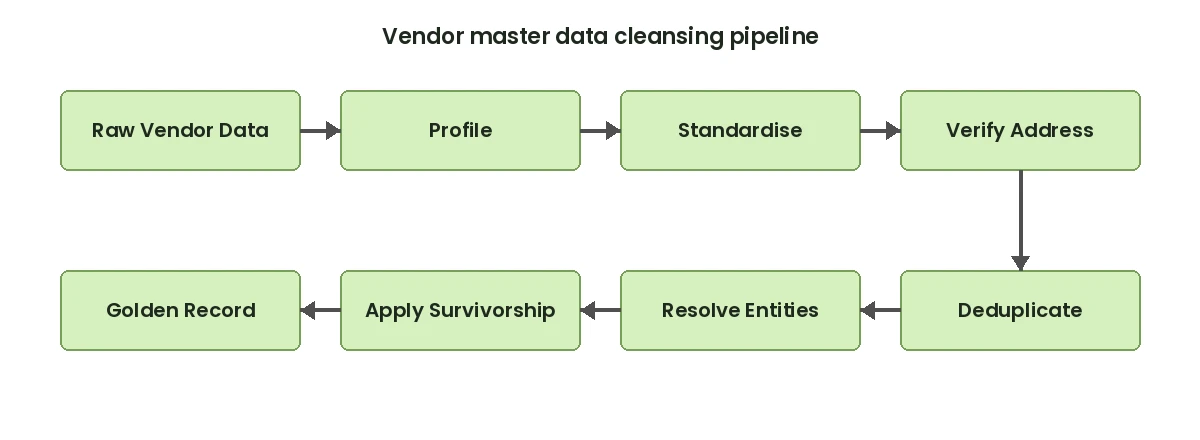
Vendor master data is the foundation of every procurement and AP workflow. When it is dirty, the consequences cascade fast: duplicate purchase orders, payments to wrong addresses, failed 1099 filings, split supplier spend across ten near-identical records. This guide walks through a practical, stage-by-stage approach to cleaning supplier data before those problems compound.
Why Vendor Master Data Degrades
Supplier records accumulate errors from three sources: manual entry, system migrations, and multi-system imports. A single supplier might appear as “Acme Corp”, “ACME Corporation”, “Acme Corp.”, and “Acme Corp Inc” across procurement, AP, and spend analytics. That fragmentation is not a data entry complaint — it is a structural problem that requires algorithmic matching, not spell-check.
Common failure patterns include:
- Name variants: “International Business Machines” vs “IBM” vs “I.B.M.” — the same entity, three different records.
- Address inconsistencies: “123 Main St Ste 400” vs “123 Main Street, Suite 400” — same location, different format.
- Tax ID drift: EIN fields entered as “XX-XXXXXXX”, “XXXXXXXXX”, or left blank — breaking 1099 filing automation.
- Duplicate vendor IDs: Multiple ERP vendor codes for the same supplier inflating spend totals and fragmenting payment history.
- Status field decay: Inactive suppliers still flagged as active; preferred status not updated after contract changes.
Studies of enterprise ERP environments consistently find that 15–25% of vendor master records contain at least one material data quality issue. In organisations with 10,000+ suppliers, that translates to 1,500–2,500 records actively undermining operational accuracy.
The 7-Stage Vendor Master Data Cleansing Pipeline
Each stage in the pipeline targets a specific class of error. Running them out of order degrades results. Profile before you standardise. Standardise before you deduplicate. Deduplicate before you resolve cross-system entities.
Stage 1: Data Profiling
AI-powered data profiling scans every field in your vendor master and returns completeness rates, format distributions, cardinality, and anomaly flags. A typical profile surfaces:
- Address fields: 34% missing ZIP code, 12% missing state
- Tax ID: 18% blank, 7% wrong format
- Payment terms: 41% null or set to default
- Duplicate rate estimate: 8.4% of records share a name or address with at least one other record
This output becomes the baseline quality score and the remediation roadmap for every subsequent stage.
Stage 2: Standardisation
Data standardisation normalises every field to a consistent format before matching runs. For vendor data, the critical transformations are:
- Legal entity suffixes: Expand or collapse “Inc”, “Inc.”, “Incorporated”, “Corp”, “LLC”, “L.L.C.” to a canonical form.
- Tax ID: Strip hyphens, pad to 9 digits, validate check format (EIN vs ITIN vs SSN).
- Phone: Strip country code prefixes, normalise to E.164 format.
- Currency and terms: Map “Net 30”, “NET30”, “N30” to a single code.
Standardisation alone reduces downstream matching error rates by 30–40% because fuzzy algorithms no longer need to bridge format differences.
Stage 3: Address Verification
Supplier addresses must be delivery-verified, not just formatted. CASS-certified address verification checks every address against the USPS postal database, appends ZIP+4 codes, corrects street abbreviations, and flags non-deliverable addresses. For a vendor master with 10,000 records, address correction typically fixes 8–12% of entries and rejects 2–4% as undeliverable.
This step matters upstream of deduplication: two records with slightly different addresses that refer to the same supplier location will merge more reliably once both are standardised to verified CASS format.
Stage 4: Deduplication
Vendor deduplication uses fuzzy matching across multiple fields simultaneously. A single-field name match catches obvious duplicates. A weighted composite score across name, address, phone, tax ID, and bank details catches the rest.
Example composite scoring on two candidate records:
| Field | Record A | Record B | Score | Weight |
|---|---|---|---|---|
| Name | Acme Corp Inc | ACME Corporation | 0.87 | 35% |
| Address | 123 Main St Ste 4 | 123 Main Street Suite 400 | 0.91 | 30% |
| Tax ID | 12-3456789 | 123456789 | 1.00 | 25% |
| Phone | 800-555-0100 | 8005550100 | 1.00 | 10% |
| Composite | 0.93 |
At a threshold of 0.85, this pair auto-merges. Pairs scoring 0.70–0.84 route to a human review queue. Below 0.70, records are treated as distinct.
Stage 5: Entity Resolution
Senzing-powered entity resolution goes further than field-level deduplication. It resolves vendor identities across multiple source systems — ERP, procurement portal, contract management, and spend analytics — even when no shared vendor ID exists. Graph-based matching links records that share overlapping attributes across systems into a single resolved entity, then outputs a cross-system vendor ID that unifies reporting.
This stage is essential for organisations that have grown through acquisition or that operate multiple ERP instances. A supplier may appear in SAP, Oracle, and a legacy system under three different IDs. Entity resolution collapses them into one.
Stage 6: Survivorship Rules
When two or more records merge, every field needs a rule determining which value survives. Survivorship logic applied to vendor data typically follows these defaults:
- Name: Most recently updated, or longest non-null value
- Address: CASS-verified record wins over unverified
- Tax ID: Most complete and correctly formatted value
- Payment terms: Most recently updated
- Bank details: Preserve all variants for AP review; do not auto-merge
The output of this stage is a clean vendor golden record: one authoritative entry per supplier, with every field set to its best known value.
Stage 7: Monitoring and Job Automation
Vendor master data decays at 10–15% per year as suppliers change addresses, merge, rename, or go inactive. A one-time cleanse without ongoing monitoring reverts to the previous state within 18 months. Automated job scheduling runs the profiling and deduplication pipeline on a defined cadence — weekly for high-volume AP environments, monthly for stable supplier bases — and flags new anomalies before they compound.
Ready to clean your vendor master? Start a free trial of Match Data Pro and run your first vendor data profile in minutes — no contract, no infrastructure setup required.
Before-and-After: What a Clean Vendor Master Looks Like
Consider a mid-market manufacturer with 8,400 vendor master records across two ERP systems. Before cleansing:
- 1,240 duplicate vendor records identified (14.8% of total)
- 630 addresses flagged as non-standard or undeliverable
- 510 tax IDs missing or misformatted
- 3 suppliers each had 5+ active records due to legacy migrations
After running the seven-stage pipeline:
- Vendor count reduced from 8,400 to 7,090 unique golden records
- Spend reporting consolidated: 19 fragmented supplier spend buckets collapsed to 6
- 1099 preparation time reduced by 60% due to clean, complete tax IDs
- Duplicate PO rate dropped from 3.2% to 0.4% in the first quarter post-cleanse
Key Fields to Include in a Vendor Data Quality Audit
Not all fields carry equal weight in a vendor master audit. Prioritise in this order:
| Field | Why It Matters | Common Issue |
|---|---|---|
| Legal name | Contract matching, 1099, compliance | Abbreviations, punctuation variants |
| Tax ID (EIN) | IRS filing, debarment screening | Missing, wrong format |
| Remit-to address | Payment delivery | Unverified, outdated |
| Bank / ACH details | Electronic payment | Stale after supplier rebrand |
| Vendor status | Prevents payments to inactive suppliers | Not updated after deactivation |
| Commodity code | Spend category analysis | Blank or wrong category |
| Contact email | PO delivery, dispute resolution | Personal addresses, role not person |
Integrating Vendor Cleansing Into Your ERP Migration
If you are planning a SAP or ERP migration, vendor master cleansing is not optional — it is the first workstream that must complete before any data load begins. Migrating dirty vendor data into a new system does not fix the data. It imports the problem into a more expensive context.
The sequence is: profile the legacy system data, run standardisation and deduplication, produce a clean export, then load to the target ERP. Match Data Pro’s import and export connectors handle the file formats, field mappings, and load validation so your migration team works from a single, verified vendor master on day one.
Want to see the pipeline in action? Book a demo and we will walk through your specific vendor data challenges.
Frequently Asked Questions
What is vendor master data cleansing?
Vendor master data cleansing is the process of profiling, standardising, deduplicating, and verifying all supplier records in an ERP or procurement system. It removes duplicate entries, corrects address and tax ID errors, and produces a single authoritative golden record per supplier — improving procurement accuracy, AP efficiency, and compliance reporting.
How long does vendor master data cleansing take?
For a dataset of 5,000–15,000 vendor records, an automated pipeline using profiling, fuzzy matching, and entity resolution typically completes an initial cleanse within 1–3 days. Manual-only approaches take 4–8 weeks for a similar dataset. Ongoing automated monitoring then maintains quality continuously without repeated project cycles.
What percentage of vendor records are typically duplicates?
Industry benchmarks show 10–20% of vendor master records in established ERP environments are duplicates or near-duplicates. Organisations that have grown through acquisition or operated multiple ERP instances often see rates of 20–30%. A data profiling run will give you an accurate estimate specific to your dataset before any cleansing begins.
Do I need to cleanse vendor data before an ERP migration?
Yes. Migrating uncleansed vendor data moves existing quality problems into the new system, where they are harder and more expensive to fix. Profiling, deduplication, and address verification should complete before the first data load into the target ERP. Most migration failures traced to data issues could have been prevented with a pre-migration cleanse.
What is a vendor golden record?
A vendor golden record is a single authoritative supplier entry built from all available source records using survivorship rules. Each field contains the best known value — verified address, correct tax ID, current status — and the record is linked to a stable cross-system vendor ID. It becomes the trusted source for procurement, AP, and spend analytics.