
Data quality monitoring detects problems in your data — missing values, format violations, sudden spikes in duplicates, and schema drift — before they cascade into broken dashboards, failed pipelines, or incorrect AI outputs. A production-grade monitoring system profiles every incoming dataset, scores each field against defined quality rules, and fires alerts the moment a metric crosses its threshold. Without it, teams discover data problems only after the damage is done.
Most data teams catch quality problems late. A CRM analyst notices the duplicate rate climbed from 3% to 11% after a batch import. A finance team finds revenue totals are off because a phone number field started accepting free text. An ML engineer discovers their training pipeline ingested 40,000 blank email addresses last week. Data quality monitoring eliminates that lag by making quality measurable, visible, and alertable in real time.
Book a demo to see how Match Data Pro runs automated quality gates across every data import — no infrastructure required.
What Data Quality Monitoring Actually Measures
Monitoring is not the same as cleansing. Cleansing corrects problems. Monitoring detects them. The two work together: monitoring identifies the issue, cleansing fixes it, and monitoring confirms the fix held.
There are six dimensions that a production monitoring system should track continuously:
- Completeness: the percentage of non-null values per field. A customer table where 22% of phone numbers are null is a completeness violation.
- Validity: values that match expected format rules. An email field where 8% of values contain no “@” sign is a validity failure.
- Consistency: the same entity value appearing identically across systems. “IBM Corp” in CRM versus “International Business Machines” in ERP is a consistency gap.
- Uniqueness: duplicate rate per entity type. A 5% duplicate rate in a customer table means 1 in 20 records is a copy — skewing segmentation and spend.
- Timeliness: how recently records were updated. A supplier record last modified 18 months ago carries a high staleness risk.
- Accuracy: values that match a verified reference. An address that does not exist in the USPS postal database is an accuracy failure.
Each dimension needs a threshold and an alert. Without defined thresholds, “monitoring” is just logging — it produces data nobody acts on.
How Data Drift Breaks Pipelines
Schema Drift
Schema drift occurs when a source system changes a field definition without notifying downstream consumers. A field called company_revenue that previously held integers starts receiving strings like “5M–10M” after a CRM update. Every matching rule and statistical calculation that depends on that field now fails silently — producing wrong results rather than errors.
Distribution Drift
Distribution drift is subtler. The field schema stays the same, but the statistical distribution of values shifts. In February, 94% of records have a valid US address. In March, after a new data import from a third-party list, that drops to 71%. If nobody is watching, the downstream deduplication and address matching pipeline starts treating 29% of records as unverified — silently degrading match quality.
Volume Drift
A daily import job that normally loads 12,000 records loads 47,000 one morning — or 200. Both are anomalies. The spike might indicate a broken deduplication step upstream. The drop might mean the extract job failed partway through. Volume thresholds catch both.
Duplication Spikes
Duplicate spikes after a list import are common. A vendor delivers a contact list with 30% overlap against your existing CRM. Without a data deduplication step that runs before records are committed, those duplicates enter your system and inflate counts, distort analytics, and trigger double-sends to the same contacts.
The 6-Stage Data Quality Monitoring Pipeline
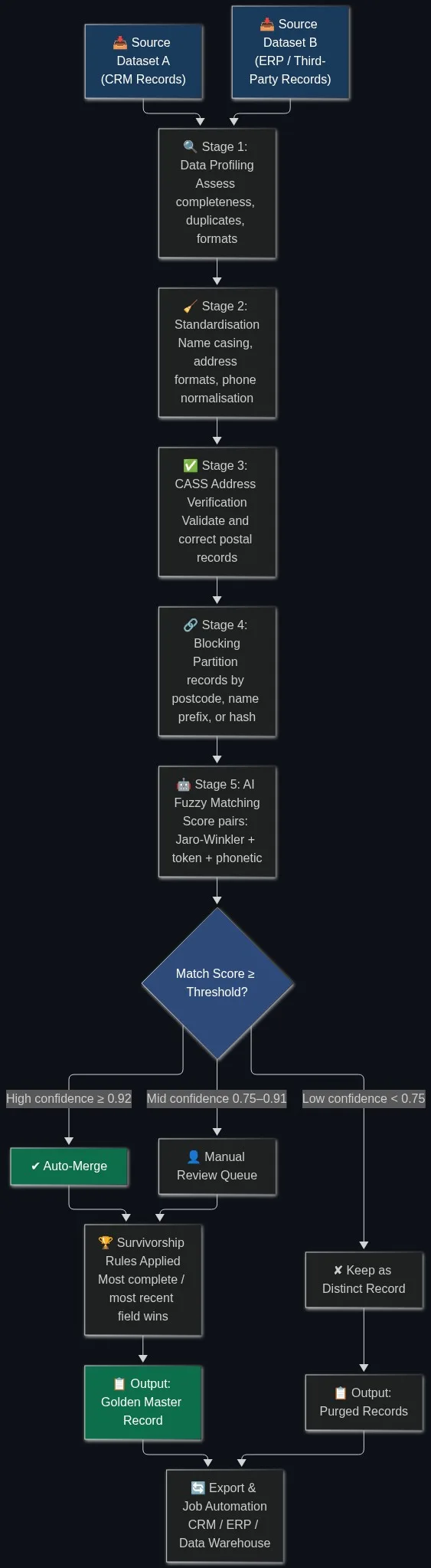
A production monitoring pipeline moves data through six stages before any record is trusted downstream:
- Ingest and profile: every incoming batch is profiled automatically using AI data profiling. Null rates, format distributions, value ranges, and record counts are computed per field.
- Validate against rules: field-level quality rules are applied — email format checks, date range checks, allowed-value lookups. Each field gets a pass/fail score.
- Standardise: name casing, phone number formatting, and date normalisation run automatically so that comparisons are consistent. Data standardisation at this stage prevents false negatives in the duplicate-detection step.
- Verify addresses: postal records are checked against the USPS database using CASS address verification. Records that fail verification are flagged, not silently passed.
- Score duplicates: fuzzy matching runs across every incoming batch to detect new duplicates against the existing master. Match scores above the configured threshold trigger an alert before merge.
- Alert and route: records that breach any quality threshold are routed to a review queue. High-severity issues trigger immediate alerts. Low-severity issues are batched into a daily quality report.
Configuring Thresholds That Actually Work
Thresholds set too tight generate alert fatigue. Set too loose, they miss real problems. The right approach is to baseline first, then set thresholds as a percentage deviation from that baseline.
Run your data quality framework against 90 days of historical data. Calculate the mean and standard deviation for each metric. Set alert thresholds at two standard deviations from the mean for non-critical fields, and one standard deviation for fields that feed compliance or financial reporting.
Example Threshold Configuration
| Field | Metric | Baseline | Alert Threshold | Severity |
|---|---|---|---|---|
| Validity rate | 97.2% | < 94% | High | |
| company_name | Completeness | 99.1% | < 97% | Medium |
| address_line_1 | CASS verification rate | 91.4% | < 85% | High |
| phone | Format validity | 88.6% | < 80% | Medium |
| daily_record_volume | Volume | 11,800 avg | < 8,000 or > 20,000 | High |
| duplicate_rate | Uniqueness | 2.8% | > 6% | High |
These thresholds are configured once and recalibrated quarterly as data sources and volumes change.
Real-Time vs. Batch Monitoring
Not every dataset warrants real-time monitoring. The choice depends on how quickly a quality failure causes downstream harm.
Real-time monitoring is appropriate for: live CRM record entry via API, point-of-sale or registration form submissions, and any pipeline where a single bad record can corrupt a shared entity store. Match Data Pro’s live fuzzy search API supports real-time deduplication checks at point of entry — catching duplicates before they are committed to the database.
Batch monitoring is appropriate for: nightly ETL jobs, weekly list imports, and quarterly enrichment runs. Batch checks run post-load, score the entire import, and produce a quality report before records are promoted to production.
Most enterprise teams need both. Real-time checks catch point-of-entry problems. Batch checks catch bulk import problems.
How Match Data Pro Supports Continuous Data Quality Monitoring
Match Data Pro is a cloud SaaS platform that runs the full monitoring and remediation pipeline in one place. There is no contract and no infrastructure to manage. Here is what it covers:
- AI data profiling: automated field-level quality scoring on every import, with historical trend tracking so you can see when a metric started drifting.
- Fuzzy matching and deduplication: configurable multi-algorithm scoring (Jaro-Winkler, Levenshtein, phonetic, token-based) catches duplicates that exact-match rules miss.
- CASS address verification: every postal record is checked against the USPS database, with ZIP+4 appended and standardised delivery-point format applied.
- Data standardisation: name casing, phone formatting, and date normalisation run automatically before matching, so comparison results are consistent.
- Entity resolution via Senzing: graph-based entity resolution links fragmented records across systems into a single verified identity — without a shared primary key.
- Job automation: monitoring jobs run on a defined schedule. Alerts route to email or webhook. Results are exportable via the import/export connectors to your data warehouse, CRM, or ERP.
Ready to put monitoring in place before the next bad import reaches production? Start a free trial and run your first profile in minutes — no contract required.
Frequently Asked Questions
What is data quality monitoring?
Data quality monitoring is the continuous measurement of key quality metrics — completeness, validity, uniqueness, consistency, timeliness, and accuracy — against defined thresholds, with automated alerts when a metric breaches its acceptable range. It detects problems before they corrupt downstream analytics, pipelines, or AI models.
How is data quality monitoring different from data cleansing?
Monitoring detects quality problems and fires alerts. Cleansing corrects them. A monitoring system tells you the duplicate rate in Tuesday’s import rose from 3% to 11%. The cleansing pipeline then deduplicates those records and confirms the rate returned to baseline. You need both: monitoring without cleansing produces reports nobody acts on; cleansing without monitoring means you only find problems after they have already caused damage.
What is data drift and why does it matter?
Data drift is a change in the properties of incoming data over time — schema changes, shifted value distributions, volume spikes, or format inconsistencies — that degrades the reliability of downstream systems. It matters because drift is invisible without monitoring. A field that starts accepting strings instead of integers, or an address verification rate that drops from 91% to 68%, will silently corrupt every matching and analytics operation that depends on those fields.
How often should data quality monitoring run?
For live API ingest or point-of-entry registration, monitoring should run in real time per record. For nightly ETL imports, run monitoring as part of the post-load step before records are promoted to production. For weekly or monthly enrichment runs, batch monitoring after each import is sufficient. The key is that no batch of records should enter your production system without a quality gate having evaluated it first.
Can Match Data Pro monitor data quality automatically?
Yes. Match Data Pro runs scheduled profiling, deduplication, address verification, and entity resolution jobs on your data automatically. Alerts fire when configured thresholds are breached. Results are exportable via import/export connectors to your CRM, ERP, or data warehouse. There is no contract and a free trial is available at members.matchdatapro.com.