
Revenue range scoring rules convert unstructured revenue fields — strings like “10-20 million” or “$15M” — into numeric scores that drive lead routing, account segmentation, and CRM enrichment. Without a structured scoring layer, your data team manually sorts accounts by size; with one, every incoming record is tiered and scored automatically in milliseconds.

Revenue fields are among the dirtiest columns in any B2B dataset. They arrive as free-text strings, inconsistent abbreviations, and ambiguous ranges. Before you can score them, you must parse, normalise, and validate them. This guide walks through the complete pipeline — from raw ingestion to scored, routable records — with concrete examples at every step. Start a free trial to run the pipeline on your own data today.
Why Revenue Scoring Rules Matter for Data Quality
Revenue is a first-order signal for account prioritisation. Sales teams route enterprise accounts to senior reps, SMB accounts to digital channels, and micro-businesses to self-serve flows. When the revenue field is unreliable, every downstream decision inherits that uncertainty.
IBM research on data quality issues notes that bad data “results in missed opportunities, inefficiencies in business processes, financial losses and regulatory penalties.” Revenue fields are a prime contributor: they are rarely validated at ingestion, often populated by sales reps in free-form, and frequently sourced from third-party enrichment providers who use different notation conventions.
The direct cost shows up in three places:
- Misrouted leads. An account with $45M revenue routed to a low-touch channel means lost revenue opportunity.
- Broken segmentation. Marketing campaigns targeting “mid-market” accounts pull in micro-businesses because the revenue field was never parsed.
- Corrupted scoring models. AI lead-scoring models trained on unparsed revenue strings produce erratic predictions because the signal is treated as categorical noise.
A structured scoring layer eliminates all three. It runs at ingestion, operates deterministically, and produces a consistent numeric output regardless of how the source field was formatted. See how inaccurate data impacts your bottom line for a broader breakdown of these cost categories.
The Revenue Field Problem: What You Are Actually Working With
Before writing a single scoring rule, profile your revenue field. In most CRM and marketing automation exports, revenue arrives in at least five different formats:
| Raw Revenue Value | Source Format | Normalised Value | Issue |
|---|---|---|---|
| 10-20 million | Enrichment provider text | $10M–$20M | Range, not point value |
| $15M | Sales rep entry | $15,000,000 | Abbreviated millions |
| 15000000 | ERP export | $15,000,000 | No currency, no separator |
| USD 15,000,000 | Finance system | $15,000,000 | Currency prefix variation |
| $15 million annually | Web scrape / enrichment | $15,000,000 | Mixed text and numeric |
| N/A | Unknown source | null | Missing, must be flagged |
| Undisclosed | CRM manual entry | null | Suppress or score = 0 |
Each of these formats requires a different parsing strategy. Using a single regex or a simple cast-to-integer will misparse or null out a large portion of your records. This is a data cleansing problem before it is a scoring problem. See the guide to automated data cleansing for the parsing patterns that handle these variants reliably.
Building the Revenue Range Scoring Pipeline
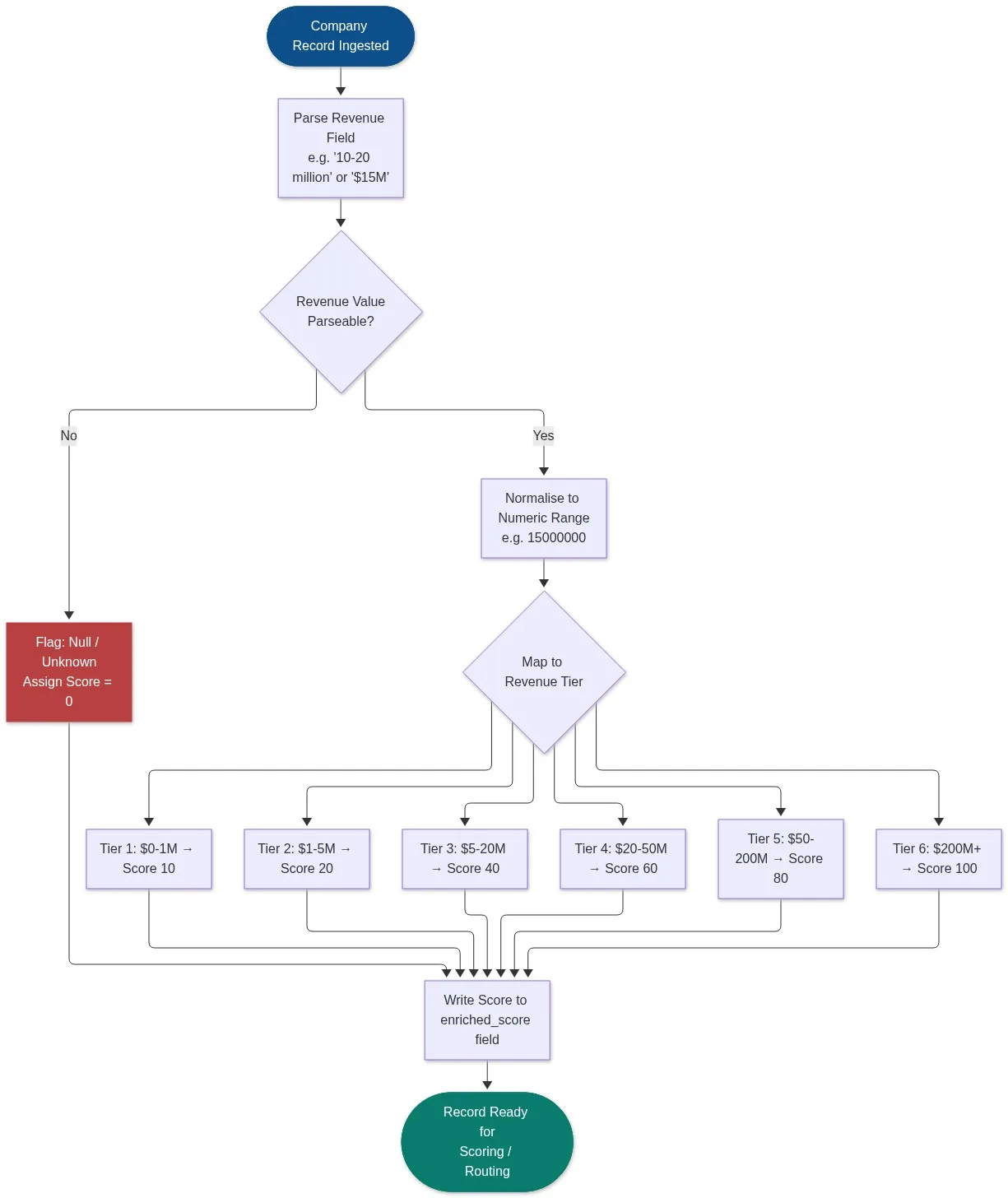
A revenue scoring pipeline has four distinct stages: parse, normalise, map to tier, and write score. Each stage is deterministic and testable independently.
Stage 1: Parse the Revenue Field
Parsing extracts the numeric signal from whatever string format arrives. A robust parser handles:
- Abbreviations: “M” for million, “B” for billion, “K” for thousand
- Currency prefixes: “$”, “USD”, “EUR” — strip before parsing
- Ranges: “10-20 million” — extract the lower bound, the upper bound, or the midpoint depending on your scoring intent
- Written numbers: “fifteen million” — requires a word-to-number normalisation step
- Null and sentinel values: “N/A”, “Undisclosed”, “Unknown” — route to a null handler, do not parse
Use the midpoint of a range for scoring purposes unless your business rules specify otherwise. For “10-20 million”, the midpoint is $15M. This avoids artificially depressing scores by always taking the lower bound.
Stage 2: Normalise to a Canonical Numeric Value
Once parsed, normalise every value to a single integer representing the full dollar amount. Store this in an intermediate field — for example, revenue_normalised — before scoring. This gives you an auditable trace: you can compare revenue_raw, revenue_normalised, and revenue_score in any data quality review.
Examples of normalisation output:
| Parsed Input | revenue_normalised |
|---|---|
| $15M | 15,000,000 |
| 10-20 million (midpoint) | 15,000,000 |
| $200K | 200,000 |
| $2.5B | 2,500,000,000 |
| Undisclosed | null |
Stage 3: Map Normalised Value to Revenue Tier and Score
Apply a lookup table that maps numeric ranges to tier labels and numeric scores. The specific thresholds and scores depend on your ICP (ideal customer profile) and sales motion. The table below shows a commonly used B2B SaaS configuration:
| Revenue Range | Tier Label | Numeric Score | Typical Routing |
|---|---|---|---|
| $0 – $1M | Micro | 10 | Self-serve / marketing nurture |
| $1M – $5M | Small | 20 | Low-touch digital sales |
| $5M – $20M | Lower Mid-Market | 40 | Inside sales |
| $20M – $50M | Mid-Market | 60 | Account executive |
| $50M – $200M | Upper Mid-Market | 80 | Senior account executive |
| $200M+ | Enterprise | 100 | Strategic accounts team |
| null / unknown | Unscored | 0 | Enrichment queue / manual review |
The score is not a linear function of revenue — it is a step function defined by your business rules. That is intentional. A company at $19M and one at $21M receive different scores (40 vs. 60) because they route to different sales teams with different capacity and motion.
Stage 4: Write Score to the Target Field and Audit
Write the output to a dedicated revenue_score field in your target system. Do not overwrite revenue_raw. Keep all three fields — raw, normalised, score — in your data warehouse for auditability. This three-field pattern integrates cleanly with any data quality dashboard that monitors field completeness and score distribution over time.
Handling Edge Cases in Revenue Scoring
Edge cases account for 15–30% of revenue field values in most B2B datasets. Ignoring them produces a scoring model with a significant null or zero-score population that distorts your pipeline metrics.
Ranges That Span Two Tiers
When a range like “$15M–$55M” spans two tiers (Lower Mid-Market and Upper Mid-Market), you have three options:
- Midpoint rule: Take the midpoint ($35M) and score against that single value. Simple, auditable, loses range information.
- Lower-bound rule: Score conservatively using the floor value. Avoids over-scoring uncertain accounts.
- Upper-bound rule: Score optimistically. Useful when sales teams prefer to qualify first and disqualify later.
Document your chosen rule explicitly in your data quality program. It becomes a governance decision, not a technical one. See the full framework for building a data quality program that captures these rules as auditable policies.
Currency Conversion
If your dataset is international, revenue values may be in GBP, EUR, CAD, or other currencies. Apply a currency normalisation step before the tier mapping. Use a fixed reference rate (updated monthly) rather than a live API rate — live rates introduce non-determinism that makes historical audits impossible.
Stale or Missing Revenue Data
Revenue data decays. A score of 100 (Enterprise) for a company that filed for bankruptcy two years ago will misdirect sales effort. Implement a staleness check: if revenue_source_date is more than 18 months old, downgrade the confidence flag on the score and queue the record for re-enrichment. This integrates with the broader data quality monitoring approach that alerts on data drift automatically.
Integrating Revenue Scoring with Deduplication and Matching
Revenue scoring does not operate in isolation. In most B2B data pipelines, you are scoring accounts that exist in multiple systems — CRM, MAP, ERP, and third-party enrichment — each with a different revenue value for the same company. Before scoring, you need a single canonical record.
That means running data deduplication and data matching first. If Salesforce has “Acme Corp, $45M” and your enrichment provider has “ACME Corporation, $50M”, those must be linked and merged before the revenue field is scored. Otherwise you end up with two records, two scores, and conflicting routing decisions.
The correct sequence for a production pipeline is:
- Ingest records from all sources
- Standardise company name, address, and identifiers
- Run fuzzy matching to identify duplicate and related records across sources
- Apply survivorship rules to select the best revenue value across duplicates (typically: prefer the most recent, most specific, highest-confidence source)
- Parse and normalise the surviving revenue value
- Apply tier mapping and write
revenue_score - Push the scored golden record to CRM, MAP, or routing system
Skipping steps 2–4 and scoring before deduplication guarantees conflicting scores across duplicate records. This is the most common failure mode in revenue scoring implementations.
Combining Revenue Score with Other Scoring Dimensions
Revenue score is one input into a composite account score. A complete ICP scoring model typically combines three to five dimensions:
| Scoring Dimension | Example Signal | Score Contribution |
|---|---|---|
| Revenue tier | $20M–$50M → 60 pts | 35% |
| Employee count | 200–500 employees → 50 pts | 25% |
| Industry vertical | Financial services → 80 pts | 20% |
| Geography | North America → 70 pts | 10% |
| Technology stack | Salesforce CRM → 60 pts | 10% |
The composite score is a weighted sum. Revenue typically carries the highest weight (30–40%) because it most directly predicts deal size and sales cycle complexity. Configure weights by analysing closed-won deals: which revenue tiers converted at the highest rates and largest ACV for your specific product?
When CRM records are the target system, run the full scoring pipeline through a CRM data cleansing pass first. Scoring dirty CRM records produces dirty composite scores.
Frequently Asked Questions
What is a revenue range scoring rule?
A revenue range scoring rule is a business logic definition that maps a numeric revenue range to a numeric score. For example: “companies with annual revenue between $20M and $50M receive a score of 60.” These rules are applied during data enrichment or ingestion to convert unstructured or semi-structured revenue fields into consistent, comparable scores that drive routing, segmentation, and prioritisation decisions.
How do I handle revenue ranges stored as text strings like “10-20 million”?
Parse the string using a pattern-matching function that identifies the numeric tokens and the magnitude qualifier (million, billion, K). Extract both bounds, calculate a midpoint or apply your lower/upper bound rule, then normalise to a full integer. Store the raw string, the normalised integer, and the resulting score as separate fields so the transformation is auditable. Do not overwrite the original field.
Should I score before or after deduplication?
Always after deduplication. Scoring before deduplication means duplicate records receive independent scores, which creates conflicting routing instructions. Run profiling, standardisation, fuzzy matching, and survivorship rules first to produce a single canonical record per company, then apply the scoring pipeline to that golden record.
How often should revenue scores be refreshed?
Revenue data decays at approximately 20–25% per year in B2B databases. Refresh scores whenever the source revenue field is updated by an enrichment provider, and run a full re-score sweep at minimum every 12 months. Flag any record where the revenue source date is older than 18 months as “stale” to prevent misdirected sales activity on out-of-date account profiles.
What is the best way to handle null or unknown revenue values?
Assign a score of 0 and route the record to an enrichment queue rather than leaving it unrouted or discarding it. A null revenue field is a data gap, not a disqualifier. Set up an automated enrichment workflow that attempts to resolve the revenue value from a third-party source. Once resolved, re-run the parse-normalise-score pipeline and update the record.
Start Building Your Revenue Scoring Pipeline
Revenue range scoring is a solvable data engineering problem. The pipeline has four clear stages, well-defined edge cases, and measurable outcomes — fewer misrouted leads, cleaner segmentation, and more accurate composite scores.
Match Data Pro provides the full infrastructure to run this pipeline at scale: AI-powered data profiling to characterise your revenue field, configurable cleansing rules to standardise and parse revenue strings, fuzzy matching and deduplication to consolidate multi-source records before scoring, and automated job execution to keep scores current as data changes.
Start your free trial and run the revenue scoring pipeline on your own data in minutes — no contract, no setup fee. Or book a demo and we will walk through your specific revenue field formats and scoring requirements. Contact the team at sales@matchdatapro.com with questions.