
CRM data cleansing is the process of auditing, correcting, and maintaining every contact, account, and lead record in your customer database so that sales, marketing, and customer success operate from accurate data. A typical mid-market CRM contains between 15% and 30% duplicate or corrupted records. Left unchecked, those errors inflate pipeline reports, fragment campaign segments, and erode revenue attribution. Cleaning the data is not a one-off task — it is a continuous, automated pipeline.
Ready to fix your CRM data today? Start a free trial of Match Data Pro and run your first data profile in minutes — no contract required.
Why CRM Data Degrades — and Why It Matters
CRM data decays at an average rate of 22–30% per year. Job changes, company rebrands, and address moves happen continuously. On top of natural decay, four mechanical causes add noise daily:
- Manual entry errors: “Acme Corp” versus “ACME Corporation” versus “Acme Corp.” — three records, one company.
- Import merges: trade show CSV files land without deduplication. Sales reps create new leads without checking existing ones.
- Multi-system feeds: marketing automation, ERP, and support platforms each write to the CRM using different field conventions.
- Legacy migrations: historical data from previous CRM instances carries decade-old formatting standards and uncleansed records.
The downstream effects are measurable. Sales teams waste an estimated 27% of their time working with inaccurate data. Marketing campaigns sent to duplicate email addresses suppress deliverability scores. Revenue attribution breaks when a single customer appears under three account records.
The Seven-Stage CRM Data Cleansing Pipeline
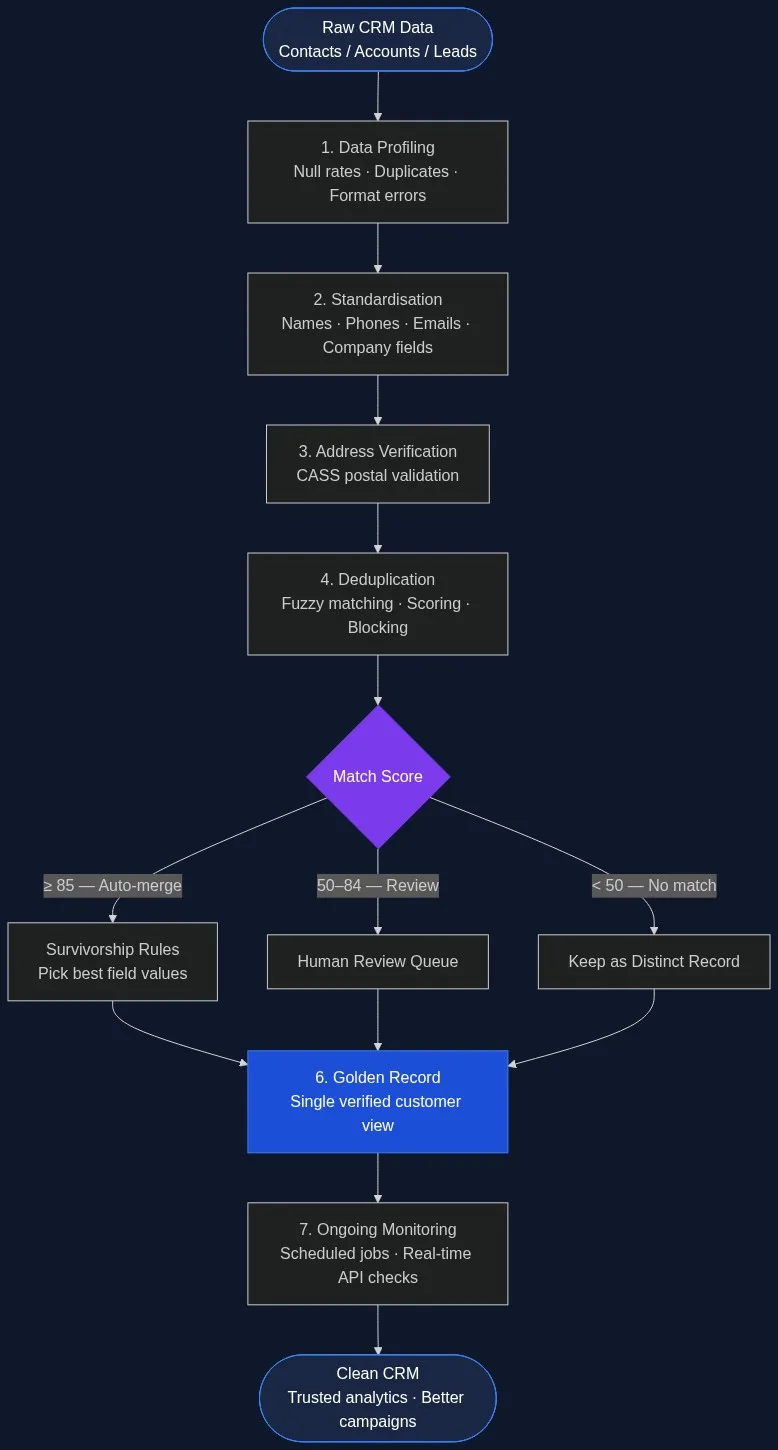
A structured pipeline replaces ad-hoc manual fixes. Match Data Pro runs this pipeline as automated, schedulable jobs — triggered on import, on a daily schedule, or in real time via API.
Stage 1 — Profile the Data
AI data profiling scans every field in your CRM export and returns a quality scorecard: null rates, format violation percentages, duplicate candidate counts, and value distribution. For example, a 50,000-contact database might reveal: 18% of phone fields contain non-numeric characters, 11% of email fields fail format validation, and 23% of company name fields have three or more variant spellings for the same entity.
Profiling is non-destructive. It tells you what is broken before you touch the data.
Stage 2 — Standardise Field Formats
Data standardisation converts every field to a consistent format. Key transformations for CRM data:
| Field | Raw Value | Standardised |
|---|---|---|
| Name | JONATHAN SMITH / jonathan smith | Jonathan Smith |
| Phone | (800) 555-1234 / 8005551234 | +18005551234 |
| Company | Acme Corp. / ACME CORPORATION | Acme Corporation |
| J.Smith@Acme.COM | j.smith@acme.com | |
| State | Calif. / CA / California | CA |
Standardisation is what makes fuzzy matching effective. Matching “Acme Corp.” against “ACME CORPORATION” without normalisation produces a lower similarity score than matching “Acme Corporation” against “Acme Corporation” — even if both resolve to the same entity. See the full guide to text data cleaning techniques for free-text field handling.
Stage 3 — Verify Addresses
Address fields are the most structurally complex in any CRM. Match Data Pro’s CASS-certified address verification parses each address into components (street number, street name, unit, city, state, ZIP+4), validates each component against the USPS postal database, and corrects common errors: transposed ZIP codes, missing unit suffixes, abbreviated street types.
A verified address also enables downstream geo-segmentation and route-to-market analysis. An unverified one wastes direct mail spend and skews territory data.
Stage 4 — Deduplicate with Fuzzy Matching
This is the most technically complex stage. Exact-match deduplication catches only obvious clones — same email, same phone. Real-world CRM duplicates are messier:
- Jon Smith vs. Jonathan Smith (nickname variant)
- Acme Corp, 100 Main St vs. Acme Corp., 100 Main Street (abbreviation)
- +1 800 555 1234 vs. 8005551234 (format difference)
- sarah.jones@acme.com vs. sarah.jones@acme-corp.com (domain alias)
Match Data Pro’s fuzzy matching engine applies a configurable weighted score across multiple fields simultaneously. A typical CRM configuration weights email at 40%, company name at 30%, phone at 20%, and address at 10%. Each field is scored using the most appropriate algorithm — Jaro-Winkler for names, token-set ratio for company names, exact match for emails — then combined into a composite match score between 0 and 100.
Records scoring 85 or above are auto-merged. Those scoring 50–84 are queued for human review. Below 50, records are kept as distinct.
Stage 5 — Apply Survivorship Rules
When two records merge, survivorship rules determine which field values survive in the golden record. Common rules:
- Most recent: use the field value from the record with the latest modification date.
- Most complete: prefer the record with the fewest null fields.
- Source priority: ERP data overrides CRM data for billing address; CRM data overrides for contact email.
- Longest non-null: preserve the most descriptive value (e.g., the longer company name).
Match Data Pro’s survivorship and golden record engine applies these rules automatically and logs every field-level decision to the audit trail.
Stage 6 — Build the Golden Record
The merged, verified output is a single authoritative customer record. It consolidates all interaction history, verified contact fields, and source metadata. A true golden record includes: the canonical ID, the source system IDs that contributed to the merge, verified mailing address, and a completeness score showing how many optional fields are populated.
Stage 7 — Monitor Continuously
Cleansing once is not enough. New records enter your CRM daily. Match Data Pro’s job automation layer runs scheduled cleansing jobs on configurable intervals — nightly, weekly, or on-import — so the CRM never accumulates a year’s worth of decay before the next cleanup cycle. The live fuzzy search API also checks for duplicates at the point of entry, blocking new duplicates before they land.
Common CRM Data Quality Problems and How to Fix Them
Problem: Duplicate Contacts Across Regions
A global sales team operating across EMEA and AMER often has the same enterprise contact entered in both regions. Names differ by locale (José vs. Jose), phone formats differ (+34 vs. 0034), and email domains vary by subsidiary. Standard deduplication misses these. Match Data Pro’s multi-source record linkage handles international character sets and format normalisation before scoring.
Problem: Stale Account Records
Accounts that closed or merged years ago still sit in the CRM as active. Profiling identifies zero-activity records — no email opens, no opportunity updates, no log entries — in a configurable time window. These are flagged for archival rather than deletion, preserving history while removing them from active segments.
Problem: Inconsistent Ownership After a Migration
CRM migrations often produce owner field chaos: the field is blank, assigned to a deleted user, or mapped to the wrong team. The profiling stage surfaces these as null-rate anomalies in the owner field, and standardisation maps them to a default owner or territory queue for reassignment.
CRM Data Cleansing vs. CRM Data Deduplication: What Is the Difference?
The terms are often used interchangeably, but they describe different operations. Deduplication is one step within the broader cleansing pipeline — it identifies and merges records that represent the same entity. Cleansing is the full pipeline: profiling, standardisation, address verification, deduplication, survivorship, and monitoring.
You need both. Deduplication without standardisation produces lower match accuracy — “Acme Corp” and “ACME Corporation” score lower than they should before normalisation. Standardisation without deduplication leaves you with clean-looking but still-duplicate records. For a deeper look at the deduplication stage specifically, see the guide on CRM deduplication.
How to Maintain CRM Data Quality After Cleansing
One cleansing run decays immediately unless you build in prevention. Three mechanisms keep quality high after the initial clean:
- Entry-point validation: the Match Data Pro fuzzy search API checks each new record against the existing database at the moment of creation. If a match scores above the configured threshold, the rep sees a “possible duplicate” warning before saving.
- Scheduled batch jobs: weekly or nightly jobs re-profile the CRM delta (records modified since the last run) and flag new anomalies. This catches duplicates created through integrations that bypass the UI.
- Data quality dashboards: completeness scores, duplicate rates, and address verification pass rates are surfaced on a monitoring dashboard so the data team can track trends, not just fix incidents.
The goal is a self-healing CRM: one that catches and corrects most errors automatically, surfaces exceptions for review, and maintains a documented audit trail of every change for governance and compliance purposes.
Match Data Pro is a cloud SaaS platform with no long-term contract and a free trial available at members.matchdatapro.com. If you prefer a guided walkthrough, book a demo with the team and bring your own data sample.
Frequently Asked Questions
How often should I run CRM data cleansing?
Run a full cleansing pipeline at least quarterly, with automated incremental jobs running weekly or nightly on new and modified records. CRM data decays at 22–30% per year, so annual cleansing leaves most organisations operating with significantly corrupted data for most of the year. Real-time API checks at the point of entry reduce the accumulation rate.
What is the difference between CRM data cleansing and deduplication?
Deduplication is one step within the cleansing pipeline — it identifies and merges records that represent the same entity. Cleansing is the full process: profiling, standardising fields, verifying addresses, deduplicating, applying survivorship rules, and monitoring for ongoing decay. Deduplication alone without standardisation produces lower match accuracy.
Can I clean CRM data without disrupting live sales operations?
Yes. The safest approach is to run cleansing on an exported snapshot, validate the results, and import the golden records back with change logging. Match Data Pro supports this workflow via import/export connectors and produces a full audit log of every merge and field change, which your team can review before committing. Real-time API validation can then prevent new duplicates at entry without any disruption.
What match score threshold should I use for auto-merging CRM records?
A threshold of 85 or above on a 0–100 composite score is a safe starting point for auto-merge in most CRM datasets. Scores of 50–84 should go to human review. Thresholds depend on field quality: if email match rate is high and reliable, a higher weight on email lets you use a lower overall threshold safely. Always validate thresholds against a labelled sample before running at scale.
Does CRM data cleansing work across multiple source systems?
Yes. Match Data Pro ingests records from multiple source systems — CRM, ERP, marketing automation, support platforms — via import/export connectors and matches them across sources using configurable fuzzy scoring. Records from different systems that represent the same customer are linked and merged into a single golden record, with source system IDs preserved for traceability.