
Entity resolution in automated pipelines connects records across siloed systems — CRM, ERP, marketing platforms, and third-party sources — without requiring a shared identifier or manual review. A well-configured pipeline routes high-confidence matches to auto-merge, mid-confidence pairs to graph-based clustering, and only genuinely ambiguous cases to a human queue. The result: 70–85% of record pairs are resolved automatically.
Book a demo to see how Match Data Pro connects records across your systems — no manual review required for most matches.
Why Automated Entity Resolution Matters
Manual identity matching does not scale. A team of analysts reviewing 10,000 record pairs per week cannot keep pace with organisations ingesting millions of records per month from APIs, CRM imports, and partner feeds. Errors compound: a duplicate account in Salesforce becomes a duplicate opportunity in the ERP and a duplicate contact in the email platform.
The downstream effects are measurable. Duplicate customer records inflate pipeline reporting by 8–15%. Fragmented patient records in healthcare cause missed diagnoses. Duplicate vendor records in accounts payable generate duplicate payments averaging 0.1–0.5% of total spend.
Automated entity resolution breaks this cycle by processing every incoming record through a scoring pipeline and routing by confidence band — not by analyst capacity.
The Pipeline Architecture: From Ingest to Golden Record
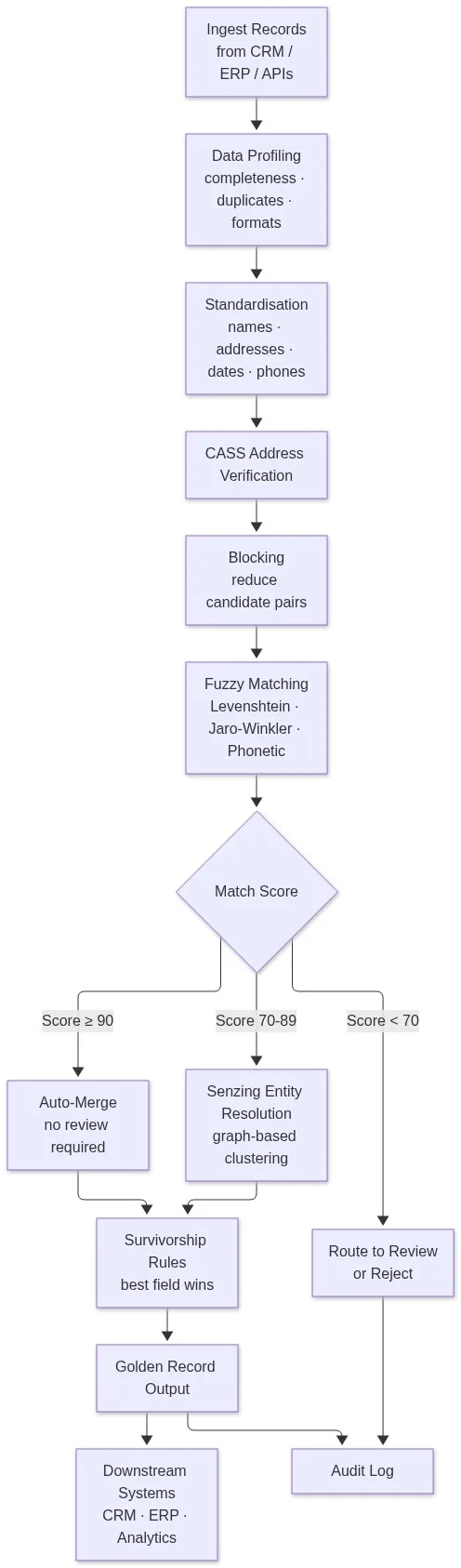
A production-grade automated entity resolution pipeline has seven stages. Each stage prepares records for more accurate matching in the next.
Stage 1: Data Profiling
Before any matching begins, data profiling scans every field for completeness rates, format distributions, duplicate density, and outliers. A profiling run on a 500,000-record CRM dataset typically reveals: 12–18% missing phone numbers, 6–9% address fields in non-standard formats, and 3–7% obvious exact duplicates that can be removed immediately. These findings configure the downstream matching thresholds — fields with high missing rates need lower weight in the composite score.
Stage 2: Standardisation
Inconsistent formats break exact matching and reduce fuzzy match accuracy. Standardisation converts raw values into a canonical form before scoring:
- Names: “BOB SMITH”, “Smith, Robert”, “R. Smith” → “Robert Smith”
- Phones: “(602) 555-0100”, “6025550100”, “+1-602-555-0100” → “16025550100”
- Dates: “01/15/2024”, “Jan 15 2024”, “2024-01-15” → ISO 8601
- Company names: “IBM Corp.”, “I.B.M.”, “International Business Machines” → canonical form
This step alone raises fuzzy match precision by 15–25 percentage points on typical enterprise datasets. Match Data Pro’s data standardisation engine handles all of these transformations as a configurable pre-processing layer.
Stage 3: CASS Address Verification
Address fields are among the most inconsistently stored fields in any database. CASS (Coding Accuracy Support System) certification verifies postal addresses against USPS data, appends ZIP+4 codes, corrects misspelled city names, and flags non-deliverable records. Verified addresses become a high-weight blocking key — two records sharing an exact CASS-verified address are strong candidates for the same entity.
Stage 4: Blocking
Comparing every record pair in a 1-million-record dataset produces 500 billion comparisons. Blocking reduces this to a manageable candidate set by grouping records that share at least one strong signal: same last name initial, same ZIP code, same phone prefix. A well-configured blocking strategy cuts candidate pairs by 99.9% while retaining 97–99% of true matches.
Stage 5: Fuzzy Matching and Composite Scoring
Within each block, records are scored using a weighted composite of field-level algorithms. Fuzzy matching algorithms differ by field type:
- Names: Jaro-Winkler (handles transpositions and abbreviations), Soundex / Double Metaphone (phonetic variants like “Smith” vs. “Smyth”)
- Addresses: Token-based similarity after CASS normalisation
- Emails: Exact match first, then domain-stripped fuzzy for variants
- Phones: Normalised exact match, then area-code-aware fuzzy
Each field score is multiplied by a configured weight. A typical weighting: name 35%, address 30%, email 20%, phone 15%. The composite score runs from 0 to 100.
Stage 6: Score-Based Routing
The composite score determines how each pair is handled:
- Score 90–100: Auto-merge. No human review. The survivorship rule selects the best field value from each source record and writes the golden record.
- Score 70–89: Pass to Senzing entity resolution for graph-based clustering. Senzing builds an entity graph from all records connected by overlapping signals, resolving complex many-to-one relationships that pairwise scoring misses.
- Score below 70: Route to a human review queue or reject. Volume here is typically 15–30% of candidate pairs and 2–5% of total input records.
Stage 7: Survivorship and Golden Record Output
Survivorship rules determine which field value survives the merge when sources conflict. Common rules: most-recent wins (for dates and status fields), most-complete wins (for address and phone), source-priority wins (CRM beats marketing import for name). The result is a golden record — a single verified representation of the entity, written back to the target system with full provenance metadata.
Connecting Entity Resolution to Automated Pipelines
Automated pipelines — scheduled batch jobs, real-time API calls, and event-driven triggers — require entity resolution to operate without human checkpoints. Three integration patterns are common.
Batch Processing
The most common pattern. A job automation scheduler triggers the full seven-stage pipeline on a defined cadence: nightly, weekly, or on data-load completion. Match Data Pro’s job automation layer configures these schedules with no custom code. Output is written to the target system and flagged records are logged to an audit trail. Teams running automated deduplication workflows at this cadence typically reduce their duplicate backlog by 60–80% in the first 90 days.
Real-Time API Resolution
High-velocity use cases — CRM record creation, e-commerce checkout, patient registration — need entity resolution at the point of ingestion. Match Data Pro’s live fuzzy search API accepts a new record as a JSON payload and returns a match score plus candidate entity IDs within 100–200ms. If the new record scores above the auto-merge threshold against an existing entity, the system merges automatically before the record is written. Duplicates never enter the database.
Event-Driven Triggers
Some pipelines fire entity resolution only when specific events occur: a record update changes a key field, a new data import completes, or a downstream system flags a potential duplicate. Event-driven patterns minimise compute overhead while keeping the entity graph current. Match Data Pro supports webhook-triggered jobs that fire the resolution pipeline on-demand from any upstream system.
What Good Automation Looks Like: A Worked Example
A B2B SaaS company ingests leads from three sources: Salesforce, HubSpot, and a trade-show list import. The same prospect appears as:
- Record A: “Jennifer Walcott”, “j.walcott@acmecorp.com”, “602-555-0191”, “Acme Corp”, “2301 N Central Ave Phoenix AZ 85004”
- Record B: “Jen Walcott”, “jwalcott@acmecorp.com”, “6025550191”, “ACME Corporation”, “2301 N. Central Avenue, Phoenix, AZ 85004-1234”
- Record C: “J Walcott”, “j.walcott@acme.com”, “(602) 555-0191”, “Acme Corp.”, “”
After standardisation and CASS verification, all three addresses normalise to the same CASS-verified record. Email domains resolve to the same company. Phone normalises to “16025550191” across all three. Name scoring via Jaro-Winkler: A vs B = 94, A vs C = 87, B vs C = 89. Composite scores trigger auto-merge for A/B (score 94), and Senzing clustering connects C to the resolved entity via shared phone and address. All three collapse to one golden record. No manual review required.
This is exactly the kind of pipeline that data deduplication and entity resolution handle together in Match Data Pro. Start a free trial and run this pipeline on your own data — no contract required.
Key Configuration Decisions for Pipeline Accuracy
Automated pipelines fail when configuration is ignored. Four decisions determine whether your pipeline achieves 90%+ precision or generates a flood of false merges.
Threshold Calibration
Setting your auto-merge threshold too low merges distinct records. Too high pushes real matches into the human queue. The correct threshold is empirically derived: run the pipeline on a labelled test set, plot precision and recall at each threshold value, and select the threshold that maximises F1 score for your use case. For customer data, 88–92 is typically the right auto-merge band. For regulated data with higher merge risk, 93–96.
Field Weights
Weight fields by their discriminative power in your dataset. Email is highly discriminative in B2B data (one email per person) but less so in consumer data (shared family accounts). Phone is high-weight for US consumer data but low-weight for international datasets where numbers change frequently. Profile your data first; configure weights second.
Blocking Strategy
Over-aggressive blocking misses true matches. Under-aggressive blocking creates compute overhead and false positives. Use multiple overlapping blocking keys: sorted-neighbourhood on last name, phonetic blocking on company name, and geo-blocking on ZIP code. Measure your blocking recall on a validation set before moving to production.
Survivorship Rules
Define survivorship per field, not per record. The most recent CRM record is not automatically the best source for every field — the trade show import may have a more complete phone number even if it is six months older. Match Data Pro’s entity resolution configuration lets teams define per-field survivorship rules with source-priority overrides and date-window logic.
Frequently Asked Questions
What is entity resolution in automated pipelines?
Entity resolution in automated pipelines is the process of identifying records that refer to the same real-world entity — across CRM, ERP, and other systems — and merging them into a golden record without requiring manual review. Automated pipelines use composite fuzzy scoring and graph-based clustering to route high-confidence matches to auto-merge and flag only genuinely ambiguous cases for human review.
How does automated entity resolution handle records with missing fields?
Missing fields reduce the composite match score proportionally based on field weight. A well-configured pipeline assigns zero weight to missing fields and redistributes the remaining score across populated fields. Blocking strategies that do not rely on the missing field still generate candidate pairs. Match Data Pro’s null-tolerant scoring engine handles sparse records without producing false rejections.
What is the difference between fuzzy matching and entity resolution?
Fuzzy matching scores the similarity between two individual records on a 0–100 scale using string algorithms. Entity resolution goes further: it clusters all records related to the same entity — including transitive relationships where A matches B, B matches C, but A does not directly match C — using graph-based methods like those in Senzing. Entity resolution is the full pipeline; fuzzy matching is one stage within it.
Can entity resolution run in real time, or only in batch?
Entity resolution can run in real time via API for point-of-ingestion use cases like CRM record creation or patient registration. Match Data Pro’s live fuzzy search API resolves a new record against the existing entity graph in 100–200ms. Batch processing handles high-volume historical cleansing. Event-driven triggers handle pipeline-integrated workflows. All three modes are supported.
How do I know if my entity resolution pipeline is accurate?
Measure precision (what fraction of auto-merged pairs are true matches) and recall (what fraction of true matches the pipeline catches) on a labelled test set before going to production. Target precision above 95% for auto-merge decisions. Use Match Data Pro’s data profiling output and match review logs to tune thresholds iteratively. Run a validation set quarterly as your data evolves.