
Enterprise entity resolution software links fragmented records across siloed systems into a verified, deduplicated master record — without a shared primary key. The right platform combines configurable fuzzy matching, graph-based identity resolution, automated survivorship rules, and a full audit trail. This guide covers every capability that separates production-grade enterprise software from tools that work only on clean, small datasets.
If you are mid-evaluation, book a 30-minute demo to see how Match Data Pro handles your specific data model.
Why Entity Resolution Is Hard at Enterprise Scale
The challenge is not finding obvious duplicates. It is finding the same entity across systems that describe it differently — with no common identifier, inconsistent field naming, and years of data entry variation.
Consider this real scenario:
- CRM record: Acme Corp., 123 Main St, Chicago IL 60601, acme@acme.com
- ERP record: ACME Corporation, 123 Main Street, Chicago, Illinois, ar@acmecorp.com
- Marketing record: Acme, 123 Main St Ste 4, Chicago IL, acme-marketing@acme.com
An exact-match join returns zero hits. A basic LIKE query returns false positives. Only a multi-field fuzzy scoring pipeline — scoring company name, address, and email separately and combining weighted scores — identifies these as the same entity with confidence.
Scale this to 10 million records across six source systems and the problem becomes computationally demanding. Naive all-pairs comparison across 10M records requires 50 trillion comparisons. Production-grade fuzzy matching platforms solve this with blocking strategies that reduce the comparison space by 99% before scoring begins.
The Six Capabilities That Define Enterprise Entity Resolution Software
1. Multi-Algorithm Fuzzy Matching
No single algorithm handles every field type accurately. Enterprise platforms apply a different algorithm per field:
- Company names: Jaro-Winkler + token-sort ratio handles abbreviations and word reordering (“IBM Corp” vs “International Business Machines”)
- Personal names: Phonetic encoding (Metaphone 3) handles spelling variants (“Jon” vs “John”, “Smyth” vs “Smith”)
- Addresses: Parsed field matching after address standardisation handles “St” vs “Street”, unit suffixes, and transposed ZIP codes
- Emails: Exact match on domain + fuzzy on local part handles typos (john.smth@acme.com vs john.smith@acme.com)
- Phone numbers: Normalised digit comparison after stripping formatting handles +1 prefix variants and extensions
Each field produces a 0–1 score. A weighted composite score determines the final match confidence. Match Data Pro lets you configure algorithm selection, field weights, and thresholds per project — no code required.
2. Blocking and Indexing for Scale
Blocking partitions records into candidate groups before comparison. Only records sharing a blocking key — first three characters of company name, ZIP code, or phone area code — are compared against each other. A well-configured blocking strategy reduces comparison volume from O(n²) to O(n log n).
Match Data Pro supports multiple blocking passes. A record that misses one blocking key (misspelled company name) can still match through a second pass on ZIP + phone. This multi-pass approach achieves recall rates above 97% on typical enterprise datasets.
3. Graph-Based Identity Resolution
Simple pairwise matching identifies duplicate pairs. Graph-based entity resolution identifies clusters — groups of records that all refer to the same real-world entity, even when no single pair is a direct match.
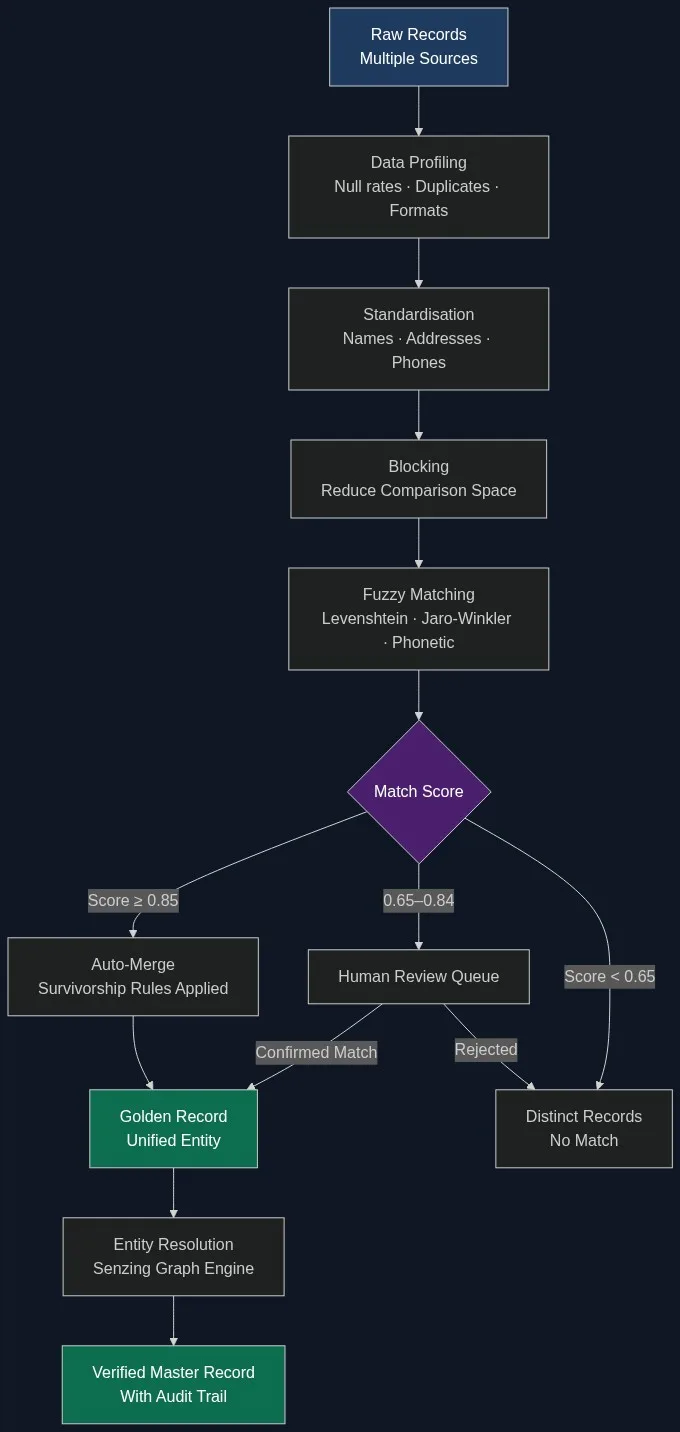
Example: Record A matches Record B (score 0.88). Record B matches Record C (score 0.82). Record A and Record C score only 0.61 directly. Graph resolution identifies A, B, and C as one cluster and produces a single golden record.
Match Data Pro integrates the Senzing entity resolution engine for graph-based clustering. Senzing uses a pre-trained probabilistic model — no hand-crafted rules — and resolves at real-time speeds even on datasets in the hundreds of millions of records.
4. Configurable Survivorship Rules
After identifying a match cluster, the platform must decide which field value survives into the golden record. Survivorship logic handles conflicts field by field.
Common survivorship strategies:
- Most recent: Use the field value from the record with the latest modified timestamp
- Most complete: Prefer the field with the most characters or fewest nulls
- Source priority: ERP address overrides CRM address; CRM email overrides marketing list email
- Most frequent: Use the value that appears in the majority of matched records
Match Data Pro applies survivorship rules at the field level, not the record level, so different rules can apply to different columns in the same merge operation. See the full guide to survivorship rules and golden record creation.
5. Audit Trail and Explainability
Every match decision — why two records were linked, which algorithm produced the score, what threshold was applied — must be logged and reviewable. This is not optional in regulated industries. It is also essential for debugging false positives that corrupt downstream systems.
Match Data Pro logs the full decision trail per match pair: field-level scores, composite score, threshold applied, survivorship outcome, and operator who reviewed borderline pairs. The audit log exports to CSV or connects via API to data governance platforms.
Teams running agentic entity resolution pipelines need explainability especially: when an automated agent resolves thousands of records per minute, human reviewers must be able to audit any decision after the fact.
6. Scalable Job Automation and Connectors
Enterprise entity resolution is not a one-time project. New records arrive daily. Acquisition data needs processing on a schedule. CRM syncs introduce new duplicates weekly.
Production platforms support:
- Scheduled batch jobs (daily, weekly, or triggered by file arrival)
- Real-time API matching for point-of-entry deduplication
- Import connectors for Salesforce, HubSpot, SQL databases, flat files, and cloud storage
- Export connectors to push golden records back to source systems
Match Data Pro’s job automation layer handles all four. Configure a job once — inputs, matching rules, survivorship logic, output destination — and it runs on schedule without manual intervention. Combined with the live fuzzy search API, teams can block duplicates at entry while batch-cleaning historical records simultaneously.
Evaluation Criteria: What to Test Before You Buy
A vendor demo on a clean dataset is not a proof of concept. Before committing, run a structured evaluation on your own data.
Precision and Recall on Your Dataset
Precision measures how many matched pairs are correct. Recall measures how many true matches the system found. Enterprise targets: precision above 95%, recall above 90%. Test with a labelled sample of 5,000–10,000 record pairs from your actual data — not the vendor’s demo data.
Threshold Configurability
You need separate thresholds for auto-merge (high confidence), human review (borderline), and auto-reject (low confidence). If the platform only offers a single global threshold, it will either over-merge or produce too large a review queue. Match Data Pro exposes three-band threshold configuration per project.
Processing Speed at Scale
Ask for benchmarks on datasets comparable in size to yours. A platform that processes 1 million records in 4 hours cannot support daily incremental runs on a 50-million-record database. Match Data Pro processes 10 million records in under 2 hours on standard cloud infrastructure.
Data Profiling Integration
The matching pipeline starts before matching. AI data profiling identifies null rates, format inconsistencies, and value distributions before standardisation runs. Teams that skip profiling consistently see 15–25% lower recall because unstandardised fields produce artificially low similarity scores.
How Match Data Pro Delivers Enterprise Entity Resolution
Match Data Pro is a cloud SaaS platform with no long-term contract. The full pipeline covers data profiling, cleansing, standardisation, AI-powered fuzzy matching, Senzing-powered entity resolution, survivorship and golden record creation, CASS address verification, and job automation — in one configurable platform.
Deployment is immediate. Connect your data sources via import connectors, configure your matching rules and thresholds, run a profiling pass, and execute your first job. Most teams complete their initial entity resolution run within 48 hours of signing up.
For teams evaluating build vs. buy options, the economics are clear: a custom build costs $500K–$1.5M over three years and takes 6–18 months before it resolves your first record. Match Data Pro resolves records in hours.
The record linkage engine handles cases with no shared identifier — matching purely on composite fuzzy scores across name, address, phone, and email fields. This makes it viable for cross-system entity resolution where legacy systems assigned their own internal IDs with no overlap.
Start a free trial: members.matchdatapro.com/en/register — no contract, no setup fee, full platform access.
Frequently Asked Questions
What is enterprise entity resolution software?
Enterprise entity resolution software identifies records across multiple systems that refer to the same real-world entity — a person, company, or location — and merges them into a verified golden record. It uses fuzzy matching, probabilistic scoring, graph clustering, and survivorship rules to handle data inconsistencies at scale without manual review of every pair.
How is entity resolution different from deduplication?
Deduplication removes duplicate records within a single dataset. Entity resolution links records across multiple datasets that may have no shared identifier, resolving clusters of records from different source systems into one unified entity. Most enterprise pipelines need both: deduplication within each source, then entity resolution across sources.
What match score threshold should I use for auto-merging?
Most enterprise teams set auto-merge thresholds between 0.85 and 0.92, depending on field quality and risk tolerance. Records scoring 0.65–0.84 go to a human review queue. Below 0.65 is typically treated as no match. Calibrate thresholds by reviewing a labelled sample from your own data — vendor defaults rarely fit without adjustment.
Can entity resolution software handle international data?
Yes, production-grade platforms handle international name variants, non-Latin character sets, international address formats, and country-specific phone number structures. Match Data Pro supports international address standardisation and applies locale-aware fuzzy algorithms for names across Latin, Cyrillic, and CJK character sets.
How long does it take to set up entity resolution on a new dataset?
With a cloud SaaS platform like Match Data Pro, initial setup takes 24–48 hours: connect your data source, run a profiling pass to understand field quality, configure matching rules and thresholds, and execute your first job. Fine-tuning thresholds based on initial results typically takes another 1–2 days.