
Automated data scrubbing removes errors, duplicates, and structural inconsistencies from raw datasets through a repeatable pipeline. At scale, that means profiling millions of records, standardising formats, correcting field-level errors, verifying addresses, deduplicating, and resolving entity identities before any downstream system ever touches the data. Match Data Pro’s data cleansing platform runs this entire pipeline in a single automated workflow, without scripts and without manual review for every record.
Ready to scrub your data at scale? Start a free trial — no contract required.
What Is Data Scrubbing and Why Does Scale Change Everything?
Data scrubbing and data cleansing are used interchangeably. Both refer to the process of identifying and correcting inaccurate, incomplete, or inconsistent records in a dataset. The distinction that matters is volume. At a few thousand rows, manual inspection is possible. At 5 million rows, it is not.
Scale introduces four problems that manual or ad-hoc approaches cannot handle:
- Volume: A CRM with 3 million contacts may contain 400,000 duplicates. Finding them by eye is impossible.
- Variety: The same company appears as “Acme Corp”, “Acme Corporation”, and “ACME CORP.” Simple string matching misses all three as duplicates.
- Velocity: New dirty data enters the system continuously through imports, form submissions, and integrations. A one-off scrub decays within weeks.
- Complexity: Errors compound. A record with a misspelled name, wrong ZIP code, and missing phone number requires three independent correction steps before it can be matched to another system.
Enterprise data scrubbing addresses all four through a structured, automated pipeline that runs on a schedule or triggers in real time via API.
The 7-Stage Data Scrubbing Pipeline
Effective data scrubbing is not a single operation. It is a sequence of interdependent stages, each preparing the data for the next. Skip a stage and errors compound downstream.
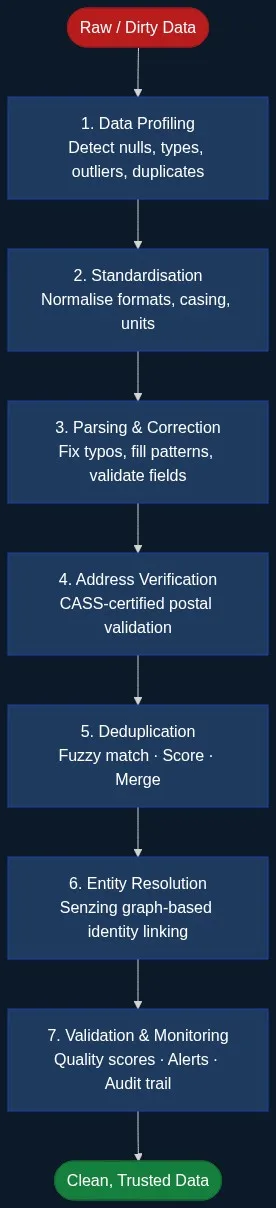
Stage 1: Data Profiling
Before correcting data, you must understand its condition. AI-powered data profiling scans every field and reports: null rates, format distributions, value ranges, cardinality, and pattern violations. A profiling run on a 2-million-row contact file might return: 18% null email, 34% non-standard phone format, 7% invalid date values. These numbers define the scrubbing scope before a single correction runs.
Stage 2: Standardisation
Standardisation converts inconsistent representations to a single canonical form. Phone numbers become E.164. Dates become ISO 8601. Company suffixes (“Inc”, “Inc.”, “Incorporated”) collapse to one form. State values like “CA”, “California”, and “Calif.” resolve to “CA”. Data standardisation eliminates the surface-level variation that causes false non-matches downstream.
Stage 3: Parsing and Field Correction
Many records arrive with values in wrong fields or combined where they should be split. A single “Name” column containing “Dr. Jane M. Smith” needs parsing into title, first, middle, and last. Free-text address fields need splitting into street number, street name, city, state, and ZIP. Pattern-based correction handles predictable errors: a ZIP code with six digits gets the trailing digit flagged; a phone number with eight digits is routed for review.
Stage 4: Address Verification
Address data degrades at roughly 10–15% per year as residents move, businesses close, and postal routes change. CASS-certified address verification validates every postal record against the USPS database, appends ZIP+4 codes, corrects deliverability errors, and standardises street suffixes and directionals. This step matters beyond mail: it is the only reliable way to match the same physical location across systems that recorded it differently.
Stage 5: Deduplication
Deduplication identifies records that represent the same real-world entity. Exact matching handles identical records. The harder problem is near-duplicates: “Jon Smith at 123 Main St” and “Jonathan Smith at 123 Main Street”. AI-powered fuzzy matching computes similarity scores across multiple fields simultaneously using Jaro-Winkler for names, token-based matching for addresses, and phonetic algorithms for error-prone fields. A weighted composite score determines whether two records are the same, similar but uncertain, or distinct.
| Field | Record A | Record B | Score |
|---|---|---|---|
| First Name | Jonathan | Jon | 0.84 (Jaro-Winkler) |
| Last Name | Smith | Smith | 1.00 |
| Address | 123 Main Street | 123 Main St | 0.97 (token) |
| jsmith@acme.com | j.smith@acme.com | 0.91 | |
| Composite | 0.93 → Match |
Records scoring above the match threshold merge using survivorship rules: the most complete, most recent, or most trusted-source field value wins. Records in the uncertain band route to a review queue.
Stage 6: Entity Resolution
Deduplication collapses records within a single dataset. Entity resolution links records across multiple datasets without a shared identifier. Senzing entity resolution uses graph-based probabilistic matching to group records from CRM, ERP, marketing, and support systems into a single unified entity view. It handles name variants, address changes over time, and partial identifier overlap — all without hand-crafted rules.
Stage 7: Validation and Monitoring
Scrubbing is not a project; it is an ongoing process. Post-scrub validation measures quality dimensions: completeness, validity, consistency, and uniqueness. Continuous monitoring watches for quality degradation between scrub cycles. Alerts trigger when null rates rise above a threshold or duplicate introduction rates spike after a bulk import. This stage closes the loop and drives the next profiling run.
Where Data Scrubbing Breaks Down Without Automation
Teams that rely on manual scrubbing or SQL scripts encounter three recurring failure modes:
One-Off Scripts Don’t Scale
A Python script that cleans 50,000 records works. The same script against 50 million records takes hours, has no error recovery, and produces no audit log. When the script breaks after a schema change, no one knows which records were cleaned and which were not. Fuzzy matching in SQL has similar limits: SOUNDEX and LIKE cannot score similarity across multiple fields simultaneously, and pg_trgm performance degrades rapidly at high cardinality.
Manual Review Doesn’t Scale Either
Even with automated detection, routing every uncertain record to a human reviewer is unsustainable above 10,000 records per day. An automated pipeline with configurable match thresholds auto-approves high-confidence matches, auto-rejects clear non-matches, and sends only genuine edge cases to review. Most enterprise datasets run 85–95% of records straight through without any human touch.
No Repeatability Means Decay
A cleaned dataset starts decaying the day after the scrub. Without job automation running scrubs on a defined schedule, quality drops back to baseline within months. Automated pipelines integrate with import/export connectors so every new data load triggers a scrub before the records enter production systems.
Data Scrubbing for Specific Use Cases
CRM Data Scrubbing
CRM systems accumulate duplicates through web forms, trade show imports, and manual data entry. A typical Salesforce or HubSpot installation accumulates a 10–20% duplication rate within two years. Scrubbing a CRM requires name-aware fuzzy matching (handling nicknames like “Bob” for “Robert”), address standardisation, email domain validation, and survivorship rules that preserve the most recent activity data.
Marketing List Scrubbing
Marketing databases sourced from multiple list vendors contain overlapping records with different formats. Scrubbing before a campaign eliminates wasted send spend, suppresses unsubscribed contacts, and ensures suppression lists are applied correctly. A scrubbed list of 1 million records typically reduces to 750,000–850,000 unique, deliverable contacts.
Financial and Operational Data Scrubbing
Vendor master files, customer ledgers, and counterparty databases require scrubbing before regulatory reporting. Duplicate vendor records create payment fraud risk. Unresolved customer identities across business lines create AML blind spots. Entity resolution across financial datasets is a compliance requirement, not just a quality improvement.
How Match Data Pro Automates Data Scrubbing
Match Data Pro delivers all seven stages in one cloud SaaS platform. There is no infrastructure to provision and no long-term contract. You connect your data source using built-in import connectors (CSV, Excel, database, API), configure the scrubbing pipeline, and run it on demand or on a schedule.
The platform’s AI data profiling engine runs before every scrub and produces a quality scorecard. Standardisation rules are configurable per field type. The fuzzy matching engine supports Levenshtein, Jaro-Winkler, phonetic, and token-based algorithms with per-field weights and composite thresholds. Senzing entity resolution runs natively inside the platform for cross-dataset linking. CASS-certified address verification appends ZIP+4 and corrects deliverability errors at the record level. Job automation schedules recurring scrubs and triggers alerts when quality thresholds are breached.
After a scrub, the platform exports clean records through the same connector used for import — directly into Salesforce, HubSpot, SQL databases, or flat files. Every match decision is logged with field-level scores and the algorithm that produced them, giving compliance teams a full audit trail.
Book a demo to see the full scrubbing pipeline running against a sample of your data.
Frequently Asked Questions
What is the difference between data scrubbing and data cleansing?
Data scrubbing and data cleansing describe the same process: detecting and correcting errors, inconsistencies, and duplicates in a dataset. The terms are interchangeable in practice. Some teams use “scrubbing” to emphasise the removal of junk records, while “cleansing” implies broader quality improvement including standardisation and enrichment. In either case, an automated pipeline covering profiling, standardisation, deduplication, and validation is the standard approach at scale.
How long does it take to scrub a large dataset?
Processing time depends on dataset size, field complexity, and the number of pipeline stages. A 1-million-row contact file with fuzzy matching and address verification typically completes in 15–45 minutes on a cloud platform. A 50-million-row file may take several hours in batch mode. Real-time scrubbing via API processes individual records or small batches in milliseconds, which is appropriate for point-of-entry validation rather than bulk scrubs.
How often should you run data scrubbing?
Data quality degrades continuously. Most enterprise teams run a scheduled scrub monthly or quarterly on their core datasets, with real-time scrubbing at point of entry for new records. Datasets that receive large bulk imports should trigger a scrub immediately after each import. Address data requires verification at least annually to account for the 10–15% annual change rate in postal records.
Can data scrubbing software handle international data?
Yes, but international data requires algorithm configuration. Name matching must handle transliteration variants (e.g. “Mohamed” vs. “Muhammad”), character sets, and name-order conventions that differ by country. Address parsing must handle non-US formats. Match Data Pro supports international fuzzy matching with configurable algorithm weights and field definitions that adapt to non-US data structures.
What is a survivorship rule in data scrubbing?
A survivorship rule determines which field value to keep when two matching records have different values. Common rules include: keep the most recently updated value, keep the non-null value, keep the value from the most trusted source, or keep the longest value for free-text fields. Survivorship rules are applied during the merge step of deduplication and must be configured per field to avoid overwriting good data with bad.