
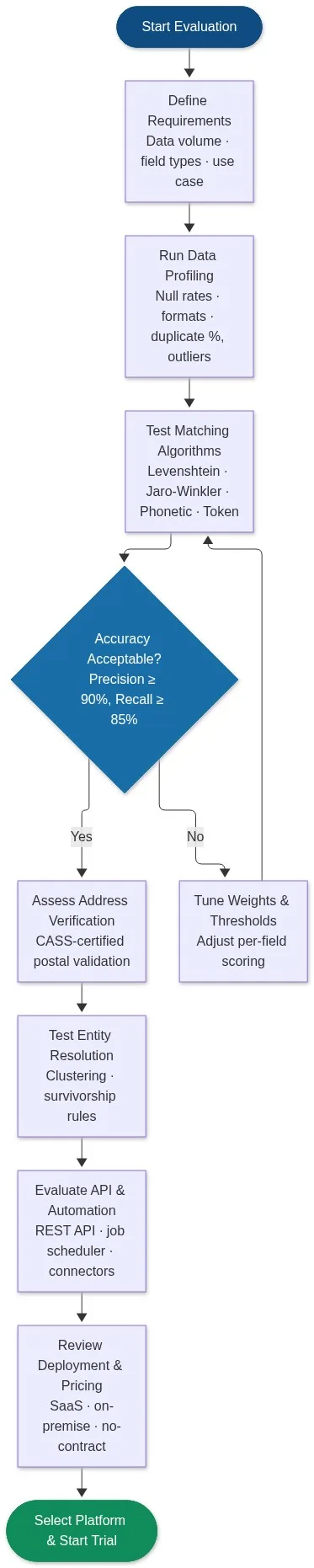
When evaluating a data matching solution, ask these seven questions: What algorithms does it support? Can it handle fuzzy, phonetic, and token-based matching? Does it profile data before matching begins? Can it resolve entities across multiple systems? Does it include address verification? How does it expose an API? And can you test it on your own data before committing? A platform that answers all seven is worth piloting.
Data matching failures are almost always evaluation failures. Teams select a tool based on demos, then discover it cannot handle their real-world data: misspelled company names, transposed digits in phone numbers, partial addresses, or records split across three source systems. This guide gives you the structured questions and criteria to prevent that outcome.
Book a demo with Match Data Pro to run a live evaluation against your own records.
Why Evaluation Criteria Matter More Than Feature Lists
Every data matching platform claims to deliver high accuracy. The difference becomes visible only when you apply the tool to your actual records. A solution that scores 97% precision on a vendor’s benchmark dataset may score 68% on yours, because your data has different field patterns, blank rates, and noise types.
The correct evaluation process starts with your data, not the vendor’s slides. Before you open a sales call, run data profiling on a representative sample. You need to know:
- What percentage of name fields contain abbreviations, initials, or nicknames?
- What is the null rate across address, phone, and email fields?
- What share of records already appear to be duplicates?
- How many source systems are you merging, and do they share a common key?
These four data points shape every other evaluation decision. A dataset with 40% null addresses, for example, needs a solution with strong null-tolerant blocking — not one that relies on address as the primary match field.
The Seven Questions to Ask When You Evaluate a Data Matching Solution
1. Which algorithms does it support, and can you configure them per field?
No single algorithm handles every field type well. Fuzzy matching algorithms each have a specialisation:
| Algorithm | Best for | Weakness |
|---|---|---|
| Levenshtein / edit distance | Short codes, IDs, postcodes | Slow on long strings |
| Jaro-Winkler | Personal names, first-name matching | Poor on transpositions mid-string |
| Double Metaphone | Phonetic name variants (Robert / Roberto) | Language-specific, weak on data codes |
| Token-sort / Token-set ratio | Company names with word order variation | Loses character-level error signals |
| Trigram / N-gram | Free-text address lines, long strings | High false-positive rate without tuning |
Ask the vendor: can I assign different algorithms to different fields, and can I weight fields independently? A solution that uses one algorithm across all fields will produce poor composite scores on mixed-type records. Match Data Pro lets you configure per-field algorithm selection and weights, then combines them into a single composite score per record pair.
2. How does it handle blocking, and what is the candidate pair limit?
Blocking is the step that narrows the comparison space before scoring. Without it, matching 1 million records against themselves requires 500 billion comparisons — computationally infeasible. Good blocking uses multiple strategies in parallel: sorted-neighbourhood, phonetic bucketing, and trigram indexing.
Ask: what is the maximum candidate pair count before performance degrades? What blocking keys are configurable? Can blocking handle null values gracefully? A platform that only supports one blocking key will miss matches when that key field is blank.
Match Data Pro’s multi-strategy blocking engine generates candidate pairs from several keys simultaneously, so a record missing its postcode can still be matched on name and phone.
3. Does it include built-in data profiling before matching runs?
A platform that runs matching without profiling first is guessing at configuration. You need to know field completeness, format distribution, and baseline duplicate rate before you set thresholds. Ask whether the tool surfaces these statistics automatically, or whether you need to run your own analysis in a separate tool.
Match Data Pro’s AI data profiling module scans every field on import: null rates, format patterns, value distributions, and an estimated duplicate rate. Those statistics are then used to propose initial match configuration — cutting setup time from days to hours.
4. Can it resolve entities across more than two systems?
Many teams start with a two-dataset problem — CRM versus marketing list — but quickly discover they need to match across five or more sources: CRM, ERP, support tickets, third-party enrichment data, and legacy databases. A solution that only does pairwise matching forces you to chain multiple jobs with no central identity graph.
True entity resolution builds a persistent identity graph across any number of sources. When a new record arrives, it is compared against the entire existing graph — not just one counterpart dataset. Match Data Pro integrates Senzing entity resolution for exactly this use case, handling billions of records across unlimited source systems with no manual rule authoring.
5. Does it include address verification, and is it CASS-certified?
Address fields are the most inconsistently formatted data type in most enterprise databases. “123 Main St Suite 4”, “123 Main Street Ste. 4”, and “123 MAIN ST #4” may refer to identical locations but score poorly on a pure string comparison. The correct fix is standardisation to a postal reference database before matching begins.
CASS certification (Coding Accuracy Support System) means the address verification engine has been tested and approved by the USPS for delivery point accuracy. Ask: is address verification built in or a separate purchase? Does it run before or after matching? Can it append ZIP+4? Match Data Pro’s CASS-certified address verification runs as part of the same pipeline — standardise, verify, then match — so your address fields are clean before any scoring begins.
6. What does the API and automation layer look like?
A data matching platform that only accepts manual file uploads is a one-off tool. Production data quality requires a platform that fits into your existing pipeline: ingesting records via REST API, triggering jobs on a schedule, and pushing results to a downstream system. Ask:
- Is there a REST API for real-time single-record matching?
- Can batch jobs be scheduled without manual intervention?
- What import and export connectors are available (CSV, SQL, Salesforce, REST)?
- Does the API return a numeric match score, or only a binary match / no-match?
Match Data Pro’s live fuzzy search API returns a scored match result in under 100ms per request, suitable for point-of-entry deduplication at form submission or CRM record creation. The job automation layer handles scheduled batch runs and pushes results to configured destinations.
7. What does “accuracy” mean in the vendor’s claims, and can you reproduce it?
Vendors report accuracy as precision (of records flagged as matches, what share are correct?), recall (of all true matches, what share were found?), or F1 (harmonic mean of both). These numbers are meaningless without knowing the test dataset. A precision of 99% on a highly standardised synthetic dataset is not the same as 99% on your messy production CRM.
Ask for a proof-of-concept (POC) run against a 10,000-record sample of your own data. Set a minimum acceptable precision of 90% and recall of 85% before agreeing to any contract. Measure the false positive rate separately — a match engine that over-merges customers is as damaging as one that misses duplicates.
Match Data Pro offers a free trial that lets you upload your own data, configure matching rules, and measure precision and recall on a labelled test set before you spend anything.
Building a Scoring Rubric for the Evaluation
Once you have answers to the seven questions, score each candidate platform against a weighted rubric. A simple version:
| Criterion | Weight | What to measure |
|---|---|---|
| Algorithm variety and per-field configurability | 20% | Number of supported algorithms; can weights be set per field? |
| Blocking sophistication and null tolerance | 15% | Multi-key blocking; handles null fields without dropped candidates |
| Built-in profiling | 10% | Automated field stats before first match run |
| Entity resolution (multi-source) | 20% | Persistent identity graph across 3+ systems |
| Address verification (CASS) | 10% | Built-in CASS; runs before matching |
| API and automation | 15% | REST API; job scheduler; export connectors |
| POC accuracy on your data | 10% | Precision and recall measured on labelled sample |
Apply this rubric to every vendor you evaluate. Weight the criteria differently if your use case prioritises real-time API access over batch entity resolution — but keep the rubric consistent across vendors so the comparison is fair.
Common Evaluation Mistakes and How to Avoid Them
Evaluating only on a clean sample
Many teams prepare a tidy test file for a vendor demo. The platform scores well, the contract is signed, and performance degrades the moment real production data hits the pipeline. Always evaluate on actual dirty data: records with blank fields, inconsistent formats, encoding errors, and all the edge cases your team has seen before.
Ignoring survivorship and merge rules
Finding duplicates is half the problem. The other half is deciding what the golden record looks like after merging. If the platform cannot apply configurable survivorship rules — most recent value wins, most complete value wins, source priority — you are left doing that work manually in a downstream system.
Not testing at scale
A platform that processes 50,000 records in a demo may take 36 hours on 10 million. Ask for documented throughput benchmarks and test with a volume close to your production load. Blocking efficiency matters most at scale: poor blocking creates a combinatorial explosion that no hardware can overcome.
Overlooking deployment and contract flexibility
Long-term contracts for data matching software lock you into a platform before you have proven ROI. Cloud SaaS with no long-term contract lets you scale usage up or down as projects change. Match Data Pro operates as cloud SaaS on a monthly basis — no annual lock-in — so your team can run a thorough POC without financial risk.
Ready to run a structured evaluation against your own data? Start a free trial or book a demo to walk through the evaluation framework with your own records.
Frequently Asked Questions
How long should a data matching evaluation take?
A thorough evaluation typically takes two to four weeks. Week one is profiling your data and defining requirements. Weeks two and three are POC runs with two or three vendors using your own labelled sample. Week four is scoring rubric review and commercial negotiation. Rushing the POC phase is the most common cause of poor platform selection.
What match rate should I expect from a good data matching solution?
On well-profiled, standardised production data, a correctly configured platform should achieve 90 to 95% precision and 85 to 92% recall. Rates below 80% precision usually indicate that thresholds are set too low or that pre-matching standardisation is missing. Rates above 97% recall on messy data often indicate over-matching — verify the false positive count.
Do I need entity resolution if I already have a deduplication tool?
Deduplication removes duplicates within a single dataset. Entity resolution links records across multiple systems into a persistent identity — even when no shared key exists. If your data lives in more than one source system (CRM, ERP, support, marketing), deduplication alone is insufficient. You need entity resolution to build a unified view across all of them.
What is the difference between precision and recall in data matching?
Precision is the share of flagged matches that are actually correct — a high-precision system avoids false positives. Recall is the share of all true matches that the system found — a high-recall system avoids false negatives. Both matter. Use F1 score (harmonic mean) as a single combined metric when you need to compare platforms, but always review both numbers independently because the costs of false positives and false negatives differ by use case.
How do I evaluate a data matching solution if I don’t have a labelled test set?
Sample 500 to 1,000 records manually and label obvious duplicates yourself. Even a small labelled set gives you a precision and recall baseline for comparison. Alternatively, ask the vendor to run a sample and show you every flagged match pair — spot-checking 50 to 100 pairs gives a usable precision estimate. Match Data Pro’s review interface makes spot-checking fast: each pair shows field-by-field scores, so you can judge correctness in seconds.