
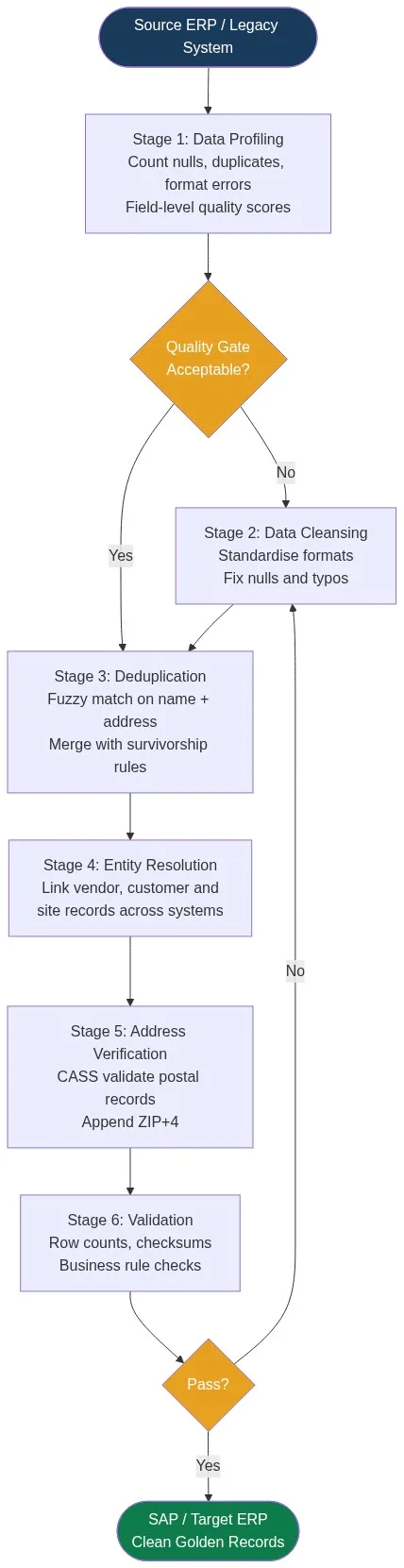
ERP data migration fails when dirty data moves with it. The technical steps most teams skip — profiling, deduplication, entity resolution, and address verification — determine whether go-live succeeds or collapses under duplicate vendors, mismatched customers, and invalid addresses. This guide covers the six data quality stages every migration team must complete before cutover.
Before you move a single record, run a full data profiling pass to understand exactly what you are dealing with. It will reframe your entire migration timeline.
Why Data Quality Determines Migration Outcomes
A vendor master with 40,000 records often contains 8,000 to 12,000 duplicates accumulated over years of manual entry across business units. A customer file migrated without deduplication can produce 15% to 25% duplicate accounts in the target system within the first week of go-live. Once dirty data lands in the new ERP, cleaning it is 3 to 5 times more expensive than cleaning it in the source.
The root causes are consistent: no enforced data standards at point of entry, multiple legacy systems feeding the same master file, and migrations that treat data quality as a post-go-live task. Teams underestimate the problem because row counts look reasonable. Row counts are not quality counts.
The Six Data Quality Steps Most Teams Skip
Step 1: Data Profiling
Profiling is the diagnostic stage. It tells you what is broken before you start fixing it. A thorough data profiling pass covers:
- Null and blank rates per field
- Format inconsistencies (dates as DD/MM/YYYY vs MM-DD-YYYY; phone numbers as 10 digits vs. with country code)
- Value distribution outliers — a ZIP code field with 30% of values longer than 10 characters signals address data mixed in
- Duplicate detection by key field combinations
Example output: a 200,000-row customer file reveals 18% null email addresses, 7% malformed phone numbers, and a 12% estimated duplicate rate. This defines scope before a single transformation rule is written.
Step 2: Data Standardisation and Cleansing
Standardisation resolves the format chaos that prevents matching. Before deduplication can work, field values must be normalised. Typical transformations include:
| Field | Raw Values | Standardised Output |
|---|---|---|
| Company name | “Acme Corp.”, “ACME CORPORATION”, “Acme Corp” | ACME CORPORATION |
| Phone | “(602) 555-1234”, “6025551234”, “+1-602-555-1234” | 16025551234 |
| State | “AZ”, “Arizona”, “az” | AZ |
| Country | “USA”, “United States”, “US” | US |
Match Data Pro’s data cleansing and standardisation engine applies field-type-aware rules in bulk. A 500,000-row vendor file processes in minutes, not weeks.
Step 3: Deduplication
Exact-match deduplication catches the obvious cases. Fuzzy matching catches the rest. In a vendor master, “Johnson Controls Inc.” and “Johnson Controls, Inc” are the same vendor. An exact match misses them. A weighted fuzzy score across name, address, and tax ID fields identifies them at a similarity threshold of 0.87.
Match Data Pro’s AI-powered deduplication engine uses configurable algorithms — Jaro-Winkler for names, token ratio for company strings, Levenshtein for codes — and applies survivorship rules to decide which field values survive into the golden record. Typically: most-recent non-null value wins, or the value from the most authoritative source wins.
Step 4: Entity Resolution Across Source Systems
Most ERP migrations pull from more than one legacy system. A customer in System A and what appears to be a different customer in System B may be the same legal entity. Without cross-system entity resolution, the target ERP inherits the same fragmentation.
Entity resolution links records across systems by scoring similarity across multiple fields simultaneously. Match Data Pro uses Senzing’s graph-based probabilistic engine under the hood. It handles name variants, address changes, and missing identifiers — assigning a persistent entity ID to every resolved group before migration. A typical run over 300,000 records from two legacy systems completes in 20 to 40 minutes.
Step 5: Address Verification
Postal addresses in legacy ERP systems accumulate errors at roughly 10% to 15% per year as contacts move and address formats drift. Migrating unverified addresses generates failed deliveries, returned mail, and downstream matching failures in the new system.
Match Data Pro’s CASS-certified address verification validates every US postal address against the USPS database, corrects street name spelling, standardises directionals and suffixes (St to Street, Ave to Avenue), and appends ZIP+4 codes. International records receive country-appropriate normalisation. A typical 200,000-address file processes in under 10 minutes.
Step 6: Validation and Reconciliation
Before cutover, validate that the transformed dataset meets the target system’s structural requirements and your own business rules. Checks to run:
- Row count reconciliation: source rows vs. deduplicated rows vs. loaded rows
- Key field completeness: vendor tax ID, customer account number, site postal code — all required fields present
- Business rule validation: no duplicate primary keys, no vendor records with blank payment terms, no customer records with invalid country codes
- Referential integrity: every order line references a valid customer and a valid product SKU
Any record that fails a mandatory check is quarantined for manual review, not loaded. Loading dirty exceptions hides the problem; it does not solve it.
The Cost of Skipping These Steps
A missed duplicate in the vendor master creates two payment records for the same invoice. An unresolved customer identity produces two accounts with separate credit limits and separate statements. An invalid postal address means returned correspondence and failed identity checks. These are not edge cases. On a 500,000-row migration, a 3% error rate means 15,000 problem records entering your new ERP on day one.
The structured data quality framework described above is not optional overhead. It is the difference between a go-live that runs and one that rolls back. Industry estimates consistently place the cost of post-migration data remediation at 3 to 5 times the cost of pre-migration cleaning.
Building a Repeatable Pre-Migration Pipeline
One-off data cleaning for a single migration does not scale. The same steps — profile, cleanse, deduplicate, resolve, verify, validate — need to run on every data load: initial migration, delta loads during parallel running, and ongoing master data maintenance post-go-live.
Match Data Pro’s job automation lets you schedule and chain these stages as a repeatable, auditable pipeline. Import a file or connect via API. Configure matching definitions and thresholds once. Run them on every subsequent delta load without re-configuring. The same pipeline that cleans the initial migration file runs automatically on every weekly refresh.
The same principles apply to CRM data migrations — the field types differ but the pipeline stages are identical and the consequences of skipping them are the same.
Ready to clean your migration data before it moves? Start a free trial of Match Data Pro — no contract, no setup fee, and your first dataset processes in minutes. Or book a demo to walk through the pipeline with your own sample data.
Frequently Asked Questions
What data quality steps are most important before an ERP data migration?
The six most critical steps are profiling, standardisation and cleansing, deduplication, entity resolution, address verification, and post-transform validation. Most migration failures trace back to skipping at least two of these — typically deduplication and entity resolution — because teams underestimate how many duplicate or fragmented records exist in legacy systems.
How long does pre-migration data cleansing take?
For a 500,000-row dataset, a complete profiling-to-validation cycle takes 2 to 5 days with the right tooling. Manual processes stretch this to weeks. Automated pipelines can profile, cleanse, deduplicate, and verify a 200,000-row file in under an hour, with the remainder of the time spent on review and sign-off by data owners.
What is entity resolution and why does it matter for ERP migrations?
Entity resolution links records that represent the same real-world entity across different source systems. In an ERP migration pulling from multiple legacy platforms, the same vendor or customer may appear in each source under slightly different names or addresses. Without entity resolution, these fragmented identities survive into the target system, causing split accounts, duplicate payments, and reporting errors from day one.
How do you handle duplicates in a vendor master before migration?
Run fuzzy matching across vendor name, address, and tax ID fields simultaneously. Set a similarity threshold — typically 0.82 to 0.90 depending on data quality — and route pairs above the threshold into a survivorship merge. The surviving record takes the most authoritative value for each field. Pairs below threshold go to a review queue. Match Data Pro handles this in a configurable matching definition without manual SQL scripting.
What is CASS address verification and do I need it for an ERP migration?
CASS (Coding Accuracy Support System) is a USPS certification program that validates and corrects US postal addresses against the official delivery database. For an ERP migration, CASS verification ensures vendor and customer addresses are deliverable, standardised, and enriched with ZIP+4 codes. Any downstream process — mail, logistics, tax jurisdiction lookups — depends on accurate address data from day one.