
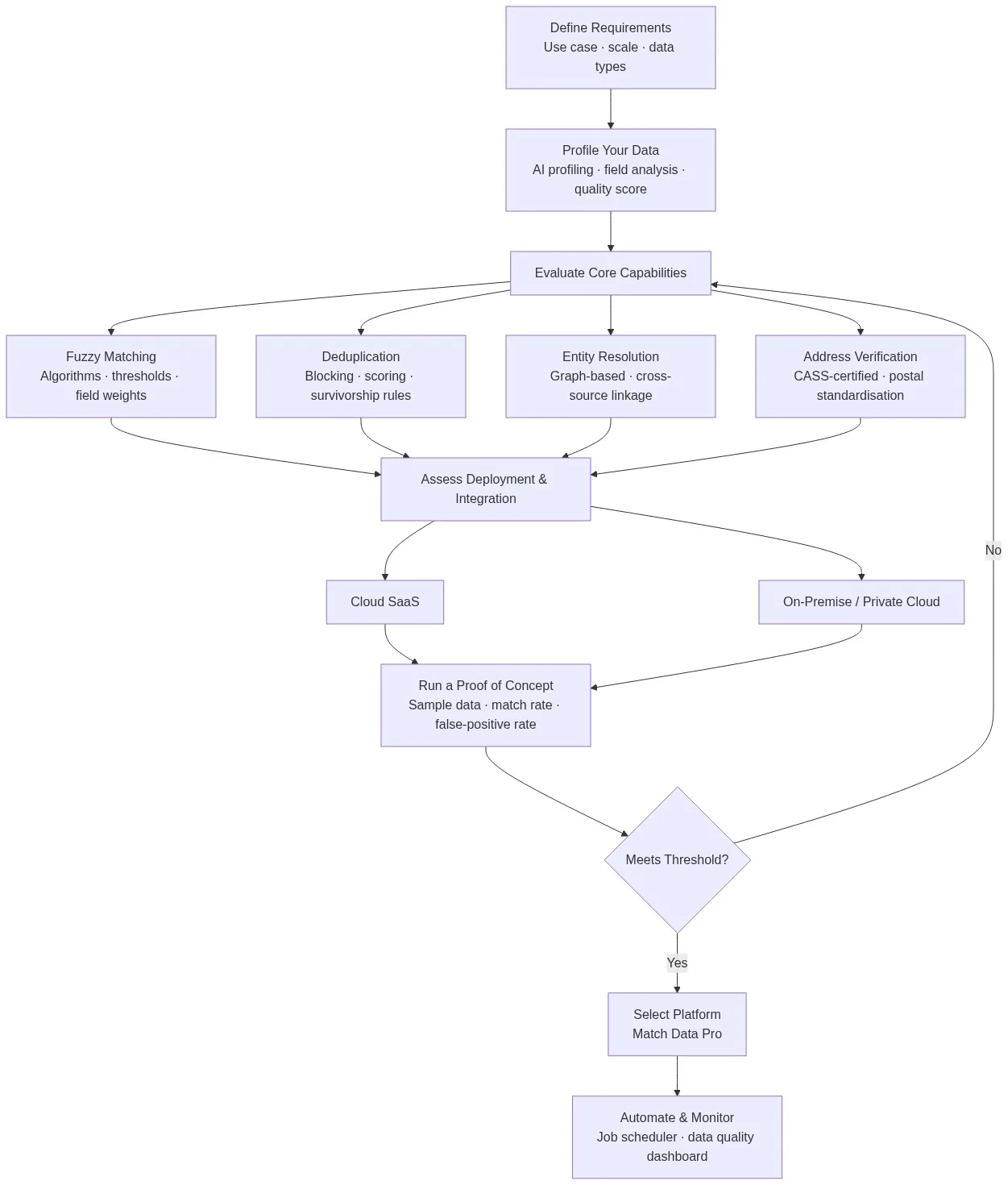
The right data matching tool eliminates duplicate records, links identities across systems, and delivers clean data to every downstream process. The wrong one wastes months of integration effort and produces match rates below 70%. This framework gives enterprise data teams a repeatable, five-stage method for evaluating, comparing, and selecting a data matching platform that fits their actual workload.
Ready to see how your data performs? Start a free trial of Match Data Pro and run a real proof of concept on your own records.
Why Data Matching Tool Evaluation Fails
Most teams evaluate tools on features, not outcomes. A vendor demo uses clean, curated sample data. Your production data has nickname variants, transposed digits, missing fields, and address abbreviations that break simplistic matching logic.
A 2024 Gartner survey found that 60% of data integration projects failed to meet match accuracy targets. The root cause in most cases was a mismatch between the platform selected and the actual data quality characteristics of the source systems.
Three common evaluation mistakes:
- Evaluating on sanitised demos — ask vendors to match a 10,000-record sample of your own data, not theirs.
- Focusing on UI over algorithms — a clean interface hides whether the underlying matching algorithms support configurable weights and multi-field scoring.
- Skipping scalability testing — tools that match 50,000 records in a minute may queue for hours at 50 million.
Stage 1: Define Your Requirements Before Touching a Demo
Write down your requirements before contacting any vendor. Requirements should cover four areas.
Data volume and velocity
How many records do you need to match? Are matches batch (nightly, weekly) or real-time (API, point-of-entry)? A CRM team processing 500,000 customer records weekly has different needs than a financial institution resolving entities across 40 million transactions per day.
Data types and field complexity
Name fields require phonetic and edit-distance algorithms. Address fields need postal parsing and CASS address verification. Company names need token-based matching that handles “Corp”, “Inc”, “LLC” variants. Free-text fields need normalisation before any scoring runs.
Source system count
Matching two lists is simpler than resolving identities across six source systems with no shared key. Cross-source matching requires a blocking strategy, composite scoring, and survivorship rules to merge matched records into a golden record.
Regulatory and audit requirements
Regulated industries — financial services, healthcare, insurance — need a full audit trail per match decision. Every score, every algorithm weight, every merge action must be traceable. Evaluate whether the platform logs match decisions by default or requires custom configuration.
Stage 2: Profile Your Data Before You Evaluate
Before you evaluate any tool, profile your source data. AI data profiling scans every field for completeness, format consistency, value distribution, and anomaly patterns. The output tells you exactly which data quality problems your matching pipeline must handle.
A profiling run on a typical B2B CRM reveals:
- 15–25% of company name fields contain abbreviations, punctuation variants, or truncations
- 8–12% of phone numbers have transposed digits or missing area codes
- 10–18% of address fields have non-standard unit suffixes (Ste vs Suite vs #)
- 4–7% of records have blank email fields but valid phone fields
This profile directly informs which algorithmic capabilities the tool must have. A platform that cannot handle field-level fallback logic — matching on phone when email is blank — will fail on a significant slice of your records before the evaluation even concludes.
Stage 3: Evaluate Core Matching Capabilities
This is where most evaluations spend too little time. Core matching capability is what separates tools that get 72% match rate from tools that get 94%.
Fuzzy matching algorithm coverage
Fuzzy matching is not a single algorithm. Each field type needs a different approach:
- Levenshtein / edit distance — best for short codes, product IDs, email local parts
- Jaro-Winkler — optimised for personal names where first characters matter more
- Phonetic (Soundex, Metaphone) — handles surname variants: “Smith” vs “Smyth”
- Token-based (TF-IDF, cosine) — handles company name variants: “Acme Corp” vs “ACME Corporation”
Ask vendors: can I configure a different algorithm per field? Can I set field-level weights so that an email match scores higher than a zip code match? Can I set confidence thresholds that route low-confidence pairs to manual review?
Deduplication pipeline depth
Evaluate the full data deduplication pipeline, not just the matching step. A complete pipeline includes: blocking (to reduce comparison pairs from N² to manageable), scoring, threshold routing, survivorship rules for field-level merge, and output to a golden record store.
Entity resolution across sources
If you match across more than two source systems, you need graph-based entity resolution — not just pairwise deduplication. Pairwise matching misses transitive matches: Record A matches Record B, Record B matches Record C, but Record A never directly touches Record C. Entity resolution collapses all three into one verified identity.
Stage 4: Assess Deployment, Integration, and Total Cost
Deployment model
Cloud SaaS deploys in hours and requires no infrastructure investment. On-premise or private cloud gives security-first teams full data custody. Evaluate both options against your data governance policy. Our deployment options guide covers the tradeoffs in detail.
Integration connectors
How does data get in and out? Native connectors to Salesforce, HubSpot, SAP, and Snowflake reduce integration effort. REST API access allows real-time matching at point of entry — critical for CRM record creation workflows where you want duplicates blocked before they enter the system, not cleaned up after.
Total cost of ownership
Vendor pricing rarely tells the full story. Add up: licensing fee (per seat, per record, or flat monthly), professional services for configuration, internal engineer time to maintain custom rules, and infrastructure costs if self-hosted. Our build vs. buy analysis shows that in-house matching solutions cost $300K–$800K over three years when engineering time is fully accounted for. A SaaS platform with monthly, no-contract pricing eliminates that exposure.
Stage 5: Run a Proof of Concept on Your Own Data
No evaluation is complete without a proof of concept (PoC) on a representative sample of your actual data. Use 50,000–100,000 records drawn from your production dataset. Give the same sample to every vendor you are evaluating.
Measure four outcomes from the PoC:
- Match rate — what percentage of true duplicates did the tool find?
- False positive rate — how many non-duplicate pairs were incorrectly flagged?
- Processing time — how long did the run take, and does it scale to 10x volume?
- Configuration effort — how many hours did your team spend tuning thresholds before acceptable results appeared?
A good platform should hit 90%+ match rate on clean data and 80%+ on raw, unprocessed data in a PoC run. False positive rates above 5% indicate the algorithm is too permissive and will create merge errors in production.
Match Data Pro is available on a free trial at members.matchdatapro.com — load your own data and run a full PoC in hours, not weeks. No contract, no infrastructure setup required.
Want to walk through the evaluation process with a data quality engineer? Book a demo and we will run the PoC together on your data.
Frequently Asked Questions
What is data matching software and what does it do?
Data matching software identifies records that refer to the same real-world entity across one or more datasets, using fuzzy scoring algorithms, blocking strategies, and survivorship rules to merge duplicates into a single authoritative record. It is used for CRM deduplication, entity resolution, record linkage, and master data management programs.
How do I evaluate data matching tools without a shared ID across systems?
Evaluate the platform’s blocking and fuzzy scoring capabilities. A tool that cannot match without a shared key must score composite similarity across name, address, phone, and email fields simultaneously. Run a PoC on your actual data with known duplicates to measure match rate and false positive rate before committing to a platform.
What match rate should I expect from a data matching tool?
Enterprise-grade platforms typically achieve 85–95% match rate on standardised data. On raw, unstandardised records the rate drops to 70–85% without pre-processing. Running an automated data cleansing and standardisation step before matching consistently pushes match rates above 90%, even on messy source data.
What is the difference between deduplication and entity resolution?
Deduplication removes duplicate records within a single dataset using pairwise comparison. Entity resolution links records across multiple source systems using graph-based clustering, handling transitive matches that pairwise deduplication misses. Most enterprise data quality programs need both: deduplication within each source, then entity resolution across sources.
How long does a data matching tool proof of concept take?
A structured PoC on 50,000–100,000 records takes 2–5 business days end to end: one day to load and profile data, one to two days for threshold tuning, and one day for results review. Cloud SaaS platforms with pre-built connectors compress this to hours. On-premise deployments add infrastructure setup time, typically 3–10 additional business days.