
Data deduplication software identifies duplicate records within a dataset, scores their similarity using configurable algorithms, and merges matched pairs into a single authoritative record. Most enterprise platforms run a six-stage pipeline: profiling, standardisation, blocking, fuzzy matching, survivorship, and golden record output. You need it when duplicate rates exceed 5% of your dataset, when records arrive from multiple systems with no shared identifier, or when downstream analytics and CRM reporting are producing inconsistent results.
Start a free trial of Match Data Pro and run your first deduplication job in minutes — no contract required.
What Data Deduplication Software Actually Does
The term “deduplication” covers several distinct operations. Understanding what each one does helps you configure the right pipeline and avoid false merges.
Duplicate detection
The software compares records and assigns a similarity score. Two records for “Jonathan Smith, 42 Oak Ave” and “Jon Smith, 42 Oak Avenue” might score 0.88 on a composite of Jaro-Winkler name matching and address token similarity. Records above a configured auto-match threshold (typically 0.90–0.95) are flagged as duplicates without human review.
Record blocking
Comparing every record against every other record at a million-row scale means roughly 500 billion comparisons. Blocking reduces this by grouping only records that share a key — a postcode prefix, phonetic surname code, or email domain. Match Data Pro’s AI-powered fuzzy matching engine applies multiple blocking keys in parallel to maximise recall without exploding runtime.
Survivorship and golden records
Once a duplicate pair is confirmed, survivorship rules determine which field values survive into the merged golden record. Common rules: take the most recently updated value, take the non-null value, take the longest string, or defer to a designated authoritative source system. Match Data Pro lets you configure these rules at the field level across any number of source systems.
The Six-Stage Deduplication Pipeline
The diagram below shows the full pipeline from raw ingestion to clean output.
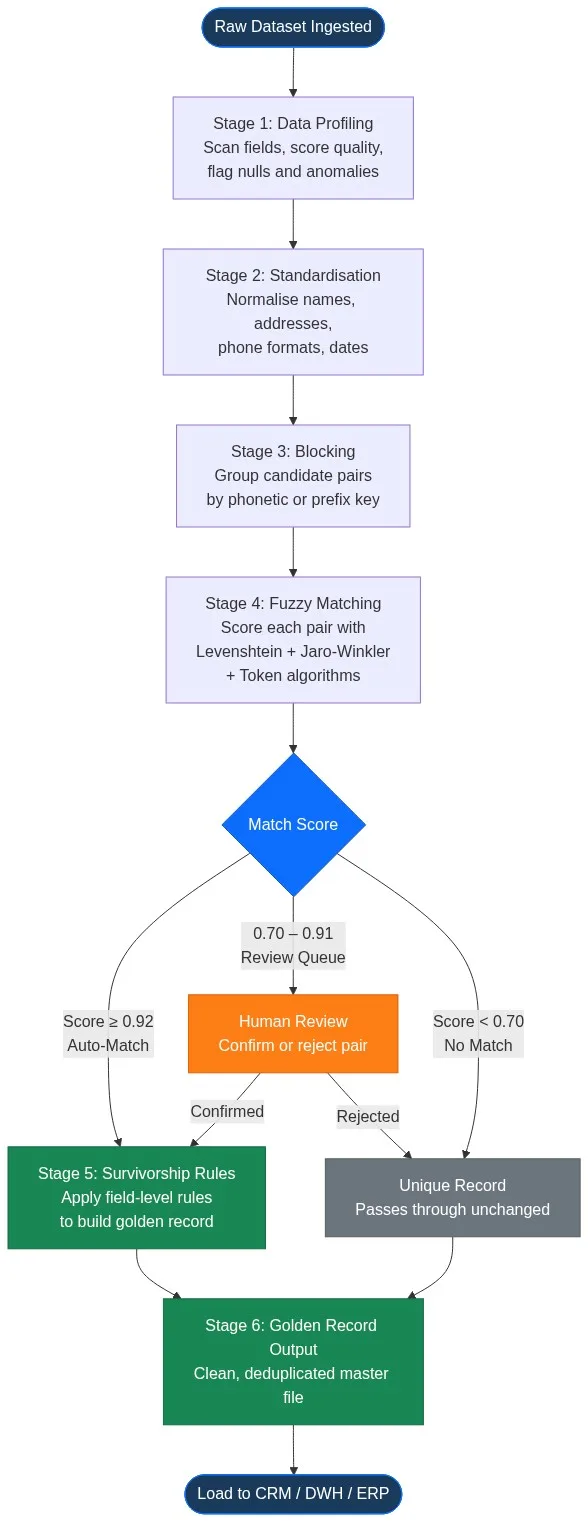
Stage 1: Data profiling
Before matching runs, AI data profiling scans every field for null rates, value distributions, format inconsistencies, and outliers. A profiling run on a 500,000-row CRM export typically surfaces: 12% null email addresses, 7% phone numbers formatted with country codes while others use local format, and 3% company names in ALL CAPS. These anomalies break naive exact matching and must be resolved before fuzzy scoring begins.
Stage 2: Standardisation
Standardisation normalises field values to a canonical form. Street address “123 Main Street Suite 400” becomes “123 MAIN ST STE 400”. Company name “International Business Machines Corp.” becomes “IBM”. Phone “(602) 555-0100” becomes “+16025550100”. Match Data Pro’s data cleansing and standardisation module handles name parsing, address parsing, phone normalisation, and date format unification in a single pass.
Stage 3: Blocking
Blocking generates candidate pairs without requiring an exhaustive cross-join. A typical configuration uses three blocking passes: exact postcode match, Soundex surname match, and email domain match. Any pair surfaced by at least one pass proceeds to scoring.
Stage 4: Fuzzy matching and scoring
Each candidate pair receives a composite score built from weighted algorithm outputs:
| Field | Algorithm | Weight |
|---|---|---|
| Full name | Jaro-Winkler | 35% |
| Address line 1 | Token Set Ratio | 25% |
| Phone number | Exact after normalisation | 20% |
| Email address | Exact / domain partial | 15% |
| Company name | Levenshtein normalised | 5% |
A pair scoring 0.92 on this composite is almost certainly a duplicate. A pair scoring 0.74 requires human review. A pair scoring below 0.65 is treated as distinct. Learn more about how fuzzy matching algorithms work and how to select the right one for each field type.
Stage 5: Survivorship rules
Survivorship logic builds the golden record. For a CRM-to-ERP merge scenario, the rules might be: take the CRM email (more frequently updated), take the ERP address (verified against CASS), take the longer company name, and take the non-null phone from either system. Match Data Pro’s survivorship and golden record merging module applies these rules in a single configurable pass.
Stage 6: Output and load
The deduplicated golden record file loads back to the target system via built-in import/export connectors for CRM, ERP, data warehouse, and flat file formats. A match audit log records every pair comparison, the score, the algorithm weights used, and the survivorship decisions applied — giving you a full audit trail for governance and compliance.
When Do You Actually Need Deduplication Software?
Not every data quality problem requires a dedicated deduplication platform. Here are the thresholds that typically justify the investment.
Dataset size and duplicate rate
Below 10,000 records with a clean input source, manual review or a basic Excel VLOOKUP may be sufficient. Once you cross 50,000 records, manual deduplication is no longer viable. At 500,000 records and a 5% duplicate rate, you have 25,000 duplicate pairs — each requiring a merge decision. Automated fuzzy matching with a configured review queue handles this in hours rather than weeks.
Multiple source systems
If records originate from more than one system — CRM plus marketing platform plus ERP — you have no shared primary key. Deduplication software uses probabilistic matching across shared attributes (name, address, phone, email) to link records that no SQL join can connect. Read our guide on matching records across multiple systems without a shared identifier for the full technical approach.
Ongoing data intake
Deduplication is not a one-time project. New records enter daily through web forms, imports, and integrations. Match Data Pro’s job automation runs scheduled deduplication jobs on new record batches, or surfaces duplicates in real time via the live fuzzy search API as records are created.
Evaluating Data Deduplication Software: Six Criteria
When assessing platforms, focus on these six capabilities rather than feature lists.
1. Algorithm configurability
No single algorithm works for all field types. Name matching needs Jaro-Winkler or phonetic algorithms. Address matching needs token-based or edit-distance approaches. Phone and email matching needs normalisation before comparison. A good platform lets you assign a different algorithm and weight to each field independently.
2. Blocking strategy
Blocking determines what the engine never compares. A poor blocking strategy misses real duplicates. Look for multi-pass blocking that combines phonetic, prefix, and field-value keys. Also confirm the platform can handle cross-dataset blocking — not just within a single file.
3. Threshold transparency
You need to see individual pair scores, not just match/no-match decisions. When a borderline pair scores 0.81, you need to understand which fields pulled the score down and why. Explainable match decisions are non-negotiable for regulated industries and governance-conscious teams.
4. Survivorship rule flexibility
Hardcoded merge rules — “always keep the newest record” — produce bad golden records. Field-level survivorship rules that can vary by source system trust level, field type, and recency are the correct approach. Confirm the platform supports this before committing.
5. Scale and performance
Ask vendors for benchmark numbers at your expected record volume. A platform that handles 100,000 records in a UI is not guaranteed to handle 10 million records via API. Match Data Pro processes tens of millions of record comparisons per job through parallelised cloud infrastructure — no infrastructure provisioning required from your side.
6. Integration and automation
A deduplication run you have to trigger manually is a deduplication run that gets skipped. Look for scheduled job automation, webhook triggers, and REST API access. Match Data Pro’s job scheduler runs deduplication on configurable cadences and can push clean records to downstream systems automatically via its connector library.
CRM Deduplication: A Worked Example
A RevOps team at a B2B SaaS company imports 80,000 contacts from an acquired company into their existing 200,000-contact Salesforce instance. They expect 15–20% overlap.
Step 1: Profile both datasets. The acquired company’s data has 22% missing email addresses and inconsistent phone formatting (some with +1 country codes, some without). The existing CRM has 4% duplicate emails within itself.
Step 2: Standardise both datasets — phone normalisation, name title removal, address parsing.
Step 3: Run blocking on email domain, postcode, and Soundex last name.
Step 4: Score 340,000 candidate pairs. 18,400 score above 0.90 (auto-merge). 6,200 score 0.70–0.89 (review queue). 315,400 score below 0.70 (distinct).
Step 5: Apply survivorship rules: CRM email wins, acquired company phone wins where CRM phone is null, longer company name wins.
Step 6: Load 261,600 clean, deduplicated contacts back to Salesforce. The cost of those 24,600 removed duplicates in wasted marketing spend, inflated CRM licenses, and duplicated outreach was estimated at $180,000 per year.
Ready to run this on your own data? Register for a free trial of Match Data Pro and upload your first dataset today. No contract, no infrastructure setup required. Or book a 30-minute demo and we will walk through your specific use case.
Frequently Asked Questions
What is data deduplication software?
Data deduplication software identifies records within a dataset that represent the same real-world entity and merges them into a single authoritative record. It uses fuzzy matching algorithms to detect near-duplicates — records that differ due to typos, abbreviations, or formatting — not just exact string matches. Enterprise platforms handle millions of records through automated pipelines with configurable thresholds and survivorship rules.
How does fuzzy matching differ from exact matching in deduplication?
Exact matching flags two records as duplicates only if every compared field is identical character-for-character. Fuzzy matching assigns a similarity score between 0 and 1 using algorithms like Jaro-Winkler, Levenshtein, and token-based methods. A fuzzy match catches “Jon Smith” and “Jonathan Smith” as likely duplicates; an exact match does not. Most enterprise deduplication software uses a composite weighted score across multiple fields.
What duplicate rate justifies investing in deduplication software?
A duplicate rate above 3–5% in a dataset larger than 50,000 records typically justifies automated deduplication software. At that scale, manual review is not viable. For organisations with multiple source systems feeding a CRM or data warehouse, even a 1–2% duplicate rate creates material reporting errors and operational costs — particularly in marketing spend, CRM licensing, and compliance screening.
What are survivorship rules in deduplication?
Survivorship rules determine which field values from a matched duplicate pair are retained in the merged golden record. For example: keep the most recently updated email address, keep the non-null phone number, keep the longer company name, prioritise address data from the system verified against a postal database. Good deduplication software lets you configure these rules at the field level for each source system independently.
Can deduplication software run continuously, not just as a one-time job?
Yes. The best platforms support scheduled batch jobs that run on new record ingestion — daily, hourly, or triggered by a webhook. Some also expose a real-time fuzzy search API that checks for duplicates at point of entry, before a new record is committed to the database. Match Data Pro supports both batch job automation and a live fuzzy search API for point-of-entry deduplication.