

Data matching and merging is the two-stage process of identifying records that refer to the same real-world entity across disconnected systems, then consolidating them into a single authoritative record. Done correctly, it eliminates duplicates, closes data gaps, and produces a golden record your analytics, compliance, and operations teams can trust. Done incorrectly, it creates phantom merges, destroys valid distinctions, and corrupts the downstream systems that depend on clean input.
Most organisations run data matching and merging as separate, uncoordinated steps: a matching job that flags likely duplicates, and a manual merge process that someone runs quarterly. That approach does not scale. At 50,000 records it is manageable. At 500,000, it breaks. This guide walks through the complete pipeline, from raw input to verified golden record, with concrete examples at each stage.
Ready to see it in action on your own data? Start a free trial of Match Data Pro and run your first matching job in minutes.
Why Matching and Merging Must Be Treated as One Pipeline
Matching without merging produces a list of probable duplicates that no one acts on. Merging without matching produces random consolidations that destroy valid records. The two operations must be sequenced, with matching generating scored candidate pairs and merging consuming those pairs according to explicit survivorship rules.
IBM describes the core challenge directly: data matching and linking is “the method of identifying, merging, and resolving duplicate or redundant data” — a single integrated operation, not two separate tasks.
The practical consequence: every matching platform needs a merge component, and every merge component needs to know the confidence score produced by the matching engine. A score of 97 warrants an auto-merge. A score of 74 warrants a human review queue. A score of 52 warrants no action. Those thresholds are configuration decisions, and they depend entirely on the precision of the matching output.
The cost of separating them
Consider a CRM with 400,000 contact records. A standalone deduplication scan flags 22,000 candidate pairs. Without a connected merge workflow, those 22,000 pairs sit in a spreadsheet. Six months later, 15,000 of them are still unactioned. Meanwhile, marketing sends duplicate campaigns, sales works stale records, and finance reconciles conflicting revenue figures. The matching step produced information. The absence of a merge pipeline meant that information was never used.
The 7-Stage Data Matching and Merging Pipeline
Here is the complete pipeline, from raw input to clean golden record. Each stage produces a defined output that feeds the next.
Stage 1: Data Profiling
Before matching begins, profile every source dataset. Profiling measures completeness (what percentage of records have a value in each field), cardinality (how many distinct values), format compliance, and outlier frequency. A field with 40% null values cannot be a primary match key. A field with format errors in 30% of records needs standardisation before it can be scored.
Match Data Pro’s AI data profiling tool automates this analysis, flagging every field-level quality issue before the matching job runs.
Stage 2: Standardisation
Raw records carry inconsistent formats. Names arrive as “Robert Smith”, “R. Smith”, “Smith, Robert”. Phone numbers appear as “(602) 555-0100”, “6025550100”, “+1-602-555-0100”. Addresses show “123 Main St Ste 4”, “123 Main Street Suite 4”, “123 MAIN ST #4”. None of these pairs will score well under a character-level similarity algorithm without normalisation first.
Standardisation converts all fields to a canonical form: uppercase, punctuation stripped, abbreviations expanded, phone numbers reduced to digits. This single step typically raises match recall by 20 to 35 percent on real-world datasets. For a detailed breakdown, see Match Data Pro’s data standardisation guide.
Stage 3: Blocking
Blocking limits the comparison space. With 500,000 records, a full pairwise comparison requires 125 billion comparisons. Blocking groups records by a shared key — first three letters of surname, ZIP code prefix, phone area code — and only compares records within the same block. Well-configured blocking typically reduces the comparison space by 99.5% while retaining 98%+ of true matches.
Stage 4: Multi-Algorithm Fuzzy Scoring
Each candidate pair is scored across multiple algorithms simultaneously. Different algorithms perform differently on different field types:
| Field Type | Recommended Algorithm | Why |
|---|---|---|
| Person name | Jaro-Winkler | Weights prefix matches, handles transpositions |
| Company name | Token Sort Ratio | Handles word-order variations (“Inc” vs “Incorporated”) |
| Address line | Levenshtein + CASS pre-verification | Edit-distance on standardised USPS form |
| Phone number | Exact match on digit string | No ambiguity after normalisation |
| Exact match (domain fuzzy) | Catch typos like gmial.com | |
| Free-text notes | Cosine similarity / TF-IDF | Token frequency over bag-of-words |
Field-level scores are combined into a composite match score (0–100) using configurable weights. Name typically carries 35–40% of the weight; address 25–30%; phone and email 15–20% each. The final score drives routing: auto-match, human review, or auto-reject.
See Match Data Pro’s guide to fuzzy matching algorithms, scoring, and thresholds for a full treatment of composite scoring configuration.
Stage 5: Threshold Routing
Threshold routing converts the composite score into an action:
- Score 90–100: Auto-merge. High confidence, no human review required.
- Score 70–89: Route to review queue. Present side-by-side field comparison to a data steward.
- Score 50–69: Flag for investigation. Likely match but insufficient evidence for auto-action.
- Score below 50: Auto-reject. Not the same entity.
These thresholds are starting points, not universal constants. Calibrate them against a labelled sample of your own records before deploying at scale. A healthcare organisation matching patient records will set a higher auto-merge threshold (95+) than a retail CRM matching customer contacts (88+). The cost of a false merge differs dramatically between domains.
Stage 6: Merge and Survivorship
Merge rules determine which field value survives when two records are consolidated. Survivorship is not just “pick the most recent record”. It is a field-level decision that considers recency, source authority, completeness, and validation status.
Example survivorship logic for a customer record merge:
| Field | Survivorship Rule | Rationale |
|---|---|---|
| Legal name | Source = ERP (highest authority) | ERP has contract-verified name |
| Preferred name | Most recent non-null value | CRM updates more frequently |
| Primary address | CASS-verified value wins | Postal verification = higher confidence |
| Phone | Most recent non-null value | Recency proxy for accuracy |
| Last successfully delivered | Deliverability = validation signal | |
| Revenue | Highest non-null value | Conservative estimate reduces missed opportunities |
Match Data Pro’s merge purge platform allows field-level survivorship rules to be configured without code, applied consistently across every merge operation, and logged for audit.
Stage 7: Golden Record Output and Monitoring
The merge produces a golden record: a single consolidated entity with the best-available value in every field, a lineage reference to every source record, and a confidence score. The golden record is written back to the master system and the source records are either soft-deleted or flagged as merged-into.
Monitoring closes the loop. New records arriving in source systems are scored against the golden record master in near-real-time, preventing re-duplication. Drift detection flags records where field values deviate from the golden record’s known-good value, triggering a re-verification job. This is covered in depth in Match Data Pro’s post on data quality monitoring and drift detection.
The Pipeline in Diagram Form
The following flowchart illustrates all seven stages, from raw address input through CASS verification, fuzzy matching, deduplication decision, survivorship merge, and final golden record output.
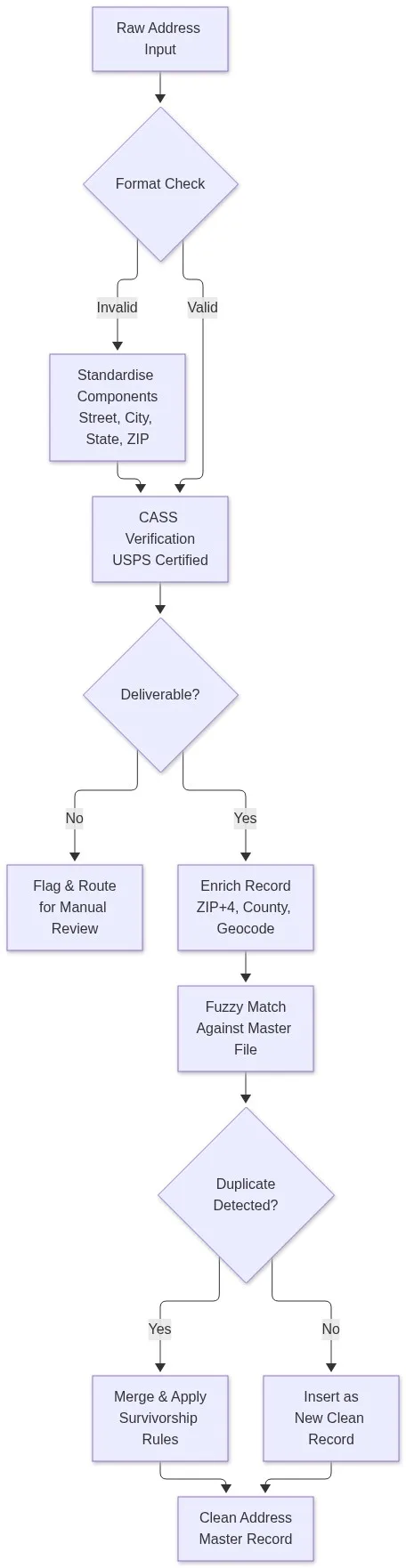
Address Data: The Hardest Field to Match and Merge
Address fields fail more matching jobs than any other data type. The same physical location can be represented in dozens of valid formats, all of which are semantically identical but score poorly under character-level algorithms:
- 123 Main Street, Suite 400
- 123 Main St Ste 400
- 123 MAIN ST #400
- 123 Main St., Unit 400
- 123 Main St, 4th Floor
The correct approach is to run CASS-certified address verification before any fuzzy scoring. CASS (Coding Accuracy Support System) is the USPS standard for address standardisation. It parses the address into components, looks up the correct USPS delivery point, and returns a standardised form with ZIP+4 code. After CASS processing, all five variants above become “123 MAIN ST STE 400 ANYTOWN AZ 85001-1234” — an exact match.
Match Data Pro’s address matching platform integrates CASS verification directly into the matching pipeline, so address standardisation runs automatically before fuzzy scoring begins. For international addresses, a similar parsing and normalisation step runs against country-specific postal databases.
For a comprehensive treatment of address data quality, see the Match Data Pro guide on modern data cleansing techniques.
Common Failure Modes and How to Prevent Them
Even well-designed pipelines fail in predictable ways. Here are the five most common failure modes and the configuration fix for each.
1. Over-merging on a single high-confidence field
A phone number match of 100 triggers an auto-merge even when the name is “John Smith” vs “Mary Johnson”. Fix: require a minimum composite score, not any single field score, to trigger auto-merge. Phone alone should never exceed 20% weight.
2. Under-matching due to unstandardised input
“Robert Smith” and “Bob Smith” score 61 on Levenshtein and miss the auto-match threshold. Fix: load a nickname expansion table before scoring. “Bob” maps to “Robert”, raising the name score to 94. Match Data Pro’s post on managing nicknames and name variants in entity matching covers this in detail.
3. Blocking too aggressively
A blocking key of “exact ZIP code” misses matches where the ZIP was entered incorrectly. Fix: use phonetic blocking (Soundex or Double Metaphone on surname) as a secondary key alongside ZIP, and test block coverage on a labelled sample before production deployment.
4. No survivorship rules, defaulting to “last record wins”
“Last record wins” is the default in many systems and is almost always wrong. The most recently modified record is not necessarily the most accurate. Fix: define explicit field-level rules as described in Stage 6 above, and enforce them through the platform rather than leaving them to ad-hoc SQL updates.
5. No monitoring after the initial merge run
A one-time deduplication job produces a clean file that re-corrupts within 90 days as new records arrive. Fix: deploy continuous matching as an automated job that scores every incoming record against the golden record master. Match Data Pro’s automated data cleansing and job automation capabilities handle this without manual scheduling.
Data Matching and Merging Across Systems: CRM, ERP, and Marketing
The pipeline above applies to any domain, but the configuration details differ significantly by system type.
CRM systems typically hold the richest contact data but accumulate duplicates fastest due to manual entry and import processes. The primary match keys are name, email, and phone. Address is secondary. Auto-merge thresholds can be set at 88–92 because false merges are recoverable. For a detailed CRM-specific guide, see CRM data cleansing.
ERP systems hold vendor and customer master data where false merges have financial consequences. Merge thresholds should be higher (93–97) and human review queues should be used for any score below 97. Tax ID and company registration number, when available, should be used as exact-match deterministic keys before fuzzy scoring begins.
Marketing databases often contain list imports from third-party sources with no shared identifier. Matching relies almost entirely on fuzzy scoring across name, address, and email. The primary risk is under-matching rather than over-merging, because the cost of sending the same person two emails is lower than the cost of merging two distinct contacts. Thresholds can be relaxed slightly (85–88). See marketing data quality for a full treatment.
When matching spans all three systems simultaneously — CRM, ERP, and marketing — the entity resolution layer becomes critical. Match Data Pro’s entity resolution guide explains how to link the same entity across systems where the same person appears under different identifiers in each.
Start Matching and Merging Your Data Today
Match Data Pro provides a complete data matching and merging pipeline: AI-powered fuzzy scoring, configurable survivorship rules, CASS address verification, entity resolution via Senzing, and automated job scheduling — in one platform, available as cloud SaaS or on-premise. No contract required.
- Start a free trial and run your first matching job on your own data today.
- Book a demo with a data engineer who will walk through your specific use case.
- Contact the sales team directly at sales@matchdatapro.com for enterprise pricing and on-premise deployment options.
Frequently Asked Questions
What is the difference between data matching and data merging?
Data matching identifies records across datasets that refer to the same real-world entity, producing a scored candidate pair. Data merging consolidates those matched pairs into a single golden record using survivorship rules that determine which field value is retained. Matching generates candidates; merging acts on them. Both must be part of the same pipeline for the process to have operational value.
How do survivorship rules work in a data merge?
Survivorship rules define which field value is retained when two matched records are merged. Rules can be based on source authority (ERP value wins over CRM), recency (most recently updated non-null value survives), validation status (CASS-verified address wins), or completeness (most populated record wins). Rules are set at the field level, not the record level, so different fields within the same merge can follow different logic.
What match score threshold should I use for auto-merge?
A starting threshold of 90–95 on a 0–100 composite score is appropriate for most datasets. High-stakes domains like healthcare or finance should set thresholds at 95+ and route borderline scores to human review. Calibrate against a labelled sample of at least 500 known-match and known-non-match pairs from your actual data before committing to a production threshold. Never use default thresholds without domain-specific validation.
Can data matching and merging run in real time, or only in batch?
Both modes are valid and serve different purposes. Batch matching processes large historical datasets overnight or on a scheduled cadence. Real-time matching scores each incoming record against the master file at the point of creation, preventing duplicates from entering the system. Production pipelines typically use real-time matching for new record ingestion and scheduled batch jobs for periodic full-file reconciliation runs.
What is the role of entity resolution in data matching and merging?
Entity resolution extends data matching and merging across multiple systems simultaneously. While standard matching links duplicate records within a single dataset, entity resolution links records that represent the same person, company, or location across CRM, ERP, marketing, and other source systems — even without a shared identifier. It is the final layer of a multi-system data quality pipeline and is essential for building a true single source of truth.