
Master data cleansing delivers measurable results within days of implementation when you follow a structured six-stage pipeline: profile first, standardise fields, deduplicate with fuzzy matching, resolve entities across sources, verify addresses, and automate ongoing refresh. Teams that skip any of these stages typically recleanse the same data within six months. This guide shows you exactly what to do at each stage to get clean, trusted master data fast.
Ready to see how quickly your master data can be cleaned? Start a free trial of Match Data Pro and run your first cleansing job in under an hour.
Why Master Data Is So Hard to Cleanse
Master data — customers, vendors, products, locations — accumulates errors from every system that touches it. A customer entered in your CRM as “Acme Corp.” appears in the ERP as “ACME Corporation” and in the legacy billing system as “Acme Corp” (no period). These are three records for one entity. Multiply that across 500,000 accounts and the problem becomes structural, not cosmetic.
Three root causes drive most master data quality failures:
- No input validation at source. Systems accept free-text name fields, inconsistent phone formats, and unverified addresses on entry.
- Multiple system ownership. Sales creates records in the CRM. Finance creates them in the ERP. Neither system checks the other.
- No automated deduplication. Manual review does not scale past a few thousand records. Duplicates compound over months and years.
The result: your reporting tools, marketing campaigns, and operational workflows all operate on conflicting versions of the same entity. The only fix is a systematic cleansing pipeline applied directly to the master data layer.
The Six-Stage Master Data Cleansing Pipeline
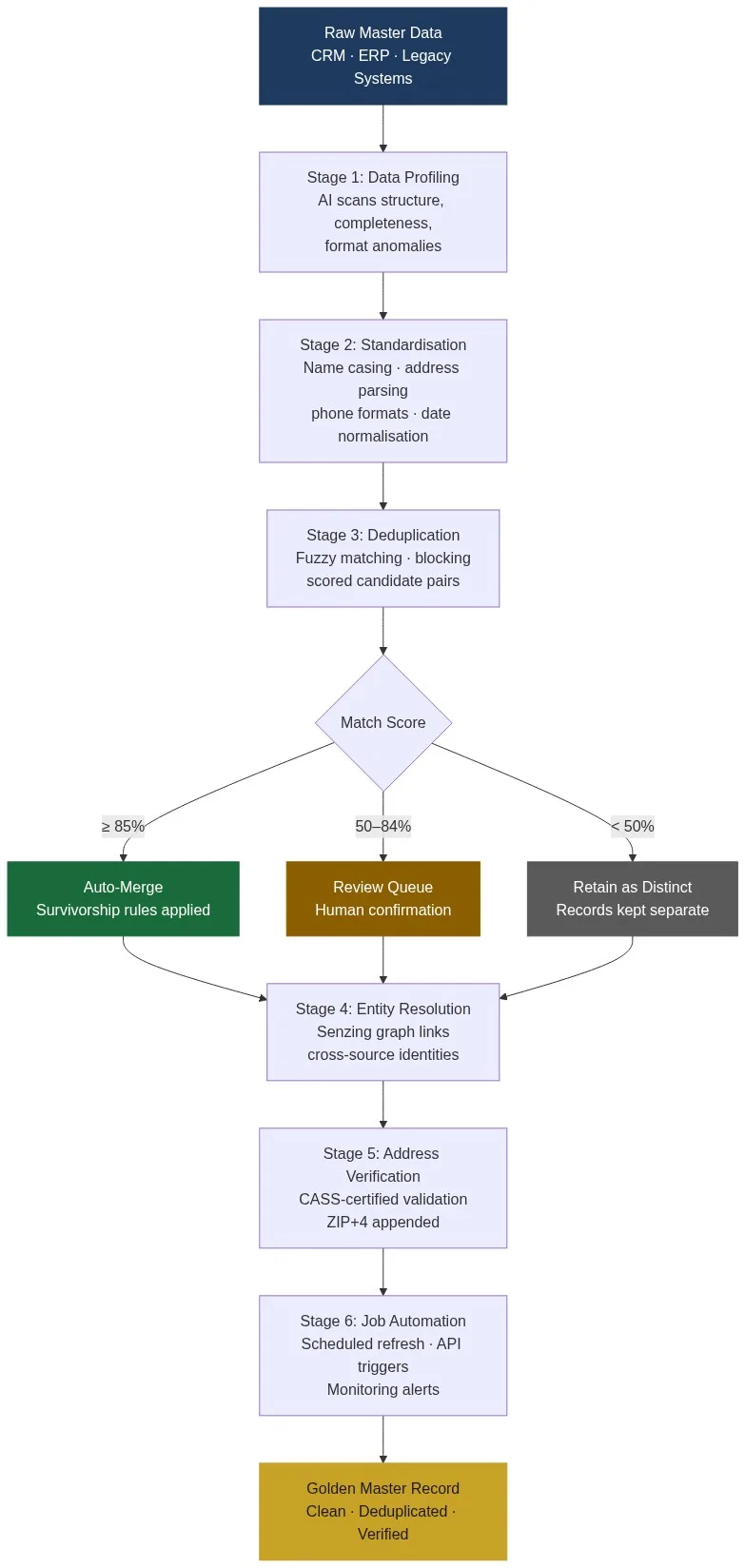
The diagram below maps the full pipeline from raw master data to a verified golden record. Each stage feeds the next; errors not caught early become harder and more expensive to fix downstream.
Stage 1: Data Profiling
Data profiling is the mandatory first step. Before you clean anything, you need a precise count of what is broken. Match Data Pro’s AI profiling engine scans every column and returns: null rate, distinct value count, format distribution, and cross-field anomalies. A profile of a 200,000-row customer file typically surfaces issues like:
- 18% of phone fields contain non-numeric characters or wrong digit counts
- 11% of postal codes are truncated (4 digits instead of 5)
- 6% of company names contain placeholder text (“N/A”, “TBD”, “test”)
- 23% of records have no email address populated at all
These numbers define your cleansing scope before any work begins. They also give you the baseline metrics to measure improvement at the end.
Stage 2: Standardisation
Data standardisation converts inconsistent field values into a canonical format so matching algorithms can compare like with like. Without it, “St.” and “Street” block valid matches. Key transformations for master data include:
| Field | Raw value | Standardised value |
|---|---|---|
| Company name | ACME corp. | Acme Corp |
| Phone | (555) 867-5309 ext. 12 | +15558675309 |
| State | Cal. | CA |
| Address suffix | Blvd | Boulevard |
| Date | 03/15/24 | 2024-03-15 |
Standardisation is rule-based and fast. A well-configured job on a 500,000-row file completes in minutes. The output is a dataset where matching algorithms can operate at maximum accuracy.
Stage 3: Deduplication with Fuzzy Matching
Deduplication is where most teams underestimate complexity. Exact-match deduplication — WHERE name = name — catches fewer than 40% of true duplicates in a typical master dataset. The remainder require fuzzy matching: scoring the similarity between fields rather than requiring identical strings.
Match Data Pro applies a weighted, multi-algorithm approach. For a customer record, the engine scores:
- Company name — Jaro-Winkler for prefix similarity, token sort ratio for word-order variants (weight: 35%)
- Address — parsed field matching on street number, street name, and ZIP (weight: 30%)
- Phone — exact match on normalised E.164 format (weight: 20%)
- Email domain — exact match on domain portion (weight: 15%)
Pairs scoring at or above 85 auto-merge. Pairs between 50 and 84 go to a review queue. Below 50, records are retained as distinct entities. Thresholds are configurable per domain. A customer domain might use 85 as the auto-merge floor; a vendor domain with shorter names might use 80.
Stage 4: Entity Resolution
Deduplication finds duplicates within a single dataset. Entity resolution links the same real-world entity across multiple source systems — connecting the CRM record to the ERP record to the billing record, even when they share no common identifier.
Match Data Pro integrates Senzing, a graph-based entity resolution engine. Senzing builds a resolution graph that links records into entity clusters. A single customer like “Globex Manufacturing” might appear across four systems with four different account numbers, but Senzing resolves all four into one entity node. This step is essential when you are cleaning master data that spans more than one source system.
Stage 5: Address Verification
CASS-certified address verification validates and corrects postal records against the USPS database. This step does four things that profiling and standardisation cannot:
- Confirms the address is deliverable (not just correctly formatted)
- Appends the ZIP+4 extension for precision routing
- Corrects transposed street numbers and misspelled street names
- Flags addresses that exist but are vacant or undeliverable
For a 200,000-record master file, CASS verification typically finds 8–15% of addresses that need correction. Missing or wrong addresses break billing runs, direct mail campaigns, and field operations routing.
Stage 6: Automation and Ongoing Monitoring
A one-time cleanse degrades within weeks as new records enter the system. The final stage is automation: scheduling cleansing jobs to run on a defined cadence and wiring alerts to catch quality drift between runs.
Match Data Pro’s job automation layer lets you configure:
- Scheduled batch jobs — nightly or weekly full-file cleans for CRM and ERP exports
- API-triggered jobs — the live fuzzy search API catches duplicates at the point of entry, before they reach the master dataset
- Threshold alerts — email or webhook notifications when null rate or duplicate rate exceeds a defined ceiling
Common Mistakes That Slow Down Master Data Cleansing
Most teams that struggle to get results from a master data cleansing program make one of four repeatable mistakes.
Mistake 1: Skipping the Profile Step
Teams jump straight to deduplication without measuring the data first. The result is a matching job configured for the wrong field weights — phone matching weighted heavily in a dataset where 30% of phones are missing. Profiling takes 20 minutes. Skipping it costs days of rework.
Mistake 2: Using Only Exact Matching
SQL-based deduplication with exact string comparison misses the majority of real duplicates. “Johnson & Johnson” versus “Johnson and Johnson” versus “J&J Corp” are all the same entity. Exact matching returns three distinct records. Only fuzzy matching connects them.
Mistake 3: Merging Without Survivorship Rules
Merging duplicate records without defined survivorship rules overwrites good data with bad. If the ERP record has a verified address and the CRM record has a placeholder, the merge must know to prefer the ERP address. Survivorship rules define which source wins field by field: most recent, most complete, highest-trust source, or a custom priority stack.
Mistake 4: Treating Cleansing as a One-Off Project
A 90-day cleansing project that produces a clean file and then stops is wasted investment. Without ongoing data quality monitoring and automated re-cleansing, the file degrades to its previous state within a quarter. Treat master data cleansing as a continuous process, not a project.
How to Get Results Quickly: A 30-Day Execution Plan
Speed matters when a sales team is working from duplicate accounts or a finance team is reconciling fragmented vendor records. Here is a realistic 30-day plan for a team working on a master dataset of up to 1 million records.
| Week | Activity | Expected output |
|---|---|---|
| Week 1 | Profile all source files. Map fields across systems. | Quality baseline report. Field mapping document. |
| Week 2 | Standardise names, phones, states, dates. Run CASS on addresses. | Standardised file. Address correction report. |
| Week 3 | Configure and run fuzzy deduplication. Review mid-range matches. | Deduplicated master file. Review queue resolved. |
| Week 4 | Run entity resolution across systems. Configure automation jobs. | Unified golden records. Scheduled monitoring active. |
Week 3 is typically where teams see the most visible impact: duplicate account counts drop by 15–40%, dashboards stop showing inflated customer totals, and marketing suppression lists shrink to accurate sizes. The key is having the platform configured and ready before week 1 ends — not spending three weeks on procurement.
Match Data Pro is a cloud SaaS platform with no contract and a free trial available at members.matchdatapro.com. Most teams complete onboarding and run their first profiling job in under an hour. Want to walk through your dataset first? Book a demo with our data quality team and we will map the pipeline to your specific sources.
Measuring Success: Metrics That Matter
Results are only visible if you measure the right things before and after. Track these five metrics at each stage of the pipeline:
- Duplicate rate — percentage of records that are copies of another record. Baseline versus post-deduplication.
- Null rate by field — percentage of records with empty values in required fields (email, phone, company name).
- Address deliverability rate — percentage of addresses validated as deliverable by CASS.
- Cross-system match rate — percentage of records successfully linked across two or more source systems by entity resolution.
- Clean record rate — composite score: records that pass all validation rules, have no duplicates, and have a verified address.
Report these metrics in your profiling output before the project begins, then again after each stage completes. A well-executed pipeline typically produces: duplicate rate reduced by 60–80%, address deliverability above 92%, and clean record rate above 85%.
Frequently Asked Questions
What is master data cleansing?
Master data cleansing is the process of detecting and correcting errors, inconsistencies, and duplicates in a shared master dataset — such as customer, vendor, or product data — that multiple systems and teams rely on. It covers standardisation, deduplication, entity resolution, and address verification, typically resulting in a single verified golden record per entity.
How long does master data cleansing take?
A structured pipeline on a dataset of up to 1 million records typically delivers a clean output within 30 days, including profiling, standardisation, deduplication, entity resolution, and address verification. Larger datasets or more source systems extend the timeline. Automation of ongoing refresh keeps the data clean indefinitely after the initial cleanse.
What is the difference between data cleansing and data standardisation?
Data standardisation converts field values to a canonical format — for example, converting all phone numbers to E.164 international format. Data cleansing is broader: it includes standardisation, but also covers removing duplicates, correcting invalid values, filling gaps, and verifying records against external sources such as postal databases. Standardisation is one step within the cleansing pipeline.
How does fuzzy matching improve master data deduplication?
Fuzzy matching scores the similarity between field values rather than requiring identical strings. It catches duplicates that exact matching misses — name misspellings, abbreviations, punctuation differences, and word-order variants. In a typical master dataset, exact matching catches fewer than 40% of true duplicates; fuzzy matching with weighted multi-field scoring typically recovers 85–95% of them.
What are survivorship rules in master data management?
Survivorship rules define which field value wins when two or more duplicate records are merged. For example: prefer the most recently updated phone number, prefer the CRM address over the ERP address, prefer the non-null email. Without survivorship rules, merging duplicates risks overwriting accurate values with placeholder data. They are configured per field and per source system priority.