
When two companies merge, their customer databases do not automatically combine into a clean master file. Post-merger customer deduplication is the process of identifying and collapsing duplicate records across two separate CRM or operational databases — producing one authoritative, deduplicated customer list that both organisations can work from immediately after close. The overlap is almost always larger than integration teams expect: shared customers, partners who appear in both systems, and contacts captured at industry events can account for 15–40% of combined record counts. Without a structured deduplication process, every downstream system — billing, marketing, support — operates on conflicting data.
Book a demo to see how Match Data Pro handles post-merger customer deduplication end to end.
Why Post-Merger Customer Deduplication Fails Without the Right Tool
The two customer databases almost never share a common key. Database A uses a customer number; Database B uses email as primary identifier. A customer recorded as “Jennifer A. Williams” in one system appears as “Jen Williams” in the other, at “123 Oak St Ste 4” vs “123 Oak Street, Suite 4”. An exact-match join produces zero results for that pair.
Manual reconciliation does not scale. A combined dataset of 500,000 records generates up to 62.5 billion comparison pairs. Even at one second per review, a human team cannot process that volume in any reasonable post-close timeline. Teams that try end up sampling, missing duplicates, and loading dirty data into the target system anyway.
Fuzzy matching solves this by scoring similarity across name, address, phone, and email fields simultaneously — catching variants that exact joins miss entirely.
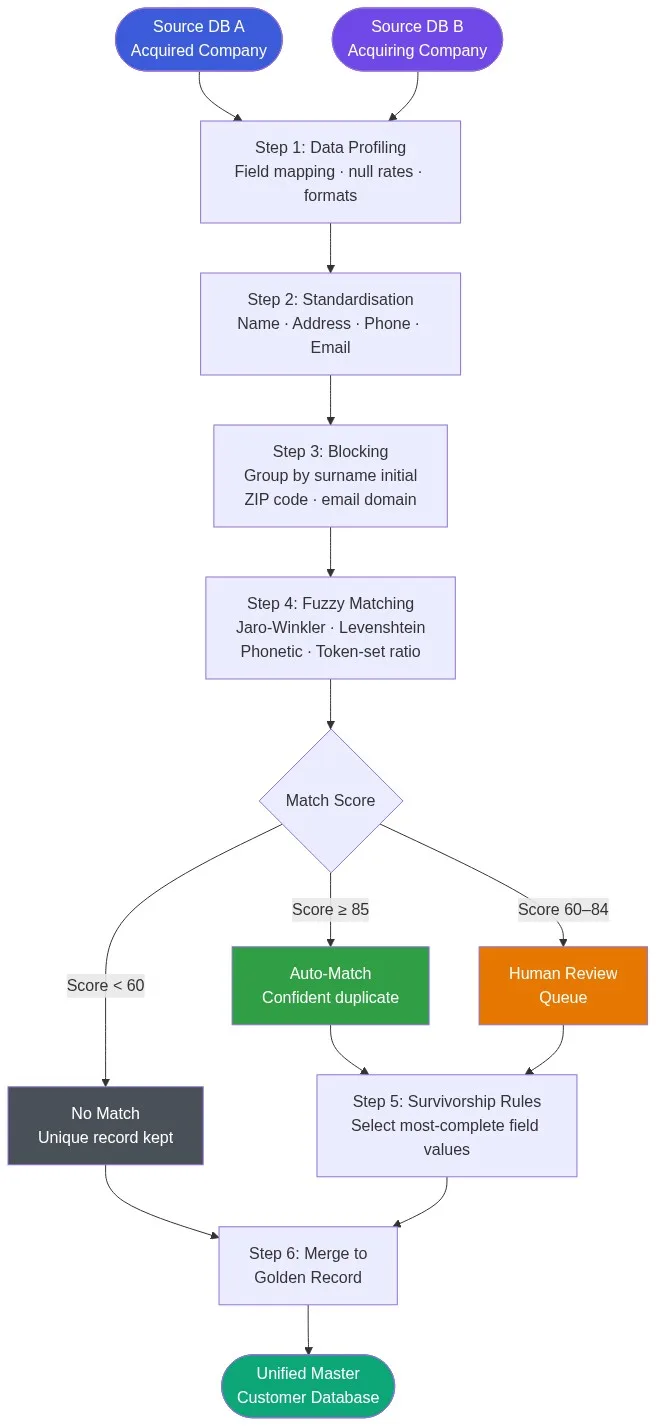
Step 1: Profile Both Databases Before Writing a Single Match Rule
Data profiling is the foundation. Before matching begins, you need to understand each source: field completeness rates, name formats, date formats, phone format standards, address conventions, and which fields are actually populated and reliable enough to match on.
What profiling surfaces
- Database A has 94% email completeness; Database B has 61% — email cannot be the sole matching key.
- Database B stores full names in a single field; Database A has separate first/last columns — normalisation is required before comparison.
- Phone numbers in Database A include country codes; Database B stores 10-digit local numbers only — stripping and normalising to E.164 is a pre-step.
- Address formats differ: Database A follows USPS standards; Database B is free-text entered by sales reps.
These findings drive your field mapping and standardisation rules. Skipping profiling means your match rules will be calibrated against assumptions, not actual data distributions.
Step 2: Standardise Before You Match
Match accuracy depends directly on input data quality. Two records representing the same customer will score low if one reads “St.” and the other reads “Street”, or if one phone is “(602) 555-0100” and the other is “6025550100”. Data cleansing and standardisation normalises these variations before the matching engine ever runs a comparison.
Key standardisation steps
- Name parsing: Split full-name fields into title, first, middle, last, suffix. Strip salutations.
- Address normalisation: Expand abbreviations (St to Street, Ave to Avenue, Ste to Suite). Apply CASS certification to verify and standardise against the USPS postal database.
- Phone normalisation: Remove formatting characters. Standardise to 10-digit or E.164. Strip extensions to a separate field.
- Email normalisation: Lowercase all values. Remove trailing whitespace. Flag disposable domain addresses for lower match weight.
After standardisation, the pair “Jen Williams / 123 Oak St Ste 4” and “Jennifer A. Williams / 123 Oak Street Suite 4” will produce field-level similarity scores above 0.85 on both name and address — well within auto-match threshold.
Step 3: Block Records to Make Matching Tractable
Comparing every record in Database A against every record in Database B is computationally infeasible at scale. Blocking partitions records into candidate groups where matches are likely, eliminating the vast majority of impossible pairs before scoring begins.
Effective blocking strategies for customer deduplication
- Surname initial + ZIP code: Groups records by the first character of last name and 5-digit ZIP. Highly selective for large datasets.
- Email domain: Records sharing an email domain (e.g., @acmecorp.com) are candidate matches regardless of name variation.
- Phone last-4: The final four digits of a normalised phone number are a stable blocking key when name formats differ.
- Soundex code: Groups phonetically similar surnames — catches “Smith” vs “Smyth” or “Garcia” vs “Garsia”.
Using multiple blocking passes — known as multi-pass blocking — ensures high recall. A record pair missed by the ZIP+surname block may still be captured by the email-domain block. The merge purge approach applies this multi-pass logic automatically, ensuring no probable duplicate goes uncompared.
Step 4: Run Fuzzy Matching with Weighted Scoring
Within each block, every candidate pair receives a composite similarity score. Match Data Pro evaluates multiple algorithms per field and combines them into a weighted total.
Example: scoring the “Jen Williams” pair
| Field | DB A Value | DB B Value | Algorithm | Score | Weight |
|---|---|---|---|---|---|
| Last name | Williams | Williams | Exact | 1.00 | 0.25 |
| First name | Jen | Jennifer | Jaro-Winkler | 0.88 | 0.20 |
| Address | 123 Oak St Ste 4 | 123 Oak Street Suite 4 | Token-set ratio | 0.92 | 0.25 |
| Phone | 6025550100 | 6025550100 | Exact (normalised) | 1.00 | 0.20 |
| jwilliams@acme.com | jen.w@acme.com | Domain match | 0.50 | 0.10 | |
| Composite | 0.91 — Auto-match | ||||
Scores above 0.85 auto-match. Scores between 0.60 and 0.84 route to a human review queue. Scores below 0.60 are treated as distinct records. These thresholds are configurable — for regulated industries you may raise the auto-match threshold to 0.92 to reduce false positives.
Step 5: Apply Survivorship Rules to Build the Golden Record
Once duplicates are identified, you must decide which field values survive into the merged record. This is survivorship, and it requires deliberate rules rather than arbitrary selection. Survivorship rules in Match Data Pro are configured per field and per source.
Common survivorship patterns
- Most recent wins: Use the last-modified address, since customers move. Apply to address, phone, and email fields.
- Most complete wins: If one record has a populated middle name and the other does not, keep the populated value.
- Source priority: Designate one system as authoritative for specific fields. If the acquiring company’s CRM holds billing data, those account numbers take precedence.
- Concatenate: For multi-value fields like notes or tags, merge all unique values rather than selecting one.
The output of survivorship is the golden record — a single customer profile combining the best available data from both source systems. Senzing entity resolution, embedded in Match Data Pro, handles complex multi-source survivorship including graph-linked entity clusters where a single customer appears across three or more source records.
Step 6: Validate, Load, and Monitor
The merged golden record set must pass validation before loading into the target CRM or data warehouse. Run post-merge data profiling to confirm: duplicate rate is below your acceptable threshold (typically under 0.5%), field completeness has not declined, and no records were lost in the merge process.
Post-load monitoring matters because new records continue to arrive after go-live. Job automation in Match Data Pro runs incremental deduplication on a schedule — checking new inbound records against the golden record set and routing probable duplicates for review before they pollute the merged database. For a full comparison of platforms, see our guide to best data deduplication software.
Ready to start? Register for a free trial and run your first post-merger deduplication job in under 30 minutes — no contract required.
Frequently Asked Questions
How long does post-merger customer deduplication typically take?
Timeline depends on record volume and data quality, but a structured six-step pipeline — profiling, standardisation, blocking, matching, survivorship, validation — typically completes in two to four weeks for combined datasets under one million records. Automated platforms compress the matching step itself to hours, leaving most of the timeline to profiling and rule configuration.
What percentage of records are typically duplicates when two customer databases merge?
Overlap rates vary by industry. B2B companies merging in the same vertical typically see 15–35% overlap. Consumer databases with broad geographic overlap can exceed 40%. Profiling both databases before running the match gives a reliable estimate before committing to a deduplication strategy.
Can fuzzy matching handle international name variations in a post-merger scenario?
Yes. Phonetic algorithms (Metaphone, Beider-Morse) handle transliterated names, while Jaro-Winkler handles character-level transpositions common in romanised Asian names. Match Data Pro applies multiple algorithms per field and selects the highest score, improving recall for name variants across different language conventions without inflating false positives.
What is a survivorship rule and why does it matter for post-merger data?
A survivorship rule determines which field value is kept in the merged record when two matching records contain different values. Without explicit rules, merges default to arbitrary choices — typically “last writer wins” — that can corrupt high-quality data. Defining rules per field (most-recent address, most-complete name, source-priority for account numbers) produces a reliable golden record.
How does Match Data Pro handle records that were only in one of the two databases?
Records with no match in the other database — score below the no-match threshold — are treated as unique and passed through to the golden record set unchanged. They are not dropped. The result is a merged database containing all unique records from both sources plus deduplicated versions of shared customers, with a full audit log showing the source and match decision for every record.