
Data standardisation is the process of transforming raw field values into a consistent format, structure, and vocabulary before any matching or analysis takes place. Done correctly, it cuts downstream match error rates by 40–60% and eliminates the silent data conflicts that corrupt analytics, CRM pipelines, and ERP reporting. The seven best practices below cover every layer of standardisation — from case normalisation and phone formatting to postal verification and schema enforcement — and show how to automate them at scale.
Ready to standardise your data without manual scripting? Start a free trial of Match Data Pro and run your first standardisation job in minutes.
Why Data Standardisation Matters Before You Match or Analyse
Consider a simple example. One system stores a company as IBM Corp. Another stores it as International Business Machines. A third stores it as I.B.M.. All three represent the same entity. Without standardisation, every downstream match fails because the strings are not comparable. The same problem appears in dates (01/06/2024 vs 2024-06-01), phone numbers ((602) 555-0100 vs 6025550100), and addresses (123 N Main St Ste 4 vs 123 North Main Street Suite 4).
The consequences go beyond missed matches. Unstandardised data produces inflated duplicate counts, incorrect revenue attribution, and broken data lineage in governance tools. A 2023 industry study found that organisations with no formal standardisation process spend an average of 35% more time on manual data correction each quarter than those with an automated pipeline.
Standardisation is not cleansing. Cleansing removes wrong values. Standardisation transforms correct-but-inconsistent values into a common form. Both are necessary, but they are different operations. The process starts with data profiling — scanning every field to expose the pattern variations you need to resolve before writing a single rule.
Best Practice 1 — Profile First, Standardise Second
Blind standardisation creates new problems. If you apply a title-case rule to a name field without profiling, you convert McBride to Mcbride and O'BRIEN to O'brien. Profiling reveals the actual patterns in your data before you write rules.
A profiling pass should measure:
- Null rate per field
- Distinct value count and top-N frequency distribution
- Pattern coverage (what percentage of values match the expected regex)
- Field-level completeness and consistency scores
Match Data Pro’s AI-powered data cleansing pipeline starts with an automated profiling step that surfaces these metrics across millions of rows in minutes, producing a field-by-field quality report before any transformation runs.
Best Practice 2 — Standardise by Field Type, Not by Dataset
Each field type has its own standardisation logic. Applying a generic string-trim rule across the entire schema misses most of the variation. The table below shows the correct transform for each common field type.
| Field Type | Common Variation | Standard Form |
|---|---|---|
| Person name | JON SMITH / Jon Smith / jonathan smith | Title case, nickname expansion |
| Company name | IBM Corp / I.B.M. / Intl Business Machines | Uppercase, abbreviation lookup |
| Phone number | (602) 555-0100 / 6025550100 / +1-602-555-0100 | E.164 format: +16025550100 |
| Date | 01/06/2024 / 2024-06-01 / June 1, 2024 | ISO 8601: 2024-06-01 |
| Address | 123 N Main St Ste 4 / 123 North Main Street Suite 4 | USPS CASS-verified postal form |
| Country code | USA / United States / US / America | ISO 3166-1 alpha-2: US |
| Currency | $1,200 / USD 1200 / 1200.00 USD | ISO 4217 + decimal: USD 1200.00 |
For free-text fields such as job title or product description, the standardisation approach is more complex. It requires tokenisation, stop-word removal, and reference-list lookups. See the full guide to text data cleaning for implementation detail on those techniques.
Best Practice 3 — Standardise Addresses with a Postal Authority
Address fields are the highest-entropy field type in most operational databases. Abbreviations alone account for over 200 official USPS variations: St, Street, Str; Ave, Avenue, Av; Blvd, Boulevard. Add unit suffix variation (Apt, Apartment, Unit, #), directional prefix variation (N, North, No.), and ZIP+4 absence, and a single physical address can appear in thousands of distinct string forms.
Rule-based normalisation cannot cover this space. The correct approach is CASS-certified postal verification, which validates each address against the USPS Coding Accuracy Support System database, returns a standardised delivery-line format, and appends the ZIP+4 code. This is not a cosmetic transform — it changes the physical deliverability of mail and the accuracy of geographic analysis.
Match Data Pro includes built-in CASS address verification as part of the standardisation pipeline. It runs alongside the matching engine so that addresses are verified and normalised before deduplication scores are calculated.
Before and After: Address Standardisation
| Raw Input | Standardised Output |
|---|---|
| 123 n main st ste 4, phoenix az 85001 | 123 N Main St Ste 4, Phoenix, AZ 85001-1234 |
| 123 North Main Street Suite 4 Phoenix Arizona | 123 N Main St Ste 4, Phoenix, AZ 85001-1234 |
| 123 N. Main Street, Apt #4, Phoenix, AZ | 123 N Main St Ste 4, Phoenix, AZ 85001-1234 |
All three rows resolve to the same standardised form, which means the deduplication engine can now match them correctly.
Best Practice 4 — Build a Reference Library, Not Just Rules
Rules handle predictable variation. Reference libraries handle the long tail. A rule can convert all phone numbers to E.164 format. Only a reference library can resolve IBM, Big Blue, International Business Machines Corporation, and I.B.M. Inc. to the same canonical company name.
Reference libraries to build and maintain:
- Company alias table: legal name, DBA, abbreviation, former name, ticker
- Name synonym table: Bill = William, Bob = Robert, Liz = Elizabeth
- Industry code mapping: SIC to NAICS, internal codes to standard codes
- Product alias table: SKU variants, regional name differences, legacy product codes
- Geographic reference: state abbreviations, country code mappings, postcode-to-city lookups
These libraries feed directly into the fuzzy matching algorithms that score record similarity. A record standardised against a reference library will score 30–50 points higher in a fuzzy match than the same record in raw form, reducing false negatives significantly.
Best Practice 5 — Enforce Schema Consistency Across Source Systems
Multi-system environments accumulate schema drift. One CRM stores dates as MM/DD/YYYY. The ERP uses YYYY-MM-DD. The marketing platform exports dates as Unix timestamps. None of these match until you enforce a common schema at ingestion.
Schema enforcement covers four layers:
- Type casting: ensure every field arrives in the declared data type (string, integer, decimal, date)
- Format normalisation: transform source-specific formats to a canonical form before load
- Field mapping: map source column names to a shared data dictionary (e.g.
cust_nmandClientNameboth map tocustomer_name) - Null handling: define whether null means unknown, not applicable, or absent — and enforce that convention consistently
Match Data Pro’s import/export connectors map source fields to a common schema at ingestion, so every system’s data enters the pipeline in the same structure. This eliminates the manual column-remapping that burns engineering hours in one-off ETL scripts.
Best Practice 6 — Link Standardisation to Deduplication and Entity Resolution
Standardisation without deduplication leaves duplicates in place. Deduplication without standardisation scores records against incomparable strings and misses real matches. The two operations must run in sequence — and the standardisation step must complete before any matching threshold is applied.
The correct pipeline order is:
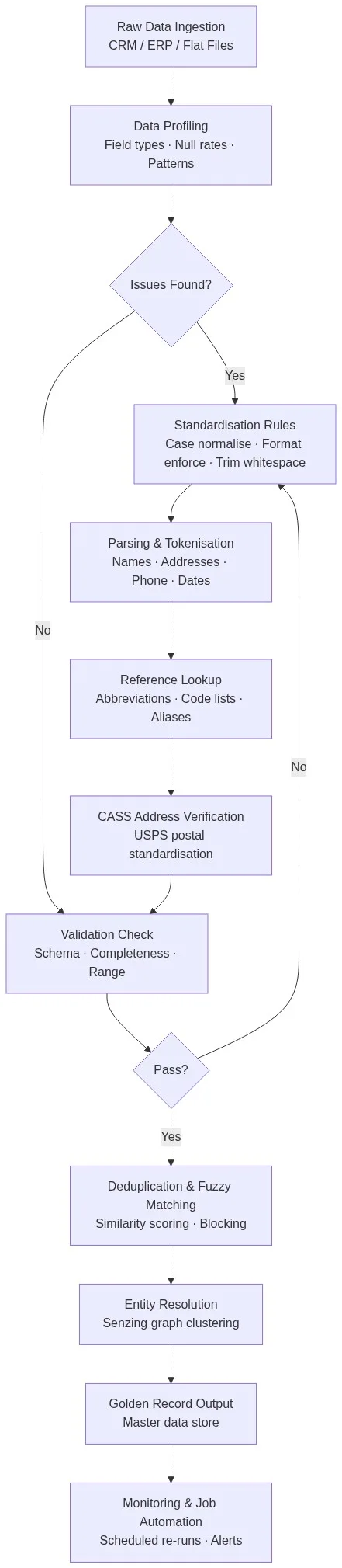
- Profile every source dataset
- Apply field-type standardisation rules and reference lookups
- Run CASS address verification
- Execute blocking to reduce comparison space
- Score record pairs with deduplication software using weighted fuzzy algorithms
- Apply entity resolution to cluster related records across sources
- Produce golden records using survivorship rules
The diagram below shows how this pipeline flows from raw ingestion to the final golden record.
Best Practice 7 — Automate and Monitor, Do Not Run Once
Data standardisation decays. New records arrive every hour from source systems that do not follow your conventions. A one-off standardisation project produces clean data that is stale within 30 days. The only durable solution is continuous, automated standardisation.
Automation requirements for a production standardisation pipeline:
- Scheduled jobs: run standardisation nightly or on each import cycle — not manually
- Incremental processing: process only new or changed records, not the full dataset, to control runtime at scale
- Quality monitoring: track pass rates and pattern-match scores for each field on every run — alert when rates drop below threshold
- Rule versioning: log every rule change with a timestamp and before/after sample so that regressions can be diagnosed
Match Data Pro’s job automation engine schedules standardisation, deduplication, and address verification runs on a configurable cadence. It logs every run result and surfaces quality trend metrics so you can see whether data is improving or degrading over time.
Want to see the pipeline running on your own data? Book a personalised demo with the Match Data Pro team. Or start a free trial — no contract, no commitment.
Frequently Asked Questions
What is data standardisation and why does it matter?
Data standardisation transforms field values into a consistent format, structure, and vocabulary so that records from different systems can be compared, matched, and merged accurately. Without it, the same customer, company, or address can appear in dozens of incompatible string forms, causing matches to fail, duplicates to persist, and analytics to report incorrect totals.
What is the difference between data standardisation and data cleansing?
Cleansing removes or corrects wrong values — nulls, out-of-range numbers, impossible dates. Standardisation transforms correct-but-inconsistent values into a common form — converting 01/06/2024 and June 1, 2024 to 2024-06-01, for example. Both are required, but they solve different problems and run as separate pipeline stages.
How long does it take to standardise a large dataset?
With an automated platform, an initial standardisation run across 1–5 million records typically completes in under two hours. The more time-consuming phase is profiling and rule design — usually two to five days for a new data source. Subsequent incremental runs process only changed records and take minutes. Manual standardisation of the same volume takes weeks and produces inconsistent results.
Should I standardise data before or after deduplication?
Always standardise before deduplication. Fuzzy matching algorithms score string similarity, so unstandardised inputs — different date formats, phone number formats, or address abbreviations — produce artificially low similarity scores and cause real duplicates to be missed. Standardisation levels the playing field so the matching engine compares like-with-like.
Can data standardisation be fully automated?
Yes — for the majority of records. Rule-based standardisation combined with reference library lookups and CASS address verification handles 90–95% of records automatically. The remaining 5–10% typically involve ambiguous values that require human review or AI-suggested corrections. Platforms like Match Data Pro route those edge cases to a review queue while processing the rest automatically.