
Automated data cleansing replaces manual spreadsheet work and hand-coded transformation scripts with a configurable pipeline that profiles, standardises, deduplicates, and verifies records automatically. Teams that automate the full cleansing workflow reduce error rates by 40–70% and cut cleaning time from weeks to hours. Match Data Pro delivers that pipeline as a cloud SaaS platform with no long-term contract.
If your team is still writing one-off scripts or relying on manual review for every transformation rule, book a demo to see how automated cleansing works at scale.
Why Manual Data Cleansing Fails at Scale
Manual cleansing works for datasets under 10,000 records. Beyond that, it breaks down in three ways.
Volume outpaces analyst capacity
A mid-size CRM typically holds 200,000–500,000 records. At 60 records per hour reviewed manually, a single analyst would need 3,300+ hours just to check every entry. That is almost two full working years for one dataset. Most organisations have dozens of datasets refreshed monthly.
Rule proliferation creates maintenance debt
Manual cleaning relies on scripts. A typical enterprise data team maintains 200–400 bespoke transformation rules across Python scripts, SQL stored procedures, and spreadsheet macros. Each rule requires individual testing when a source system schema changes. When a CRM migrates or a new data feed is added, those rules break silently — producing dirty output with no alert.
No learning loop
Manual scripts do not improve from corrections. An analyst who flags “Jon Smith” and “Jonathan Smith” as duplicates teaches nothing to the next run. Automated platforms with AI-powered scoring learn from confirmed matches and raise threshold accuracy over time.
According to Gartner, poor data quality costs organisations an average of $12.9 million per year. The majority of that cost traces back to preventable errors that automation would catch on first pass.
The Six Stages of an Automated Data Cleansing Pipeline
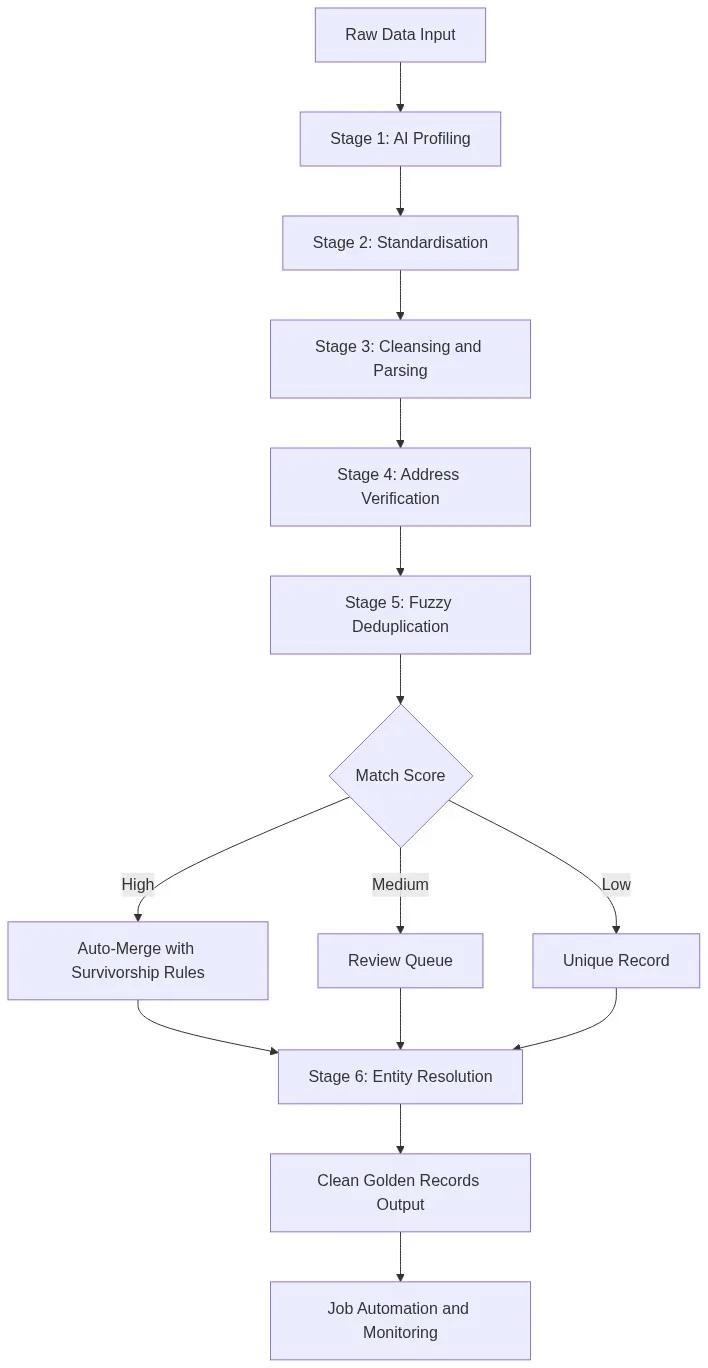
Match Data Pro runs automated cleansing as a six-stage pipeline. Each stage feeds the next. No stage requires manual configuration for each new dataset — the platform infers field types, detects patterns, and applies pre-built rules that teams tune once and reuse.
Stage 1: AI data profiling
AI data profiling scans every field in a dataset and returns completeness scores, value distributions, format patterns, and anomaly flags before any transformation runs. A typical profile run on a 500,000-row CRM export takes under three minutes and surfaces issues like 18% null values in the email column, inconsistent date formats across three patterns, and phone numbers stored in eight different formats. Manual data audits of the same dataset take two to three days.
Stage 2: Standardisation
Data standardisation normalises formats across fields so downstream matching works correctly. Common examples include:
- Phone:
(800) 555-1234and8005551234and+1-800-555-1234all normalised to E.164 format - Dates:
01/15/2024,15-Jan-24,2024-01-15all resolved to ISO 8601 - Company:
Acme Corp.,ACME CORPORATION,Acme, Corpnormalised to a canonical form - State:
California,CA,Calif.mapped to the two-letter USPS abbreviation
Without standardisation, fuzzy matching algorithms waste cycles on format differences that carry no semantic signal.
Stage 3: Cleansing and parsing
Cleansing removes or corrects invalid values. Parsing splits compound fields into their atomic components. A name field containing DR. JAMES R. SMITH JR. is parsed into prefix, first, middle, last, and suffix tokens. A single-line address field is parsed into street number, street name, unit type, unit number, city, state, and ZIP. Parsing is a prerequisite for accurate field-level matching.
Stage 4: CASS address verification
CASS-certified address verification validates every postal address against the USPS delivery database, appends ZIP+4 codes, corrects street abbreviations, and flags non-deliverable addresses. Unverified address data decays at roughly 10–15% per year as people move. Running CASS verification on ingest prevents that decay from accumulating.
Stage 5: Fuzzy deduplication
Automated deduplication uses a multi-algorithm scoring engine — Levenshtein edit distance, Jaro-Winkler, phonetic matching, and token-set ratio — to compare candidate pairs at scale. Blocking rules limit comparisons to plausible pairs (same first three characters of last name, same city), reducing an O(n²) problem to a manageable size.
Consider this example from a real B2B CRM:
| Field | Record A | Record B | Match Score |
|---|---|---|---|
| First name | William | Bill | 0.71 (phonetic) |
| Last name | Johnson | Jonson | 0.92 (Levenshtein) |
| Company | Acme Corp | Acme Corporation | 0.94 (token-set) |
| wjohnson@acme.com | bjohnson@acme.com | 0.81 | |
| Composite score | 0.88 — Auto-merge |
Records above a configurable high threshold merge automatically. Records in a mid-range band route to a review queue. Records below a low threshold pass through as distinct entities.
Stage 6: Entity resolution
Senzing entity resolution in Match Data Pro uses graph-based probabilistic matching to link records that represent the same real-world entity across multiple systems — even when no shared identifier exists. Where deduplication collapses identical records within one system, entity resolution links related records across CRM, ERP, marketing platform, and support desk simultaneously.
Automation Configuration: What You Set Once vs. What Runs Automatically
A common misconception is that automated cleansing simply shifts the configuration burden — that you still write all the same rules, just in a different tool. That is not accurate. Here is what the division of labour looks like on Match Data Pro.
What you configure once
- Field mapping: which source columns map to which canonical fields
- Match thresholds: auto-merge at 0.90+, review at 0.70–0.89, split below 0.70
- Survivorship rules: which source system wins for each field type (most-recent date, longest non-null string, highest completeness score)
- Job schedule: run nightly at 02:00, or trigger on new file upload via the import connector
What runs automatically on every execution
- AI profile scan of every field
- Format standardisation using learned patterns
- CASS address verification against live USPS data
- Candidate pair generation and multi-algorithm scoring
- Auto-merge with survivorship rules applied
- Entity resolution graph update
- Alert if error rate exceeds baseline threshold
Job automation in Match Data Pro means teams schedule a cleansing run once and get clean output on every subsequent execution without touching the configuration. The platform handles schema drift detection — if a source adds a new column or changes a date format, the profiler flags it before the cleansing stage runs.
Automated Cleansing vs. Manual Scripts: A Practical Comparison
Data teams often ask whether maintaining their own Python or SQL scripts is cheaper than buying a platform. Here is a direct comparison across the dimensions that matter.
| Dimension | Manual scripts | Match Data Pro automation |
|---|---|---|
| Setup time for new dataset | 3–10 days | 2–4 hours |
| Deduplication accuracy | 60–75% (exact rules only) | 90–96% (multi-algorithm fuzzy) |
| Schema change handling | Manual script update | Auto-detected, flagged |
| Address verification | Not included | CASS-certified, built in |
| Entity resolution | Not included | Senzing, built in |
| Ongoing maintenance | 4–8 hrs/week per engineer | Near zero |
| Audit trail | Manual logging required | Automatic, field-level |
The labour cost of maintaining 300 transformation scripts across a three-person data engineering team typically runs $180,000–$240,000 per year in fully loaded staff time. That cost disappears when the platform handles transformation logic automatically.
Where to Start: Automating Your First Cleansing Job
For teams moving from manual to automated cleansing, start with the dataset that causes the most downstream pain. That is usually the master customer file in your CRM.
- Export the dataset as a CSV or connect via the native CRM connector.
- Run the AI profiler. Review the field-level quality report. Note which fields have the highest null rates and the most format inconsistencies.
- Configure field mappings. Match source columns to canonical fields. This takes 20–40 minutes for a typical CRM export.
- Set match thresholds. Start with the platform defaults (auto-merge at 0.90, review at 0.70–0.89) and tighten after reviewing the first batch of results.
- Run the full pipeline. Review the deduplication report. Spot-check 20 auto-merged pairs and 20 review-queue pairs to calibrate your confidence in the thresholds.
- Schedule the job. Set the cadence to match your data refresh rate — nightly for active CRMs, weekly for slower-moving datasets.
The modern data cleansing guide covers the full pipeline in detail if you need a deeper technical reference before you start.
Ready to replace manual scripts with an automated pipeline? Start a free trial — no contract, no credit card required, and your first dataset runs in minutes.
Frequently Asked Questions
What is automated data cleansing?
Automated data cleansing is the use of software to profile, standardise, deduplicate, and verify records without manual scripting or analyst intervention for each dataset. A platform like Match Data Pro runs a configurable pipeline — profiling, standardisation, CASS address verification, fuzzy deduplication, and entity resolution — on a defined schedule, delivering clean output automatically.
How does automated cleansing handle duplicate records?
Automated deduplication uses multi-algorithm fuzzy scoring — combining Levenshtein edit distance, Jaro-Winkler, phonetic matching, and token-set ratio — to score candidate pairs. Pairs above a high threshold merge automatically using survivorship rules. Pairs in a mid-range band route to a review queue. Pairs below a low threshold pass through as distinct records.
Can automated cleansing handle schema changes in source systems?
Yes. An AI profiling stage runs before every cleansing execution and detects schema changes — new columns, changed data types, shifted date formats — and flags them before transformation runs. This prevents silent failures where a schema change causes incorrect output. Match Data Pro alerts the configured team members when a schema drift is detected.
How long does it take to configure automated cleansing for a new dataset?
For a typical CRM export of 200,000–500,000 records, initial configuration takes 2–4 hours: field mapping, threshold setting, survivorship rules, and schedule definition. Subsequent datasets that share a similar schema take 30–60 minutes. The AI profiler accelerates configuration by identifying field types and recommending mappings automatically.
Is automated data cleansing suitable for regulated industries?
Yes. Automated cleansing platforms generate field-level audit trails on every transformation, merge, and deletion. Match Data Pro records who ran each job, which records changed, and what rules applied — producing a governance-grade log that satisfies healthcare, financial services, and public sector compliance requirements.