
A CRM data migration fails when dirty data moves with it. Before a single record crosses the cutover boundary, you need to profile, cleanse, deduplicate, and validate every field in the source system. Teams that skip these steps typically find 15–30% duplicate contact records and significant field-level inconsistencies waiting for them on the other side.
The fix is a structured seven-stage pre-migration data quality pipeline. This article walks through each stage, shows concrete examples of the issues you will find, and explains how Match Data Pro’s data matching and cleansing platform handles the heavy work automatically.
Ready to clean your CRM data before migration? Start a free trial of Match Data Pro and run your first data profile in minutes.
Why CRM Data Degrades Before You Even Notice
CRM data decays at roughly 30% per year. Contact details go stale, company names change, and the same prospect enters the system three times via different web forms with slightly different spellings. By the time a migration project starts, the average enterprise CRM contains:
- 15–25% duplicate contact or account records
- 20–40% of phone fields in non-standard formats
- 10–18% of address fields that fail postal validation
- Hundreds of records with placeholder values such as “N/A”, “test@test.com”, or “123 Main St”
Moving this data as-is seeds the new system with the same problems you were trying to escape. The new CRM’s matching and deduplication tools are no substitute for a thorough pre-migration cleanup.
The Cost of Migrating Dirty Data
Post-migration cleanup costs three to five times more than pre-migration cleanup. Sales reps calling duplicate contacts, marketing campaigns hitting invalid emails, and support teams unable to find the single correct account record all erode the ROI of the new platform from day one.
The Seven-Stage Pre-Migration Pipeline
The diagram below shows the full workflow. Each stage feeds the next. A failure at any point loops back to the cleansing stage rather than proceeding to load.
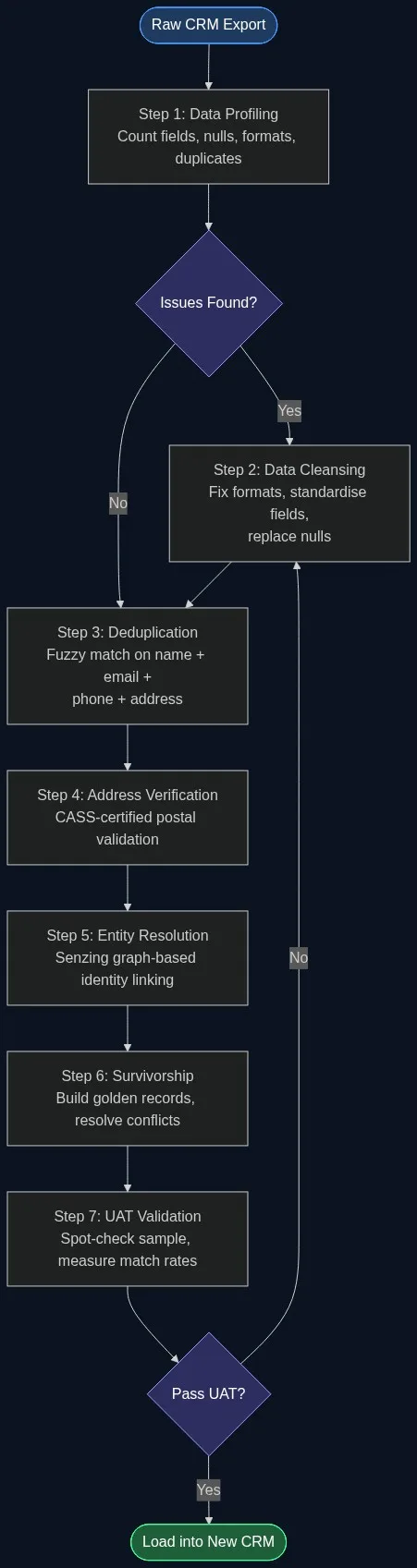
Stage 1: Data Profiling
Profiling gives you an objective baseline. Before writing a single cleansing rule, run a full statistical analysis across every field in your CRM export. You want to know: completeness (what percentage of each field is populated?), uniqueness (how many values appear only once?), and distribution (what formats and patterns exist?).
Match Data Pro’s AI data profiling scans your uploaded file and returns a field-by-field report: null rates, format variance, suspicious patterns (all caps, numeric-only name fields, placeholder strings). A typical 500K-record CRM export reveals issues in three to six hours of profiling that would have taken days to spot manually.
Document every finding. The profiling report becomes your cleansing specification and your post-migration acceptance checklist.
Stage 2: Data Cleansing and Standardisation
Cleansing resolves what profiling found. For a CRM migration, focus on these field categories:
Name Fields
Normalise case (title case for person names, upper for company names where convention dictates). Strip salutations and suffixes into separate columns if your target schema supports them. Handle common nickname variants: “Bob” vs “Robert”, “Liz” vs “Elizabeth”. Match Data Pro’s automated data cleansing engine applies configurable transformation rules across millions of records without manual scripting.
Phone Fields
Standardise to E.164 format (+1XXXXXXXXXX for US numbers). Strip extensions into a separate column. Flag numbers shorter than 10 digits as invalid. A common pattern found in CRM data: the same number appears as “555-867-5309”, “(555) 867-5309”, and “5558675309” across three duplicate records for the same contact.
Email Fields
Lowercase all email addresses. Validate format with a regex pattern. Flag role-based addresses (info@, sales@, support@) as lower-priority for deduplication purposes. Remove known junk domains (mailinator.com, guerrillamail.com).
Stage 3: Deduplication with Fuzzy Matching
Exact-match deduplication catches only the simplest cases. In practice, duplicates look like this:
| Record A | Record B | Fuzzy Score |
|---|---|---|
| Jennifer A. Harrison | Jen Harrison | 84 |
| Acme Corp. | ACME Corporation | 91 |
| jharrison@acme.com | j.harrison@acme.com | 88 |
| 312-555-0198 | (312) 555-0198 | 100 |
A fuzzy matching engine computes similarity scores across multiple fields simultaneously, then applies a weighted composite score. Records above a configured threshold (typically 85–92 for CRM data) are flagged as probable duplicates. Records between 70–85 go to a review queue. Records below 70 are kept as distinct.
Match Data Pro’s AI-powered fuzzy matching supports Levenshtein, Jaro-Winkler, phonetic (Soundex, Double Metaphone), and token-based algorithms. You configure field weights: email typically gets a weight of 40, name 30, phone 20, and address 10. The engine handles millions of record pairs in a single batch job.
For very large CRM datasets, use blocking strategies to reduce the comparison space: compare only records that share the same first three characters of the last name, or the same 5-digit ZIP code. This reduces an O(n²) problem to a manageable O(n log n) operation.
Stage 4: Address Verification
Invalid addresses waste direct mail budget and distort territory reporting in the new CRM. Run every address record through CASS-certified verification before migration.
CASS (Coding Accuracy Support System) validation standardises address components to USPS format, appends ZIP+4 codes, and flags undeliverable addresses for correction or removal. Match Data Pro includes CASS-certified address verification natively. A typical CRM export returns 8–15% of addresses as undeliverable; of those, 60–70% can be corrected automatically using fuzzy address matching against the USPS database.
Address issues to expect in CRM data:
- Suite numbers missing or in the wrong field (“Ste 400” vs “Suite 400” vs “Suite400”)
- City name misspellings (“Chikago”, “San Fransisco”)
- State abbreviation inconsistency (“California” vs “CA” vs “ca.”)
- ZIP codes transposed by one digit
Stage 5: Entity Resolution
After deduplication and address correction, entity resolution links records that represent the same real-world organisation or person across different object types in the CRM. A contact and an account may both represent “Acme Corp” even when the name fields differ across records imported from three separate systems over five years.
Match Data Pro integrates Senzing entity resolution, a graph-based probabilistic engine that links records without requiring a shared identifier. It evaluates combinations of name, phone, email, address, and domain fields to build an identity graph. Clusters in that graph represent the same real entity.
For CRM migrations, entity resolution is most critical for account hierarchy: linking contact records to the correct parent account, and identifying duplicate accounts that entered the system under different names from different sources (trade show lists, inbound web forms, manual entry).
Stage 6: Survivorship and Golden Record Construction
Once duplicates are identified and entities resolved, survivorship rules determine which field values populate the final record that loads into the new CRM. This is not a trivial decision.
Common survivorship strategies:
- Most recent wins: Use the field value from the record with the most recent modification timestamp.
- Most complete wins: Use the field value from the record where the most fields are populated.
- Source priority: Values from the ERP beat values from a marketing list import.
- Longest non-null: For free-text fields, prefer the longer, more descriptive entry.
Match Data Pro’s data merging and survivorship module lets you configure these rules per field. The output is a set of golden records: one authoritative record per unique entity, with the best available values from all source duplicates. Field-level merge decisions are logged for audit purposes.
Stage 7: Validation and User Acceptance Testing
Before loading, validate the cleaned dataset against your migration acceptance criteria. Minimum checks:
- Duplicate rate below 1% (compared to 15–25% pre-migration)
- Address validity rate above 90%
- Email field completeness above 85% for contact records
- No placeholder values in required fields
- Record count reconciles with source (net of intentional purges)
Sample 500–1,000 records for manual spot-check. Focus on records that scored in the 70–85 fuzzy match range during deduplication — these are the ambiguous cases most likely to produce errors. Adjust thresholds and re-run the pipeline if error rates exceed 2%.
Want to walk through this with your own data? Book a demo with the Match Data Pro team and we will review your CRM export together.
Frequently Asked Questions
How long does CRM data preparation take before migration?
Timeline depends on data volume and quality. A 100K-record CRM typically requires two to four weeks: one week for profiling and cleansing rules, one week for deduplication and address verification, and one week for entity resolution and survivorship, plus a UAT cycle. Automated tooling compresses this significantly compared to manual cleanup.
What percentage of CRM records are typically duplicates?
Industry benchmarks place duplicate rates at 15–25% for CRM contact and account records. Systems that have been running for five or more years without a deduplication cycle, or that have absorbed data from acquisitions or multiple marketing systems, often see rates above 30%.
Should I clean data in the old CRM or in a staging environment?
Clean in a staging environment, not in the live CRM. Export the data, run your full cleansing and deduplication pipeline against the export, validate the output, then load the clean data into the new system. This avoids risk to live operations and gives you a clean rollback point if UAT fails.
What is the difference between deduplication and entity resolution in a CRM migration context?
Deduplication collapses multiple records that represent the same entity within a single object type (two contact records for the same person). Entity resolution links records across object types and systems — connecting a contact to the right account, or linking records from three source systems that all represent the same company but share no common ID field.
Does Match Data Pro support automated job scheduling for pre-migration data pipelines?
Yes. Match Data Pro includes job automation so you can schedule cleansing, deduplication, and address verification runs to execute on a defined cadence. This is useful during pre-migration when you need to run incremental updates as new records enter the source CRM in the weeks before cutover.