
Enterprise data cleaning is the process of systematically profiling, standardising, deduplicating, resolving entities, and verifying records across every data source in an organisation — running as a repeatable, automated pipeline rather than a one-off project. Done correctly, a six-stage automated workflow delivers measurably cleaner data with every scheduled run, without manual intervention for the majority of records.
Most enterprise teams treat data cleaning as a project. It should be a pipeline. A one-time scrub degrades within weeks as new records arrive with the same errors. The difference between a team that continuously improves data quality and one that is perpetually firefighting is almost always pipeline design and automation.
Book a demo to see how Match Data Pro automates enterprise data cleaning from profiling to export.
Why Enterprise Data Cleaning Is Different From Spreadsheet-Level Cleanup
A single analyst cleaning a 10,000-row spreadsheet faces a tractable problem. An enterprise team managing 50 million records across six source systems faces an entirely different challenge. Three factors make enterprise data cleaning structurally different:
- Volume: Millions of records cannot be reviewed manually. Every decision must be encoded as a rule or a scored threshold.
- Velocity: CRM, ERP, and marketing systems add and update records continuously. A cleaning pipeline must handle incremental loads, not just batch snapshots.
- Variety: Customer names arrive in different formats (“IBM Corp”, “I.B.M.”, “International Business Machines”). Phone numbers have seven formats. Addresses are unstandardised. No single cleaning rule handles all of it.
The business cost is concrete. Gartner has estimated poor data quality costs organisations an average of $12.9 million per year. Duplicate customer records alone inflate marketing spend, distort analytics, and erode CRM trust. A repeatable automated pipeline eliminates the recurring cost of manual remediation.
The Six Stages of an Enterprise Data Cleaning Pipeline
A well-designed enterprise data cleaning workflow moves every record through six sequential stages. Each stage has a clear input, a defined operation, and a measurable output.
Stage 1: Data Profiling
Profiling scans the dataset before any transformation occurs. It answers: how many nulls, what is the value distribution, are there format violations, which fields have outliers? Match Data Pro’s AI data profiling produces a structured quality report — field-by-field completeness, uniqueness, and pattern conformity — that tells the pipeline exactly what needs fixing downstream.
Example output from a profiling run on a 2-million-record CRM export:
- Email field: 94.2% populated, 3.1% malformed (missing @), 2.7% null
- Phone field: 11 distinct formats detected, 6.4% invalid length
- Company name: 18% contain abbreviations vs. full legal names across different records
Stage 2: Standardisation
Standardisation converts disparate formats into a consistent schema before matching begins. This is not cosmetic. Unstandardised data produces false negatives at the deduplication stage — “St.” and “Street” are the same; a matcher that treats them as different will miss duplicates.
Key standardisation operations for enterprise data:
- Name parsing: split compound fields into first/last/suffix/title components
- Phone normalisation: strip extensions, convert to E.164 format (+1XXXXXXXXXX)
- Date standardisation: enforce ISO 8601 (YYYY-MM-DD) across all fields
- Address parsing: split address lines into street number, street name, unit, city, state, ZIP
- Company name normalisation: expand abbreviations (“Corp” to “Corporation”), strip legal suffixes for matching purposes
Match Data Pro’s data cleansing and standardisation engine applies configurable transformation rules at scale, processing millions of records in a single job run.
Stage 3: Cleansing
Cleansing corrects errors that standardisation cannot handle by rule alone. This includes:
- Filling null values from secondary sources or derived logic (e.g., derive state from ZIP)
- Removing records that fail hard validation (invalid email syntax, impossible date values)
- Correcting transposition errors in identifiers (phone digit swaps, ZIP code off-by-one)
- Flagging records that require human review rather than automated correction
Stage 4: Deduplication
Deduplication identifies and collapses records that represent the same real-world entity. At enterprise scale, exact matching misses the majority of duplicates. A customer recorded as “Jon Smith, 123 Main St” and “Jonathan Smith, 123 Main Street” is one person — exact matching produces two records.
AI-powered fuzzy matching solves this. Match Data Pro applies configurable algorithms — Jaro-Winkler for names, token-based scoring for company names, Levenshtein for short identifiers — and produces a composite similarity score for each record pair. Pairs above the auto-merge threshold are collapsed automatically. Pairs in the review band are queued for human adjudication. Pairs below the threshold remain separate.
| Score Range | Action |
|---|---|
| 90–100 | Auto-merge, apply survivorship rules |
| 70–89 | Route to human review queue |
| Below 70 | Retain as distinct records |
See also: how agentic pipelines handle duplicate records at scale.
Stage 5: Entity Resolution
Deduplication removes duplicates within a single dataset. Entity resolution links records across multiple systems. A customer in your CRM, your ERP, and your marketing platform may share no common identifier — but they are the same entity.
Match Data Pro integrates Senzing entity resolution, a graph-based probabilistic engine that clusters records by the weight of matching evidence across all available fields. It handles the hardest cases: partial name matches, shared addresses, overlapping phone numbers, historical aliases. The output is a golden record for each resolved entity — a single authoritative view built from the best values across all source records.
Stage 6: Address Verification
Address fields are among the most error-prone in any enterprise dataset. Transpositions (“Main St” vs. “Maine St”), missing suite numbers, incorrect ZIP codes, and non-deliverable addresses degrade downstream operations from shipping to compliance.
Match Data Pro’s CASS-certified address verification validates every address against the USPS database, corrects deliverability errors, and appends ZIP+4 codes. This stage runs after entity resolution so the verified address is applied to the golden record, not duplicated across merged records.
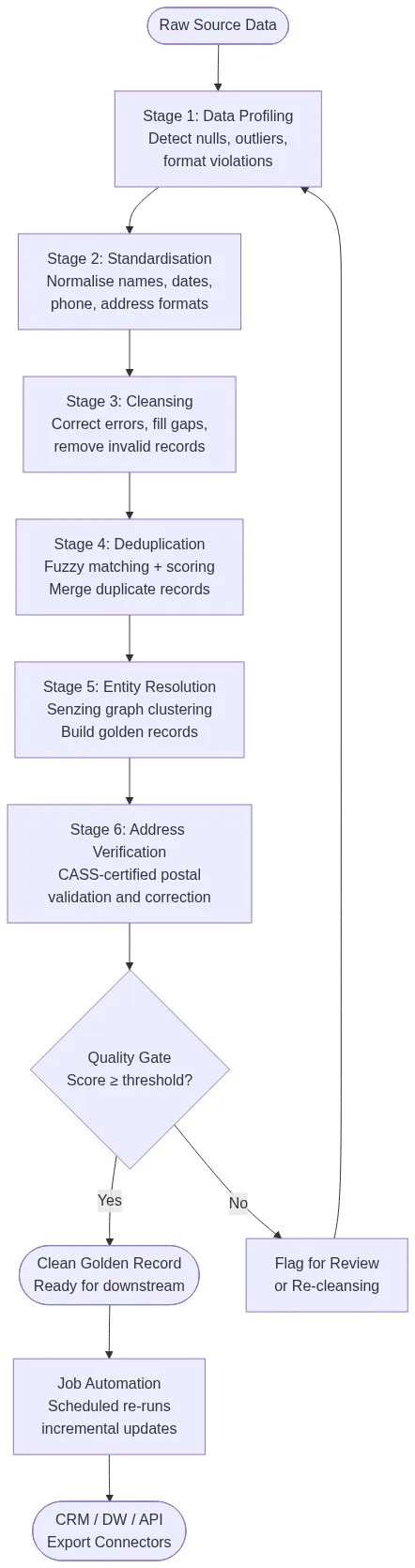
Making It Repeatable: Job Automation and Incremental Loads
A six-stage pipeline run once is a data quality project. Run on a schedule against incremental data, it becomes a data quality program. Repeatable enterprise data cleaning requires three engineering decisions.
Incremental vs. Full Refresh
Full refresh re-processes every record on each run. Accurate but expensive at scale. Incremental processing applies the pipeline only to records added or modified since the last run, identified by a change timestamp or event log. Most enterprise implementations run incremental jobs daily and full refreshes weekly or monthly.
Threshold Governance
Match thresholds are not set-and-forget. As data volumes grow and source system quality changes, optimal thresholds shift. Build threshold review into your quarterly governance cycle. Track the false-positive rate in your auto-merge queue and the volume of records reaching the human review stage. Both are leading indicators that thresholds need recalibration.
Job Scheduling and Alerting
Match Data Pro’s job automation engine supports scheduled pipelines with configurable triggers, dependency chains between stages, and alerting when a job fails or when quality metrics fall below defined thresholds. A typical production configuration runs profiling and standardisation on every incremental load, with deduplication and entity resolution running nightly on the accumulated delta.
Connecting Clean Data to Downstream Systems
Clean data has no value if it stays in the cleaning platform. The final step in every enterprise data cleaning workflow is export — pushing golden records back to the systems that consume them.
Match Data Pro’s import/export connectors support structured exports to CRM platforms, data warehouses, marketing automation tools, and any system that accepts CSV, JSON, or API calls. The live fuzzy search API also allows downstream applications to query the clean record store in real time, returning the best-matched golden record for any incoming query.
Match Data Pro runs as a cloud SaaS platform — no infrastructure to manage, no long-term contract. A free trial is available immediately so your team can profile a real dataset and see results before committing to a full implementation.
Common Failure Modes in Enterprise Data Cleaning Programs
Most enterprise data cleaning programs fail for one of four reasons:
- Skipping profiling: Teams jump straight to cleansing without measuring the problem. The result is untargeted effort and no baseline for measuring improvement.
- Over-relying on exact matching: Exact matching typically finds 40–60% of actual duplicates. The remainder require fuzzy logic to surface.
- No survivorship rules: Merging duplicates without defining which field values survive the merge produces golden records with inconsistent or incorrect values.
- Treating it as a one-time project: Without automation and scheduling, data quality degrades at the rate of new data ingestion. The pipeline must be continuous.
See the implementation guide for master data cleansing for practical survivorship rule templates and threshold configuration examples.
Frequently Asked Questions
What is enterprise data cleaning?
Enterprise data cleaning is the systematic, automated process of profiling, standardising, deduplicating, resolving entities, and verifying records across large datasets and multiple source systems. Unlike one-off manual cleanup, it runs as a repeatable pipeline on a schedule, handling incremental data loads and continuously improving data quality over time.
How long does enterprise data cleaning take?
Initial pipeline setup typically takes one to three weeks, depending on source system complexity and the number of integration points. A first full run on a multi-million-record dataset completes in hours on a cloud platform. Ongoing incremental runs — processing only new and changed records — typically complete in minutes to a few hours per day.
What is the difference between data cleansing and data standardisation?
Standardisation converts fields into a consistent format — normalising phone numbers, parsing address components, expanding abbreviations. Cleansing corrects errors that remain after standardisation — fixing transposition mistakes, filling nulls from derived logic, removing invalid records. Both stages are required; standardisation must run first to enable accurate downstream matching.
How do you measure the success of a data cleaning program?
Track four metrics: duplicate rate (percentage of records with a match above your review threshold), null rate (percentage of required fields that are empty), address deliverability rate (percentage that pass CASS verification), and entity match rate (percentage of records that resolve to a golden entity). Establish a baseline before the first run and measure delta after each subsequent pipeline execution.
Can enterprise data cleaning run continuously rather than in batch?
Yes. Incremental pipeline runs process records added or modified since the last job, triggered by a schedule or an event. The live fuzzy search API layer allows point-of-entry cleaning — validating and deduplicating each record at the moment it enters a system, before it writes to the database. Most enterprise teams combine both: real-time at ingestion and batch nightly for reconciliation.