
Los flujos de trabajo de deduplicación de Agentic detectan, puntúan y fusionan automáticamente los registros duplicados sin que sea necesaria la intervención humana en cada decisión. Un flujo de trabajo bien configurado deriva las coincidencias de alta fiabilidad directamente a las reglas de selección, señala los casos dudosos para que sean revisados manualmente y deja pasar sin modificaciones los registros únicos, procesando millones de filas en una sola ejecución automática.
La deduplicación manual no es escalable. Un único CRM con 500 000 contactos puede contener entre 80 000 y 120 000 pares duplicados cuando los datos se han importado desde múltiples fuentes a lo largo de varios años. Revisar esos pares manualmente, dedicando 60 segundos a cada uno, supondría más de 1.300 horas de trabajo de los analistas. Los procesos de Agentic reducen ese coste de mano de obra en un 90 % o más, al tiempo que generan un registro de coincidencias coherente y auditable. Reserva una demostración para ver cómo Match Data Pro automatiza este proceso de principio a fin.
¿Qué hace que un proceso de deduplicación sea «agente-centrado»?
La deduplicación tradicional es un proceso manual que se realiza por lotes: se sube un archivo, se configura una regla, se revisa el resultado y se exporta. Un flujo de trabajo basado en agentes funciona de otra manera. Opera de forma continua, toma decisiones autónomas basadas en reglas y solo recurre a un operador humano cuando el nivel de confianza cae por debajo de un umbral definido.
Hay tres componentes que definen un sistema de deduplicación agencial:
- Toma de decisiones autónoma: los registros que superan un umbral de coincidencia se fusionan y se marcan como «registros de referencia» sin esperar a que los revise un revisor.
- Escalación configurable: los registros de la «zona gris» —normalmente, puntuaciones entre 0,75 y 0,91— se derivan a una cola de revisión manual, en lugar de ir directamente a la pila de rechazos automáticos.
- Bucles de retroalimentación: las decisiones de los revisores sobre los casos dudosos actualizan las ponderaciones de coincidencia con el paso del tiempo, lo que reduce la zona gris para futuras ejecuciones.
El motor de coincidencia aproximada basado en inteligencia artificial de Match Data Pro es compatible con las tres opciones. Los umbrales, las ponderaciones y las reglas de supervivencia se configuran una sola vez por proyecto. Las ejecuciones posteriores —activadas según una programación o a través de la API— se llevan a cabo sin intervención manual.
El proceso de deduplicación agéntica en siete etapas
Cada una de las etapas que se indican a continuación es independiente, auditable y —en Match Data Pro— configurable sin necesidad de escribir código.
Fase 1 — Captación
Los datos se reciben mediante la carga de archivos, un conector de bases de datos o una API. Los conectores de importación de Match Data Pro admiten archivos CSV, Excel, bases de datos SQL, Salesforce, HubSpot y mucho más. Cada fuente se asigna a un esquema canónico en el momento de la importación, de modo que los nombres de los campos y los tipos de datos sean coherentes antes de que comience cualquier proceso de coincidencia.
Fase 2 — Perfil
La plataforma realiza un análisis de perfiles de datos mediante IA en todos los ámbitos: índices de exhaustividad, distribuciones de valores, patrones de formato e indicadores de valores atípicos. Un resultado típico de este análisis de perfiles para un conjunto de datos de contactos de un CRM podría tener este aspecto:
| Campo | Exhaustividad | Problemas de formato | Posibles duplicados |
|---|---|---|---|
| Correo electrónico | 94% | 3 % (falta @domain) | 11% |
| Teléfono | 78% | 12 % (formatos mixtos) | 8% |
| Nombre de la empresa | 88% | 7 % (abreviaturas) | 19% |
| Nombre | 99% | 1 % (valores numéricos) | 14% |
Los resultados del análisis de perfiles determinan la configuración de limpieza para la siguiente fase. A los campos con altas tasas de errores de formato se les aplican automáticamente reglas de análisis específicas.
Fase 3: Limpieza y estandarización
Antes de la comparación, se llevan a cabo procesos automatizados de limpieza y estandarización de datos. Esto incluye el análisis sintáctico de los nombres (separación de nombre, apellidos y sufijos), la normalización de los números de teléfono al formato E.164, la estandarización de los sufijos de las empresas (LLC frente a L.L.C. frente a Limited Liability Company) y el tratamiento de los valores nulos. Las direcciones se analizan sintácticamente, se estandarizan y se verifican mediante un sistema de verificación de direcciones certificado por CASS.
La estandarización previa a la comparación mejora considerablemente la tasa de recuperación de coincidencias. Dos registros como «Robert Johnson, Acme Corp., 123 Main St» y «Bob Johnson, ACME Corporation, 123 Main Street» pasan a ser estructuralmente comparables tras el proceso de limpieza, aunque obtendrían una puntuación baja en una comparación directa de cadenas de caracteres sin procesar.
Fase 4 — Bloque
El filtrado reduce el espacio de comparación de O(n²) a un conjunto manejable de pares candidatos. Un conjunto de datos de 1 millón de registros tiene 500.000 millones de pares posibles. El filtrado por código fonético del apellido y código postal podría reducir esa cifra a 15 millones de pares candidatos, lo que supone una reducción del 99,997 % antes incluso de calcular una sola puntuación difusa.
Match Data Pro admite varias claves de filtrado simultáneas, por lo que un registro que no cumpla con un criterio de filtrado (código postal incorrecto debido a un error tipográfico) puede encontrarse igualmente mediante otro (que coincida con el código fonético).
Etapa 5 — Emparejamiento y puntuación
Cada par de candidatos se puntúa en varios campos mediante una combinación ponderada de algoritmos de coincidencia difusa: la distancia de edición de Levenshtein para los nombres, el algoritmo de Jaro-Winkler para cadenas cortas, la relación entre tokens y conjuntos para los nombres de empresas, Soundex/NYSIIS para la similitud fonética y la coincidencia exacta para los números de identificación fiscal o las direcciones de correo electrónico. La puntuación de cada campo se multiplica por su ponderación configurada y se suma para obtener una puntuación de similitud compuesta comprendida entre 0 y 1.
Ejemplo: comparación de dos registros de contactos campo por campo:
| Campo | Registro A | Disco B | Puntuación | Peso | Contribución |
|---|---|---|---|---|---|
| Nombre | Robert | Bob | 0.62 | 0.15 | 0.093 |
| Apellido | Johnson | Johnson | 1.00 | 0.20 | 0.200 |
| Correo electrónico | rjohnson@acme.com | bob.johnson@acme.com | 0.71 | 0.30 | 0.213 |
| Empresa | Acme Corp | ACME Corporation | 0.92 | 0.20 | 0.184 |
| Teléfono | +1-555-200-1234 | +15552001234 | 1.00 | 0.15 | 0.150 |
| Total | 0.840 |
Una puntuación de 0,840 se encuentra dentro de la zona de revisión humana (0,75–0,91). El proceso deriva este par a un revisor en lugar de fusionarlo automáticamente.
Etapa 6 — Decidir y fusionar
Los registros con una puntuación igual o superior al umbral de fusión automática (por defecto: 0,92) se envían directamente a las reglas de supervivencia. Estas reglas definen qué valor de campo «sobrevive» en el registro de referencia: el más reciente, el más completo, la fuente de mayor fiabilidad o un orden de prioridad personalizado. Los registros por debajo del umbral de rechazo se consideran únicos. El motor de fusión de coincidencias y supervivencia de Match Data Pro aplica estas reglas automáticamente, generando un registro de referencia limpio para cada grupo de coincidencias.
Etapa 7 — Exportar y automatizar
Los registros de referencia deduplicados se exportan de nuevo al sistema de origen, se envían a través de la API o se guardan en un almacén de datos. La capa de automatización de tareas de Match Data Pro te permite programar todo este proceso —captura, perfilado, limpieza, comparación, fusión y exportación— como una tarea periódica. Las ejecuciones diarias, semanales o activadas por eventos mantienen los sistemas posteriores continuamente limpios sin necesidad de que intervengan los analistas.
La API de deduplicación también permite comprobar en tiempo real si hay duplicados en el momento de la introducción de datos: antes de que se guarde un nuevo registro en el CRM, una búsqueda aproximada en tiempo real lo compara con los registros existentes y muestra los resultados que se acercan más, para que el usuario los revise o los elimine.
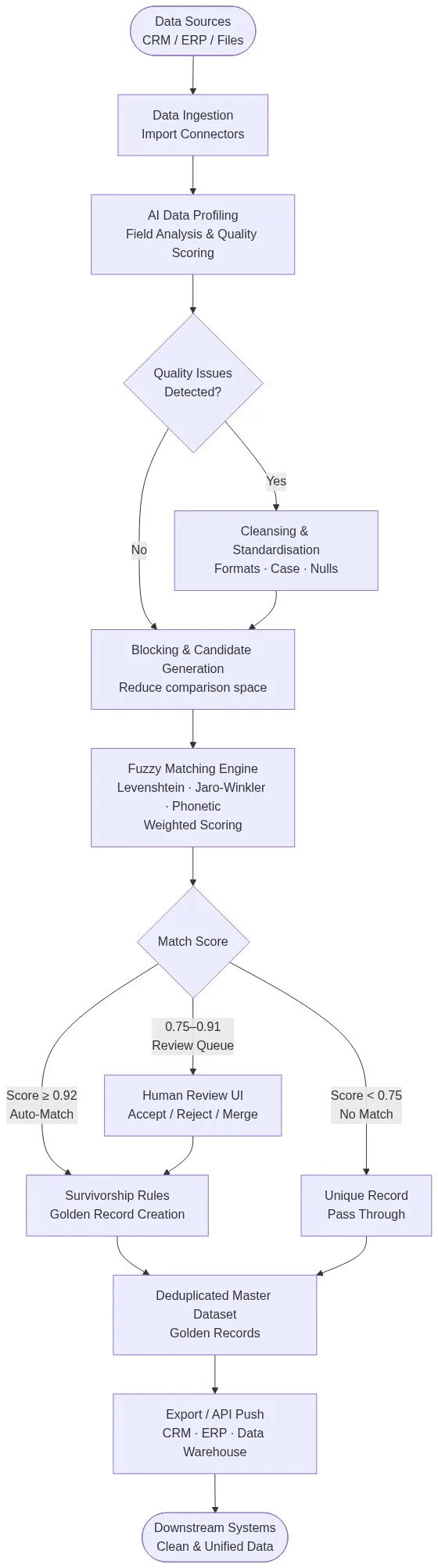
Figura 1: El proceso integral de deduplicación basada en agentes de Match Data Pro: desde la ingesta de datos de múltiples fuentes hasta la generación del registro de referencia, pasando por la elaboración de perfiles mediante IA, la puntuación difusa y la selección de registros.
Configuración de umbrales: la decisión técnica fundamental
La decisión de configuración más importante en cualquier proceso de deduplicación basado en agentes es el umbral de división: ¿dónde termina la fusión automática y dónde empieza la revisión manual?
No existe una respuesta correcta universal. Los umbrales adecuados dependen del perfil de error de tus datos, de tu tolerancia al riesgo en las fases posteriores del proceso y del coste que supongan los falsos positivos frente a los falsos negativos. Una empresa de servicios financieros que fusiona cuentas de clientes no puede permitirse fusiones erróneas, por lo que un umbral de fusión automática de 0,95 es adecuado. Un equipo de marketing que elimine duplicados de una lista de contactos nuevos puede fijarlo en 0,88 para reducir los contactos redundantes sin perder clientes potenciales por un exceso de precaución.
Match Data Pro recomienda una configuración de tres zonas:
- Zona de fusión automática (0.92+): el proceso de fusión se lleva a cabo sin intervención humana. Normalmente abarca entre el 60 % y el 75 % de los duplicados detectados.
- Zona de revisión (0,75–0,91): los pares dudosos pasan a la cola para que un humano tome una decisión. Normalmente, entre el 10 % y el 20 % son duplicados.
- Zona de rechazo (por debajo de 0,75): no hay coincidencia. Los registros se tratan como únicos.
Calibre los umbrales procesando una muestra de entre 1.000 y 5.000 registros a través del flujo de trabajo y revisando manualmente los resultados en cada banda de puntuación. Ajuste las ponderaciones y los umbrales hasta que la precisión y la recuperación alcancen los valores deseados antes de procesar el conjunto de datos completo. Las herramientas de puntuación de reglas de coincidencia de Data Pro le permiten ajustar las ponderaciones y obtener una vista previa de las distribuciones de puntuación antes de iniciar una ejecución en producción.
Modos de fallo habituales y cómo evitarlos
Bloqueo excesivo: omisión de duplicados en la generación de candidatos
Si tus claves de filtrado son demasiado restrictivas, los duplicados auténticos nunca entrarán en la lista de candidatos, y el motor de coincidencia nunca los detectará. Un error tipográfico en la inicial de un apellido puede hacer que un registro no cumpla con un filtro fonético. Solución: utiliza varias claves de filtrado que se solapen y supervisa el recuento de pares de candidatos por filtro. Si un filtro devuelve cero o muy pocos pares para un conjunto de datos grande, es probable que el filtro sea demasiado restrictivo.
Desviación del umbral: la zona de fusión automática se reduce con el tiempo
A medida que mejore la calidad de los datos, la cola de revisión debería reducirse. Si aumenta, significa que tus ponderaciones se han desajustado con respecto a los datos actuales. Vuelve a realizar la calibración de umbrales cada trimestre o tras cualquier importación significativa de datos. Match Data Pro registra cada decisión de coincidencia junto con las puntuaciones de los campos que la han determinado, lo que facilita la recalibración.
Conflictos de supervivencia: se conserva un valor de campo incorrecto
Las reglas de supervivencia deben ser explícitas. La expresión «más reciente» parece segura, pero el registro actualizado más recientemente en un CRM es, a veces, el que contiene más errores (por ejemplo, un comercial que introdujo datos erróneos ayer). Crea reglas de supervivencia que tengan en cuenta tanto la actualidad como la fiabilidad de la fuente. Match Data Pro permite establecer reglas de supervivencia a nivel de campo con ponderaciones que dan prioridad a la fuente, de modo que puedes dar preferencia al correo electrónico de Salesforce, pero utilizar la dirección de un archivo de importación verificado.
La deduplicación basada en agentes en la práctica: tres casos de uso
Deduplicación de datos en CRM a gran escala
Una empresa de SaaS que utiliza HubSpot y cuenta con 400 000 contactos acumulados a lo largo de ocho años de crecimiento, adquisiciones e importaciones. Una tarea puntual de deduplicación tras la fusión detectó 67 000 grupos de duplicados. Las reglas de supervivencia conservaron el registro de contacto más completo de cada grupo. El proceso se ejecutó durante la noche; la cola de revisión contenía 9 200 pares dudosos que dos analistas resolvieron en cuatro horas al día siguiente.
Deduplicación diaria de los clientes potenciales entrantes
Un equipo de marketing B2B que recibía entre 2.000 y 5.000 formularios rellenados al día necesitaba eliminar los duplicados antes de remitirlos al departamento de ventas. Utilizaron la API de búsqueda aproximada en tiempo real de Match Data Pro como comprobación previa a la inserción: cada nuevo cliente potencial se compara con los registros existentes en menos de 200 ms. Los clientes potenciales con una puntuación superior a 0,88 respecto a un contacto existente se eliminan y se marcan para su enriquecimiento en el CRM, en lugar de crear un nuevo registro.
Fichero maestro de clientes de múltiples fuentes
Una empresa con registros de clientes repartidos en cuatro sistemas —un ERP, un CRM heredado, una plataforma de facturación y un sistema de gestión de incidencias— utilizó el proceso de resolución de entidades de Match Data Pro para crear un registro maestro unificado de clientes. Los registros se importaron desde los cuatro sistemas, se analizaron, se depuraron y se emparejaron. El proceso generó 1,4 millones de registros de clientes «de referencia» a partir de 2,1 millones de entradas sin procesar —lo que supone una reducción del 33 %—, con un registro de auditoría completo que vincula cada registro de referencia con los registros de origen que lo componen.
Primeros pasos con Match Data Pro
Match Data Pro es una plataforma SaaS en la nube que no requiere ningún contrato a largo plazo. Permite configurar y ejecutar un proceso completo de deduplicación basada en agentes —captura, perfilado, limpieza, comparación, fusión y exportación— sin necesidad de escribir código. Los conectores de importación, las reglas de coincidencia aproximada, la lógica de supervivencia y la programación de tareas se pueden configurar a través de la interfaz de usuario de la plataforma.
Empieza una prueba gratuita y ejecuta tu primera tarea de deduplicación hoy mismo. O reserva una demostración para analizar un caso práctico real con nuestro equipo.
Preguntas frecuentes
¿Qué es la deduplicación agencial?
La deduplicación autónoma es un proceso que identifica y fusiona registros duplicados de forma autónoma, utilizando umbrales de coincidencia configurables para decidir qué pares fusionar automáticamente, cuáles remitir a revisión humana y cuáles tratar como únicos, sin necesidad de que una persona revise cada par candidato.
¿En qué se diferencia la deduplicación por agente de la deduplicación tradicional?
La deduplicación tradicional requiere una configuración manual para cada ejecución y una revisión manual de todos los pares coincidentes. La deduplicación de Agentic se ejecuta de forma autónoma según una programación, remite únicamente los casos dudosos a los revisores y aplica automáticamente las reglas de supervivencia, lo que reduce el tiempo de trabajo de los analistas entre un 80 % y un 90 % en conjuntos de datos de gran tamaño.
¿Qué umbral de coincidencia debo utilizar para la fusión automática de registros?
La mayoría de los equipos comienzan con un umbral de fusión automática de 0,92 y una zona de revisión de 0,75 a 0,91. El valor adecuado depende de la calidad de tus datos y de tu tolerancia al riesgo. Realiza una calibración revisando manualmente una muestra de entre 1.000 y 5.000 registros en cada banda de puntuación antes de establecer un umbral definitivo para la producción.
¿Puede un «agentic pipeline» realizar comprobaciones de duplicados en tiempo real, y no solo en ejecuciones por lotes?
Sí. La API de búsqueda aproximada en tiempo real de Match Data Pro compara cada registro entrante con el conjunto de datos existente en menos de 200 ms en el momento de su entrada. De este modo, se evita la creación de duplicados en lugar de tener que eliminarlos a posteriori, lo que constituye la estrategia de deduplicación más eficaz.
¿Qué ocurre cuando las reglas de supervivencia entran en conflicto entre los distintos sistemas de origen?
Las reglas de prevalencia a nivel de campo resuelven los conflictos asignando prioridad a sistemas de origen específicos para campos concretos. Puedes dar preferencia al correo electrónico de tu CRM, pero utilizar la dirección de un archivo de importación verificado, con la actualidad como criterio de desempate. Match Data Pro registra cada decisión de prevalencia para que el registro de referencia sea totalmente auditable.