
When a legacy ETL or data integration platform reaches end of life, your team faces a hard deadline: migrate your pipelines and data quality processes, or risk running unsupported software on production data. The right move is to treat the migration as a data quality opportunity — profile every dataset, cleanse and deduplicate records before loading them into any new system, and replace brittle hand-coded transformations with a modern, AI-powered pipeline.
Ready to modernise your data quality stack? Book a demo with Match Data Pro and see the full pipeline in action.
Why Legacy Data Integration Platforms Become a Liability
Legacy ETL platforms were built for on-premise batch workloads. Many date back to the 1990s and early 2000s, when nightly batch jobs moved data between mainframes and relational databases. The architecture worked for that era. It does not work well for modern data stacks.
When a vendor announces end of life, several things happen simultaneously:
- Security patches stop. Any vulnerability discovered after the EOL date goes unpatched. Running unsupported software on data containing PII, financial records, or health information is a compliance risk.
- Integration breaks accumulate. Cloud connectors, API versions, and operating system dependencies change. Legacy platforms cannot keep pace.
- Talent costs rise. Developers who know the legacy system retire or move on. Hiring replacements becomes expensive and slow.
- Support contracts expire. Even if the software still runs, the vendor’s ability to troubleshoot production incidents disappears.
The result: a data integration platform that was once a mission-critical asset becomes a liability that blocks every downstream analytics, AI, and compliance initiative.
The Common Trap: Lift-and-Shift Migration
The easiest migration path is lift-and-shift: replicate every existing job in the new platform as closely as possible. Most teams default to it because it feels safe. It is not.
Lift-and-shift migration carries every data quality problem from the legacy system into the new one. If the old platform was producing 8% duplicate customer records, the new platform will produce 8% duplicates on day one. If address data was unstandardised, it remains unstandardised. You pay the migration cost twice: once to move, once to fix.
What Actually Moves When You Migrate
A typical legacy ETL migration touches three categories of objects:
| Object type | Ejemplo | Data quality risk |
|---|---|---|
| Source connections | JDBC to Oracle, flat-file inputs | Schema drift, missing null handling |
| Transformations | Field mappings, lookups, aggregations | Hardcoded business rules that are now wrong |
| Target loads | CRM, data warehouse, data lake | Dirty data lands in clean target |
Without a data quality pass before migration, all three categories carry forward their existing errors.
The Seven-Step Migration Pipeline That Protects Data Quality
A migration done right inserts a data quality pipeline between the legacy source and the new target. Match Data Pro provides every stage of that pipeline as a cloud SaaS platform with no long-term contract and a free trial you can start today.
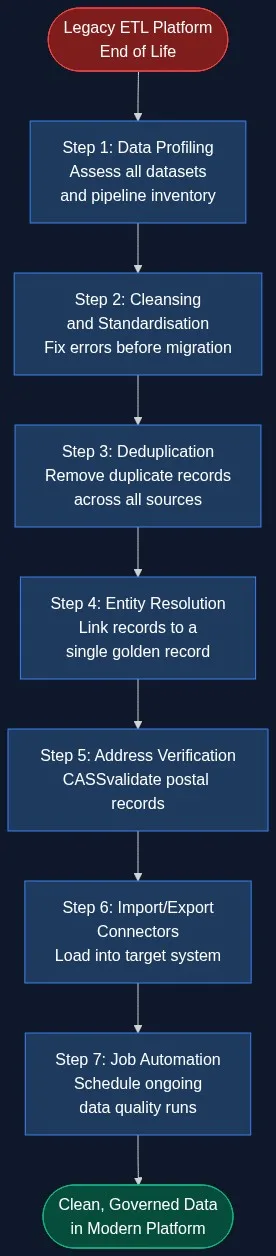
Step 1: Data Profiling
Before touching a single record, run AI data profiling across every source dataset. Profiling surfaces field-level completeness, uniqueness, format distributions, and referential integrity violations. A typical legacy database contains 10–25% fields with quality issues that are invisible to developers working from memory of what the data “should” look like.
Profiling output gives you a baseline quality score, a prioritised issue list, and the evidence you need to justify cleaning effort to stakeholders.
Step 2: Cleansing and Standardisation
Data cleansing corrects format errors, trims whitespace, normalises case, expands abbreviations, and applies business-specific rules to every field. For a customer table migrating out of a legacy CRM, this typically means:
- Splitting concatenated name fields (“SMITH,JOHN” → first: John, last: Smith)
- Standardising phone formats (+1-555-867-5309 → 15558675309)
- Parsing and normalising company names (“Acme Corp.” / “ACME CORPORATION” → Acme Corporation)
- Replacing placeholder values (“N/A”, “999-999-9999”, “test@test.com”) with nulls
Standardisation is not optional. Fuzzy matching in later steps depends on consistent field formats to produce reliable similarity scores.
Step 3: Deduplication
Deduplication identifies records that represent the same real-world entity and collapses them into a single master record. In a legacy system that has been running for 10 or more years, duplicate rates of 8–22% are common across customer, vendor, and product tables.
Match Data Pro’s deduplication engine uses configurable fuzzy matching algorithms — Jaro-Winkler for names, token-set ratio for company names, phonetic matching for handling transcription errors — combined with weighted field scoring. A candidate pair might score:
- First name: “Robert” vs “Bob” → phonetic match 0.82
- Last name: “Johnson” vs “Jonson” → Levenshtein 0.91
- Email: “rjohnson@acme.com” vs “bob.johnson@acme.com” → domain match 0.78
- Composite score: 0.85 → auto-merge above threshold of 0.80
Step 4: Entity Resolution
Entity resolution goes beyond deduplication within a single table. It links records that represent the same entity across multiple source systems — the customer in the CRM, the billing account in the ERP, and the contact in the marketing platform. Match Data Pro integrates Senzing entity resolution, a pre-trained probabilistic graph engine that resolves identities across sources without requiring hand-crafted rules.
The output is a golden record: one authoritative view of each entity, with field-level provenance showing which source system contributed each value.
Step 5: Address Verification
Legacy systems accumulate years of address decay. USPS data shows that 17% of Americans move each year. A customer database that has not been verified in three years may have a 40%+ undeliverable address rate.
Match Data Pro’s CASS-certified address verification validates and standardises every postal record against the USPS postal database, appends ZIP+4 codes, and flags undeliverable addresses before they reach the target system.
Step 6: Import/Export Connectors
Once data is clean, verified, and deduplicated, Match Data Pro’s import/export connectors load it into the target platform. Supported formats include CSV, Excel, JSON, XML, and direct database connections. The connector layer handles schema mapping, field transformation, and error logging so every load is auditable.
Step 7: Job Automation
Migration is not a one-time event. New records arrive daily from CRM updates, form submissions, and API integrations. Job automation schedules recurring data quality runs — profiling, cleansing, deduplication — so the quality gains from migration are maintained over time. Match Data Pro’s job scheduler supports cron-based and event-triggered execution, with email alerts on job failure or threshold breach.
Evaluating Your Migration Options
Data teams facing a legacy platform EOL typically consider four paths:
| Option | Time to value | Data quality control | Total cost |
|---|---|---|---|
| Lift-and-shift to similar legacy tool | 3–6 months | None — same problems persist | High (licence + migration) |
| Build custom ETL + quality pipeline | 12–24 months | High but fragile | Very high ($500K–$1.5M) |
| Enterprise MDM platform | 12–18 months | High | Very high ($200K–$1M+/yr) |
| Modern cloud data quality SaaS | Days to weeks | High (AI-powered) | Low — monthly, no contract |
For most data teams, a modern cloud data quality platform delivers the best combination of speed, quality control, and cost. You get AI-powered fuzzy matching, full entity resolution, address verification, and job automation — without the 18-month implementation timeline of an enterprise MDM.
What to Do Before the EOL Deadline
A structured pre-migration checklist reduces risk and speeds up cutover:
- Inventory every pipeline. Document each source-to-target job: what it moves, how often, and what business process depends on it.
- Profile source data now. Do not wait for migration day. Run a profiling scan on every source table to establish baseline quality scores and find hidden problems.
- Prioritise by downstream impact. Fix customer master and product master data first. These feed the most downstream systems and have the highest cost of error.
- Set quality thresholds for go-live. Define measurable acceptance criteria: duplicate rate below 1%, address verification rate above 95%, null rate in required fields below 0.5%.
- Test with a representative sample. Run 10–20% of production volume through the new pipeline and validate outputs before full cutover.
- Automate post-migration monitoring. Schedule ongoing AI data profiling runs to catch quality drift after go-live.
Start a free trial of Match Data Pro and run a data profiling scan on your source datasets before your EOL deadline. No contract required.
Frequently Asked Questions
What happens if I keep running a platform that has reached end of life?
Running an end-of-life data platform means no security patches, no vendor support, and growing integration failures as cloud APIs and operating systems evolve. For organisations handling PII, financial data, or health records, running unsupported software is a direct compliance risk under GDPR, CCPA, HIPAA, and SOX. Most compliance auditors will flag it as a critical finding.
How long does a legacy ETL migration typically take?
Timeline depends on pipeline count and data volume. A focused migration of 20–50 ETL jobs with a data quality pipeline inserted typically takes 6–12 weeks with a modern cloud platform. Enterprise MDM replacements can take 12–18 months. The biggest variable is the time required to profile, cleanse, and deduplicate source data — which is why starting that work before the EOL deadline matters.
Do I need to clean my data before migration or after?
Before, always. Cleaning data after migration means dirty records already exist in the target system, potentially corrupting analytics, CRM records, and operational processes from day one. Pre-migration cleansing using AI profiling, fuzzy deduplication, and address verification ensures the target starts clean and maintains quality through automated post-go-live monitoring.
What is the difference between ETL migration and data quality migration?
ETL migration replaces the pipeline mechanics: connectors, schedulers, and transformation logic. Data quality migration addresses the content of the data those pipelines move. A complete migration does both: replaces the technical infrastructure and improves the data that flows through it. Skipping the data quality step is the leading cause of post-migration project failure.
Can Match Data Pro replace my legacy ETL platform entirely?
Match Data Pro is a data quality platform, not a general-purpose ETL replacement. It handles profiling, cleansing, standardisation, deduplication, entity resolution, address verification, and job automation for data quality workflows. For complex general ETL — multi-system orchestration, real-time event streaming, or BI pipeline management — you would typically pair Match Data Pro with a modern ETL or orchestration layer such as dbt, Airbyte, or Apache Airflow.