
Fuzzy matching algorithms determine how two records are scored for similarity — and choosing the wrong one for your field type is the single biggest cause of missed matches and false positives. Levenshtein distance handles short codes and IDs. Jaro-Winkler wins on personal names. Soundex and Double Metaphone catch phonetic variations. Token-based cosine similarity handles long, restructured text. Used in combination with weighted scoring, these algorithms form the core of any production-grade record linkage pipeline.
Start a free trial of Match Data Pro and run your first fuzzy matching job in minutes — no contract, no setup fee.
Why One Algorithm Is Never Enough
A single fuzzy algorithm applied uniformly across all fields produces unreliable results. Consider this pair of customer records:
| Field | Record A | Record B |
|---|---|---|
| First name | Jonathan | Jon |
| Apellido | Smyth | Smith |
| Correo electrónico | j.smyth@acme.com | jsmith@acmecorp.com |
| Phone | 555-301-4422 | 5553014422 |
| Company | Acme Corp | ACME Corporation |
Levenshtein distance on “Jonathan” vs “Jon” returns a low similarity score — 5 edits out of 8 characters. That looks like a non-match. But Jaro-Winkler, which weights prefix agreement more heavily, returns 0.82. That is a likely match. Using Levenshtein on names causes false negatives. Using Jaro-Winkler on email addresses causes false positives.
The correct approach: route each field type to the algorithm best suited for it, then aggregate the per-field scores into a single composite score.
The Five Core Fuzzy Matching Algorithms
1. Levenshtein Distance
Levenshtein distance counts the minimum number of single-character edits — insertions, deletions, substitutions — needed to transform one string into another. Normalised to a 0-1 similarity scale, it reads as: 1 minus (edit distance / max string length).
Best for: Short identifiers, product codes, postcode fields, reference numbers. “AB1234” vs “AB1235” scores 0.83 — one digit transposed, high confidence.
Avoid on: Personal names with abbreviations (Jon vs Jonathan), token-reordered text (Smith John vs John Smith).
See our detailed guide on Levenshtein distance and edit distance scoring for worked examples with match thresholds.
2. Jaro-Winkler Similarity
Jaro-Winkler extends the base Jaro score by adding a prefix bonus. Records sharing a common prefix of up to four characters get an upward score adjustment. This reflects the reality that name misspellings typically happen in the middle or end of a string, not at the start.
Best for: First names, last names, and short proper nouns. “Katherine” vs “Kathryn” scores 0.88 under Jaro-Winkler. Under raw Levenshtein normalised, it scores 0.56.
Avoid on: Email addresses and codes where prefix matches mean very different things.
3. Soundex and Double Metaphone
Phonetic algorithms encode names as phonetic keys and compare the keys rather than the raw strings. Soundex reduces a name to a letter plus three digits (Smith = S530, Smyth = S530). Double Metaphone handles a broader range of international name pronunciations and returns two keys per name for ambiguous sounds.
Best for: Cross-language name matching, call-centre sourced records, data entry errors from verbal intake. “Nguyen” and “Win” may phonetically encode to the same key depending on romanisation.
Avoid on: Addresses and codes. “Maine” and “Main” are phonetically identical but mean entirely different things in a street address context.
4. Token-Based and Cosine Similarity
Token-based methods split strings into word or character n-gram tokens and measure the overlap. Cosine similarity represents each string as a vector of token frequencies and measures the angle between vectors. A score of 1.0 means identical token sets; 0.0 means no overlap.
Best for: Company names with varying word order (“Acme Corp Ltd” vs “Ltd Acme Corporation”), product descriptions, address lines with reordered components.
Example: “Global Logistics Partners Inc” vs “Partners Inc Global Logistics” scores 1.0 on cosine similarity and 0.42 on Levenshtein normalised. Levenshtein fails here. Cosine does not.
5. Exact Match with Normalisation
Not every field needs fuzzy scoring. Phone numbers, tax IDs, and standardised postal codes should be cleaned and normalised first — strip formatting, expand abbreviations, pad leading zeros — then matched exactly. Applying fuzzy logic to a field like a 9-digit EIN introduces noise rather than resolving it.
Best for: Any field with a canonical format: SSN, EIN, phone (E.164 normalised), ZIP+4 after CASS address cleansing.
How the Algorithm Selection Pipeline Works
The diagram below shows the full algorithm routing and scoring pipeline used in a production fuzzy matching system.
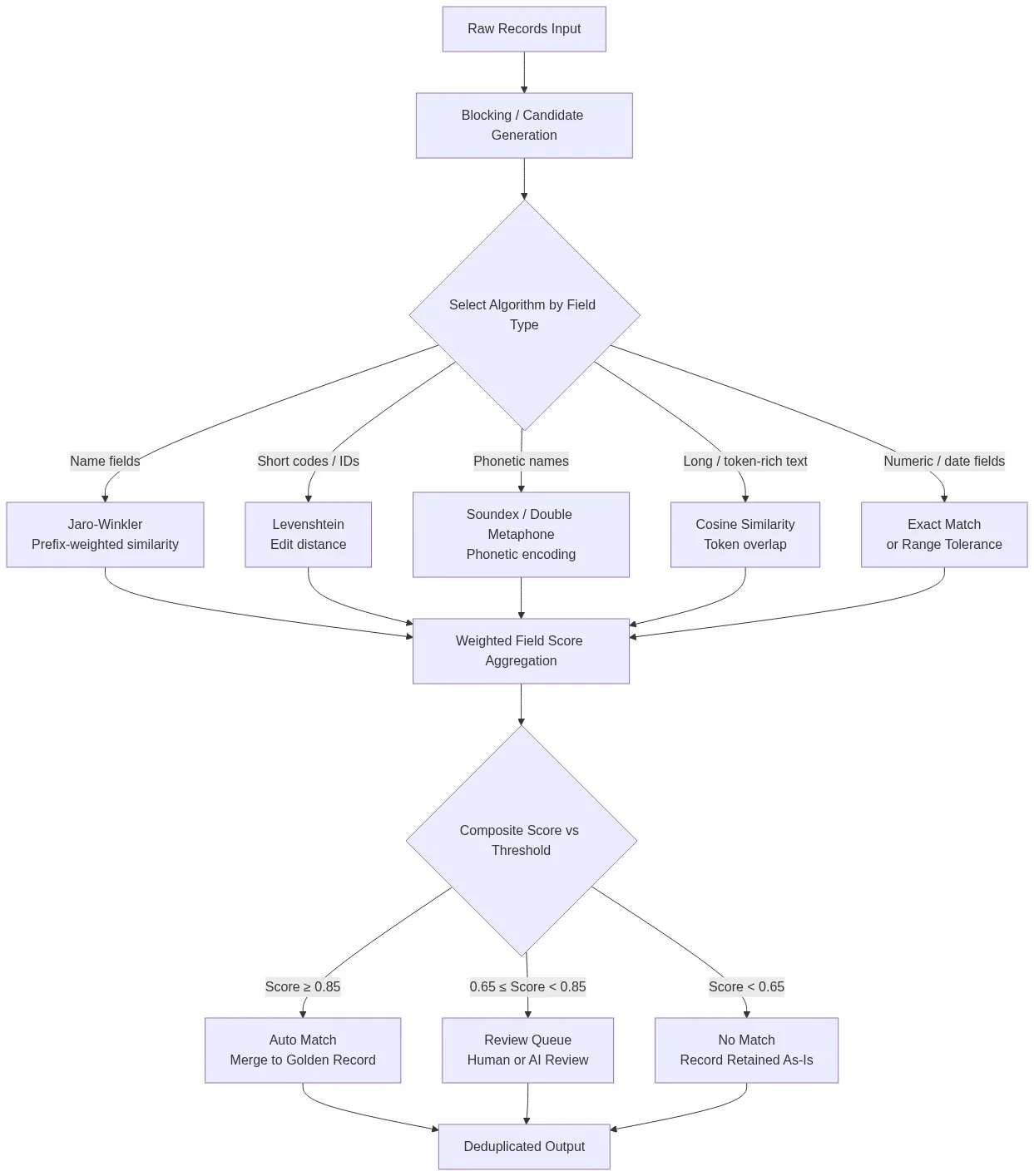
The pipeline has four stages:
- Blocking: Generate candidate pairs using a shared key (first letter of surname, ZIP prefix) to avoid O(n²) comparisons on large datasets.
- Algorithm routing: Assign each field to the appropriate algorithm based on its type. Name fields go to Jaro-Winkler. Code fields go to Levenshtein. Free-text fields go to cosine similarity.
- Weighted aggregation: Multiply each field score by a configured weight (e.g. last name = 0.30, email = 0.25, phone = 0.20, company = 0.15, address = 0.10) and sum to a composite score.
- Threshold decision: Score above 0.85 = auto-match and merge. Score 0.65-0.84 = review queue. Score below 0.65 = no match.
Match Data Pro’s configurable fuzzy matching engine implements this exact pattern. You assign algorithms and weights per field in the UI, without writing code.
Configuring Thresholds: The Critical Step Most Teams Get Wrong
Thresholds control the precision-recall trade-off. Set the auto-match threshold too high and you miss real duplicates. Set it too low and you merge records that should stay separate.
Recommended Starting Thresholds by Use Case
| Use Case | Auto-Match | Review Band | Reject |
|---|---|---|---|
| Deduplicación de CRM | ≥ 0.85 | 0.65 – 0.84 | < 0.65 |
| Entity resolution (AML/KYC) | ≥ 0.92 | 0.75 – 0.91 | < 0.75 |
| Vendor master matching | ≥ 0.80 | 0.60 – 0.79 | < 0.60 |
| Address deduplication | ≥ 0.90 | 0.70 – 0.89 | < 0.70 |
These are starting points. Validate against a labelled sample of at least 200 known-match pairs before applying to production data. Match Data Pro’s AI data profiling tool helps you understand your data’s distribution before you set thresholds.
Evaluating Match Quality
Measure precision (correct matches / all returned matches) and recall (correct matches / all true matches) on your labelled sample. A precision of 0.95 with a recall of 0.78 means you are missing 22% of real duplicates — likely a threshold set too high. Adjust in 0.02 increments and re-measure.
Combining Algorithms for Multi-Source Record Linkage
When linking records across multiple systems — CRM, ERP, marketing platform — you rarely have all fields present in every source. A CRM record may have full name and email but no phone. An ERP record may have company and tax ID but no email.
The correct approach: use a multi-algorithm weighted scoring model that handles missing fields gracefully. When a field is absent, redistribute its weight proportionally across present fields rather than defaulting to zero. A missing email field (weight 0.25) adds 0.083 to each of the three remaining fields.
Match Data Pro’s entity resolution engine (powered by Senzing) handles sparse record sets natively. It uses graph-based identity resolution to link records across three or more source systems without a shared key field.
For teams building record linkage across disconnected systems, see our guide on deterministic vs. probabilistic matching — particularly the section on hybrid scoring for sparse datasets.
Applying Algorithms in Practice: A CRM Deduplication Example
A B2B SaaS company imports 80,000 contact records from three sources: Salesforce, HubSpot, and a legacy database. The field quality varies significantly across sources.
Field assignment:
- First name: Jaro-Winkler (weight 0.15)
- Last name: Jaro-Winkler (weight 0.25)
- Email: Exact match after normalisation (weight 0.30)
- Company: Token cosine similarity (weight 0.20)
- Phone: Exact match after E.164 normalisation (weight 0.10)
Result on a test batch of 5,000 pairs with known labels: precision 0.97, recall 0.91. The 9% recall gap was traced to contacts who had changed email domains between source systems. Adding a phonetic secondary pass on the name fields recovered 60% of those missed pairs, pushing recall to 0.96.
This is the iterative, measurement-driven process that separates production-grade matching from one-pass deduplication. Match Data Pro’s data matching and merging platform supports this iteration loop with configurable match definitions and built-in result scoring.
Book a demo to see how Match Data Pro configures multi-algorithm scoring across your specific field types.
Frequently Asked Questions
Which fuzzy matching algorithm is best for personal names?
Jaro-Winkler is the strongest single algorithm for personal names because it weights prefix agreement heavily — most name misspellings occur mid-string or at the end, not at the start. Combine it with a phonetic pass (Double Metaphone) for data sourced from verbal intake or cross-language sources. Together they cover both typographic and phonetic variation in name fields.
What is the difference between Levenshtein distance and Jaro-Winkler?
Levenshtein counts the minimum character-level edits between two strings and works best on short codes, IDs, and structured fields. Jaro-Winkler measures transposition and prefix agreement and is tuned for human names. For a field like “Jon” vs “Jonathan,” Levenshtein scores 0.38; Jaro-Winkler scores 0.82. The right choice depends entirely on field type, not one metric being universally better.
How do I set the right match threshold?
Start with 0.85 for auto-match and 0.65 for the review floor, then measure precision and recall on a labelled sample of at least 200 known-match pairs. If precision is high but recall is low, your threshold is too high — lower it in 0.02 increments. If you are seeing false positives, raise the threshold. Iterate until both metrics exceed 0.90 for your use case.
Can I use multiple algorithms on the same field?
Yes, and for name fields this is often the right approach. Run both Jaro-Winkler and Double Metaphone on a last name field, then take the higher of the two scores. This catches both typographic variations (Smyth vs Smith, covered by Jaro-Winkler) and phonetic ones (Nguyen vs Win, covered by phonetic encoding). Match Data Pro supports multi-algorithm field definitions natively.
What happens when source records are missing fields?
Missing fields should trigger weight redistribution, not a zero score. If the email field (weight 0.30) is absent in one record, add 0.10 to each of the three remaining weighted fields so the composite still sums to 1.0. Setting absent fields to zero drags the composite score down artificially and causes false non-matches. Match Data Pro handles this redistribution automatically as part of its scoring engine.