
Comparing two lists is a fundamental data engineering task — but when records differ due to typos, formatting inconsistencies, or missing fields, a simple row-by-row comparison will silently miss matches and corrupt your results. The right approach combines normalization, a tiered matching strategy, and configurable confidence thresholds to surface true matches, near-matches, and genuinely unique records.

Whether you are reconciling a CRM export against a marketing automation list, cross-referencing vendor invoices with procurement records, or identifying duplicate customer accounts across two database systems, the core challenge is the same: records that represent the same real-world entity rarely look identical in both lists. A customer named “IBM Corporation” in List A may appear as “I.B.M. Corp.” in List B. An address formatted as “123 Main St, Suite 4” in one system may be “123 Main Street #4” in another.
According to the TDWI 2024 State of Data Quality Report, “mature enterprise data quality practices enable better data-driven decisions and allow trusted data to drive business results” — and reliable list comparison sits at the foundation of that maturity. This guide covers every layer of the comparison pipeline, from pre-processing to output, with practical examples and algorithm recommendations.
Why Exact Matching Fails at Scale
Most engineers instinctively reach for exact matching first — a SQL JOIN, a VLOOKUP, or a Python set intersection. Exact matching is fast, deterministic, and zero-ambiguity. When your data is perfectly standardized, it works. In practice, it almost never is.
The Hidden Cost of False Negatives
When you compare two lists using only exact matching, every formatting difference, every abbreviation, and every typo becomes a missed match — a false negative. In a CRM deduplication scenario, that means duplicate accounts survive your merge job. In a vendor reconciliation workflow, that means legitimate payments go unlinked and appear as discrepancies. In a marketing suppression use case, that means contacts who opted out of one system still receive communications from another.
Consider a concrete example. You are comparing a 200,000-row customer master list (List A) against a 180,000-row CRM export (List B). An exact JOIN on company_name returns 140,000 matches. The remaining 60,000 records from List A appear unmatched. Spot-checking 100 of those reveals that 35% are formatting variants, abbreviations, or minor typos of names that exist in List B — meaning roughly 21,000 records that should have matched were silently discarded.
Common Sources of List Divergence
- Abbreviations: “Street” vs “St”, “Corporation” vs “Corp”, “Limited” vs “Ltd”
- Punctuation differences: “Smith & Jones” vs “Smith and Jones”
- Case inconsistency: “ACME INC” vs “Acme Inc”
- Encoding artifacts: accented characters stripped or substituted (“Müller” vs “Muller”)
- Data entry errors: transpositions, missing characters, OCR-introduced errors
- Field fragmentation: “John Michael Smith” in one list; first/last split as “John” / “Smith” in another
- Legacy system truncation: name fields capped at 30 characters vs 50 characters
The Five-Stage Pipeline for Comparing Two Lists
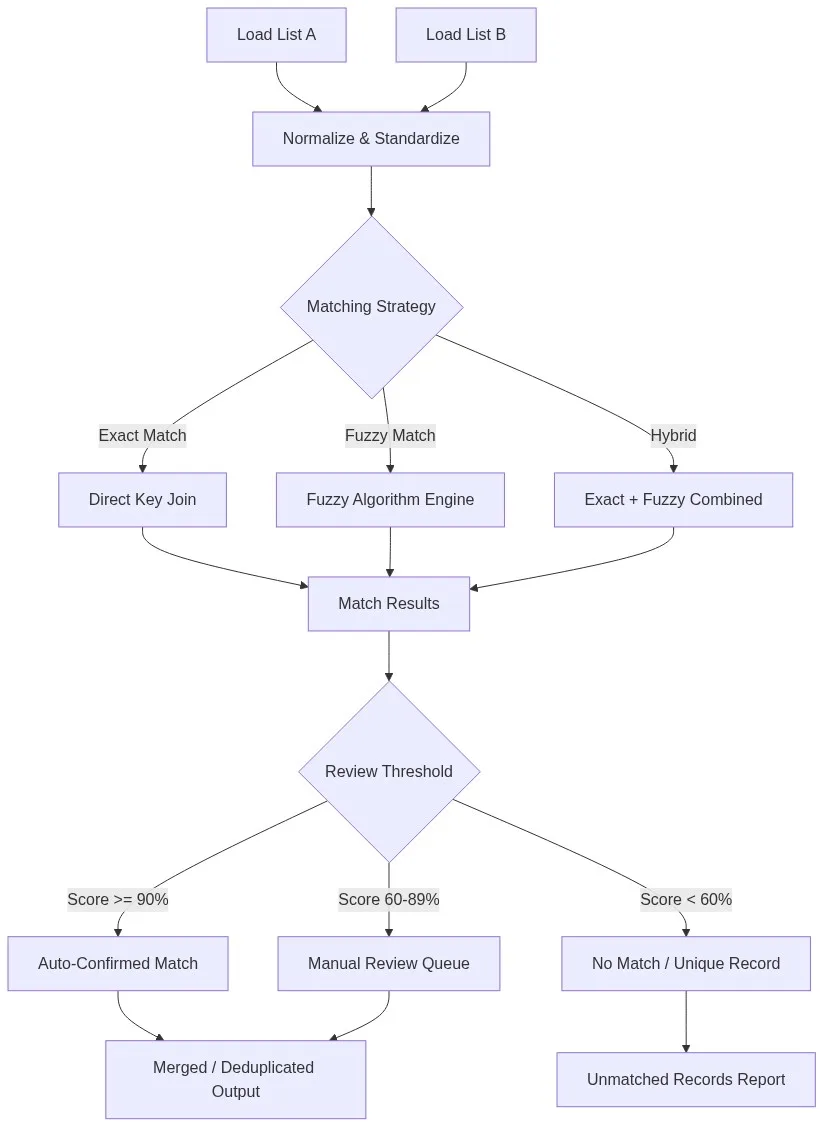
Reliable list comparison is a pipeline, not a single operation. Each stage reduces noise and narrows the comparison space before the matching engine runs.
Stage 1 — Ingest and Profile Both Lists
Before you can compare two lists, you need to understand their structure. Run an AI data profiling pass on both datasets independently. Profile outputs should include: field-level completeness (% populated), value-distribution histograms, format pattern detection (e.g., phone formats, date formats), and cardinality metrics. This step surfaces schema mismatches early — for example, discovering that List A stores phone numbers as +1-555-123-4567 while List B stores them as 5551234567, which would cause all phone-based matches to fail silently.
Stage 2 — Normalize and Standardize
Normalization is where most list comparison quality is won or lost. Apply consistent transformations to both lists before any comparison logic runs:
- Uppercase or lowercase all text fields
- Expand or collapse abbreviations to a canonical form (define a lookup table)
- Strip punctuation, extra whitespace, and non-ASCII characters
- Standardize phone number formats (E.164 is recommended)
- Parse and reformat dates to ISO 8601
- Run address fields through a CASS-certified address standardization process
After normalization, re-run your exact match. In most real-world datasets, normalization alone recovers 15–25% of matches that exact matching previously missed.
Stage 3 — Blocking and Candidate Pair Generation
Fuzzy matching every record in List A against every record in List B is an O(n²) operation. At 200,000 rows each, that is 40 billion comparisons — computationally intractable. Blocking partitions both lists into candidate groups so that comparisons only happen within likely-match segments. Common blocking keys include: first three characters of last name, ZIP code, first two digits of phone number, or SIC code for company data. A well-chosen blocking key reduces the comparison space by 99%+ while retaining near-perfect recall of true matches.
Stage 4 — Apply the Matching Strategy
This is the core of the pipeline. Depending on data quality and business requirements, apply one of three strategies:
| Strategy | Lo mejor para | Algorithm Examples | Speed | Recall |
|---|---|---|---|---|
| Coincidencia exacta | Well-governed, standardized data | Hash join, SQL INNER JOIN | Very fast | Low (misses variants) |
| Fuzzy Match | Dirty, legacy, or manually-entered data | Jaro-Winkler, Levenshtein, Soundex, N-gram | Moderate | High |
| Hybrid (Exact + Fuzzy) | Mixed-quality enterprise datasets | Weighted field scoring, token sort ratio | Moderate | Very high |
| Probabilistic / ML | High-volume entity resolution | Fellegi-Sunter, Senzing AI engine | Fast at scale | Highest |
For most list comparison tasks involving customer or company names, a hybrid strategy delivers the best precision/recall balance. Use an exact match on a clean blocking key (e.g., normalized email domain), then apply fuzzy matching on name fields with a configurable Jaro-Winkler or token sort ratio threshold.
Stage 5 — Score, Threshold, and Route
Each candidate pair receives a composite match score — typically a weighted average across multiple fields. Define three routing tiers:
- Auto-confirm (score ≥ 90%): High-confidence matches are automatically linked or merged without human review.
- Manual review queue (score 60–89%): Ambiguous pairs are surfaced to a data steward for adjudication.
- No match (score < 60%): Records are classified as unique and written to a separate unmatched output.
Threshold calibration is empirical — validate against a labeled sample of known match/non-match pairs to tune your cutoffs before running production volumes.
Comparing Two Lists: Common Use Cases by Industry
CRM and Marketing Operations
Marketing Ops teams routinely receive trade show scan lists, third-party enrichment files, and webinar attendee exports that must be reconciled against the CRM. The comparison task here is bidirectional: identify which inbound records already exist as CRM contacts (to update, not create), which are net-new leads (to create), and which are suppression matches (opted-out contacts to exclude from outbound). A fuzzy match on email, first_name + last_namey company_name using a hybrid strategy typically achieves 92–96% precision on clean CRM data.
Finance and Vendor Reconciliation
AP teams compare purchase order line items against vendor invoice records. Discrepancies can arise from description field formatting, partial shipments recorded as separate line items, and unit price rounding differences. A list comparison pipeline here benefits from numeric-aware fuzzy matching — treating “1,000.00” and “1000” as identical values — alongside string matching on line item descriptions.
Healthcare and Patient Record Matching
Patient record matching across provider systems carries the highest stakes of any list comparison scenario. False negatives (missed matches) fragment patient histories; false positives (incorrect merges) create clinical risk. This use case typically demands probabilistic entity resolution rather than simple fuzzy matching, using multi-field weighted scoring across name, DOB, address, and insurance ID, with strict human-review requirements for any match below a 95% confidence threshold.
Choosing the Right Algorithm to Compare Two Lists
Algorithm selection depends on the dominant error type in your data. The following guide maps error types to the most effective algorithms:
| Error Type | Ejemplo | Recommended Algorithm |
|---|---|---|
| Single-character typos | “Smtih” vs “Smith” | Levenshtein / Edit Distance |
| Name prefix matching | “Jon” vs “Jonathan” | Jaro-Winkler |
| Phonetic variants | “Fischer” vs “Fisher” | Soundex / Double Metaphone |
| Word-order transposition | “Smith John” vs “John Smith” | Token Sort Ratio |
| Abbreviations / partial names | “IBM” vs “International Business Machines” | Token Set Ratio / N-gram |
| Multi-field identity resolution | Name + DOB + address | Fellegi-Sunter / Senzing |
Learn more about specific algorithm mechanics in our complete fuzzy matching guide.
Automating List Comparison with Match Data Pro
Manual list comparison — whether via Excel VLOOKUP chains, hand-written Python scripts, or one-off SQL queries — does not scale. It introduces human error, lacks auditability, and cannot adapt to schema changes without code modifications. Enterprise-grade list comparison requires a purpose-built platform.
Match Data Pro provides a no-code, configurable matching engine that handles the full five-stage pipeline described above. Key capabilities include:
- AI-powered fuzzy matching: Configurable algorithms including Jaro-Winkler, Levenshtein, Soundex, token sort/set ratio, and N-gram — selectable per field with independent weight assignments.
- Automated normalization rules: Pre-built and custom transformation rules applied before matching runs, including abbreviation expansion, phone formatting, and address parsing.
- Intelligent blocking: Automatically generates blocking keys from your data profile to reduce comparison space without sacrificing recall.
- Three-tier output routing: Auto-confirm, review queue, and no-match outputs are configurable by threshold at the job level.
- Import/export connectors: Direct connectors to Salesforce, HubSpot, Microsoft Dynamics, SQL databases, CSV/Excel, and REST APIs.
- Job automation: Schedule recurring comparison jobs with email alerts and exception reporting — no manual intervention required for standard reconciliation cycles.
- Senzing entity resolution: For high-volume, multi-source entity resolution scenarios, Senzing’s probabilistic engine is available natively within the platform.
See how Match Data Pro compares against other data quality platforms in our 2026 Data Quality Software Buyer’s Guide.
Frequently Asked Questions: Comparing Two Lists
What is the best way to compare two lists for duplicate records?
The most reliable approach is a hybrid pipeline: normalize both lists first (standardize casing, abbreviations, and formats), then apply exact matching on clean key fields, followed by fuzzy matching on name and address fields using algorithms like Jaro-Winkler or token sort ratio. Route results into auto-confirm, manual review, and no-match tiers based on composite confidence scores. For large datasets, add a blocking step first to reduce the comparison space.
What is the difference between exact matching and fuzzy matching when comparing lists?
Exact matching requires two values to be character-for-character identical to be classified as a match. It is fast and unambiguous but misses formatting variants, abbreviations, and typos. Fuzzy matching calculates a similarity score between strings, allowing records to match even when they differ slightly. Fuzzy matching significantly increases recall but requires threshold tuning to control false positives.
How do I compare two large lists efficiently without running out of memory or time?
Use blocking to partition both lists into candidate groups before fuzzy comparison. A blocking key — such as the first three characters of a name or a ZIP code — restricts comparisons to likely-match pairs, reducing an O(n²) problem to near-linear complexity. For datasets above 500,000 rows, a purpose-built matching platform with parallel processing is recommended over custom scripts.
Can I compare two lists that have different column structures?
Yes, but it requires field mapping as a pre-processing step. Map semantically equivalent fields from List A to their counterparts in List B (e.g., full_name in List A maps to first_name + last_name in List B). Apply field-level normalization after mapping. Matching then proceeds on the harmonized field set. Match Data Pro’s field mapping UI handles this without code.
What confidence score threshold should I use when comparing two lists?
There is no universal threshold — it must be calibrated against a labeled sample from your specific dataset. A common starting point is: ≥90% for auto-confirm, 60–89% for manual review, and <60% for no-match. In high-stakes scenarios (healthcare, financial reconciliation), raise the auto-confirm threshold to ≥95% and route more records to human review. Always validate thresholds against precision/recall metrics before deploying to production.
Start Comparing Your Lists Accurately Today
If your current list comparison workflow relies on VLOOKUP, SQL JOINs, or manual review, you are almost certainly missing matches and producing results you cannot fully trust. Match Data Pro’s AI-powered matching engine handles every stage of the pipeline — from normalization and blocking through fuzzy scoring and output routing — without a single line of code.
- Start a free trial — no contract, no credit card required. Upload your first two lists and see match results in minutes.
- Book a demo — talk to a data matching specialist about your specific reconciliation or deduplication use case.
- Contact sales: sales@matchdatapro.com
Related reading:
- What Is Fuzzy Matching? A Complete Guide with Examples & Algorithms
- What Is Data Matching? Complete 2026 Guide with Real Examples
- Data Matching and Merging: Complete 2026 Guide
- Data Cleansing Guide 2026: Techniques & Tools
- ¿Cuál es la mejor manera de cotejar datos de varios campos?