
Vendor matching software identifies duplicate and fragmented supplier records across ERP, procurement, and accounts-payable systems, then consolidates them into a single verified vendor identity. Without it, most organisations carry 15–30% duplicate vendor rates, which drives overpayments, missed contract rebates, and failed audit reconciliations. The right platform combines AI-powered fuzzy matching, configurable survivorship rules, CASS address verification, and automated monitoring in one pipeline — not a patchwork of scripts.
Ready to see it in action? Book a demo of Match Data Pro’s vendor matching capabilities.
Why Vendor Records Are Harder to Match Than Customer Records
Customer records at least share a pattern: first name, last name, email, phone. Vendor records are far messier. A single supplier can appear as:
- Acme Supply Co. in the ERP
- ACME SUPPLY COMPANY INC in accounts payable
- Acme Supply in the procurement portal
- Acme Supplies LLC in the contract management system
Add address variants (“Suite 400” vs “Ste. 400” vs “4th Floor”), different phone formats, and missing Tax IDs, and you have a matching problem that exact-string logic cannot solve. A study by the Institute of Finance and Management found that the average enterprise holds vendor records across 4.7 separate systems. Each system applies its own naming conventions and validation rules — or none at all.
Vendor matching software solves this by scoring record similarity across multiple fields simultaneously, using algorithms that account for abbreviations, suffixes, transpositions, and missing values. Learn more about the underlying techniques in our guide to fuzzy matching algorithms and pipelines.
The 10-Criterion Evaluation Checklist
Use this checklist when evaluating vendor matching platforms. Each criterion maps to a specific failure mode you will encounter in production.
1. Coincidencia difusa con múltiples algoritmos
No single algorithm handles every vendor name pattern. Look for platforms that run Levenshtein edit distance, Jaro-Winkler, phonetic (Soundex/NYSIIS), and token-based comparison in parallel. Each catches different error types: Levenshtein catches transpositions and typos; phonetic algorithms catch sound-alike variants like “Siemens” vs “Seemens”; token matching handles word-order differences like “Supply Acme Co” vs “Acme Supply Co.”
Ask vendors: can field-level algorithm weights be configured without code? You need to weight company name differently from street address and Tax ID.
2. Blocking and Indexing Strategy
Comparing every vendor record against every other is computationally prohibitive at scale. A 500,000-record vendor master requires 125 billion pair comparisons if unblocked. Blocking reduces this by grouping candidates that share a common token — first three characters of the company name, ZIP code, or Tax ID prefix — before scoring runs.
Evaluate: does the platform support multi-pass blocking? Single-pass blocking misses cross-zone duplicates where one record has a different ZIP or name token.
3. Tax ID and Registration Number Matching
EIN, VAT, ABN, and other tax identifiers are the strongest deterministic signal in vendor data. A good platform treats tax ID as a high-weight exact-match field while still tolerating formatting differences: “47-1234567” vs “471234567” vs “47 1234567” must resolve to the same vendor.
Check: does the platform normalise identifier formats before comparison, or does it require pre-cleaned input?
4. CASS-Certified Address Verification
Address data is one of the most variable fields in vendor records. “123 Main Street, Suite 200, Chicago, IL 60601” and “123 Main St Ste 200 Chicago IL” are the same address — but string comparison scores them as only 62% similar. CASS address verification standardises both to the USPS-canonical form before fuzzy matching runs, cutting false negatives by 20–35%.
Match Data Pro includes built-in CASS-certified address cleansing as part of the vendor matching pipeline — not as an optional add-on. Read our full address matching guide to understand why this matters.
5. Survivorship Rules and Golden Record Logic
Identifying duplicates is only half the problem. The platform must then decide which field values to keep in the merged golden record. Common survivorship rules include:
- Most recent: keep the value from the latest-updated source
- Most complete: keep the non-null value
- Most trusted source: ERP overrides procurement portal
- Concatenate: combine all phone numbers or aliases
Evaluate: are survivorship rules configurable per field and per source system, or are they hard-coded? Hard-coded rules fail when your ERP is the dirtiest source, not the cleanest. See how this connects to building and maintaining golden records.
6. Match Score Thresholds and Review Routing
Not every match decision is binary. A well-designed platform routes records into three buckets:
- Auto-merge: score above 92 — system merges without human review
- Review queue: score 75–92 — analyst reviews the pair
- Auto-pass: score below 75 — records treated as distinct vendors
Thresholds must be configurable, not fixed. A 92% threshold appropriate for a clean ERP import will produce too many false positives on raw procurement data. Ask for the ability to set thresholds per dataset, per field type, and per match run.
7. Entity Resolution for Complex Hierarchies
Some vendors operate as subsidiaries, parent companies, or joint ventures. A subsidiary “Acme Logistics LLC” and parent “Acme Group International” are related but not duplicates. Entity resolution — powered by Senzing in Match Data Pro — goes beyond pairwise deduplication to build a graph of related vendor entities, preserving subsidiary relationships while flagging true duplicates.
Ask: does the platform support entity graphs, or only pairwise matching? If your spend analysis depends on consolidated group-level spend, pairwise matching alone will undercount. Explore the difference in our entity resolution definitive guide.
8. API and Integration Connectors
Vendor matching cannot live in a silo. Your platform must integrate with the systems that generate and consume vendor data: SAP, Oracle, Coupa, Ariba, NetSuite, Salesforce, and your data warehouse. Evaluate two integration paths:
- Batch connectors: scheduled jobs that pull vendor files, run matching, and push results back on a defined cadence
- Real-time API: REST endpoints that score a vendor record at point-of-entry and return a match decision in milliseconds
Match Data Pro’s live fuzzy search API handles real-time lookup, while job automation handles scheduled batch runs. Both are included in the platform. Also review how API vs batch deduplication applies to your vendor workflow.
9. Audit Trail and Governance
Every merge, rejection, and manual override must be logged. Your procurement compliance team will ask: who merged vendor 4512 with vendor 7893, when, and on what basis? Platforms that cannot answer that question with a timestamped, field-level audit trail will fail internal or external audits. Check that the audit log is immutable and exportable — not just viewable in-app.
10. AI-Assisted Match Suggestions
Rule-based matching catches known patterns. AI-powered match suggestions surface probable duplicates that fall outside configured rules — company names that have changed post-acquisition, or vendors registered under a different legal entity in one country. Match Data Pro’s AI engine analyses historical match decisions to refine scoring weights automatically, reducing false negatives over time without manual threshold adjustments.
The Vendor Matching Pipeline: What Happens Step by Step
Understanding the pipeline helps you validate that a platform you are evaluating actually does what it claims.
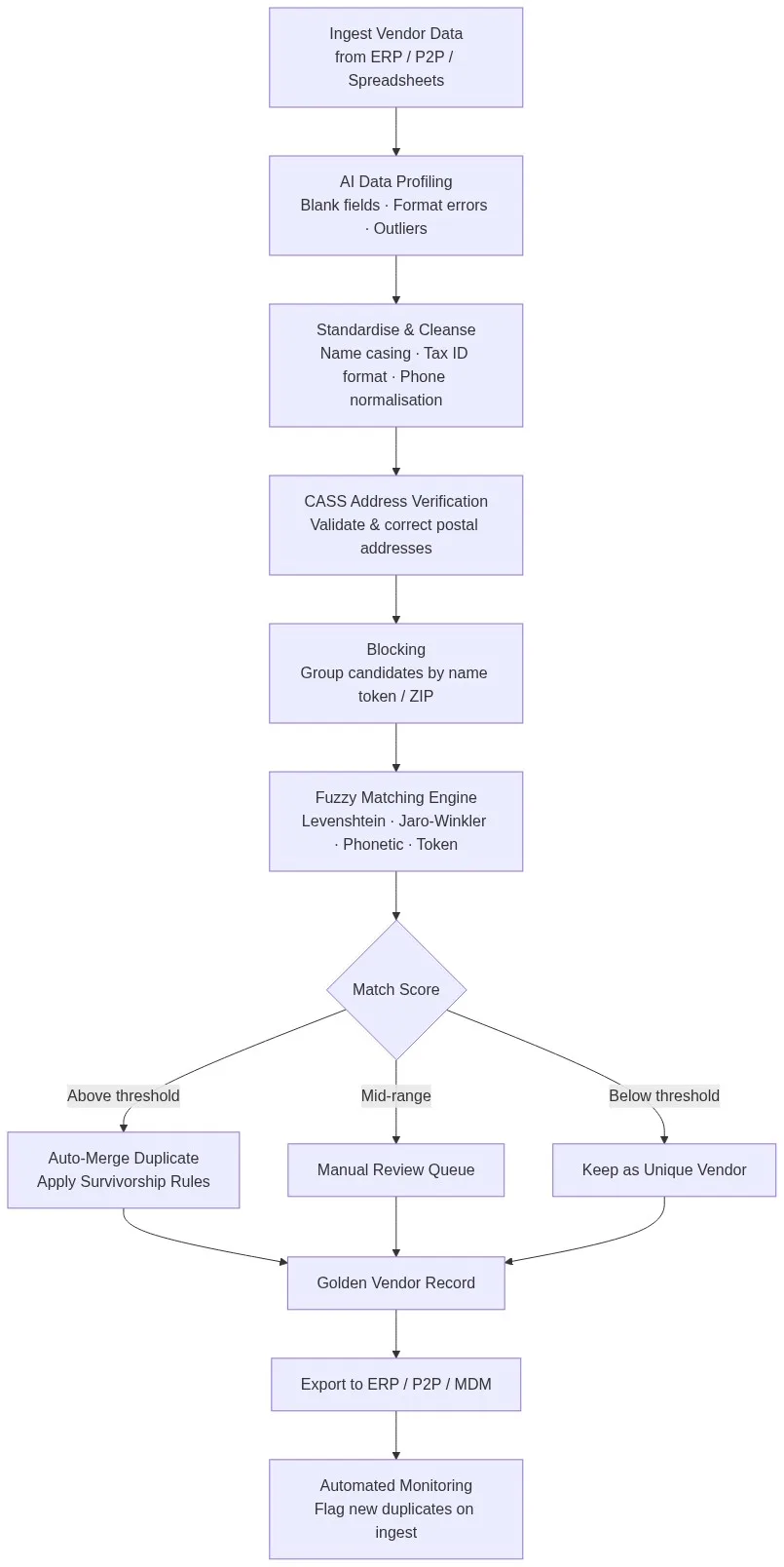
The pipeline above shows the full flow: raw vendor data from ERP, P2P, and spreadsheets enters AI data profiling, which scores field completeness, detects outliers, and flags format errors. Standardisation normalises company name casing, Tax ID delimiters, and phone number formats. CASS address verification corrects and standardises postal addresses. Blocking groups candidate pairs. The fuzzy matching engine scores each pair using multiple algorithms. Scores route records to auto-merge, manual review, or auto-pass. Survivorship rules select field values for the golden vendor record. The clean record exports to downstream systems. Automated monitoring flags new inbound records that score above the duplicate threshold, preventing re-contamination.
Match Data Pro’s data quality dashboard gives your team visibility into duplicate rates, merge volumes, and review queue depth at every stage of the pipeline.
Common Failure Modes and How to Test for Them
False Positives: Different Vendors Merged
Two vendors named “National Services Inc” in different states are not the same company. A platform that weights company name alone will incorrectly merge them. Test your candidate platform with records that share company name but differ on address and Tax ID. The platform should score them below the auto-merge threshold when address and Tax ID diverge significantly.
False Negatives: Duplicates Missed
The harder problem. “Grainger Industrial Supply” and “W.W. Grainger” are the same company — but a token-only matcher will miss this because “W.W.” and “Grainger” tokenise differently. Test with known real-world duplicates from your own vendor master before signing a contract.
Performance at Scale
Request a benchmark on your actual record count. A platform that handles 50,000 vendors in 20 minutes may take 14 hours on 2 million. Ask specifically about blocking strategy and whether the engine is parallelised. Match Data Pro processes 1 million vendor records in under 4 hours on standard SaaS infrastructure.
Procurement and Finance Teams: What to Demand from Your Evaluation
If you are leading the evaluation from a procurement or finance angle, the technical checklist above maps to these business outcomes:
- Duplicate vendor rate below 2% after initial clean-up and automated monitoring
- Overpayment recovery: organisations typically recover 0.5–1.5% of AP spend after deduplication
- Contract compliance: consolidated vendor view enables spend analytics that surface off-contract purchasing
- Audit readiness: immutable match logs satisfy SOX, ISO, and internal audit requirements
Read how this connects to ERP data quality and vendor master data cleansing for a complete picture of the data quality stack your procurement team needs.
Start your free trial of Match Data Pro — no contract required. Register now and run vendor matching on your own data today.
Preguntas frecuentes
What is vendor matching software?
Vendor matching software identifies duplicate and fragmented supplier records across systems — ERP, P2P, accounts payable, and procurement portals — and consolidates them into a single verified vendor identity using fuzzy matching algorithms, address verification, and configurable survivorship rules. The output is a clean vendor master file or golden vendor record.
How does fuzzy matching handle vendor name variations?
Fuzzy matching applies multiple algorithms in parallel: Levenshtein edit distance catches typos and transpositions, Jaro-Winkler weights name-prefix similarity, phonetic algorithms resolve sound-alike variants, and token-based matching handles word-order differences. Scores from each algorithm combine into a composite match score, which is then compared against a configurable threshold to determine whether records should merge.
What match score threshold should I use for vendor deduplication?
A threshold of 90–93% is a reasonable starting point for auto-merge when running on standardised, CASS-verified vendor data. Set a manual review band from 75–90%. Thresholds should be tuned using a labelled sample of known duplicates and known non-duplicates from your actual vendor master before going live. Never use default thresholds without testing on your own data first.
Can vendor matching software integrate with SAP or Oracle?
Yes. Match Data Pro supports batch connectors for SAP, Oracle, NetSuite, Coupa, and Ariba — either via direct API, flat file export, or database connection. Real-time matching is also available via a REST API that can be called at point-of-entry in any procurement workflow to check a new vendor record against the master before it is saved.
How long does it take to clean a vendor master with 500,000 records?
On Match Data Pro’s cloud SaaS infrastructure, a 500,000-record vendor matching run — including profiling, standardisation, CASS address verification, blocking, fuzzy scoring, and golden record output — typically completes in 60–90 minutes. Initial setup and threshold configuration add 1–3 days depending on source system complexity and the number of data sources being merged.