
Poor ERP data quality degrades every process the system is supposed to support: procurement overpays duplicate vendors, finance closes on inaccurate ledgers, and operations ships to wrong addresses. The fix is a structured pipeline that profiles, standardises, deduplicates, and continuously monitors ERP data before problems compound. This article explains what goes wrong in typical ERP environments, why standard ERP data management tools miss the hardest problems, and how to build a data quality workflow that actually holds.
Before you read further: start a free trial of Match Data Pro and profile your ERP data in minutes to see exactly where quality breaks down.
Why ERP Data Quality Matters More Than Most Teams Realise
An ERP system is only as reliable as the data inside it. When master data is dirty, every module that depends on it produces flawed output. Finance pulls incorrect cost centres. Procurement triggers duplicate purchase orders. Warehouse management ships to stale addresses. Reporting dashboards aggregate figures that do not reflect reality.
The scale of the problem is larger than most IT teams estimate. Studies consistently show that 20–30% of enterprise master data records contain at least one material quality defect at the time of a major ERP implementation. In organisations that have run their ERP for five or more years without systematic data governance, that figure climbs above 40%.
Three factors make ERP data uniquely difficult to manage:
- Volume and variety. A mid-market ERP holds millions of records across dozens of tables: customers, vendors, materials, employees, cost centres, GL accounts, and more. Each entity type has its own quality failure modes.
- Cross-module interdependency. A single vendor master record feeds procurement (MM), accounts payable (FI), and logistics (LE). A defect in one field propagates to all three.
- Continuous data entry. Unlike a static data warehouse, an ERP receives new records every day from buyers, sales reps, warehouse staff, and automated integrations — each a potential source of new errors.
A structured data quality framework addresses all three factors by treating ERP data quality as an ongoing operational discipline, not a one-time cleanup project.
The Seven Most Common ERP Data Quality Issues
Understanding the specific failure modes helps teams prioritise where to apply quality controls first.
1. Duplicate Master Records
The classic ERP data problem. A vendor appears as “Acme Corp”, “Acme Corporation”, and “ACME CORP LTD” across three legacy system migrations. Each entry has its own payment terms, contact data, and purchase history — none complete. Procurement teams cannot see consolidated spend. AP processes three separate payment runs. Duplicate vendor and customer records typically account for 5–15% of total master data volume in ERP environments that have undergone at least one system consolidation.
2. Inconsistent Unit of Measure and Code Values
Material masters often carry quantities in mixed units: some items measured in “EA” (each), others in “PC” (piece), with no consistent mapping. Similarly, cost centre codes from an acquired subsidiary follow a different numbering schema than the parent’s. These inconsistencies break automated matching between ERP modules and downstream analytics platforms.
3. Stale and Invalid Address Data
Address data decays at roughly 10–15% per year. Ship-to and bill-to addresses entered during onboarding are rarely updated when customers or vendors move. The result: failed deliveries, returned mail, and incorrect tax jurisdiction assignments. For any ERP with a physical goods or invoicing component, address quality is a direct operational cost.
4. Missing or Null Critical Fields
Required fields that were not enforced during data entry or migration often contain NULL, placeholder text (“TBD”, “Unknown”), or zero values. Payment terms, tax codes, and payment method fields are frequent offenders. A vendor record with a NULL payment term defaults to the system fallback — which may not match the negotiated contract.
5. Unstandardised Name and Description Fields
Free-text fields accumulate variations over time. “International Business Machines” appears alongside “IBM”, “I.B.M.”, and “IBM Corp.” Material descriptions contain abbreviated unit suffixes (“500ml”, “500 ml”, “500ML”) and inconsistent terminology across plants. These variations prevent automated matching and make spend analytics unreliable.
6. Cross-System Identity Fragmentation
Most ERP environments receive data feeds from CRM, WMS, HR, and legacy point solutions. The same real-world entity — a customer, employee, or supplier — carries a different identifier in each system. Without record linkage, there is no single view of that entity across the enterprise. Reporting that spans systems double-counts records or leaves gaps.
7. Inherited Dirty Data From Migrations
ERP implementations frequently migrate data from legacy systems without adequate pre-migration cleansing. Technical teams focus on field mapping and schema transformation; data quality is treated as a post-go-live concern. The result is that defects baked into the legacy system — duplicates, nulls, format inconsistencies — migrate cleanly into the new ERP and immediately begin undermining processes. Our guide on SAP data migration best practices covers the specific quality steps that most migration teams skip.
The Seven-Stage ERP Data Quality Pipeline
Fixing ERP data quality requires a sequential pipeline where each stage builds on the output of the previous one. Here is how Match Data Pro structures it.
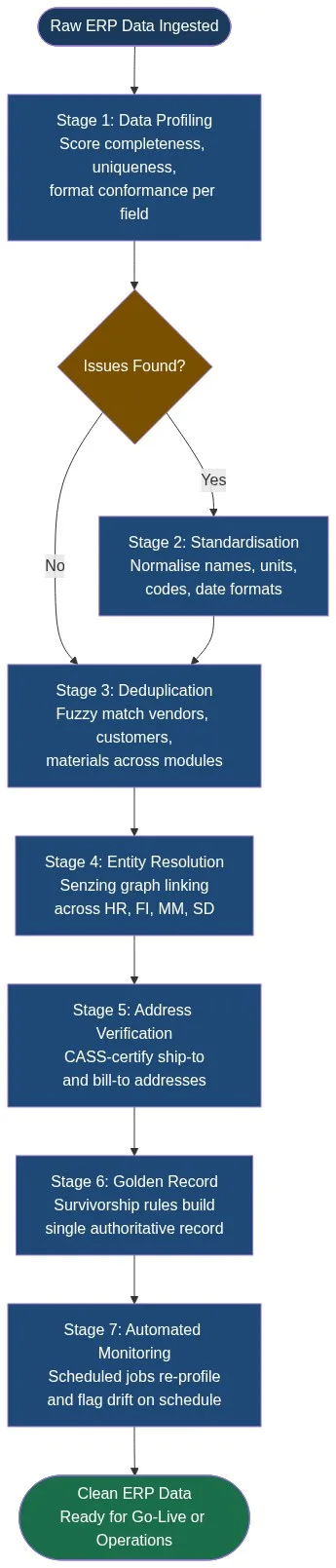
Stage 1: Data Profiling
Before any cleansing, you need a measurable baseline. Data profiling in Match Data Pro scans every field in the extracted ERP dataset and scores it across five dimensions: completeness, uniqueness, validity, consistency, and conformance. Output is a field-level quality scorecard.
A typical ERP profiling run surfaces: 12% null rate on payment term fields, 8% duplicate rate on vendor names, and 23% of addresses failing format validation. These numbers set the scope for every downstream stage.
Stage 2: Standardisation
Data cleansing and standardisation normalises free-text fields to consistent formats. Name fields are parsed into components (prefix, first, middle, last, suffix). Unit of measure codes are mapped to a canonical schema. Date formats are normalised to ISO 8601. Description fields are stripped of special characters and tokenised. This stage removes the surface variation that would otherwise cause fuzzy matching to miss obvious duplicates.
Stage 3: Deduplication
Deduplication in Match Data Pro uses configurable blocking rules to partition the vendor, customer, or material dataset into candidate pairs, then scores each pair across multiple fields using weighted fuzzy algorithms. Consider this vendor scenario:
| Record A | Record B | Match Score |
|---|---|---|
| Acme Corp | ACME CORPORATION | 94 / 100 |
| 123 Main St, Chicago IL 60601 | 123 Main Street, Chicago, IL 60601-1234 | 97 / 100 |
| +1 312 555 0101 | 3125550101 | 100 / 100 |
| Overall composite score | 96 — Merge candidate |
Records above the configured merge threshold are collapsed automatically. Records in the review band (typically 70–85) route to a steward queue for manual confirmation. Records below threshold are kept as separate entities.
Stage 4: Entity Resolution Across Modules
Deduplication handles duplicates within a single table. Entity resolution (Senzing) links the same real-world entity across tables and systems. Senzing’s graph-based engine resolves vendor identities across the vendor master, the AP transaction ledger, and the third-party supplier portal — even when there is no shared surrogate key. Every resolved entity receives a persistent entity ID that survives record updates and system refreshes.
Stage 5: Address Verification
CASS address verification validates every ship-to, bill-to, and employee address against the USPS Coding Accuracy Support System database. Non-deliverable addresses are flagged. Valid addresses are standardised to USPS format and appended with ZIP+4 codes. This step directly reduces failed deliveries, returned mail, and incorrect freight billing. For international ERP environments, Match Data Pro supports address validation and standardisation for more than 240 countries.
Stage 6: Golden Record Construction
After deduplication and entity resolution, survivorship rules determine which field values populate the single authoritative record. Rules are field-specific: use the most recently updated value for contact details; use the longest non-null string for company name; use the CASS-verified value for address. Golden record survivorship in Match Data Pro is configurable without code — data stewards define rules in the UI and can override them per entity type.
Stage 7: Automated Monitoring and Job Scheduling
A one-time cleanse decays immediately as new records enter the ERP. Match Data Pro’s job automation schedules profiling, matching, and address verification runs on a defined cadence — daily for high-volume tables, weekly for stable reference data. Automated alerts trigger when a field’s quality score drops below a configured threshold, giving data stewards early warning before defects propagate to downstream processes.
ERP Data Quality Metrics to Track
Measuring data quality requires specific, field-level metrics — not generic “data quality scores.” Track these for each critical ERP master data domain:
| Domain | Key Metric | Healthy Threshold |
|---|---|---|
| Vendor Master | Duplicate rate | < 2% |
| Customer Master | Address deliverability rate | > 95% |
| Material Master | Null rate on UoM field | < 0.5% |
| GL Accounts | Inactive account usage rate | 0% |
| Employee Master | Entity resolution match rate (to HR) | > 98% |
These thresholds should be defined during the profiling stage and embedded in the automated monitoring configuration. When a metric breaches its threshold, the job scheduler triggers a targeted re-run of the affected pipeline stage rather than a full dataset reprocess.
When to Run ERP Data Quality Work
Teams often treat ERP data quality as a pre-go-live activity. That is necessary but not sufficient. There are four moments when structured data quality work is non-negotiable:
- Pre-migration. Profile and cleanse source data before extraction. Defects that cross the migration boundary are far more expensive to fix post-go-live than pre-migration. See the detailed checklist in our guide on SAP data migration best practices.
- Post-migration validation. After loading, re-profile the target environment to confirm that transformation scripts did not introduce new defects. Re-run entity resolution to catch IDs that fragmented during schema conversion.
- Module go-live. When extending ERP scope to a new business unit or module, the new data feeds need profiling before they touch the clean master data environment.
- Continuous operations. The highest-value use of ERP data quality tooling is ongoing automated monitoring — catching new defects at the point of entry rather than during the next migration project.
Match Data Pro’s import/export connectors let teams extract data from ERP systems via flat file, API, or database connection, run the seven-stage pipeline, and push the clean golden records back into the ERP — all orchestrated through the job automation engine without manual intervention.
Ready to see your ERP data quality baseline? Start a free trial — no contract, no infrastructure setup required — or book a demo to walk through the pipeline with your own data.
Frequently Asked Questions
What is ERP data quality and why does it matter?
ERP data quality refers to the accuracy, completeness, consistency, and uniqueness of master data inside an ERP system — vendors, customers, materials, employees, and GL accounts. It matters because every ERP process — procurement, accounts payable, order fulfilment, financial reporting — depends on master data. A 5% duplicate rate in the vendor master translates directly into overpayments, broken spend analytics, and failed audits.
What are the most common data quality issues in ERP systems?
The seven most common ERP data quality issues are: duplicate master records (vendor, customer, material), inconsistent unit-of-measure and code values, stale or invalid address data, missing or null critical fields (payment terms, tax codes), unstandardised name and description fields, cross-system identity fragmentation, and dirty data inherited from prior migrations. Duplicate records and address invalidity are the highest-frequency defects in most production ERP environments.
How do you fix duplicate vendor records in an ERP?
Fixing duplicate vendor records requires a three-step process: first, standardise vendor name and address fields to remove surface variation (capitalisation, abbreviation, punctuation). Second, apply AI-powered fuzzy matching to score all vendor pairs on name, address, tax ID, and phone. Third, merge confirmed duplicates using survivorship rules that select the most complete field value from each record. The result is one authoritative vendor record per real-world entity.
When should you run data quality checks during an ERP migration?
Run data quality checks at three points: before extraction from the source system (to fix defects where they are cheapest to correct), after transformation but before loading into the target ERP (to catch mapping-introduced errors), and immediately post-load (to validate that the target environment matches expected quality thresholds). Teams that only check quality post-load discover defects after they have already been embedded in production data, making remediation far more complex.
Can ERP data quality be maintained automatically after go-live?
Yes. Automated ERP data quality maintenance uses scheduled jobs to re-profile master data tables on a defined cadence, trigger fuzzy matching runs against incoming records, flag anomalies for steward review, and push clean records back into the ERP. Match Data Pro’s job automation engine handles this without manual intervention — setting thresholds per field, per entity type, and per data domain so that quality drift is caught within hours rather than discovered during the next audit cycle.