
Una API de deduplicación de datos elimina los registros duplicados en milisegundos a medida que cada nuevo registro entra en tu sistema. La deduplicación por lotes procesa archivos o tablas completas en una única ejecución programada. Utiliza la API cuando tu flujo de trabajo requiera decisiones en tiempo real; utiliza la deduplicación por lotes cuando tengas que limpiar un gran conjunto de datos históricos o cuando la latencia no sea un factor determinante. La mayoría de los entornos de producción acaban necesitando ambas opciones.
¿Estás listo para ver cómo gestiona Match Data Pro ambos modos? Reserva una demostración de 30 minutos y te mostraremos en directo cómo funciona la deduplicación con tu propio esquema de datos.
¿Qué es una API de deduplicación de datos?
Una API de deduplicación de datos ofrece funciones de coincidencia aproximada y detección de duplicados a través de puntos finales HTTP. Tu aplicación envía un registro —un contacto, una empresa, una dirección— y la API devuelve una decisión sobre la coincidencia y una puntuación de confianza en tiempo real. El registro se asocia a una entidad maestra ya existente o se guarda como una nueva.
La API de búsqueda aproximada y deduplicación en tiempo real de Match Data Pro acepta una carga útil en formato JSON, realiza una evaluación de similitud mediante múltiples algoritmos en tu conjunto de datos maestro y devuelve una respuesta estructurada —que incluye la coincidencia más probable, su puntuación de coincidencia y el desglose por campos— en menos de 200 milisegundos para la mayoría de los conjuntos de datos con menos de 5 millones de registros.
Cómo funciona la llamada a la API
Una solicitud típica tiene este aspecto:
POST /api/v1/deduplicate
{
  "first_name": "Jon",
  "last_name":  "Smyth",
  "email":      "jsmith@acme.com",
  "company":    "Acme Corp"
}
El motor aplica el algoritmo Jaro-Winkler a los campos de nombre, la coincidencia basada en tokens a la empresa y la coincidencia exacta al correo electrónico. Devuelve una lista de candidatos ordenada por relevancia:
| N.º de identificación del candidato | Nombre en el registro maestro | Puntuación | Decisión |
|---|---|---|---|
| CID-10042 | John Smith — jsmith@acme.com | 0.94 | Probable duplicado |
| CID-10887 | Jonathan Smythe — j.smythe@acme.co | 0.71 | Posible — revisión |
La aplicación de llamadas puede fusionar automáticamente los resultados por encima de 0,90, ponerlos en cola para su revisión manual entre 0,70 y 0,89, y crear un nuevo registro por debajo de 0,70. Estos umbrales se pueden configurar por proyecto en Match Data Pro.
¿Qué es la deduplicación por lotes?
La deduplicación por lotes procesa un archivo completo o una tabla de base de datos en una sola ejecución. Se introduce la fuente —un archivo CSV, un archivo de Excel, una tabla SQL o una extracción mediante un conector— y el motor compara cada par de registros (o cada par candidato tras el bloqueo) para generar un archivo maestro deduplicado.
El proceso por lotes de Match Data Pro ejecuta primero un análisis de perfiles de datos mediante IA para detectar problemas de calidad en los campos: índices de valores nulos, inconsistencias de formato y distribuciones de valores. Este análisis permite determinar qué campos son lo suficientemente fiables como para utilizarlos como claves de bloqueo, lo que reduce el espacio de pares candidatos de O(n²) a un conjunto manejable antes de que comience la puntuación difusa.
El proceso de deduplicación por lotes, paso a paso
- Importación. Carga el archivo de origen o conéctate directamente a una base de datos, un CRM o un almacén de datos mediante un conector de importación.
- Perfil. Identifica si los campos están completos, cuáles son los formatos predominantes y los valores atípicos. Un campo con una tasa de valores nulos del 40 % no es una clave de agrupación adecuada.
- Limpiar y estandarizar. Normalizar las mayúsculas y minúsculas de los nombres, eliminar los signos de puntuación, analizar y estandarizar las direcciones. Consulta el proceso de limpieza de datos de Match Data Pro para conocer el proceso completo de estandarización.
- Bloqueo. Divide los registros en grupos de candidatos utilizando claves de alta cardinalidad (por ejemplo, código postal + las tres primeras letras del apellido), de modo que el motor de búsqueda solo compare pares plausibles.
- Puntuación. Se aplican algoritmos de coincidencia difusa basados en múltiples algoritmos —Jaro-Winkler, Levenshtein, fonéticos (Soundex, Double Metaphone) y ordenación por tokens—, ponderados según la importancia de cada campo.
- Agrupar. Agrupa los registros que superan el umbral en grupos duplicados.
- Supervivencia. Se aplican las reglas de supervivencia a nivel de campo a cada grupo: el correo electrónico más reciente, el nombre de la empresa más largo, la dirección verificada y el número de teléfono más completo. El paso de fusión basado en la supervivencia y el «registro de referencia» genera un único registro oficial por grupo.
- Exportar. Envía el conjunto de datos maestro limpio al sistema de destino o descárgalo a través del conector.
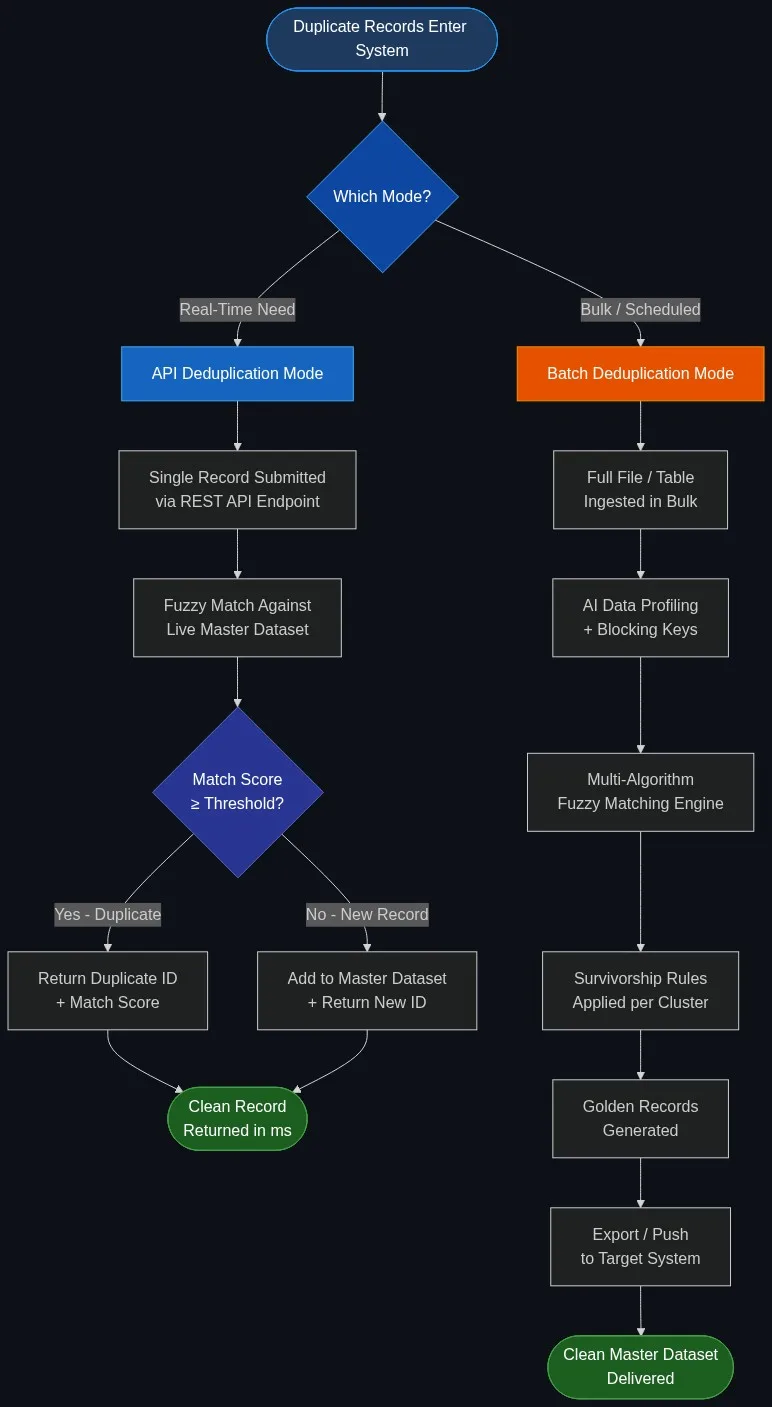
Deduplicación mediante API frente a deduplicación por lotes: comparación detallada
| Dimensión | Deduplicación de la API | Deduplicación por lotes |
|---|---|---|
| Disparador | Evento por registro (envío de formulario, grabación en CRM, webhook) | Tarea programada o ejecución manual |
| Latencia | <200 ms per record | De minutos a horas para millones de registros |
| Volumen por ciclo | De 1 a ~1.000 registros | De miles a cientos de millones |
| Supervivencia | Fusión o señalización en tiempo real | Creación completa de registros de referencia a nivel de clúster |
| Perfil | Ponderaciones de campos preconfiguradas | Creación de perfiles basada en IA antes de cada ejecución |
| Casos de uso | CRM en tiempo real, formularios de registro, flujos de trabajo basados en API | Migración de datos, puesta en marcha del ERP, actualización periódica de los datos maestros |
| Revisión por parte de una persona | Marca automática basada en umbrales, cola de revisión asíncrona | Revisar antes o después de la exportación |
Cuándo utilizar una API de deduplicación
Creación de registros en el CRM
Un comercial crea un nuevo contacto. Antes de que se guarde el registro, el flujo de trabajo de tu CRM llama a la API de deduplicación. La API devuelve el mensaje «Probable duplicado de CID-10042 — puntuación 0,94». El comercial ve un mensaje que dice: «Es posible que este contacto ya exista. ¿Deseas ver el registro existente?». La tasa de duplicados se reduce casi a cero sin necesidad de realizar ninguna tarea manual de limpieza de la lista.
Registro a través del formulario web
Un cliente potencial rellena un formulario de solicitud de demostración. El responsable de la gestión de solicitudes envía el formulario a la API de deduplicación. La API confirma que el cliente potencial ya figura en la base de datos, comprueba su nivel de cuenta y deriva la solicitud al responsable de ventas correspondiente, todo ello en tiempo real, antes de que se envíe el correo electrónico de confirmación.
Flujos de trabajo basados en eventos
Un consumidor de Kafka o Pub/Sub lee los nuevos eventos de clientes procedentes de una plataforma de comercio electrónico. Cada evento activa una llamada a la API para comprobar si hay duplicados antes de grabarlos en el almacén de análisis. De este modo se evita que el almacén acumule miles de filas casi duplicadas de usuarios que se registran con ligeras variaciones en el nombre entre una sesión y otra.
La API REST de Match Data Pro para la comparación de datos admite tanto respuestas sincrónicas como devoluciones de llamada asíncronas para flujos de eventos de alto rendimiento, con un tiempo de espera configurable y una lógica de reintentos.
Cuándo utilizar la deduplicación por lotes
Limpieza de los datos históricos antes de la migración
Estás migrando 4 millones de registros de clientes desde un CRM heredado a una nueva plataforma. No puedes consultar esos registros uno por uno: necesitas que todo el conjunto de datos se analice, se limpie, se deduplique y se fusione antes de la puesta en marcha. La deduplicación por lotes mediante la automatización de tareas gestiona este proceso en una única ejecución del flujo de trabajo, generando un archivo maestro limpio para su importación.
Consolidación tras la fusión
Dos empresas se fusionan y es necesario combinar sus bases de datos de clientes en una sola. Ninguna de las dos organizaciones cuenta con una integración de API activa. El modo por lotes importa ambos archivos de exportación, analiza cada uno de ellos por separado y, a continuación, realiza una comparación entre ambos archivos para identificar los registros que aparecen en ambos conjuntos de datos. Consulta el flujo de trabajo completo en nuestra guía sobre la deduplicación de clientes tras una fusión.
Actualización periódica de los datos maestros
El departamento de operaciones de marketing ejecuta una tarea por lotes mensual para eliminar duplicados del CRM antes de enviar las campañas. La tarea extrae la tabla completa de contactos, identifica 2.400 grupos de duplicados entre 1,1 millones de contactos, los fusiona utilizando reglas de supervivencia y devuelve una lista limpia al CRM. La automatización de tareas de fusión y purga de Match Data Pro programa estas ejecuciones sin necesidad de intervención manual.
Integración de múltiples fuentes
Extraes los datos de los clientes de un CRM, un sistema de facturación y una plataforma de automatización de marketing. Los tres utilizan esquemas de identificación y formatos de nombre diferentes. La deduplicación por lotes importa los datos de las tres fuentes, estandariza los formatos de los campos y utiliza la resolución de entidades de Senzing para identificar al mismo cliente en las tres fuentes, generando así un «registro de referencia» unificado por cada entidad, independientemente de las convenciones de nomenclatura de cada sistema de origen.
Ejecutar ambos modos a la vez
La mayoría de los flujos de datos maduros ejecutan la deduplicación por lotes y la deduplicación mediante API de forma conjunta, no como alternativas. El patrón es el siguiente:
- Ejecución inicial por lotes. Limpia el conjunto de datos existente para crear un conjunto maestro sin duplicados. De este modo, se elimina la deuda histórica antes de que la API entre en funcionamiento.
- API para nuevos registros. Cada nuevo registro creado tras la puesta en marcha se compara con el maestro limpio en tiempo real. Los duplicados nunca llegan a entrar en el maestro.
- Actualización periódica por lotes. Una tarea programada por lotes —semanal o mensual— vuelve a procesar el fichero maestro para detectar cualquier duplicado que se haya pasado por alto debido a decisiones de la API con baja fiabilidad, o registros que se hayan convertido en duplicados tras una actualización de un campo (por ejemplo, un usuario que haya cambiado su correo electrónico para que coincida con el de un contacto ya existente).
Este modelo híbrido reduce el coste continuo del mantenimiento de datos. La API evita que se generen nuevos duplicados. El procesamiento por lotes programado detecta los casos excepcionales. Juntos, mantienen las tasas de duplicados por debajo del 0,5 % en entornos de CRM y MDM en producción.
Match Data Pro admite ambos modos en la misma plataforma —el mismo motor de coincidencia aproximada, los mismos umbrales configurables, las mismas reglas de supervivencia—, por lo que nunca tendrás que conciliar los resultados de dos herramientas distintas. Empieza con una prueba gratuita para configurar ambos modos con tus propios datos antes de comprometerte con ningún contrato.
Elegir el umbral adecuado para cada modo
Los umbrales se comportan de forma diferente en el modo API y en el modo por lotes. En la API, un falso positivo (marcar como duplicado algo que no lo es) interrumpe el flujo de trabajo del usuario: el comercial recibe una advertencia errónea de que «ya existe». Por eso, los umbrales de la API suelen establecerse de forma conservadora: fusión automática a partir de 0,95+, revisión manual entre 0,80 y 0,94, y creación de un nuevo registro por debajo de 0,80.
En el modo por lotes, los falsos negativos (no detectar un duplicado) se acumulan con el tiempo en el conjunto de datos maestro. Los equipos suelen establecer umbrales de fusión automática más bajos y confían en la cola de revisión para detectar los grupos dudosos. Un umbral de 0,75 en el modo por lotes con una cola de revisión da como resultado un conjunto de datos maestro más limpio que un umbral de 0,90 sin revisión. Para obtener orientación detallada sobre el ajuste, consulta nuestro artículo sobre los umbrales de coincidencia determinísticos frente a los probabilísticos.
Preguntas frecuentes
¿Qué es una API de deduplicación de datos?
Una API de deduplicación de datos es un punto final HTTP que acepta un único registro, realiza una evaluación de similitud aproximada con respecto a un conjunto de datos maestro y devuelve una decisión de coincidencia y una puntuación de confianza en tiempo real —normalmente en menos de 200 milisegundos—. Permite a cualquier aplicación comprobar si hay duplicados antes de escribir un nuevo registro en la base de datos, lo que evita los duplicados en el momento de su introducción, en lugar de tener que eliminarlos posteriormente.
¿Cuándo debería utilizar la deduplicación por lotes en lugar de una API?
Utiliza la deduplicación por lotes cuando tengas que limpiar un conjunto de datos existente de gran tamaño: una migración, una consolidación tras una fusión o una actualización periódica de los datos maestros. El modo por lotes procesa millones de registros en una sola ejecución mediante la creación de perfiles con IA, el bloqueo, la puntuación difusa con múltiples algoritmos y las reglas de supervivencia. Es la opción adecuada cuando la principal limitación es el volumen de registros, y no la latencia.
¿Puedo ejecutar la deduplicación mediante API y por lotes en la misma plataforma?
Sí. Match Data Pro ejecuta ambos modos en el mismo motor de correspondencia con una configuración compartida: mismas ponderaciones de campos, mismos umbrales y mismas reglas de supervivencia. El procedimiento recomendado consiste en realizar una ejecución por lotes única para limpiar el conjunto de datos existente y, a continuación, aplicar la API a todos los registros nuevos, con una actualización periódica por lotes para detectar los casos extremos que hayan podido pasar desapercibidos en las decisiones de la API con baja confianza.
¿A qué velocidad se ejecuta, en la práctica, una llamada a la API de deduplicación?
En la mayoría de los conjuntos de datos con menos de 5 millones de registros maestros, una sola llamada a la API de deduplicación devuelve una lista de coincidencias ordenada en menos de 200 milisegundos. El bloqueo y los conjuntos de candidatos preindexados mantienen reducido el tiempo de consulta. En el caso de conjuntos de datos maestros muy grandes —decenas de millones de registros—, los tiempos de respuesta suelen mantenerse por debajo de los 500 milisegundos con una configuración adecuada de los índices y un diseño adecuado de las claves de bloqueo.
¿Qué algoritmos de coincidencia aproximada utiliza una API de deduplicación?
Una API de deduplicación bien diseñada aplica varios algoritmos en un proceso ponderado: Jaro-Winkler para cadenas de nombres cortas (gestiona bien las transposiciones y los prefijos), la distancia de edición de Levenshtein para la comparación general a nivel de caracteres, algoritmos fonéticos como Double Metaphone para nombres que suenan igual pero se escriben de forma diferente (por ejemplo, «Smith» frente a «Smythe»), y métodos basados en tokens para nombres de empresas o direcciones con orden variable de las palabras.