
La deduplicación del CRM identifica los registros duplicados de clientes en todo el sistema, los fusiona en un único registro verificado y establece controles para evitar que se generen nuevos duplicados. Si se lleva a cabo correctamente, reduce el desperdicio en las campañas de contacto entre un 20 % y un 30 %, mejora la precisión de la segmentación y ofrece a los departamentos de ventas y marketing una visión única y fiable de cada cliente.
Esta guía explica cómo se duplican los formularios en el CRM, cómo un proceso estructurado de deduplicación los localiza y los fusiona, y cómo Match Data Pro automatiza cada etapa sin necesidad de una revisión manual registro por registro.
¿Estás listo para limpiar tu CRM? Empieza una prueba gratuita de Match Data Pro y ejecuta tu primera tarea de deduplicación en cuestión de minutos.
Por qué los registros duplicados en el CRM son más difíciles de detectar de lo que parece
Los registros duplicados de clientes rara vez comparten valores idénticos en los campos. Los duplicados reales tienen este aspecto:
| Registro A | Disco B |
|---|---|
| Jon Smith | Jonathan Smith |
| jsmith@acme.com | j.smith@acme.com |
| +1 (212) 555-0198 | 212-555-0198 |
| Calle Main, 123, Nueva York, NY | Calle Main, 123, Nueva York, 10001 |
Una consulta de coincidencia exacta no devuelve ningún duplicado. Una consulta WHERE «email = email» no encuentra nada porque los formatos de correo electrónico son diferentes. Sin embargo, estos registros representan claramente a la misma persona.
Los registros duplicados se introducen en los sistemas CRM a través de varias vías previsibles:
- Envíos de formularios web que eluden los controles de deduplicación
- Importar trabajos desde archivos CSV sin necesidad de realizar una limpieza previa
- Migraciones de sistemas en las que se fusionan dos bases de datos sin que coincidan
- Integraciones mediante API de herramientas de marketing, plataformas de atención al cliente o proveedores de datos
- Introducción manual por parte de varios comerciales que introducen los datos del mismo cliente potencial
Los estudios indican sistemáticamente que la tasa de duplicados en los sistemas CRM empresariales oscila entre el 10 % y el 30 % del total de registros. Con 100 000 contactos, eso supone hasta 30 000 registros que aumentan los costes, distorsionan los informes y merman el rendimiento de las campañas.
Consulte «El coste real de los registros duplicados» para obtener un desglose completo de las repercusiones económicas derivadas de ello.
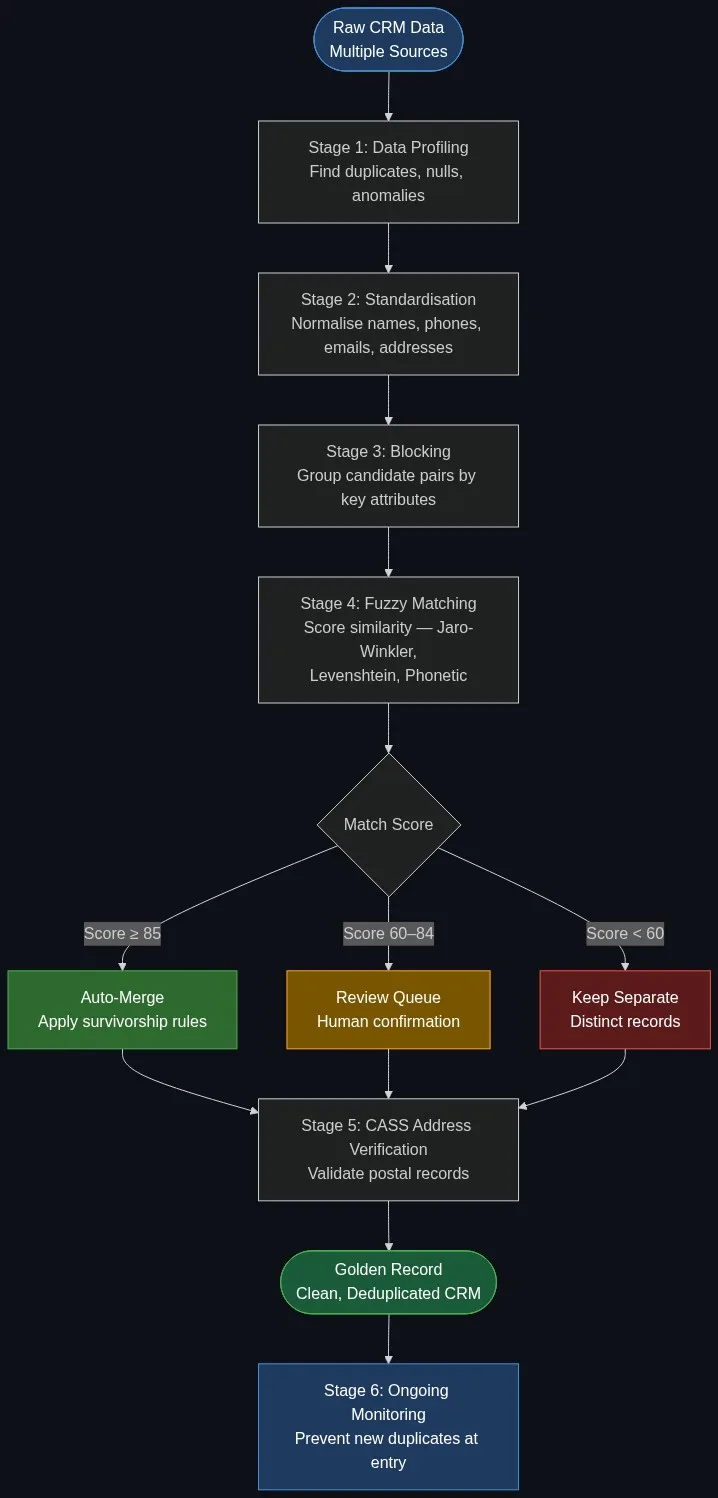
El proceso de deduplicación del CRM en seis etapas
Una deduplicación eficaz de los datos de CRM se lleva a cabo como un proceso estructurado, no como una tarea por lotes puntual. Cada fase se basa en la anterior. Saltarse cualquier fase aumenta los falsos positivos (fusiones erróneas) y los falsos negativos (duplicados no detectados).
Fase 1: Perfilado de datos
El análisis de perfiles de datos mediante IA examina todos los campos del conjunto de datos de tu CRM y pone de manifiesto el alcance del problema antes incluso de que toques un solo registro. Cuenta los valores nulos, identifica inconsistencias de formato, mide las tasas de cumplimentación de los campos y señala posibles grupos de duplicados.
Un informe de análisis de perfiles de una base de datos de CRM con 200 000 registros suele revelar lo siguiente:
- Números de teléfono almacenados en entre 8 y 12 formatos diferentes
- Campos de nombre con mayúsculas y minúsculas mezcladas, prefijos y sufijos aplicados de forma inconsistente
- Campos de dirección con tipos de calle abreviados (St frente a Street frente a Str.)
- Dominios de correo electrónico con errores ortográficos (gmial.com, hotmali.com)
La creación de perfiles agiliza las fases de limpieza y comparación, ya que indica exactamente qué transformaciones hay que aplicar.
Fase 2: Normalización
Antes de realizar cualquier proceso de cotejo, todos los campos deben normalizarse para que tengan un formato uniforme. El motor de limpieza y estandarización de datos de Match Data Pro aplica reglas específicas para cada campo:
- Nombres: eliminar prefijos y sufijos, desarrollar las abreviaturas (Jon por Jonathan), normalizar las mayúsculas y minúsculas
- Números de teléfono: eliminar los caracteres de formato y normalizarlos según la norma E.164 (+12125550198)
- Correos electrónicos: escribir en minúsculas, eliminar los espacios al final y señalar los errores ortográficos conocidos en los dominios
- Direcciones: desglosarlas en sus componentes (número, calle, sufijo, ciudad, provincia, código postal) y, a continuación, estandarizar cada componente
La normalización por sí sola resuelve una gran parte de los duplicados aparentes. Dos registros como «212-555-0198» y «+1 (212) 555-0198» pasan a ser idénticos tras la normalización y pueden emparejarse de forma determinista sin necesidad de aplicar ningún sistema de puntuación aproximada.
Etapa 3: Bloqueo
Comparar cada registro con todos los demás registros, con 200.000 contactos, da lugar a 20.000 millones de comparaciones. Esto supone un gran esfuerzo computacional y es lento. El bloqueo reduce el espacio de comparación agrupando los registros en pares candidatos que comparten un atributo común.
Claves de bloqueo habituales para los datos del CRM:
- Los tres primeros caracteres del apellido más el código postal
- Prefijo normalizado de número de teléfono
- Dominio de correo electrónico más el primer carácter de la parte local
- Nombre de la empresa Código Soundex
Match Data Pro aplica varias claves de bloqueo superpuestas en paralelo, de modo que los registros que comparten cualquier atributo común pasan a la lista de comparación, lo que reduce las tasas de omisión derivadas de un bloqueo imperfecto.
Fase 4: Coincidencia aproximada y puntuación
Dentro de cada par de candidatos, la coincidencia difusa calcula una puntuación de similitud para cada campo utilizando el algoritmo más adecuado para ese tipo de campo:
| Campo | Algoritmo | ¿Por qué? |
|---|---|---|
| Nombre de la persona | Jaro-Winkler | Gestiona las transposiciones y las variaciones de prefijos |
| Nombre de empresa | Índice de clasificación de fichas | Gestiona las diferencias en el orden de las palabras (Acme Corp frente a Corp Acme) |
| Línea de dirección | Normalizado según Levenshtein | Corrige las abreviaturas y los pequeños errores ortográficos |
| Transcripción fonética del apellido | Doble Metaphone | Apellidos: Smith / Smyth / Smythe |
La puntuación de cada campo se pondera en función de su fiabilidad. El correo electrónico tiene una ponderación elevada, ya que es menos probable que contenga errores tipográficos que un campo de texto libre para el nombre. La puntuación compuesta ponderada determina el enrutamiento:
- Puntuación igual o superior a 85: fusión automática; aplicar inmediatamente las reglas de supervivencia
- Puntuación de 60 a 84: se envía a una cola de revisión manual con el par coincidente y el desglose de la puntuación
- Puntuación inferior a 60: mantener como registros independientes
Los umbrales son configurables. Un equipo sanitario podría establecer el umbral de fusión automática en 92 para reducir las fusiones erróneas. Un equipo de operaciones de marketing que depure una lista de clientes potenciales podría aceptar un umbral de 78 para lograr una mayor tasa de recuperación. Consulta la sección «Coincidencia determinista frente a probabilística» para obtener orientación sobre cómo establecer los umbrales según cada caso de uso.
Etapa 5: Fusión y supervivencia
La fusión no consiste simplemente en eliminar el registro secundario. Las reglas de supervivencia determinan qué valor de campo de qué registro se convierte en el valor canónico del registro de referencia. Entre las lógicas de supervivencia más habituales se incluyen:
- Más reciente: toma el valor del registro con la fecha de modificación más reciente
- El más completo: se prefiere el registro con menos campos nulos
- Prioridad de la fuente: el registro del CRM prevalece sobre el valor importado del CSV
- Estado de verificación: una dirección verificada por CASS es mejor que una dirección no verificada
El motor de supervivencia y «registro de oro» de Match Data Pro aplica estas reglas a nivel de campo, de modo que el registro resultante hereda el mejor valor disponible de cada fuente emparejada. El historial de fusiones se conserva en el registro de auditoría, por lo que cualquier fusión puede revisarse o revertirse.
Etapa 6: Verificación de la dirección
Tras la fusión, se debe ejecutar la verificación de direcciones CASS en todas las direcciones postales del registro de referencia. La validación CASS confirma la posibilidad de entrega, añade el código ZIP+4 y estandariza la dirección al formato de USPS. Los registros con direcciones en las que no es posible realizar la entrega se marcan para su supresión, en lugar de pasar silenciosamente a los sistemas posteriores.
La verificación de direcciones también detecta un tipo de duplicados que la coincidencia aproximada pasa por alto: dos registros con nombres diferentes pero con el mismo punto de entrega verificado. Una coincidencia en el punto de entrega verificado es un indicio claro de que dos contactos residen en la misma dirección.
Cómo evitar los duplicados en el CRM al introducir los datos
La deduplicación limpia los registros existentes. La prevención evita que se creen nuevos duplicados. La API de búsqueda aproximada en tiempo real de Match Data Pro se integra en el punto de introducción de datos para señalar posibles coincidencias en tiempo real antes de que se guarde un nuevo registro.
La API acepta un registro parcial (nombre, correo electrónico o teléfono) y devuelve una lista ordenada de candidatos coincidentes con puntuaciones de similitud. Tu formulario web o integración con el CRM consulta la API al enviar los datos. Si se devuelve una coincidencia que supera el umbral configurado, la interfaz de usuario puede solicitar al usuario que confirme si está introduciendo un nuevo contacto o actualizando uno ya existente.
Esta comprobación en tiempo real detecta las dos vías de creación de duplicados con mayor volumen: los envíos de formularios web y la introducción manual de datos en el CRM. En combinación con la deduplicación por lotes programada, mantiene la tasa de duplicados por debajo del 2 % en la mayoría de los entornos de producción.
Deduplicación en CRM: casos extremos habituales
Los datos reales de los clientes generan casos extremos que las herramientas sencillas de deduplicación no gestionan adecuadamente. A continuación se enumeran los más habituales y se explica cómo los aborda un proceso de producción.
Apodos y nombres oficiales
Bill Gates y William Gates. Bob Johnson y Robert Johnson. Los diccionarios de apodos asocian los nombres informales más comunes con sus equivalentes oficiales antes de calcular la puntuación. Sin ellos, una comparación según el método Jaro-Winkler entre «Bob» y «Robert» da una puntuación de 0,62, por debajo de la mayoría de los umbrales de fusión, y no se detecta el duplicado.
Contacto profesional frente a contacto personal
Una misma persona puede aparecer como «Jane Doe» en una empresa y como «Jane Doe» en otra; se trata de dos registros que representan relaciones comerciales distintas, aunque se trate de la misma persona. La resolución de entidades con Senzing resuelve este problema modelando la relación entre la persona y la organización, en lugar de limitarse a comparar los campos de nombre.
Deduplicación a nivel de hogar
En los casos de uso B2C, un mismo hogar puede tener registros legítimos independientes para distintos miembros de la familia. La agrupación a nivel de hogar aplica la coincidencia de direcciones para agrupar los registros por punto de entrega sin fusionar a personas distintas dentro del mismo hogar.
Dígitos invertidos en los números de teléfono
Los errores al introducir datos suelen dar lugar a 212-555-0918 en lugar de 212-555-0198. La distancia de edición de Levenshtein detecta las transposiciones de un solo dígito con una puntuación normalizada de 0,89. Sin la distancia de edición normalizada en los campos de teléfono, estos pares no coinciden.
Cómo gestiona Match Data Pro la deduplicación en el CRM
Match Data Pro ejecuta las seis etapas del proceso en una única tarea automatizada. Las reglas de coincidencia, los umbrales y la lógica de supervivencia se configuran a través de la interfaz de usuario sin necesidad de escribir código personalizado. La plataforma se conecta a los sistemas CRM mediante conectores de importación/exportación o API, y admite ejecuciones por lotes programadas o la deduplicación en tiempo real a través de la API de búsqueda difusa en tiempo real.
Funcionalidades clave para la deduplicación en CRM:
- Coincidencia aproximada basada en IA para nombres, correos electrónicos, números de teléfono, direcciones y campos personalizados
- Reglas de coincidencia y umbrales configurables por campo y por proyecto
- Motor de reglas de supervivencia para la creación del «registro de referencia»
- Verificación de direcciones CASS integrada en el proceso de fusión de datos
- API de búsqueda aproximada en tiempo real para evitar duplicados en el punto de entrada
- Automatización de tareas para programar ejecuciones periódicas de deduplicación
- Registro de auditoría completo con historial de fusiones para cada modificación de un registro
No se requiere ningún contrato a largo plazo. Match Data Pro funciona como un servicio SaaS en la nube y ofrece una prueba gratuita disponible de inmediato. Los equipos más grandes con requisitos de residencia de datos también pueden implementarlo de forma local.
¿Quieres ver cómo funciona la plataforma con tus propios datos? Reserva una demostración y te mostraremos en directo cómo se lleva a cabo un proceso de deduplicación con una muestra de tus registros de CRM.
Preguntas frecuentes
¿Qué es la deduplicación en CRM?
La deduplicación en un CRM es el proceso de identificar registros duplicados de clientes o contactos dentro de un sistema CRM, fusionarlos en un único registro de referencia y aplicar controles para evitar que se introduzcan nuevos duplicados. Utiliza la coincidencia aproximada para encontrar registros que, aunque difieran en el formato, correspondan a la misma persona u organización del mundo real.
¿Cómo puedo encontrar registros duplicados en mi CRM?
Para detectar duplicados es necesario realizar primero un análisis de perfiles, seguido de una comparación aproximada en los campos de nombre, correo electrónico, teléfono y dirección. Las consultas de coincidencia exacta pasan por alto la mayoría de los duplicados reales, ya que los valores de los campos difieren debido al formato, los apodos y los errores en la introducción de datos. Una plataforma especializada en la deduplicación aplica múltiples algoritmos y una puntuación ponderada para identificar todos los pares candidatos.
¿Qué es una regla de supervivencia en la deduplicación de CRM?
Una regla de supervivencia determina qué valor de campo se conserva en el registro de referencia fusionado cuando dos registros coincidentes presentan valores diferentes para el mismo campo. Entre las reglas más habituales se encuentran el valor más reciente, el registro más completo y la prioridad de la fuente. La lógica de supervivencia garantiza que no se pierdan datos durante una fusión: estos se seleccionan y se conservan, en lugar de eliminarse.
¿Con qué frecuencia debo ejecutar la deduplicación del CRM?
Ejecuta una tarea de deduplicación por lotes completa al menos una vez al mes. Los sistemas CRM de gran volumen que reciben importaciones de gran tamaño o un elevado tráfico de formularios web deberían ejecutarla semanalmente. Complementa las ejecuciones por lotes con una comprobación de duplicados en tiempo real en el momento de la introducción de datos, utilizando una API de búsqueda aproximada en tiempo real para detectar los duplicados antes de que se guarden en la base de datos.
¿Cuál es la diferencia entre la deduplicación en CRM y la resolución de entidades?
La deduplicación en CRM identifica y fusiona los registros duplicados, tanto dentro de un mismo sistema como entre distintos sistemas, en un «registro de referencia». La resolución de entidades tiene un alcance más amplio: modela las relaciones entre registros a nivel de entidad, vinculando a una persona a través de múltiples organizaciones, funciones o sistemas sin necesidad de fusionarlos. En casos de uso complejos de CRM B2B con jerarquías de cuentas, la resolución de entidades gestiona los casos que la deduplicación estándar no detecta.