
La limpieza automatizada de datos sustituye el trabajo manual con hojas de cálculo y los scripts de transformación programados a mano por un proceso configurable que perfila, estandariza, deduplica y verifica los registros de forma automática. Los equipos que automatizan todo el flujo de trabajo de limpieza reducen las tasas de error entre un 40 % y un 70 % y acortan el tiempo de limpieza de semanas a horas. Match Data Pro ofrece ese proceso como una plataforma SaaS en la nube sin contrato a largo plazo.
Si tu equipo sigue escribiendo scripts puntuales o recurriendo a revisiones manuales para cada regla de transformación, solicita una demostración para ver cómo funciona la limpieza automatizada a gran escala.
Por qué la limpieza manual de datos fracasa a gran escala
La limpieza manual funciona para conjuntos de datos con menos de 10 000 registros. A partir de ahí, presenta tres problemas.
El volumen supera la capacidad de los analistas
Un sistema CRM de tamaño medio suele contener entre 200 000 y 500 000 registros. A un ritmo de 60 registros por hora revisados manualmente, un solo analista necesitaría más de 3 300 horas solo para comprobar cada entrada. Eso supone casi dos años laborables completos para un único conjunto de datos. La mayoría de las organizaciones cuentan con docenas de conjuntos de datos que se actualizan mensualmente.
La proliferación de normas genera una deuda de mantenimiento
La limpieza manual se basa en scripts. Un equipo de datos empresarial típico gestiona entre 200 y 400 reglas de transformación personalizadas repartidas entre scripts de Python, procedimientos almacenados de SQL y macros de hojas de cálculo. Cada regla requiere pruebas individuales cuando cambia el esquema de un sistema de origen. Cuando se migra un CRM o se añade una nueva fuente de datos, esas reglas dejan de funcionar sin que se detecte —lo que genera resultados erróneos sin que se active ninguna alerta—.
Sin ciclo de aprendizaje
Los scripts manuales no mejoran con las correcciones. Un analista que marque «Jon Smith» y «Jonathan Smith» como duplicados no aporta nada a la siguiente ejecución. Las plataformas automatizadas con sistemas de puntuación basados en IA aprenden de las coincidencias confirmadas y aumentan la precisión del umbral con el tiempo.
Según Gartner, la mala calidad de los datos supone a las organizaciones un coste medio de 12,9 millones de dólares al año. La mayor parte de ese coste se debe a errores evitables que la automatización detectaría en la primera fase.
Las seis etapas de un proceso automatizado de limpieza de datos
Match Data Pro ejecuta un proceso de limpieza automatizado que consta de seis etapas. Cada etapa alimenta a la siguiente. Ninguna etapa requiere una configuración manual para cada nuevo conjunto de datos: la plataforma deduce los tipos de campo, detecta patrones y aplica reglas predefinidas que los equipos ajustan una sola vez y reutilizan posteriormente.
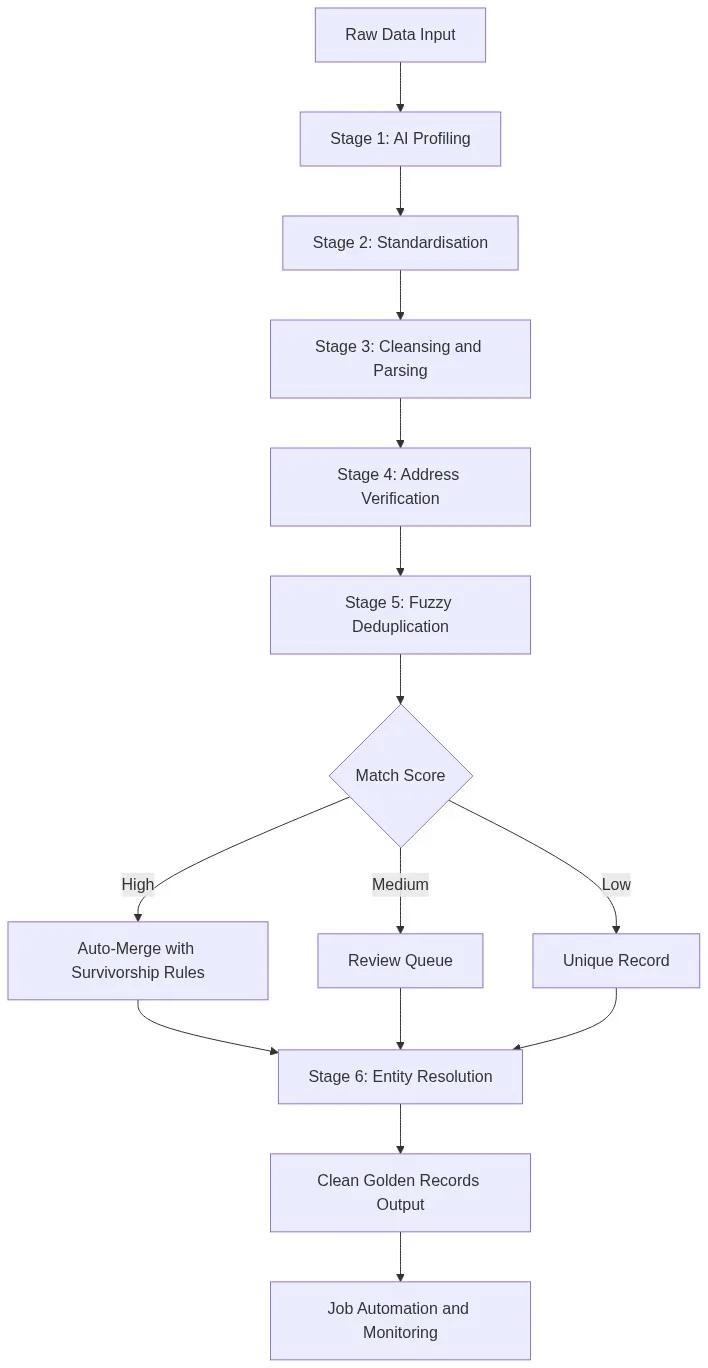
Fase 1: Elaboración de perfiles de datos para la IA
El análisis de perfiles de datos mediante IA examina todos los campos de un conjunto de datos y ofrece puntuaciones de exhaustividad, distribuciones de valores, patrones de formato e indicadores de anomalías antes de que se ejecute cualquier transformación. Una ejecución típica de este análisis en una exportación de CRM de 500 000 filas tarda menos de tres minutos y pone de manifiesto problemas como un 18 % de valores nulos en la columna de correo electrónico, formatos de fecha inconsistentes con tres patrones distintos y números de teléfono almacenados en ocho formatos diferentes. Las auditorías manuales de datos del mismo conjunto de datos tardan entre dos y tres días.
Fase 2: Normalización
La estandarización de datos unifica los formatos en todos los campos para que la comparación posterior funcione correctamente. Algunos ejemplos habituales son:
- Teléfono:
(800) 555-1234y8005551234y+1-800-555-1234todos normalizados al formato E.164 - Fechas:
01/15/2024,15-Jan-24,2024-01-15todos convertidos a la norma ISO 8601 - Empresa:
Acme Corp.,ACME CORPORATION,Acme, Corpnormalizado a una forma canónica - Estado:
California,CA,Calif.asignada a la abreviatura de dos letras del USPS
Sin estandarización, los algoritmos de coincidencia aproximada desperdician ciclos en diferencias de formato que no aportan ninguna información semántica.
Etapa 3: Limpieza y análisis sintáctico
La limpieza elimina o corrige los valores no válidos. El análisis divide los campos compuestos en sus componentes básicos. Un campo de nombre que contenga DR. JAMES R. SMITH JR. se analiza en tokens de prefijo, nombre, segundo nombre, apellido y sufijo. Un campo de dirección de una sola línea se analiza en número de calle, nombre de la calle, tipo de vivienda, número de vivienda, ciudad, provincia y código postal. El análisis es un requisito previo para una coincidencia precisa a nivel de campo.
Fase 4: Verificación de la dirección CASS
La verificación de direcciones certificada por CASS comprueba cada dirección postal con la base de datos de reparto del USPS, añade los códigos ZIP+4, corrige las abreviaturas de las calles y señala las direcciones en las que no se puede realizar el reparto. Los datos de direcciones no verificados se deterioran a un ritmo aproximado del 10-15 % al año, a medida que la gente se muda. Realizar la verificación CASS en el momento de la importación evita que ese deterioro se acumule.
Etapa 5: Deduplicación difusa
La deduplicación automatizada utiliza un motor de puntuación basado en múltiples algoritmos —distancia de edición de Levenshtein, Jaro-Winkler, coincidencia fonética y ratio de conjuntos de tokens— para comparar pares candidatos a gran escala. Las reglas de filtrado limitan las comparaciones a los pares plausibles (los mismos tres primeros caracteres del apellido, la misma ciudad), lo que reduce un problema de complejidad O(n²) a un tamaño manejable.
Veamos este ejemplo tomado de un CRM B2B real:
| Campo | Registro A | Disco B | Resultado del partido |
|---|---|---|---|
| Nombre | William | Bill | 0,71 (fonético) |
| Apellido | Johnson | Jonson | 0,92 (Levenshtein) |
| Empresa | Acme Corp | Acme Corporation | 0,94 (conjunto de tokens) |
| Correo electrónico | wjohnson@acme.com | bjohnson@acme.com | 0.81 |
| Puntuación global | 0,88 — Fusión automática |
Los registros que superan un umbral máximo configurable se fusionan automáticamente. Los registros que se encuentran en un rango intermedio se desvían a una cola de revisión. Los registros que están por debajo de un umbral mínimo pasan como entidades independientes.
Etapa 6: Resolución de entidades
La resolución de entidades de Senzing en Match Data Pro utiliza la correspondencia probabilística basada en grafos para vincular registros que representan la misma entidad del mundo real en múltiples sistemas, incluso cuando no existe ningún identificador común. Mientras que la deduplicación agrupa los registros idénticos dentro de un mismo sistema, la resolución de entidades vincula simultáneamente registros relacionados entre el CRM, el ERP, la plataforma de marketing y el servicio de asistencia técnica.
Configuración de la automatización: lo que se configura una vez frente a lo que se ejecuta automáticamente
Una idea errónea muy extendida es que la limpieza automatizada simplemente traslada la carga que supone la configuración, es decir, que sigues escribiendo las mismas reglas, solo que en una herramienta diferente. Eso no es cierto. Así es como se distribuye el trabajo en Match Data Pro.
Lo que configuras una vez
- Asignación de campos: qué columnas de origen se asignan a qué campos canónicos
- Umbrales de coincidencia: fusión automática a partir de 0,90, revisión entre 0,70 y 0,89, y división por debajo de 0,70
- Reglas de supervivencia: qué sistema de origen prevalece para cada tipo de campo (fecha más reciente, cadena no nula más larga, puntuación de exhaustividad más alta)
- Programación de la tarea: se ejecuta todas las noches a las 02:00 o se activa cuando se sube un nuevo archivo a través del conector de importación.
Lo que se ejecuta automáticamente en cada ejecución
- Análisis de perfiles mediante IA de todos los campos
- Estandarización del formato mediante patrones aprendidos
- Verificación de direcciones CASS con datos actualizados de USPS
- Generación de pares de candidatos y evaluación mediante múltiples algoritmos
- Fusión automática con aplicación de las normas de supervivencia
- Actualización del gráfico de resolución de entidades
- Avisar si la tasa de error supera el umbral de referencia
La automatización de tareas en Match Data Pro permite a los equipos programar una sesión de limpieza una sola vez y obtener resultados limpios en cada ejecución posterior sin necesidad de modificar la configuración. La plataforma se encarga de detectar las variaciones en el esquema: si una fuente añade una nueva columna o cambia el formato de una fecha, el analizador lo señala antes de que se ejecute la fase de limpieza.
Limpieza automatizada frente a scripts manuales: una comparación práctica
Los equipos de datos suelen preguntarse si mantener sus propios scripts de Python o SQL resulta más económico que adquirir una plataforma. A continuación se ofrece una comparación directa entre los aspectos que realmente importan.
| Dimensión | Scripts manuales | Automatización de Match Data Pro |
|---|---|---|
| Tiempo de configuración de un nuevo conjunto de datos | De 3 a 10 días | 2 a 4 horas |
| Precisión de la deduplicación | 60-75 % (solo reglas exactas) | 90-96 % (algoritmos difusos múltiples) |
| Gestión de cambios en el esquema | Actualización manual del script | Detectado automáticamente, marcado |
| Verificación de la dirección | No incluido | Certificado por CASS, integrado |
| Resolución de entidades | No incluido | Senzing, construido en |
| Mantenimiento continuo | 4-8 horas a la semana por ingeniero | Casi cero |
| Registro de auditoría | Es necesario realizar el registro manualmente | Automático, a nivel de campo |
El coste de personal que supone el mantenimiento de 300 scripts de transformación en un equipo de ingeniería de datos formado por tres personas suele oscilar entre 180 000 y 240 000 dólares al año, contando el tiempo total dedicado por el personal. Ese coste desaparece cuando la plataforma se encarga automáticamente de la lógica de transformación.
Por dónde empezar: cómo automatizar tu primera tarea de limpieza
Para los equipos que pasan de la limpieza manual a la automatizada, lo mejor es empezar por el conjunto de datos que causa más problemas en las fases posteriores del proceso. Normalmente, se trata del fichero maestro de clientes de vuestro CRM.
- Exporta el conjunto de datos como un archivo CSV o conéctate a través del conector nativo de CRM.
- Ejecuta el generador de perfiles de IA. Revisa el informe de calidad a nivel de campo. Toma nota de qué campos presentan las tasas de valores nulos más elevadas y el mayor número de inconsistencias de formato.
- Configura las asignaciones de campos. Asigna las columnas de origen a los campos canónicos. Esto lleva entre 20 y 40 minutos en una exportación típica de CRM.
- Establece los umbrales de coincidencia. Empieza con los valores predeterminados de la plataforma (fusión automática a 0,90; revisión entre 0,70 y 0,89) y ajústalos tras revisar el primer lote de resultados.
- Ejecuta el proceso completo. Revisa el informe de deduplicación. Realiza una comprobación aleatoria de 20 pares fusionados automáticamente y 20 pares de la cola de revisión para calibrar tu nivel de confianza en los umbrales.
- Programa la tarea. Establece la frecuencia de acuerdo con la tasa de actualización de tus datos: cada noche para los CRM activos y semanalmente para los conjuntos de datos que se actualizan con menos frecuencia.
La guía moderna sobre limpieza de datos describe en detalle todo el proceso, por si necesitas una referencia técnica más exhaustiva antes de empezar.
¿Estás listo para sustituir los scripts manuales por un proceso automatizado? Empieza una prueba gratuita: sin compromiso, sin necesidad de tarjeta de crédito, y tu primer conjunto de datos se procesará en cuestión de minutos.
Preguntas frecuentes
¿Qué es la limpieza automatizada de datos?
La limpieza automatizada de datos consiste en el uso de software para perfilar, estandarizar, deduplicar y verificar registros sin necesidad de crear scripts manualmente ni de que intervenga un analista para cada conjunto de datos. Una plataforma como Match Data Pro ejecuta un proceso configurable —que incluye el perfilado, la estandarización, la verificación de direcciones CASS, la deduplicación difusa y la resolución de entidades— según un calendario definido, lo que permite obtener resultados limpios de forma automática.
¿Cómo gestiona la limpieza automática los registros duplicados?
La deduplicación automatizada utiliza una puntuación difusa basada en múltiples algoritmos —que combina la distancia de edición de Levenshtein, el índice de Jaro-Winkler, la coincidencia fonética y la proporción de conjuntos de tokens— para puntuar los pares candidatos. Los pares que superan un umbral alto se fusionan automáticamente siguiendo las reglas de supervivencia. Los pares que se encuentran en una banda intermedia se envían a una cola de revisión. Los pares que no alcanzan un umbral bajo pasan como registros distintos.
¿Puede la limpieza automatizada gestionar los cambios en el esquema de los sistemas de origen?
Sí. Antes de cada ejecución de limpieza se lleva a cabo una fase de análisis mediante IA que detecta cambios en el esquema —nuevas columnas, tipos de datos modificados, formatos de fecha alterados— y los señala antes de que se ejecute la transformación. Esto evita fallos ocultos en los que un cambio en el esquema provoque resultados incorrectos. Match Data Pro avisa a los miembros del equipo configurados cuando se detecta una desviación en el esquema.
¿Cuánto tiempo se tarda en configurar la limpieza automática de un nuevo conjunto de datos?
Para una exportación típica de CRM de entre 200 000 y 500 000 registros, la configuración inicial lleva entre 2 y 4 horas: asignación de campos, configuración de umbrales, reglas de supervivencia y definición de la programación. Los conjuntos de datos posteriores que compartan un esquema similar tardan entre 30 y 60 minutos. El perfilador de IA agiliza la configuración al identificar los tipos de campo y recomendar asignaciones de forma automática.
¿Es adecuada la limpieza automatizada de datos para los sectores regulados?
Sí. Las plataformas de limpieza automatizada generan registros de auditoría a nivel de campo en cada transformación, fusión y eliminación. Match Data Pro registra quién ejecutó cada tarea, qué registros se modificaron y qué reglas se aplicaron, lo que da lugar a un registro de nivel de gobernanza que cumple con los requisitos de cumplimiento normativo de los sectores sanitario, de servicios financieros y del sector público.