
Data integration for data quality is the discipline of moving data from multiple source systems into a target environment while actively cleaning, standardising, and validating every record in transit. Done correctly, the integration pipeline itself becomes a quality gate. Skip it, and you load dirty data into your warehouse, CRM, or analytics platform — where it compounds.
This guide covers how to plan, execute, and validate enterprise data integration projects so every record that reaches the target system is accurate, deduplicated, and verifiable.
Start now: Start a free trial of Match Data Pro to run your first data integration quality pipeline today — no contract required.
Why Data Quality Cannot Be an Afterthought in Integration Projects
Most integration projects focus on connectivity: get the data from A to B. Teams configure connectors, map fields, run the pipeline, and declare success when no ETL errors appear. The problem is that ETL errors measure movement, not quality.
A record for “Jon Smith” in Salesforce and “Jonathan Smith” in your ERP both transfer cleanly. Neither throws an error. But they represent the same customer — now duplicated in your target system. Multiply that across 400,000 customer records from three source systems and you have a master data problem hiding inside a technically successful integration.
The numbers matter. Gartner research has repeatedly put the cost of poor data quality at $12.9 million annually on average. IBM estimates bad data costs the US economy $3.1 trillion per year. These costs accrue precisely because data integration pipelines are built for throughput, not quality.
The fix is to embed data quality stages inside the integration pipeline itself — not as a separate remediation project, but as a required phase of every load.
Planning a Data Integration Pipeline With Quality Built In
Step 1: Profile Your Sources Before You Map Anything
The first step is AI-powered data profiling across every source system. Profiling gives you a baseline: null rates per field, format distributions, value cardinality, and cross-system inconsistencies.
A typical profiling output for a customer master dataset reveals problems like these:
- Phone field: 23% null, 14% non-numeric characters, 8% wrong digit count
- Address field: 31% missing postal code, 19% abbreviated state codes, 6% PO Box in street field
- Company name: 47 distinct spellings of “International Business Machines” across CRM and ERP
Without this baseline, your source-to-target mapping will silently propagate every one of these problems into the target system. Profiling takes hours with an automated tool. Manual inspection of a 500,000-row dataset is not realistic.
Step 2: Define Your Source-to-Target Mapping With Quality Rules
Source-to-target mapping is where most teams document field names and data types and stop. A quality-driven mapping adds three columns to every row: expected format, transformation rule, and validation threshold.
| Source Field | Target Field | Transformación | Validation Rule |
|---|---|---|---|
| cust_phone | phone_e164 | Strip non-numeric, prepend +1 | Must match ^\+1\d{10}$ |
| addr1 + city + st + zip | address_verified | Parse, CASS verify, standardise | CASS return code = 0 |
| company_nm | org_name_std | Uppercase, strip punctuation, expand abbrevs | Not null, length 2-200 |
Every field with a null or format violation becomes a data quality task, not just a mapping note.
Step 3: Build Your Seven-Stage Quality Pipeline
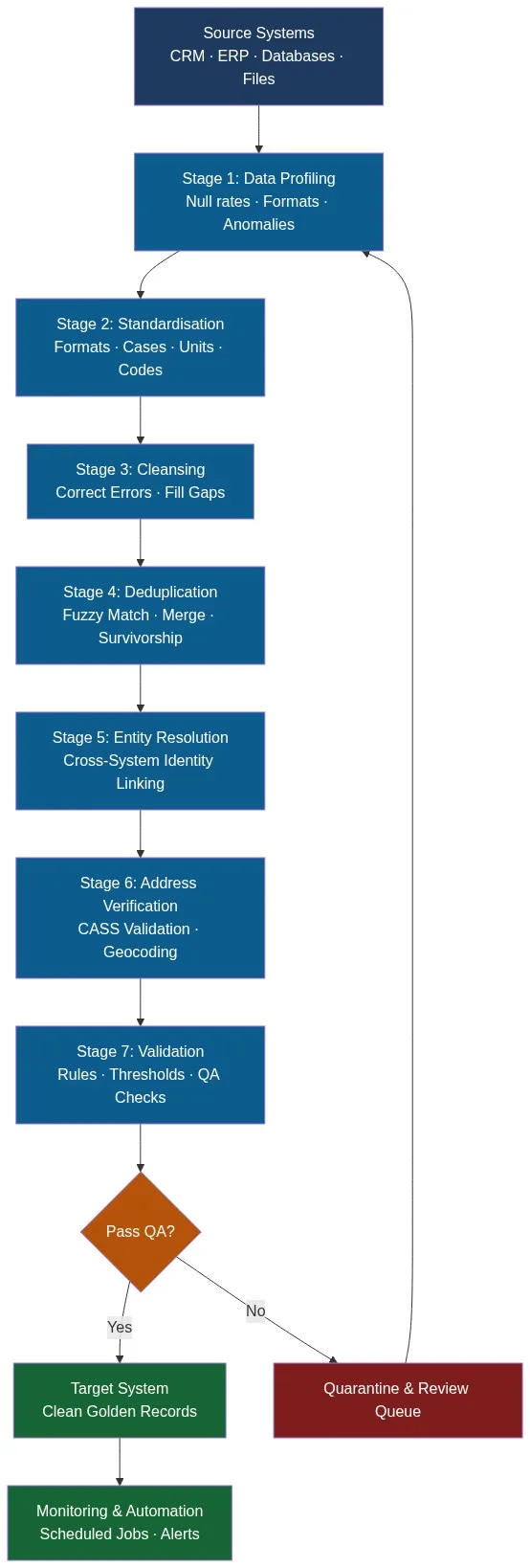
A production-grade data quality pipeline for enterprise integration runs seven sequential stages:
- Profiling — Automated field-level quality scoring across all sources
- Standardisation — Normalise formats, case, units, and codes
- Cleansing — Correct errors, fill gaps, remove invalid characters
- Deduplication — Fuzzy match, cluster, merge with survivorship rules
- Entity resolution — Link cross-system identities into a unified record
- Address verification — CASS-validate and geocode postal addresses
- Validation — Rule-based QA with pass/fail thresholds and quarantine routing
The diagram below shows how each stage connects in a complete enterprise data integration quality workflow:
Executing the Integration: Stage-by-Stage Technical Detail
Standardisation: The Foundation of Cross-Source Matching
Records from different systems rarely agree on format. “California”, “CA”, “Calif.” and “CALIFORNIA” are the same value but will not match on a string join. Standardisation converts every variant to a single canonical form before any matching runs.
Critical standardisation rules for enterprise integrations:
- Dates: convert all formats to ISO 8601 (YYYY-MM-DD)
- Phone numbers: strip formatting, normalise to E.164 (+15555551234)
- State/province codes: expand abbreviations to ISO 3166-2
- Company suffixes: “Inc.”, “Incorporated”, “Inc” all become “INC”
- Names: uppercase, strip accents, expand common abbreviations
Automated data cleansing applies these rules programmatically across millions of records in minutes, with no manual script maintenance.
Deduplication: Matching Records Across Source Systems
Cross-system deduplication is the hardest part of any enterprise integration. Records sharing no common key must be matched on weighted similarity scores across multiple fields. A simple exact-match join on customer name misses 30-40% of true duplicates in typical enterprise datasets.
A fuzzy matching deduplication pass for a customer record might look like this:
| Campo | Fuente A | Fuente B | Algoritmo | Puntuación | Peso |
|---|---|---|---|---|---|
| Nombre | ACME Corp | Acme Corporation | Token sort | 0.91 | 0.35 |
| Teléfono | +15555551234 | +15555551234 | Exacto | 1.00 | 0.30 |
| DIRECCIÓN | Calle Main, 123 | Calle Principal, 123 | Jaro-Winkler | 0.87 | 0.25 |
| Correo electrónico | null | info@acme.com | N / A | 0.00 | 0.10 |
Weighted composite score: 0.85. Above the merge threshold of 0.80 — these records are the same entity. Below 0.60 — they are different. The band between 0.60 and 0.80 goes to a review queue.
Match Data Pro’s batch and API deduplication modes handle both scenarios: bulk integration runs and real-time point-of-entry matching.
Entity Resolution: Linking Identities Across Silos
Deduplication merges records within a dataset. Entity resolution goes further: it links identities across multiple source systems, even when no shared key exists. A customer in your CRM, your billing system, and your support platform may have three different IDs. Entity resolution establishes that all three map to a single real-world entity and produces a unified golden record.
Match Data Pro uses Senzing’s graph-based engine for entity resolution, which processes millions of cross-system record pairs in hours and requires no hand-crafted matching rules.
Address Verification: The Overlooked Integration Step
Address data degrades at 15-20% annually as businesses move. Integrating outdated addresses into a target system preserves the problem. CASS address verification validates every record against the USPS database, corrects street names and postal codes, and appends ZIP+4 before the record reaches the target.
| Campo | Antes | Después de CASS |
|---|---|---|
| Street | 123 mian st ste 5 | 123 Main St Ste 5 |
| Ciudad | Los Angleles | Los Angeles |
| Estado | Ca | CA |
| Código postal | 90001 | 90001-1234 |
Validating the Integration: What to Measure and How
Validation is the stage most integration teams shortcut. “No ETL errors” is not a quality metric. A rigorous data integration validation plan measures six dimensions:
- Completeness: What percentage of records have null values in required fields? Target less than 2% nulls in primary key fields.
- Accuracy: Does the field value match the real-world value? Sampled manual verification against source documents, targeting 95%+ accuracy.
- Consistency: Do values in related fields agree? Phone area code matches state. ZIP code matches city.
- Uniqueness: What is the duplicate rate in the target system after deduplication? Target below 0.5% for customer master data.
- Validity: Do values conform to domain rules? Email addresses pass regex. Dates are not in the future. Revenue figures are positive numbers.
- Referential integrity: Do all foreign keys resolve? No orphaned child records.
Build these checks directly into the pipeline as automated validation rules. Records that fail route to a quarantine dataset for review rather than loading into the target.
Monitoring After Go-Live
Data quality does not stay static after go-live. New records enter through CRM forms, API integrations, and manual data entry. Each one is a potential quality failure. Scheduled monitoring jobs re-run profiling and deduplication checks on incremental data so quality degradation is caught before it reaches a threshold that requires a full remediation project.
Match Data Pro’s job automation schedules and runs these checks on a cadence you define — hourly, daily, or weekly — and surfaces results in a monitoring dashboard without requiring engineering intervention for each run.
What a Production Data Integration Quality Project Actually Looks Like
A mid-market retailer integrating three CRM instances after a merger ran this pipeline using Match Data Pro:
- Source volume: 1.2 million customer records across three systems
- Profiling run: 4 hours — identified 34% phone format inconsistencies, 22% address anomalies, 18% estimated duplicate rate
- Standardisation and cleansing: 6 hours — reduced format errors by 89%
- Fuzzy deduplication: 8 hours — collapsed 216,000 duplicate pairs into 108,000 unique records
- Entity resolution: 3 hours — linked 94,000 cross-system identity matches
- CASS address verification: 2 hours — corrected 41,000 addresses, added ZIP+4 to 310,000
- Target load: 984,000 clean, deduplicated, verified golden records
- Duplicate rate in target: 0.3%
The alternative — loading raw and cleaning later — would have propagated 216,000 duplicates into the production CRM, requiring a manual remediation project estimated at 14 weeks of analyst time.
Ready to embed quality into your next integration project? Start a free trial of Match Data Pro or book a demo to walk through your specific integration scenario with a data quality specialist.
Preguntas frecuentes
What is the difference between data integration and data quality?
Data integration moves data between systems. Data quality ensures that data is accurate, complete, consistent, and deduplicated. In enterprise projects, data quality should be embedded inside the integration pipeline — not treated as a separate remediation step after the load.
How do you handle duplicate records during data integration?
Deduplication uses fuzzy matching algorithms to score record similarity across multiple fields — name, phone, address, email — and merges records above a configured threshold using survivorship rules to decide which field values survive in the merged golden record.
What is data profiling and why is it the first step in any integration?
Data profiling scans every field across every source system and produces a quality baseline: null rates, format distributions, anomaly counts, and cross-system inconsistencies. It reveals problems before mapping and transformation work begins, so your quality rules are grounded in actual data issues, not assumptions.
How long does enterprise data integration with data quality take?
Timeline depends on source volume and complexity. A 1-2 million record integration with full profiling, cleansing, deduplication, entity resolution, and address verification typically runs in 24-48 hours of automated pipeline processing. Planning and configuration add 2-4 weeks for a first-time project.
Does Match Data Pro support both batch and real-time data integration quality checks?
Yes. Match Data Pro supports bulk batch processing for initial integration loads and a live fuzzy search API for real-time deduplication and validation at point of entry — so new records are checked before they reach the target system, keeping quality high after go-live.