
Mapping revenue bands to scores means converting a raw revenue figure into a discrete numeric value — 0 to 100, for example — based on which predefined range the company falls into. You do this to make revenue a comparable, machine-readable signal inside lead scoring models, account segmentation rules, and data matching pipelines. Get the band boundaries wrong, use inconsistent data, or skip data quality preparation, and the scores will mislead every downstream decision that depends on them.

Ready to see how this works on your own data? Start a free trial of Match Data Pro and run your first revenue band scoring job in minutes.
Why Revenue Band Scoring Matters in Data Pipelines
Revenue is one of the most widely used firmographic signals in B2B workflows. Sales teams use it to prioritise outreach. Marketing operations use it to route leads to the right nurture track. Data engineers use it as a matching weight when linking records across CRM, ERP, and marketing platforms. But raw revenue figures are messy: “$2.4M”, “2400000”, “2.4 million”, and “under $5M” all represent the same order-of-magnitude company, yet they are not equal strings and cannot be compared directly.
Converting raw revenue to a band score solves three problems at once:
- Normalisation. A score of 55 means the same thing regardless of whether the source system stored “$12,000,000”, “12M”, or “twelve million”.
- Comparability. Scores from different fields — revenue, employee count, industry — can be combined into a single weighted composite without one field dominating because of its unit scale.
- Threshold routing. A pipeline can branch on “score >= 55” without parsing currency strings at decision time.
For a broader look at how scoring fits into a complete data quality strategy, see the data quality framework stages guide.
Designing Your Revenue Band Structure
Before writing a single scoring rule, define the bands. Band design decisions affect everything downstream: the granularity of your segmentation, the sensitivity of your scores to data noise, and how much rework you will do when your business changes its ICP definition.
Choosing Band Boundaries
Band boundaries should reflect business-meaningful thresholds, not arbitrary round numbers. For most B2B SaaS and technology companies, a five-band model covering SMB through enterprise works well:
| Band | Revenue Range | Segment Label | Score | Typical Routing |
|---|---|---|---|---|
| 1 | $0 – $999,999 | Micro / SMB | 10 | Self-serve / nurture |
| 2 | $1M – $9,999,999 | Small Business | 30 | SDR outreach |
| 3 | $10M – $49,999,999 | Mid-Market | 55 | Inside sales |
| 4 | $50M – $199,999,999 | Upper Mid-Market | 75 | Field sales |
| 5 | $200M+ | Enterprise | 100 | Strategic accounts |
The score values (10, 30, 55, 75, 100) are deliberately non-linear. The largest jumps occur where your ICP boundaries sit. If your ideal customer is mid-market and above, the gap between band 2 (30) and band 3 (55) should be wide enough that a composite score crosses your qualification threshold only when revenue is $10M or more.
Handling Missing and Ambiguous Revenue Data
Real datasets always have missing revenue fields. A well-designed scoring model treats NULL and blank as a separate condition — never as zero revenue. Options include:
- Score 0, flag for enrichment. Route the record to a data enrichment queue rather than to sales or nurture until revenue is confirmed.
- Impute from employee count. If headcount is known, map to a revenue proxy band using industry-standard revenue-per-employee ratios.
- Score as band 2 (default mid-low). Conservative assumption that avoids over-prioritising unknown accounts.
Document whichever policy you choose. Undocumented imputation is a common cause of scoring drift that is very hard to debug six months later. Run AI data profiling against your source dataset first to understand exactly how many records have missing, malformed, or out-of-range revenue values before you design your NULL policy.
Data Quality Preparation Before Scoring
A scoring model is only as reliable as its input data. Revenue fields routinely contain format inconsistencies that will cause your band logic to misfire if you do not standardise them first. Common issues across real CRM and ERP exports:
| Raw Value | Problem | Standardised Value |
|---|---|---|
| “$2.4M” | Mixed currency symbol + abbreviation | 2400000 |
| “2,400,000” | Comma-formatted string | 2400000 |
| “under $5M” | Approximate range text | NULL (flag for review) |
| “2400” | Ambiguous: thousands or full value? | NULL (flag for review) |
| “USD 2.4 million” | Verbose currency format | 2400000 |
| “” (blank) | Empty string | NULL |
The standardisation pipeline runs before the scoring logic. It parses the revenue string, strips currency symbols, resolves abbreviations (K, M, B), and converts to a numeric integer. Records that cannot be parsed cleanly get a NULL with a reason code. Only after this step does the band-scoring rule execute.
This is precisely the kind of field-level cleansing that Match Data Pro’s data cleansing pipeline handles automatically — including regex-based parsing, unit normalisation, and flagging of unresolvable values for manual review.
Implementing the Band-to-Score Logic
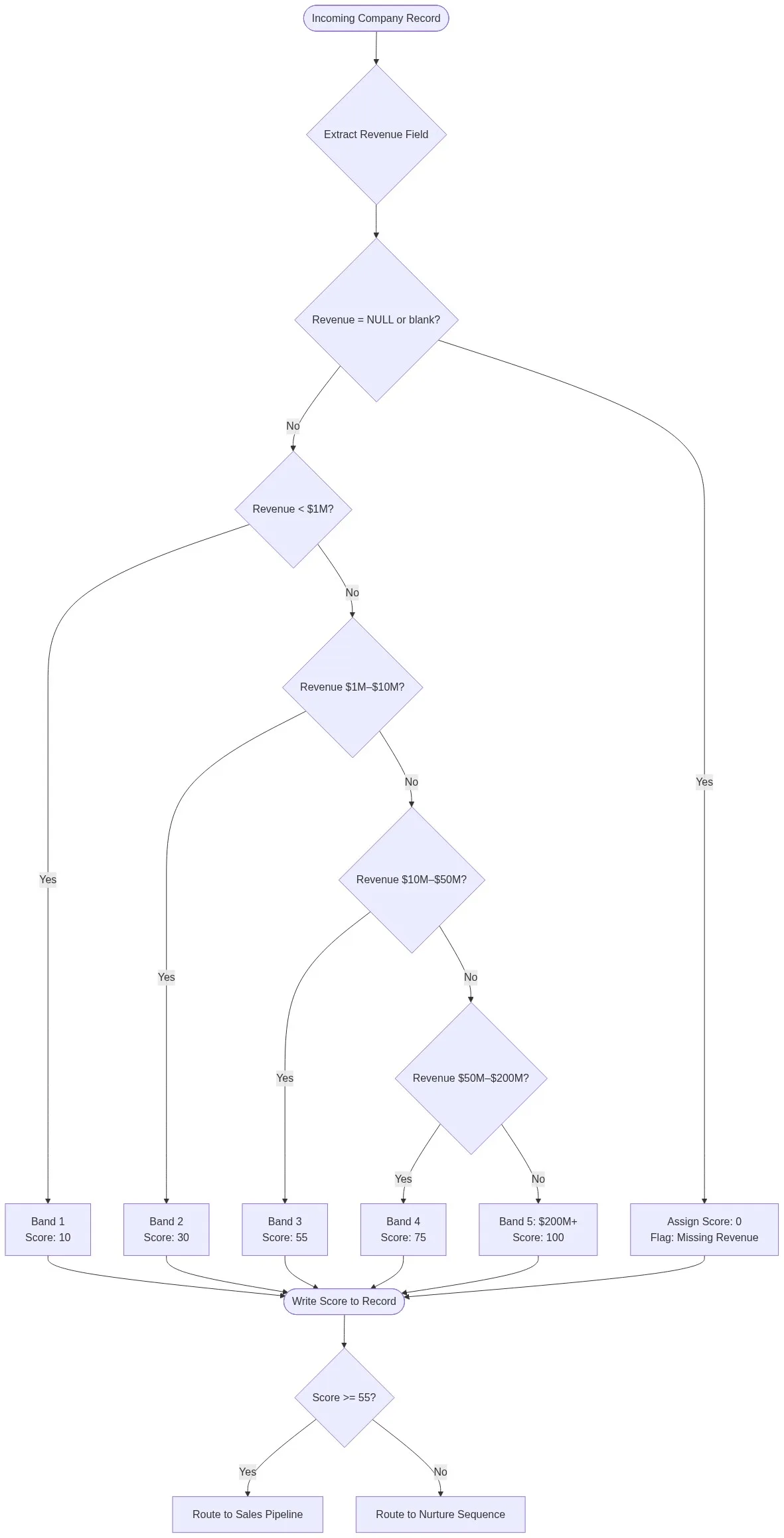
The core scoring algorithm uses a first-matching-condition rule set. The revenue value is tested against each band boundary in order. The first band whose condition is satisfied returns the associated score, and evaluation stops. This is faster than evaluating all conditions and avoids overlap errors.
For a deeper look at how first-match condition logic works across different field types, see the first matching condition scoring rules reference.
Pseudocode Implementation
function score_revenue(revenue_raw):
    revenue = standardise(revenue_raw)   # parse, strip symbols, resolve M/K/B

    if revenue is NULL:
        return {score: 0, band: None, flag: "MISSING_REVENUE"}

    if revenue < 1_000_000:
        return {score: 10, band: 1, flag: None}

    if revenue < 10_000_000:
        return {score: 30, band: 2, flag: None}

    if revenue < 50_000_000:
        return {score: 55, band: 3, flag: None}

    if revenue < 200_000_000:
        return {score: 75, band: 4, flag: None}

    return {score: 100, band: 5, flag: None}
The function returns three values: the numeric score, the band number, and an optional flag. Always persist all three. The band number makes downstream debugging possible — you can instantly query "show me all band 3 records" without rerunning the scoring logic. The flag field surfaces data quality issues without blocking the pipeline.
Revenue Band Scoring Decision Flow
The diagram below illustrates the full decision path from raw record ingestion through to pipeline routing:
SQL Implementation for Database Pipelines
SELECT
    account_id,
    revenue_raw,
    CASE
        WHEN revenue_numeric IS NULL          THEN 0
        WHEN revenue_numeric < 1000000       THEN 10
        WHEN revenue_numeric < 10000000      THEN 30
        WHEN revenue_numeric < 50000000      THEN 55
        WHEN revenue_numeric < 200000000     THEN 75
        ELSE                                      100
    END AS revenue_score,
    CASE
        WHEN revenue_numeric IS NULL          THEN NULL
        WHEN revenue_numeric < 1000000       THEN 1
        WHEN revenue_numeric < 10000000      THEN 2
        WHEN revenue_numeric < 50000000      THEN 3
        WHEN revenue_numeric < 200000000     THEN 4
        ELSE                                      5
    END AS revenue_band
FROM accounts_standardised;
Run this against a pre-standardised view, not against the raw revenue column. The CASE statement is a direct SQL expression of the first-matching-condition rule set. The ELSE clause catches everything above $200M without requiring an explicit upper bound — important because enterprise revenue figures can range from $200M to hundreds of billions.
Integrating Revenue Scores into a Composite Matching or Lead Scoring Model
A revenue band score rarely operates in isolation. In most production pipelines it is one component of a weighted composite score that combines multiple firmographic and behavioural signals. The composite score determines routing, prioritisation, or match confidence.
| Signal | Raw Score (0–100) | Weight | Weighted Contribution |
|---|---|---|---|
| Revenue band | 55 | 35% | 19.25 |
| Employee count band | 60 | 20% | 12.00 |
| Industry match | 100 | 25% | 25.00 |
| Geography (region) | 80 | 10% | 8.00 |
| Engagement score | 40 | 10% | 4.00 |
| Composite Score | 68.25 | ||
In this example the account hits the qualification threshold (65+) and routes to inside sales — driven significantly by its mid-market revenue band score of 55 and a strong industry match. Adjust weights to reflect your actual ICP: if revenue is your primary qualifier, increase its weight to 40–50%.
When this composite model is applied to records being linked across CRM and ERP systems, it functions as a probabilistic matching weight alongside name and address similarity scores. Revenue band agreement between two candidate records raises match confidence; disagreement lowers it. This is exactly how Match Data Pro's matching rule scoring algorithms apply configurable weights across multiple fields simultaneously.
For records that do match across systems, survivorship rules then determine which revenue value — and therefore which band score — the golden record carries forward. See data match merging and survivorship rules for the full decision framework.
Common Failure Modes and How to Avoid Them
Revenue band scoring fails in predictable ways. Knowing the failure modes ahead of time prevents the most expensive rework.
- Band boundary drift. Your ICP shifts from mid-market ($10M–$50M) to enterprise ($100M+), but the band boundaries in your scoring rules are never updated. Records that should score 75 still score 55. Audit band definitions quarterly against your current ICP.
- Stale source data. Revenue figures in your CRM are 18 months old. Companies that have grown from band 2 to band 4 are still scored as small businesses. Schedule periodic re-enrichment from a third-party firmographic provider.
- Currency inconsistency. An international dataset mixes USD, EUR, GBP, and JPY revenue figures. Without currency normalisation, a €50M German company (well above band 3 in USD equivalent) may score as band 2. Add a currency-to-USD conversion step in your standardisation pipeline.
- Self-reported vs. verified revenue. Form-fill revenue data is notoriously inflated. Companies routinely select the highest revenue bracket available. Use verified firmographic data where possible, or weight self-reported revenue lower in your composite model.
- Hardcoded thresholds in application code. Band boundaries defined in application logic rather than a configuration table are invisible to business users and require a code deployment to change. Externalise band definitions to a database table or configuration file.
For pipelines that link records across multiple source systems before scoring, a fuzzy matching pipeline is typically the step that resolves which revenue value belongs to which entity before the band-scoring logic runs. Matching first, scoring second is the correct order of operations.
Frequently Asked Questions
What is the best way to map revenue bands to scores?
Use a first-matching-condition rule set: define each band as a half-open interval (e.g., $10M to under $50M), test the standardised revenue value against each boundary in ascending order, and return the score for the first condition that is satisfied. Store band number, score, and a data quality flag as separate output fields for easier debugging and downstream filtering.
How many revenue bands should I use in a scoring model?
Five bands is the standard for most B2B lead scoring and account segmentation models. Fewer than four bands produces too little differentiation between segment tiers. More than seven bands adds complexity without proportionate signal value, especially when your source data has significant noise in the revenue field. Match the number of bands to the number of distinct routing or prioritisation tiers your sales process actually uses.
How do I handle missing or NULL revenue values in a scoring model?
Assign a score of zero and write a MISSING_REVENUE flag to a separate field. Never impute NULL as $0 revenue — that conflates "unknown" with "no revenue," which sends genuine prospects to the wrong nurture track. Route zero-scored records to an enrichment queue so they are not permanently excluded from scoring. Document your NULL policy explicitly in your data quality framework so it is not silently changed later.
Can revenue band scores be used in fuzzy record matching?
Yes. Revenue band scores work well as one weighted field in a multi-signal fuzzy matching model. When two candidate records share a name or address that is 80% similar, revenue band agreement (both score 55, for example) raises composite match confidence. Revenue band disagreement (one scores 10, the other 100) is a strong signal that these are different entities, even if their names look similar. This prevents cross-company record merges in post-merger consolidation pipelines.
How often should revenue band definitions be reviewed?
Review band boundaries quarterly and after any significant ICP change, market expansion, or pricing restructure. Band definitions that were correct for a $20M ACV target enterprise business are wrong for a team now selling to mid-market at $200K ACV. Treat band definitions as a versioned configuration artefact, not a one-time setup. Log every change with a timestamp and reason so you can retroactively explain scoring anomalies in your pipeline output.
Start Mapping Revenue Bands to Scores with Match Data Pro
Match Data Pro gives data engineers and RevOps teams a configurable scoring engine that handles revenue band definitions, first-matching-condition rule sets, composite weighted scoring, and full pipeline integration — with no-contract monthly SaaS or on-premise deployment.
- Define band boundaries in a UI table — no code deployment required
- Run revenue standardisation and band scoring in the same job pipeline
- Combine revenue scores with name, address, and industry match weights
- Export scored records directly to CRM, data warehouse, or downstream API
- Audit every score decision with field-level reason codes
Start your free trial and run your first revenue band scoring job today. No contract, no commitment. Or schedule a demo to walk through your specific use case with our team. Questions? Email sales@matchdatapro.com.