
Customer data deduplication before a CRM migration is the single most important data quality step you can take before cutover. Move duplicate records into a new system and you inherit every problem — inflated contact counts, split customer histories, duplicate outreach, and corrupted analytics — at the new system’s price point. Run deduplication first: profile your data, standardise formats, apply fuzzy matching across name, email, phone, and address fields, apply survivorship rules to build golden records, then migrate only clean, consolidated data.
Start a free trial of Match Data Pro — no contract, no infrastructure setup required.
Why Duplicates in a CRM Migration Are Expensive
CRM migrations move bad data faster. A legacy system with 120,000 contact records and a 22% duplication rate carries roughly 26,400 duplicate pairs. At $1 per record in storage, licence costs, and downstream process failures, that translates directly into waste — compounded when sales reps work from fragmented contact histories in the new system.
The migration cutover window is finite. Post-migration deduplication costs 3–5x more in business disruption than pre-migration work. You cannot roll back a live CRM. That asymmetry makes deduplication before the move the only sensible sequence.
Common duplicate patterns in CRM datasets include:
- Same customer, different email domains:
j.smith@acme.comvsjohn.smith@acme.co.uk - Name variants:
Jonathan SmithvsJon SmithvsJ. Smith - Address discrepancies:
123 Main St Ste 4vs123 Main Street Suite 4 - Phone format differences:
(602) 555-0100vs6025550100 - Records created from multiple import batches with no deduplication gate
None of these are caught by exact-match deduplication. All require fuzzy matching with configurable thresholds.
Step 1: Profile Your Data Before Anything Else
Profiling answers the question: how bad is the data? Without a baseline, you cannot set match thresholds, estimate effort, or define success criteria for the migration.
Use Match Data Pro’s AI data profiling to scan every field in your source CRM export and surface:
- Completeness: what percentage of records have a populated email, phone, or address field?
- Format consistency: what fraction of phone numbers match a standard E.164 pattern?
- Uniqueness: approximate duplication rate by email domain, name token, or address block
- Value distributions: top 20 company names, city values, and country codes to spot ingestion errors
A typical mid-market CRM of 80,000–150,000 records profiles in under 10 minutes. The output is a field-level quality scorecard that drives every subsequent decision: which fields to standardise first, which to use as blocking keys, and which to exclude from match scoring due to low population.
Paso 2: Estandariza antes de emparejar
Fuzzy matching tolerates variation. It does not tolerate chaos. Standardising fields before matching dramatically reduces false negatives — cases where two records for the same customer score below threshold because one says United States and the other says US.
Name fields
Parse full names into prefix, first, middle, last, and suffix. Remove honorifics and noise tokens (Dr., III, Jr). Expand common abbreviations. Normalise case to title case. This brings dr john b smith jr y John Smith close enough for the fuzzy scorer to link them correctly.
Phone numbers
Strip all non-numeric characters, apply country code logic, and normalise to E.164 format. (602) 555-0100, 602-555-0100y 6025550100 all become +16025550100 — an exact match that removes noise from the fuzzy layer.
Direcciones de correo electrónico
Lowercase everything. Strip display names. Flag role addresses (info@, sales@) that cannot reliably identify a person. Handle subdomain variants that map to the same organisation.
Address fields
Address data cleansing using CASS-certified verification expands abbreviations (St a Street, Ste a Suite), appends ZIP+4 codes, and flags non-deliverable addresses before they migrate. Two records at 123 Main St Ste 4, Phoenix AZ 85001-1234 y 123 Main Street Suite 4, Phoenix, Arizona 85001 become identical after standardisation — no fuzzy matching overhead needed.
Match Data Pro’s data standardisation pipeline applies all of these transformations in a single automated pass, with configurable rules per field type.
Step 3: Run Fuzzy Matching with the Right Algorithm Mix
After standardisation, run the deduplication job. Match Data Pro’s engine supports configurable multi-algorithm scoring so you can weight each field’s contribution to the final match score.
A typical CRM deduplication configuration:
| Campo | Algoritmo | Peso | Auto-merge threshold |
|---|---|---|---|
| Apellido | Jaro-Winkler | 0.25 | 0.85 |
| Email address | Exacto / Levenshtein | 0.30 | 0.90 |
| Phone (E.164) | Exacto | 0.20 | 1.00 |
| Dirección postal | Índice de clasificación de fichas | 0.15 | 0.80 |
| Nombre de empresa | Phonetic + token | 0.10 | 0.75 |
A composite score above 0.85 routes to auto-merge. Scores between 0.60 and 0.84 route to a review queue. Below 0.60 retains both records as unique.
Blocking reduces the comparison space before scoring. Without blocking, comparing 120,000 records against each other requires 7.2 billion pair evaluations. With email domain blocking and first-letter-of-last-name blocking, that drops to under 2 million — a 99.97% reduction — without sacrificing recall.
Learn more about the underlying algorithms in our guide to data matching algorithms.
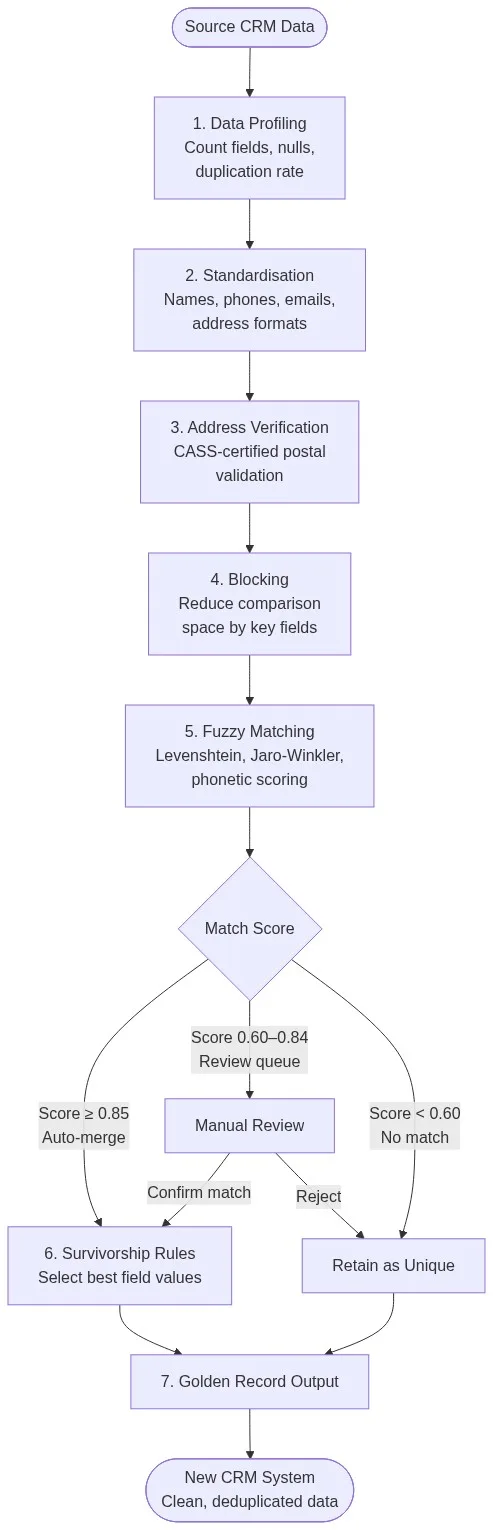
Step 4: Apply Survivorship Rules to Build Golden Records
Matching identifies duplicate pairs. Survivorship decides which field values survive into the merged golden record. Without survivorship rules, merged records default to the most recent value — which is often wrong.
Example survivorship decisions for a CRM migration:
- Email: prefer the record with the most recent engagement date
- Phone: prefer the longest, most complete value (E.164 over partial)
- Address: prefer the CASS-verified record
- Company name: prefer the record from the system of record (e.g., the finance system import)
- Create date: always retain the earliest value to preserve acquisition history
Match Data Pro’s survivorship engine lets you define per-field rules using source priority, recency, completeness, or custom logic. The data merging and survivorship guide covers the full rule set.
Every merge produces a golden record with a full audit trail: which source records contributed, which field values were selected and why, and the match scores that triggered the merge. That audit trail matters for GDPR right-of-access requests post-migration.
Step 5: Validate Before Cutover
Deduplication is not done when the job finishes. Validate output quality before you load into the new CRM.
Validation checks to run:
- Record count reconciliation: input count minus merged pairs should equal output count
- Golden record completeness: what percentage of golden records have a verified email, phone, and address?
- Match review queue clearance: how many records remain in the 0.60–0.84 band awaiting human review?
- Address verification pass rate: what percentage of addresses returned a CASS-valid delivery point?
- Regression test: run a sample of known duplicates from the old system and confirm they merged correctly
Set a migration go/no-go criterion before you start. A common threshold is 95% of golden records must have at least two populated contact fields (email or phone), and address verification pass rate must exceed 92%.
Use Match Data Pro’s data quality dashboard to track these metrics in real time as the deduplication job runs.
Preventing Duplicates in the New CRM
Migrating clean data solves the historical backlog. It does not prevent new duplicates from forming. Two mechanisms prevent post-migration duplication:
Real-time fuzzy search at entry
Match Data Pro’s live fuzzy search API queries the deduplicated golden record set as each new contact is created. If an inbound record scores above 0.80 against an existing record, the CRM can surface a “possible duplicate” warning before the record saves. This prevents the same customer re-entering through web forms, manual entry, or import jobs.
Scheduled deduplication jobs
Configure a weekly deduplication job via Match Data Pro’s job automation to catch duplicates that slipped through the entry gate — batch imports, API integrations, or sales reps bypassing the warning. The CRM deduplication guide covers the full scheduling configuration.
Ready to deduplicate your customer data before migration? Start a free trial of Match Data Pro — no contract, no infrastructure setup. Or book a demo and we will walk through your source data with you.
Preguntas frecuentes
How long does CRM data deduplication take before a migration?
For a dataset of 80,000–150,000 records, automated deduplication with profiling, standardisation, fuzzy matching, and survivorship typically completes in 2–6 hours on Match Data Pro’s cloud platform. The longest part is usually reviewing the 0.60–0.84 match-score band, which can take 1–3 business days depending on review queue size and staffing.
What duplication rate should I expect in a legacy CRM?
Most legacy CRMs have a duplication rate of 10–30% of total records. Rates above 25% typically indicate multiple historical import events with no deduplication gate — for example, marketing list imports layered on top of a sales-entered base. Run a profiling job first to get your actual rate before planning effort.
Do I need to deduplicate if my new CRM has a built-in duplicate checker?
Yes. Built-in CRM duplicate checkers typically rely on exact or near-exact email matching. They do not catch name variants, address discrepancies, or multi-field fuzzy matches. Migrating without deduplication means duplicates in the source become orphaned records in the new system — the built-in checker will not retroactively merge them.
What is a golden record in the context of a CRM migration?
A golden record is the single authoritative version of a customer entity, built by merging all duplicate records and applying survivorship rules to select the best field value from each source. It carries the full history of merged records and a complete audit trail. After migration, the new CRM contains one golden record per customer — not multiple fragmented entries.
How do I handle records where I am not sure whether two entries are duplicates?
Use a review queue. Records scoring between 0.60 and 0.84 on the composite match score go into a human-review workflow where a data steward can inspect the fields side by side and confirm or reject the merge. Match Data Pro’s review interface shows the field-level scores that drove the composite, making each decision transparent and auditable.