
La «fusión y purga» es el proceso de combinar dos o más conjuntos de datos que se solapan, detectar los registros duplicados entre ellos y generar un único archivo maestro sin duplicados, sin perder datos válidos. Se utiliza siempre que los datos se encuentran aislados —tras adquisiciones, migraciones de CRM, consolidaciones de almacenes de datos o la limpieza rutinaria de listas de marketing— y las uniones por coincidencia exacta no logran detectar todos los duplicados debido a que los nombres, las direcciones y los identificadores se registran de forma inconsistente en las distintas fuentes.
¿Estás listo para limpiar tus conjuntos de datos que se solapan? Empieza una prueba gratuita de Match Data Pro y ejecuta tu primera tarea de fusión y purga en cuestión de minutos.
Qué significa realmente «Merge Purge»
El término combina dos operaciones distintas. «Merge» se refiere a reunir registros procedentes de múltiples fuentes en un único lugar. «Purge» se refiere a identificar y eliminar los duplicados dentro de ese conjunto combinado. Ninguno de estos pasos es sencillo cuando se trata de grandes volúmenes.
Una simple instrucción SQL UNION une dos tablas en cuestión de segundos. Lo difícil es la depuración: decidir qué registros representan la misma entidad del mundo real cuando la fuente A tiene «Jon Smith, 123 Main St» y la fuente B tiene «Jonathan Smith, 123 Main Street». Una consulta de coincidencia exacta pasa por alto por completo ese par. Los algoritmos de coincidencia aproximada calculan un índice de similitud entre los dos registros y señalan el par como un posible duplicado para que pueda fusionarse o revisarse.
Casos prácticos en los que se utiliza la operación «Merge Purge»
- Consolidación del CRM tras una adquisición: es necesario fusionar dos bases de datos de clientes de diferentes organizaciones en una sola sin duplicar el número de contactos a los que se dirige la comunicación.
- Limpieza de listas de marketing: una lista de correo procedente de tres proveedores y una exportación interna contiene miles de registros que se solapan y presentan un formato inconsistente.
- Unificación del almacén de datos: los datos operativos, financieros y de apoyo se almacenan en el mismo almacén sin un identificador de cliente compartido.
- Migración de ERP o CRM: Es necesario eliminar los datos duplicados de origen antes de cargarlos en el nuevo sistema para evitar importar un 20 % de registros duplicados desde el primer día.
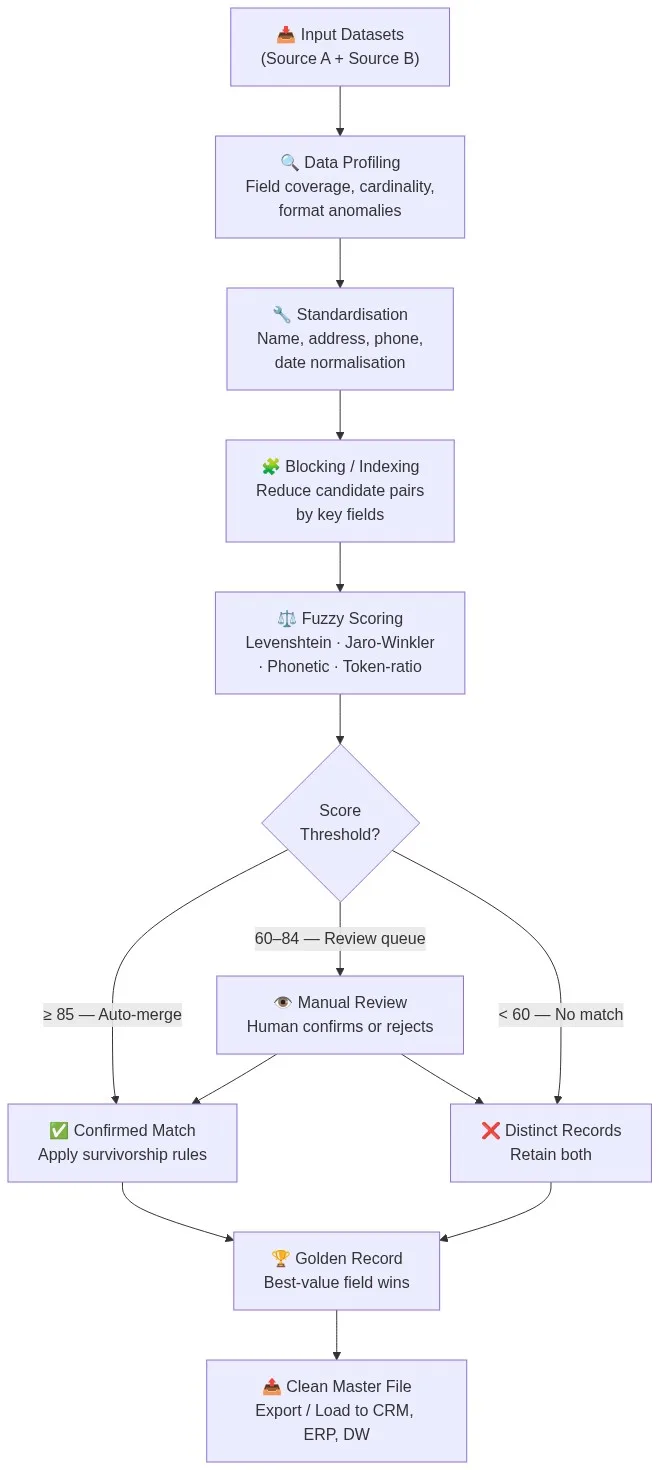
El proceso de fusión y purga en seis etapas
Un proceso fiable de fusión y eliminación de duplicados sigue una secuencia definida. Saltarse alguna de las etapas da lugar a que se pasen por alto duplicados, a fusiones erróneas o a valores de campo corruptos. A continuación se muestra el proceso completo con ejemplos concretos en cada etapa.
Fase 1: Perfilado de datos
La creación de perfiles de datos analiza cada fuente en busca de cobertura de campos, variaciones de formato y cardinalidad antes de que comience cualquier proceso de coincidencia. Un informe de perfil te indica que la Fuente A tiene una cobertura de correo electrónico del 92 % y la Fuente B del 61 %, que los números de teléfono aparecen en cuatro formatos diferentes en el conjunto combinado y que los nombres de las empresas presentan 38 formas distintas de «Limited», «Ltd» y «LTD». Sin esta información, no es posible configurar las reglas de coincidencia con precisión.
Fase 2: Normalización
La estandarización normaliza los valores de los campos para que los algoritmos difusos comparen elementos homogéneos. Entre las transformaciones más habituales se incluyen:
- Análisis sintáctico del nombre: «Jonathan R. Smith Jr.» se convierte en nombre = «Jonathan», apellido = «Smith», sufijo = «Jr»
- Análisis de direcciones y verificación CASS: «123 Main St, apartamento 4B, NY 10001» se convierte en un registro estructurado y verificado por el USPS
- Normalización de números de teléfono: «+1 (212) 555-0100», «2125550100» y «212.555.0100» se resuelven todos en la misma forma canónica.
- Normalización de fechas: «01/15/2023», «15 de enero de 23» y «2023-01-15» se ajustan a la norma ISO 8601
El proceso de limpieza de datos de Match Data Pro gestiona estas transformaciones de forma automática mediante reglas configurables a nivel de campo antes de que comience la comparación.
Etapa 3: Bloqueo
Comparar cada registro de la fuente A con cada registro de la fuente B supone un gran esfuerzo computacional. Un conjunto de datos con 500 000 registros por fuente genera 250 000 millones de pares candidatos. El bloqueo reduce esta cifra a un conjunto manejable agrupando los registros que comparten una clave común —los mismos tres primeros caracteres de un apellido, el mismo código postal o el mismo prefijo telefónico— y comparando únicamente dentro de esos grupos. Una estrategia de agrupación bien diseñada conserva más del 99 % de los duplicados reales, al tiempo que reduce los pares candidatos entre un 95 % y un 99 %.
Etapa 4: Puntuación difusa
Cada par de candidatos recibe una puntuación de similitud combinada, calculada a partir de varios algoritmos. Se aplica una configuración típica de «merge-purge»:
- Jaro-Winkler sobre los campos de nombre y apellido (gestiona las transposiciones y la similitud de prefijos)
- Distancia de Levenshtein entre partes locales de direcciones de correo electrónico (tiene en cuenta los errores tipográficos de un solo carácter)
- Coincidencia de la proporción de tokens en los nombres de las empresas («Acme Corp LLC» frente a «ACME Corporation»)
- Coincidencia exacta del número de teléfono y el NIF, con una ponderación elevada
- Similitud de direcciones tras la verificación CASS
Cada puntuación por campo se pondera y se suma para obtener una puntuación global comprendida entre 0 y 100. Consulta el desglose completo en la guía de algoritmos de coincidencia aproximada.
Etapa 5: Enrutamiento por umbral
Tres umbrales dividen los pares candidatos en tres grupos:
- Fusión automática (puntuación ≥ 85): Los registros son duplicados confirmados. Fusionar automáticamente.
- Cola de revisión (puntuación de 60 a 84): Los registros son probablemente duplicados. Derivarlos a un revisor humano.
- No match (score < 60): Records are distinct. Retain both in the master file.
Los valores umbral dependen de la calidad de los datos y de la tolerancia al riesgo. Un equipo de servicios financieros que realice comprobaciones de KYC puede reducir el umbral de fusión automática a 90 y ampliar la cola de revisión. Un equipo de correo directo que se encargue de la limpieza de listas puede aceptar un umbral de 80 para la fusión automática. Match Data Pro te permite configurar los umbrales por definición de coincidencia sin necesidad de modificar el código.
Fase 6: Normas de supervivencia y creación del «Golden Record»
Cuando se confirma que dos registros son duplicados, las reglas de supervivencia determinan qué valores de los campos se conservan en el resultado fusionado. Entre las estrategias de supervivencia más habituales se incluyen:
- Últimos triunfos: utiliza el valor del campo del registro con la fecha de modificación más reciente
- Mayoría de victorias: utiliza el valor del campo que no sea nulo cuando el otro sea nulo
- Prevalece la prioridad de la fuente: se da más crédito al correo electrónico de la fuente A que al de la fuente B si la fuente A es el CRM de referencia.
- Victorias más largas: para la segunda línea de la dirección, es preferible una descripción más detallada
El resultado es un «registro de referencia»: un registro maestro por cada entidad del mundo real, creado a partir de los mejores valores de campo disponibles en todas las fuentes. El motor de «supervivencia» y de «registro de referencia» de Match Data Pro aplica estas reglas campo por campo y registra cada decisión para su auditoría.
Cuando la operación «Merge Purge» falla si no se dispone de las herramientas adecuadas
Dígitos invertidos en los números de teléfono
Fuente A: 617-555-0182. Fuente B: 617-555-0128. Tras la normalización, parecen números diferentes. La distancia de Levenshtein es de 2 (dígitos invertidos), lo que da una puntuación de ~78 solo en el campo del teléfono. Sin una puntuación compuesta ponderada, este par no se fusiona. Con una ponderación adecuada de varios campos —nombre, empresa y dirección, todos con una coincidencia superior al 95 %—, la puntuación compuesta supera los 85 y los registros se fusionan correctamente.
Sufijos de unidades y conjuntos
«123 Main Street» y «123 Main St Ste 400» no coincidirán en una comparación exacta de direcciones. La verificación CASS estandariza ambas como «123 MAIN ST STE 400» antes de la puntuación, resolviendo así la discrepancia en la fase de normalización.
Variantes de los apodos
«Robert Johnson» y «Bob Johnson» obtienen una puntuación baja en cuanto a la similitud pura de las cadenas de caracteres. Un algoritmo fonético como Metaphone asigna códigos diferentes a «Bob» y «Robert». Se trata de un caso límite conocido que se gestiona mejor ampliando la clave de bloqueo para incluir el dominio de correo electrónico: si ambos registros comparten el mismo dominio de correo electrónico y la misma empresa, la puntuación compuesta tiene en cuenta la probable coincidencia, incluso cuando la puntuación del nombre es baja.
Automatización de la fusión y purga a gran escala
La fusión y purga manuales no son escalables más allá de unos pocos cientos de registros por sesión. Un conjunto de datos de 2 millones de contactos procedentes de tres fuentes requiere una programación automatizada de tareas, un procesamiento en paralelo y la gestión de excepciones. El motor de automatización de tareas de Match Data Pro ejecuta la fusión y purga como un flujo de trabajo programado: importación desde los conectores, creación de perfiles, estandarización, comparación, envío de excepciones a una cola de revisión y exportación del archivo maestro de referencia a tu CRM, almacén de datos o ERP.
La plataforma admite la importación desde archivos CSV, Excel, bases de datos SQL, Salesforce, HubSpot y otros sistemas a través de su API REST y sus conectores de importación. Los resultados se envían automáticamente a los mismos sistemas, con registros completos de las tareas para garantizar la trazabilidad y el cumplimiento normativo.
Para los equipos que necesitan evitar duplicados en tiempo real en el punto de entrada, en lugar de mediante un procesamiento por lotes, la API de búsqueda difusa en tiempo real compara cada nuevo registro con la base de datos maestra antes de su inserción, de modo que los duplicados nunca llegan a entrar en el sistema.
Fusión y purga frente a deduplicación frente a resolución de entidades
Estos tres términos suelen utilizarse indistintamente, pero describen ámbitos diferentes:
- La deduplicación detecta y elimina los registros duplicados dentro de un mismo conjunto de datos.
- La función «Merge purge» combina varios conjuntos de datos y elimina los datos duplicados en todos ellos simultáneamente.
- La resolución de entidades vincula registros de distintos sistemas sin fusionarlos necesariamente, creando así un grafo de registros relacionados en lugar de un único archivo plano.
En la práctica, la mayoría de los proyectos de datos empresariales necesitan los tres. Match Data Pro ejecuta la resolución de entidades de Senzing junto con su motor de fusión y purga, de modo que los equipos posteriores a la fusión puedan tanto consolidar su archivo maestro como crear un grafo de relaciones para los análisis posteriores.
Primeros pasos con Match Data Pro
Match Data Pro es una plataforma SaaS en la nube sin contrato a largo plazo. Puedes subir tu primer conjunto de datos, configurar una definición de coincidencia y revisar los posibles duplicados el mismo día. La plataforma incluye perfilado de datos basado en IA, coincidencia difusa configurable, verificación de direcciones CASS, reglas de supervivencia y un programador de tareas, todo ello en un único flujo de trabajo, sin necesidad de configuración adicional.
Empieza tu prueba gratuita o reserva una demostración para ver cómo funciona el proceso de fusión y purga con tus propios datos.
Preguntas frecuentes
¿Qué es la «merge purge» en la gestión de datos?
La fusión y depuración es el proceso de combinar dos o más conjuntos de datos que se solapan y eliminar los registros duplicados para obtener un único fichero maestro limpio. Utiliza algoritmos de coincidencia aproximada para identificar registros que hacen referencia a la misma entidad del mundo real, incluso cuando los nombres, las direcciones o los identificadores se registran de forma diferente en las distintas fuentes. El resultado es un único registro de referencia por entidad.
¿En qué se diferencia la fusión y eliminación de datos de la deduplicación?
La deduplicación elimina los duplicados dentro de un mismo conjunto de datos. La fusión con purga se encarga del caso más complejo, que consiste en combinar primero varios conjuntos de datos y, a continuación, deduplicar todas las fuentes simultáneamente. La fusión con purga también requiere reglas de supervivencia para decidir qué valores de campo se deben conservar cuando dos registros de fuentes diferentes contienen datos válidos pero contradictorios.
¿Qué algoritmos se utilizan en el método «merge-purge»?
La fusión y purga suele utilizar una combinación de los algoritmos de Jaro-Winkler o Levenshtein para los campos de nombre, la coincidencia por proporción de tokens para los nombres de empresas, algoritmos fonéticos para el tratamiento de apodos y la coincidencia exacta o casi exacta para identificadores estructurados, como números de teléfono y números de identificación fiscal. Cada algoritmo asigna una puntuación a un campo específico; una puntuación compuesta ponderada determina si dos registros coinciden.
¿Cómo se configuran los umbrales de purga de fusiones?
Empieza con un umbral de 85 para la fusión automática y de 60 como límite inferior para la cola de revisión; a continuación, calibra el sistema con una muestra de entre 1.000 y 2.000 pares de registros extraídos de tus datos reales. Mide los falsos positivos (registros fusionados incorrectamente) y los falsos negativos (duplicados reales que no se han detectado) y ajusta el umbral en incrementos de 5 puntos hasta que ambas tasas de error se encuentren dentro de los límites aceptables para tu caso de uso.
¿Se puede ejecutar la operación «merge purge» de forma automática sin necesidad de una revisión manual?
Sí, en el caso de coincidencias de alta fiabilidad que superen el umbral de fusión automática. En un proceso bien configurado, entre el 70 % y el 85 % de los pares duplicados superan el umbral de fusión automática y no requieren revisión manual. El 15 %-30 % restante pasa a una cola de revisión, donde un operador humano confirma o rechaza la coincidencia. La automatización de tareas ejecuta todo el proceso según un calendario y solo envía la cola de revisión a los analistas.