
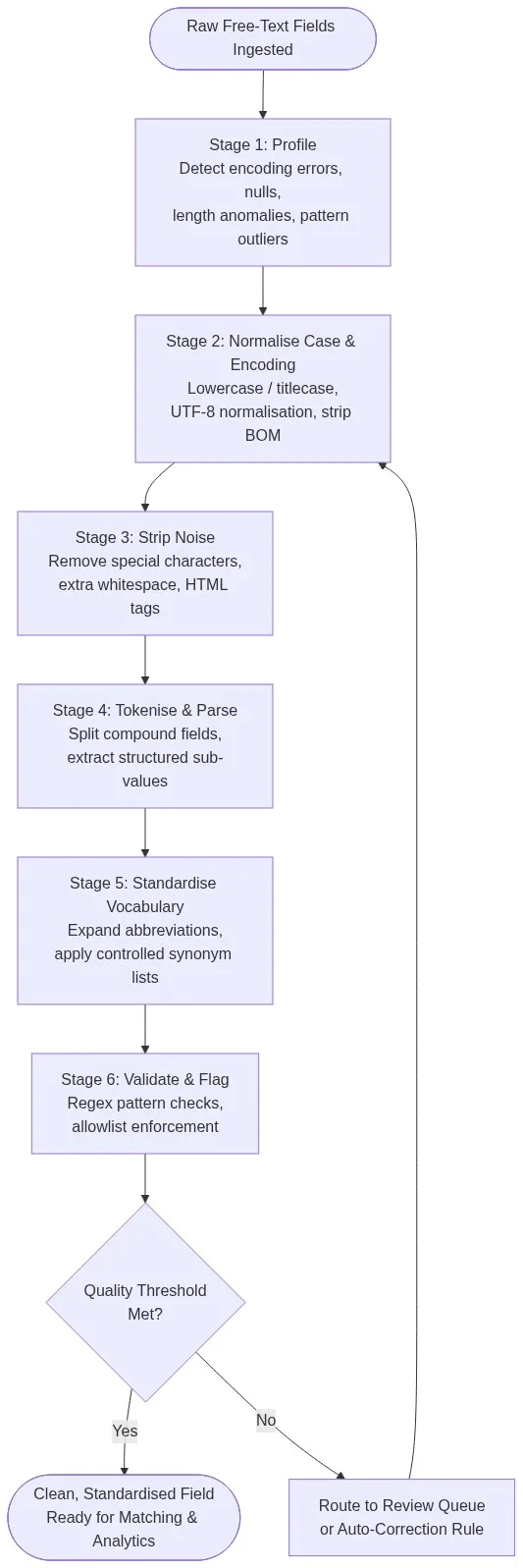
Free-text fields are the leading cause of downstream matching failures. A six-stage cleaning pipeline — profile, normalise, strip noise, tokenise, standardise vocabulary, and validate — can reduce match error rates by 40–70% across CRM, ERP, and operational databases.
Every analytics pipeline, deduplication job, and machine learning model depends on consistent input. When a customer name field contains JN SMITH, John Smithy SMITH, JOHN, no exact join finds all three. Text data cleaning resolves these variants before they corrupt match results. Match Data Pro’s data cleansing module applies all six stages automatically across structured and free-text columns.
Why Free-Text Fields Break Matching Pipelines
Structured fields — dates, phone numbers, postal codes — follow defined formats. Free-text fields do not. A “company name” column in a CRM can hold any of the following for the same entity:
- International Business Machines
- IBM Corp.
- I.B.M.
- ibm corporation
- IBM (with trailing non-breaking space)
These five values represent one company. An exact match finds zero pairs. Fuzzy matching finds some, but only if the text has first been normalised — case folded, punctuation stripped, extra whitespace collapsed, and abbreviations expanded.
The Hidden Cost of Uncleaned Text
Gartner estimates poor data quality costs organisations an average of $12.9 million per year. A significant share of that cost originates in free-text fields used for search, segmentation, and entity resolution. A 2023 industry study found that 63% of failed record linkage operations traced back to inconsistent text formatting, not missing data.
Common sources of dirty free-text include web form submissions, legacy imports with inconsistent encoding, OCR output from scanned documents, user-typed notes fields, and ERP migrated data. See our guide on ERP data quality issues for migration-specific examples.
The Six Stages of Text Data Cleaning
A production text cleaning pipeline is sequential. Each stage removes a class of noise before the next stage runs. Skipping a stage introduces errors that compound downstream.
Stage 1: Profile the Field
Before writing a single rule, profile each text column. Measure: length distribution, character set composition (ASCII vs. extended UTF-8), null rate, duplicate rate, and top-n value frequency. This step, handled by Match Data Pro’s AI data profiling, surfaces whether a field has encoding anomalies, truncation, or embedded HTML before any transformation runs.
Example output: a “job title” field with 8,200 distinct values, 12% nulls, median length 14 chars, max 512 chars (indicating a notes field was mapped incorrectly), and 3% of values containing HTML anchor tags.
Stage 2: Normalise Case and Encoding
Fold everything to a consistent case — titlecase for names, uppercase for codes, lowercase for tokens destined for comparison. Strip the byte-order mark (BOM). Normalise Unicode to NFC form so that “café” and “café” hash identically. Convert Windows-1252 characters (curly quotes, em dashes) to their UTF-8 equivalents.
| Raw value | After normalisation |
|---|---|
| SMITH, john | John Smith |
| café (BOM prefix) | Café |
| Müllerö | Müller |
Stage 3: Strip Noise Characters
Remove HTML tags, XML entities, leading/trailing whitespace, and runs of internal whitespace. Strip or replace punctuation that carries no semantic value in the field context. For name fields, strip periods and commas. For product description fields, retain hyphens (they separate model numbers).
The rule is field-specific. A “notes” field and a “company name” field require different noise profiles. Configure these rules once in Match Data Pro’s cleansing module and apply them across all jobs.
Stage 4: Tokenise and Parse Compound Fields
Many free-text fields contain multiple logical values. An “address” field entered as Suite 400, 123 Main St, Chicago, IL 60601 stores four separate data points. A “name” field containing Smith, John A. MD contains a last name, first name, middle initial, and professional suffix.
Tokenisation splits these into structured sub-fields. Parsing applies rules to assign each token to a labelled slot. This is a prerequisite for address data cleansing and CASS verification, which require pre-parsed address components. Without this stage, address verification tools fail on roughly 30–40% of records.
Stage 5: Standardise Vocabulary
Abbreviation expansion and synonym normalisation are the highest-leverage operations in free-text cleaning. They convert semantically identical tokens into a single canonical form:
St→Street,Rd→Road,Corp→CorporationIntl→International,Mfg→ManufacturingJr→Junior,Sr→Senior
Standardised tokens dramatically improve fuzzy matching algorithm accuracy because token-based scores (Jaccard, cosine) operate on token sets, not character sequences. Expanding abbreviations before scoring raises recall on company name matches by 15–25% in typical B2B CRM datasets.
Stage 6: Validate and Flag
Apply pattern checks to confirm the cleaned value is plausible. A person name field should not contain digits. A product code field should match the expected alphanumeric pattern. A company name should not be shorter than two characters after stripping.
Values that fail validation are routed to a review queue or auto-corrected via lookup table. This stage generates the field-level quality score that feeds the data quality framework monitoring dashboard.
Before and After: Three Real-World Examples
Example 1: CRM Contact Name Field
| Raw value | After cleaning | Issue resolved |
|---|---|---|
| SMITH, JOHN A | John A. Smith | Inverted format, ALL CAPS |
| jon smith jr. | John Smith Junior | Extra whitespace, abbreviation |
| J.Smith | J. Smith | HTML entity, missing space |
| <b>Jane Doe</b> | Jane Doe | HTML tags stripped |
Example 2: Product Description Field
| Raw value | After cleaning |
|---|---|
| WIDGET – RED – XL – 500ml | Widget Red XL 500ml |
| widget,red,xl,500 ml | Widget Red XL 500ml |
| Wdgt Red X-Large 500mL | Widget Red XL 500ml |
All three rows now match on exact comparison. Before cleaning, no two rows matched. After cleaning, all three resolve to the same canonical form — enabling deduplication without any fuzzy scoring.
Example 3: Address Notes Field
Free-text address notes like Bldg C, 2nd flr, opp. the parking lot must be parsed, then stripped of unverifiable tokens before CASS verification. Match Data Pro’s pipeline parses structured components (building, floor) and discards the unverifiable remainder before sending to the CASS address verification engine.
Scaling Text Cleaning Across Millions of Records
Manual or script-based text cleaning does not scale. A Python script cleaning 1 million records sequentially takes 40–120 minutes per run. More critically, scripts require maintenance every time a new field type or data source is added.
Automatización de trabajos
Match Data Pro runs text cleaning jobs on a configured schedule — nightly, weekly, or triggered by import events. Each job applies the full six-stage pipeline to defined field sets, writes cleaned values to a target table or export file, and logs a quality score delta for each field. See how this fits into enterprise data cleaning workflows.
Parallel Processing
The platform distributes cleaning operations across parallel workers. A dataset of 5 million records with 12 text fields completes in under 8 minutes on a standard SaaS tier. There is no cluster to provision — processing scales automatically with record volume.
The Live Fuzzy Search API
For teams that need real-time text standardisation at point of entry, Match Data Pro’s live fuzzy search API normalises and scores incoming text against the existing master dataset as each record is written. This prevents new dirty values from entering the pipeline rather than cleaning them after the fact.
Ready to clean your free-text fields at scale? Start a free trial and connect your first dataset in minutes — no contract required.
Integrating Text Cleaning with Deduplication and Entity Resolution
Text cleaning is not an end in itself. Its output feeds deduplication and entity resolution. Clean, standardised text raises fuzzy match scores and reduces false positives by narrowing the character-level distance between semantically identical values.
A typical integration looks like this: text cleaning runs first, producing standardised field values. Those values are then blocked by phonetic key or prefix, scored with Jaro-Winkler or token cosine similarity, and passed to Senzing entity resolution for graph-based identity clustering. This three-stage chain — clean, match, resolve — is how Match Data Pro produces a golden record from fragmented source data.
Teams working on CRM deduplication typically see match recall improve by 30–50% after applying the text cleaning pipeline described here, compared to running fuzzy matching on raw, uncleaned values.
Want to see the pipeline in action? Book a demo with the Match Data Pro team and walk through a live example with your own data.
Frequently Asked Questions
What is text data cleaning and why does it matter for data matching?
Text data cleaning is the process of normalising, standardising, and validating free-text field values so they can be compared reliably. It matters for data matching because fuzzy algorithms score character-level or token-level similarity — uncleaned text inflates distance scores and causes valid matches to be missed. Cleaning before matching typically raises recall by 30–50%.
What is the difference between text cleaning and data standardisation?
Text cleaning removes noise — encoding errors, extra whitespace, HTML tags, illegal characters. Data standardisation converts cleaned values into a canonical form — titlecase names, expanded abbreviations, controlled vocabulary terms. Both are required: cleaning without standardisation still leaves semantically identical values in different forms, and standardisation applied to noisy text produces inconsistent results.
How do you handle abbreviations and synonyms in free-text fields?
Build a controlled lookup table that maps each abbreviation or synonym to its canonical form. Apply this table as a replacement pass after noise stripping and case normalisation. For domain-specific fields (legal entity suffixes, product category codes, medical specialties), the lookup table must be assembled and validated by a subject matter expert before it goes into production.
Can text data cleaning be fully automated, or does it require human review?
Most text cleaning can be fully automated: case normalisation, whitespace collapsing, HTML stripping, and known abbreviation expansion require no human input. Values that fail the final validation stage — those with no plausible canonical form — should be routed to a review queue. Typically 2–8% of records fall into this category, making human review selective rather than universal.
How does Match Data Pro handle text cleaning for non-English or multilingual datasets?
Match Data Pro applies Unicode NFC normalisation, which resolves diacritic encoding variants across most European scripts. The platform supports UTF-8 throughout the pipeline. For multilingual name fields, phonetic algorithms such as Double Metaphone and Daitch-Mokotoff cover a broad range of European name variants. Asian-language script tokenisation requires field-specific configuration that the Match Data Pro team configures during onboarding.